
df -h 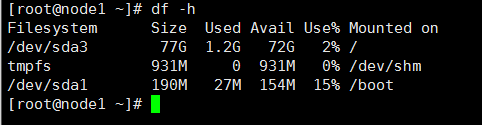

这里我们要更换光盘,并挂载:
mount /dev/cdrom /mnt Packages]# ls ./ |grep "http*" 先行拷贝httpd-2.2.15-59.el6.centos.x86_64.rpm包到家目录,并使用rpm安装:
//我们的软件在安装过程中是需要依赖关系的,因为httpd需要一些依赖包,只能先下载依赖包了。这个过程又变得麻烦了,为了简化,我们回过头去到repodata下 error: Failed dependencies: /etc/mime.types is needed by httpd-2.2.15-59.el6.centos.x86_64 apr-util-ldap is needed by httpd-2.2.15-59.el6.centos.x86_64 httpd-tools = 2.2.15-59.el6.centos is needed by httpd-2.2.15-59.el6.centos.x86_64 libapr-1.so.0()(64bit) is needed by httpd-2.2.15-59.el6.centos.x86_64 libaprutil-1.so.0()(64bit) is needed by httpd-2.2.15-59.el6.centos.x86_64 - mirrors.163.com
- mirrors.aliyun.com
配置网络yum源
cd /etc/yum.repos.d/ yum install -y wget 新建backup文件夹,把yum.repos.d/目录下所有的文件都移动到backup中:
mv CentOS-* backup 从阿里镜像站的centos帮助文档中找到以下命令,直接执行来下载repo的包:
wget -O /etc/yum.repos.d/CentOS-Base.repo http://mirrors.aliyun.com/repo/Centos-6.repo //把本地缓存的依赖关系先干掉! yum clean all 然后再去阿里下载软件包的依赖关系:
yum makecache 依赖关系缓存好了之后,再去阿里下载东西就变得简单了。如下载mysql:
yum install mysql-server 只需要在给出的提示中,指定指令y即可下载完成。
配置本地yum源
yum clean all yum makecache 拿安装mysql和httpd测试:
yum install mysql-server yum install httpd yum相关命令
- yum repolist 看有多少包
- yum clean all
- yum makecache
- yum update
查询命令:
- yum list 列表展示
- yum search
- yum info 显示详细信息
安装&卸载:
- yum install
- remove | erase
分组:
- yum grouplist
- yum groupinfo
- yum groupinstall
- yum groupremove
- yum groupupdate
关于分组,可以安装Chinese Support:
yum groupinfo “Chinese Support” 查看中文文档
yum groupinstall "Chinese Support" 增加epel的repo(阿里镜像站找到epel):
wget -O /etc/yum.repos.d/epel.repo http://mirrors.aliyun.com/repo/epel-6.repo 进入到对应目录:
cd /etc/yum.repos.d/ 来看一下它有多少包:
yum repolist 完事后还是老套路:
yum clean all yum makecache 最后执行install齐活:
yum install man man-pages man-pages-zh-CN 通过man bash确认是否成功!(重新登录后,需要改变语言才能显示中文。切换中英文显示LANG=zh_CN.UTF-8 LANG=en_US.UTF-8)
版权声明:本文内容由互联网用户自发贡献,该文观点仅代表作者本人。本站仅提供信息存储空间服务,不拥有所有权,不承担相关法律责任。如发现本站有涉嫌侵权/违法违规的内容, 请联系我们举报,一经查实,本站将立刻删除。
发布者:全栈程序员-站长,转载请注明出处:https://javaforall.net/215394.html原文链接:https://javaforall.net


![vs2010使用过程中的问题和解决、vs密钥[通俗易懂]](https://javaforall.net/wp-content/uploads/2020/11/2020110817443450-480x300.jpg)
