
一、SpringBoot中使用Servlet
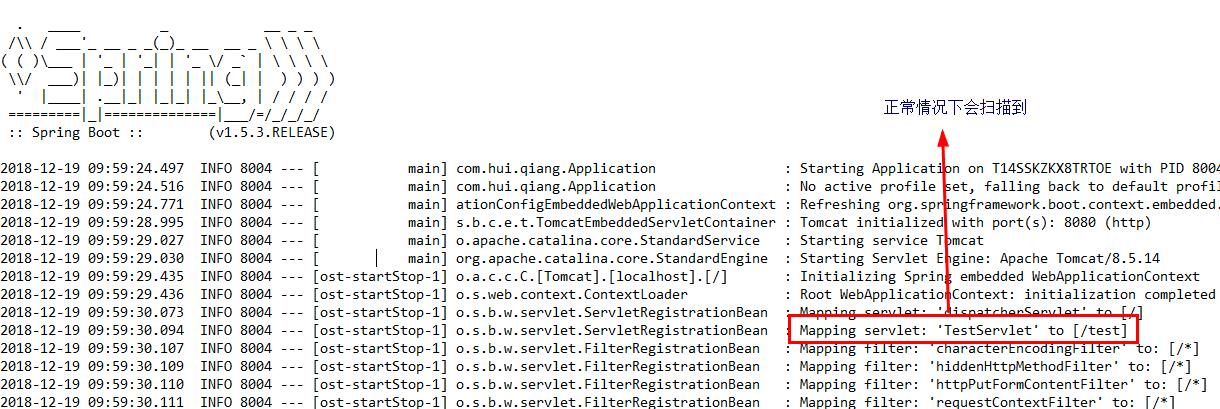
在SpringBootApplication上使用@ServletComponentScan注解后,Servlet、Filter、Listener可以直接通过@WebServlet、@WebFilter、@WebListener注解自动注册,无需其他代码。
1.在入口Application类上加入注解@ServletComponentScan
package com.hui; import org.springframework.boot.SpringApplication; import org.springframework.boot.autoconfigure.SpringBootApplication; import org.springframework.boot.web.servlet.ServletComponentScan; @SpringBootApplication @ServletComponentScan public class Application { public static void main(String[] args) { SpringApplication.run(Application.class, args); } } 2.新建Servlet类,继承HttpServlet并且加入注解@WebServlet(name=“TestServlet”,urlPatterns=”/test”)
package com.hui.qiang; import java.io.IOException; import javax.servlet.ServletException; import javax.servlet.annotation.WebServlet; import javax.servlet.http.HttpServlet; import javax.servlet.http.HttpServletRequest; import javax.servlet.http.HttpServletResponse; @WebServlet(name="TestServlet",urlPatterns="/test") public class TestServlet extends HttpServlet { private static final long serialVersionUID = 1L; @Override protected void doGet(HttpServletRequest req, HttpServletResponse resp) throws ServletException, IOException { System.out.println("doGet"); } } 3.之后运行代码,在浏览器地址栏输入http://localhost:8080/test,若看到控制台打印doGet,则表示Servlet创建成功。
注意:
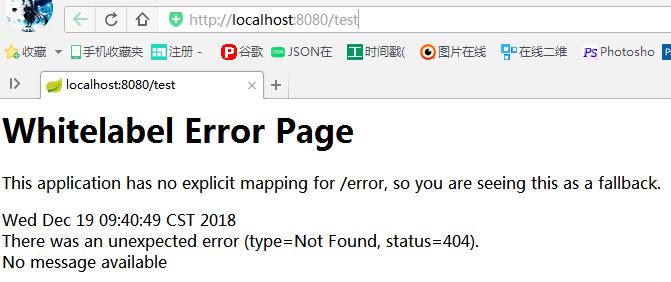
(1)如果不加@ServletComponentScan注解则会报404即找不到页面,控制台也扫描不到我们配置的servlet:/test,即无法被映射
(2)如果Application类和Servlet类不在同一包下,则@ServletComponentScan需要添加相应的路径,如Application类在包com.hui.xiao下,则写为@ServletComponentScan(“com.hui.xiao”)或@ServletComponentScan(“com.hui”)

二、Spring, Spring Boot中的@ComponentScan注解用法介绍
@ComponentScan
如果你理解了ComponentScan,你就理解了Spring.
Spring是一个依赖注入(dependency injection)框架。所有的内容都是关于bean的定义及其依赖关系。
定义Spring Beans的第一步是使用正确的注解-@Component或@Service或@Repository.
但是,Spring不知道你定义了某个bean除非它知道从哪里可以找到这个bean.
ComponentScan做的事情就是告诉Spring从哪里找到bean
注:@ComponentScan的不同写法
1.@ComponentScan({“com.xiao.hui”,“com.xiao.qiang”})或@ComponentScan(basePackages = {“com.xiao.hui”,“com.xiao.qiang”})
2.@ComponentScan(“com.xiao”)或@ComponentScan(value = “com.xiao”)或@ComponentScan(basePackages = { “com.xiao” })
3.@ComponentScan(basePackageClasses=要扫描类.class所在位置的包) 意思是要扫描哪个类所在的包,如@ComponentScan(basePackageClasses=hehe.class),这种写法不如上面的那种写法好有局限性
Spring Boot项目
总结:
1.SpringBoot在写启动类的时候如果不使用@ComponentScan指明对象扫描范围,默认指扫描当前启动类所在的包里的对象,如果你的其他包都在使用了@SpringBootApplication注解的主类所在的包及其下级包,则你什么都不用做,SpringBoot会自动帮你把其他包都扫描了。为了方便,我一般都把主类放在了所有类的上一级包中,如项目所有的class文件都放在了包com.beauty的下级包中,则把spring boot的主类放在包com.beauty下。
2.如果当前启动类没有包,则在启动时会报错:Your ApplicationContext is unlikely to start due to a @ComponentScan of the default package错误,因为启动类不能直接放在main/java文件夹下,必须要建一个包把它放进去或者使用@ComponentScan指明要扫描的包。
3.如果你有一些bean所在的包,不在主类的包及其下级包,那么你需要手动加上@ComponentScan注解并指定那个bean所在的包。
举个栗子,看下面定义的类:
package com.xiao.qiang.qianming; import org.springframework.boot.SpringApplication; import org.springframework.boot.autoconfigure.SpringBootApplication; import org.springframework.context.ApplicationContext; import org.springframework.context.ConfigurableApplicationContext; @SpringBootApplication public class SpringbootApplication { public static void main(String[] args) { ApplicationContext applicationContext = SpringApplication.run(SpringbootApplication.class, args); for (String name : applicationContext.getBeanDefinitionNames()) { System.out.println(name); } } } 方案1
定义@ComponentScan(“com.xiao”),这么做扫描的范围扩大到整个父包com.xiao
@ComponentScan("com.xiao") @SpringBootApplication public class SpringbootIn10StepsApplication { 方案2
定义分别扫描两个包
@ComponentScan({"com.xiao.hui","com.xiao.qiang"}) @SpringBootApplication public class SpringbootIn10StepsApplication { 非Spring Boot项目
在非Spring Boot项目中,我们必须显式地使用@ComponentScan注解定义被扫描的包,可以通过XML文件在应用上下文中定义或在Java代码中对应用上下文定义
Java代码方式:
@ComponentScan({"com.xiao.package1","com.xiao.package2"}) @Configuration public class SpringConfiguration { 注:@Configuration 和@ComponentScan注解背后会做什么呢?
其实很简单,@ComponentScan告诉Spring哪个package中用注解标识的类会被spring自动扫描并且装入bean容器。
例如,如果你有个类用@Controller注解标识了,那么,如果不加上@ComponentScan,自动扫描该controller,那么该Controller就不会被spring扫描到,更不会装入spring容器中,因此你配置的这个Controller也没有意义。
类上的注解@Configuration 是最新的用注解配置spring,也就是说这是个配置文件,和原来xml配置是等效的,只不过现在用java代码进行配置了 加上一个@Configuration注解就行了,是不是很方便,不需要那么繁琐的xml配置了,这样基于注解的配置,可读性也大大增高了。
XML文件方式:
三、使用@ComponentScan自动扫描组件实例

新增控制层的java类:TestController和HelloController
import org.springframework.stereotype.Controller; @Controller public class TestController { } import org.springframework.web.bind.annotation.RequestMapping; import org.springframework.web.bind.annotation.RequestMethod; import org.springframework.web.bind.annotation.RestController; @RestController public class HelloController { @RequestMapping(value="/hello", method = RequestMethod.GET) public String hello() { return "Hello, Spring Boot"; } } 新建一个业务逻辑层类:TestService
import org.springframework.stereotype.Service; @Service public class TestService { } 新建一个数据库连接Dao类:TestDao
import org.springframework.stereotype.Repository; @Repository public class TestDao { } 新建一个Person:
public class Person { public Person(String string, int i) { } } 主方法测试:
spring boot:
import org.springframework.boot.SpringApplication; import org.springframework.boot.autoconfigure.SpringBootApplication; import org.springframework.context.ApplicationContext; import org.springframework.context.annotation.ComponentScan; @SpringBootApplication @ComponentScan(value = "com.hui") public class Application { public static void main(String[] args) { ApplicationContext applicationContext = SpringApplication.run(Application.class, args); for (String name : applicationContext.getBeanDefinitionNames()) { System.out.println(name); } } } 非spring boot:
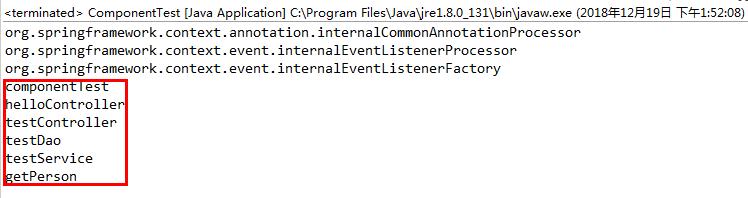
import org.springframework.context.ApplicationContext; import org.springframework.context.annotation.AnnotationConfigApplicationContext; import org.springframework.context.annotation.Bean; import org.springframework.context.annotation.ComponentScan; import org.springframework.context.annotation.Configuration; import com.hui.entity.Person; @Configuration @ComponentScan(value = "com.hui") public class ComponentTest { @Bean public Person getPerson() { return new Person("百度好帅", 10000); } public static void main(String[] args) { @SuppressWarnings("resource") ApplicationContext applicationContext = new AnnotationConfigApplicationContext(ComponentTest.class); String[] beanNames = applicationContext.getBeanDefinitionNames(); for (String bean : beanNames) { System.out.println(bean); } } } 运行Application:
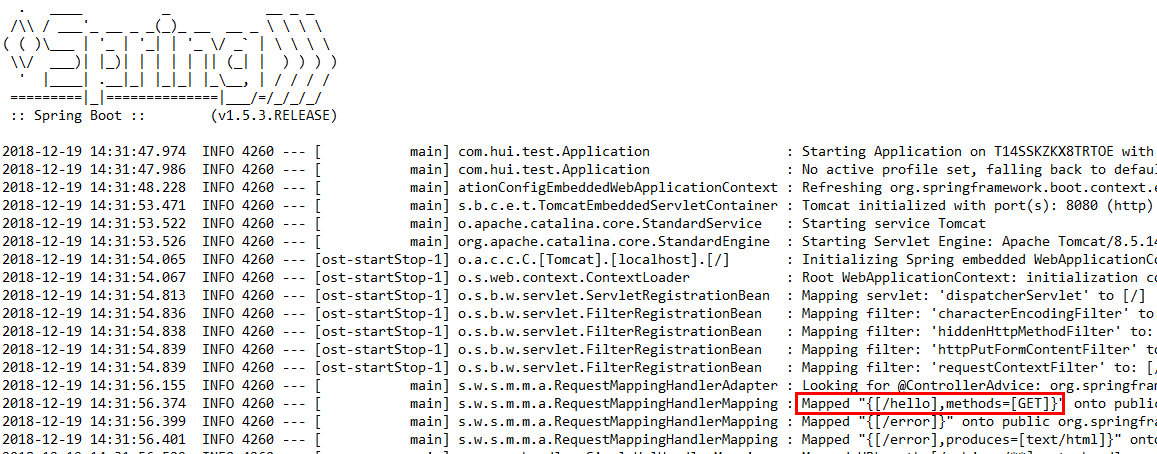
控制台扫描到了/hello,即映射成功
把Application注释掉运行ComponentTest:
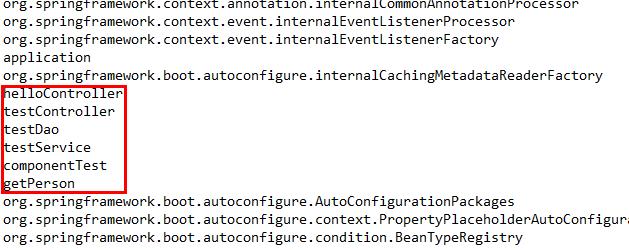
发布者:全栈程序员-站长,转载请注明出处:https://javaforall.net/219651.html原文链接:https://javaforall.net




