
LayoutParams源码分析
概述
- LayoutParams是布局参数的意思,我们在XML布局文件里的layout_xxx等属性都是对LayoutParams的描述。
- LayoutParams不属于View,是ViewGroup控制View的具体显示在哪里。
LayoutParams基本用法
TextView textView1 = new TextView(this); textView1.setText("TextView1"); linearLayout.addView(textView1); TextView textView2 = new TextView(this); textView2.setText("TextView2"); textView2.setLayoutParams(new LinearLayout.LayoutParams(LinearLayout.LayoutParams.WRAP_CONTENT, LinearLayout.LayoutParams.WRAP_CONTENT)); linearLayout.addView(textView2); TextView textView3 = new TextView(this); textView3.setText("TextView3"); textView3.setLayoutParams(new LinearLayout.LayoutParams(100, 100)); linearLayout.addView(textView3); LayoutParams源码分析
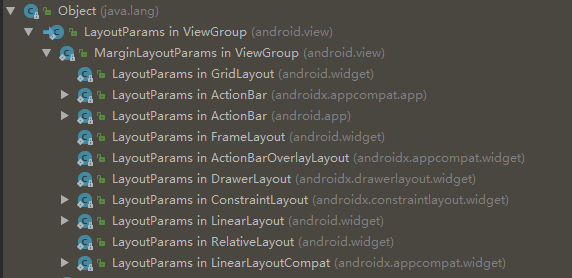

ViewGroup.LayoutParams
public LayoutParams(Context c, AttributeSet attrs) {
    TypedArray a = c.obtainStyledAttributes(attrs, R.styleable.ViewGroup_Layout); setBaseAttributes(a, R.styleable.ViewGroup_Layout_layout_width, R.styleable.ViewGroup_Layout_layout_height); a.recycle(); } public LayoutParams(int width, int height) {
    this.width = width; this.height = height; } public LayoutParams(LayoutParams source) {
    this.width = source.width; this.height = source.height; } LayoutParams() {
    }
ViewGroup.MarginLayoutParams
public static class MarginLayoutParams extends ViewGroup.LayoutParams {
    public int leftMargin; public int topMargin; public int rightMargin; public int bottomMargin; private int startMargin = DEFAULT_MARGIN_RELATIVE; private int endMargin = DEFAULT_MARGIN_RELATIVE; public static final int DEFAULT_MARGIN_RELATIVE = Integer.MIN_VALUE; public MarginLayoutParams(Context c, AttributeSet attrs) {
    super(); TypedArray a = c.obtainStyledAttributes(attrs, R.styleable.ViewGroup_MarginLayout); setBaseAttributes(a, R.styleable.ViewGroup_MarginLayout_layout_width, R.styleable.ViewGroup_MarginLayout_layout_height); int margin = a.getDimensionPixelSize( com.android.internal.R.styleable.ViewGroup_MarginLayout_layout_margin, -1); if (margin >= 0) {
    leftMargin = margin; topMargin = margin; rightMargin= margin; bottomMargin = margin; } else {
    int horizontalMargin = a.getDimensionPixelSize( R.styleable.ViewGroup_MarginLayout_layout_marginHorizontal, -1); int verticalMargin = a.getDimensionPixelSize( R.styleable.ViewGroup_MarginLayout_layout_marginVertical, -1); ... } ... } }
addView流程
public void addView(View child) {
    addView(child, -1); } public void addView(View child, int index) {
    if (child == null) {
    throw new IllegalArgumentException("Cannot add a null child view to a ViewGroup"); } LayoutParams params = child.getLayoutParams(); //若子View的LayoutParams为null,则使用默认LayoutParams if (params == null) {
    params = generateDefaultLayoutParams(); if (params == null) {
    throw new IllegalArgumentException( "generateDefaultLayoutParams() cannot return null"); } } addView(child, index, params); } //生成默认LayoutParams @Override protected LayoutParams generateDefaultLayoutParams() {
    if (mOrientation == HORIZONTAL) {
    return new LayoutParams(LayoutParams.WRAP_CONTENT, LayoutParams.WRAP_CONTENT); } else if (mOrientation == VERTICAL) {
    return new LayoutParams(LayoutParams.MATCH_PARENT, LayoutParams.WRAP_CONTENT); } return null; } public void addView(View child, int index, LayoutParams params) {
    if (DBG) {
    System.out.println(this + " addView"); } if (child == null) {
    throw new IllegalArgumentException("Cannot add a null child view to a ViewGroup"); } requestLayout(); invalidate(true); addViewInner(child, index, params, false); } private void addViewInner(View child, int index, LayoutParams params, boolean preventRequestLayout) {
    ... //检查LayoutParams是否合法,若不合法则使用默认值 if (!checkLayoutParams(params)) {
    params = generateLayoutParams(params); } ... //子View添加到mChildren数组 addInArray(child, index); ... } //检查LayoutParams是否合法 @Override protected boolean checkLayoutParams(ViewGroup.LayoutParams p) {
    return p instanceof LinearLayout.LayoutParams; } @Override public LayoutParams generateLayoutParams(AttributeSet attrs) {
    return new LinearLayout.LayoutParams(getContext(), attrs); }
版权声明:本文内容由互联网用户自发贡献,该文观点仅代表作者本人。本站仅提供信息存储空间服务,不拥有所有权,不承担相关法律责任。如发现本站有涉嫌侵权/违法违规的内容, 请联系我们举报,一经查实,本站将立刻删除。
发布者:全栈程序员-站长,转载请注明出处:https://javaforall.net/220295.html原文链接:https://javaforall.net




