
1.go
- 官网下载go Downloads – The Go Programming Language (google.cn)
mv go /usr/local/ #1 go移动到/usr/local/ sudo mv go /usr/local/ #2 配置环境 export GOROOT=/usr/local/go chmod -R 777 /usr/local/go #创建自己的gopath mkdir gopath/src gopath/pkg gopath/bin sudo vi /etc/profile #在最后添加 export PATH=/home/tong/gopath/src/github.com/fabric/fabric-samples/bin:$PATH export GOPATH=/home/tong/gopath/ export GOROOT=/usr/local/go export PATH=$GOPATH/bin:$GOROOT/bin:$PATH export GO111MODULE=auto #编辑结束再source一下 source /etc/profile #go源: export GOPROXY=https://goproxy.io #src里获取源 go mod init go mod tidy go mod vendor export GO111MODULE=auto # 检查 go env go version 2.docker环境
sudo apt-get install git sudo apt-get install curl #使用国内脚本安装 sudo apt-get update sudo apt-get upgrade curl -sSL https://get.daocloud.io/docker | sh # 设备docker 运行环境 sudo systemctl start docker sudo systemctl enable docker sudo usermod -a -G docker <自己用户的名字> #检查 docker --version # docker-compose 安装: sudo curl -L https://get.daocloud.io/docker/compose/releases/download/1.22.0/docker-compose-`uname -s`-`uname -m` -o /usr/local/bin/docker-compose sudo chmod +x /usr/local/bin/docker-compose #检查 docker-compose --version 3.示例、二进制文件、配置文件、docker镜像
#clone 示例 一般我也会 clone源码 cd gopath/src mkdir github.com cd github.com/ git clone https://github.com.cnpmjs.org/hyperledger/fabric.git cd fabric git clone https://github.com.cnpmjs.org/hyperledger/fabric-samples.git cd fabric-samples #创建脚本文件 复制本文最下面的代码 vi bootstrap.sh 复制本文最下面的代码 chmod 777 bootstrap.sh ./bootstrap.sh chmod -R 777 bin #检查 ./bin/peer version #正常会显示一下 版本号2.2.0 #Version: 2.2.0 #Commit SHA: 5ea85bc54 #Go version: go1.14.4 #OS/Arch: linux/amd64 #Chaincode: #Base Docker Label: org.hyperledger.fabric #Docker Namespace: hyperledger #二进制文件设置全局 pwd #获取你的目录 eg:/home/ubuntu/gopath/src/github.com/fabric/fabric-samples/bin export PATH=PATH=/home/tong/gopath/src/github.com/fabric/fabric-samples/bin:$PATH export PATH=/home/ubuntu/gopath/src/github.com/fabric/fabric-samples/bin:$PATH #test peer version 测试
service docker start systemctl enable docker.service sudo chmod 777 /var/run/docker.sock #检查 systemctl status docker.service 应该为:active(running) cd test-network #启动网络 开启docker 创建通道默认为mychannel 开启couchdb ./network.sh up createChannel -s couchdb #实例化智能合约 -ccp 跟自己合约地址 下面用的合约是官网给的 ./network.sh deployCC -ccn basic -ccp ../asset-transfer-basic/chaincode-go -ccl go #测试合约 export FABRIC_CFG_PATH=$PWD/../config/ export CORE_PEER_TLS_ENABLED=true export CORE_PEER_LOCALMSPID="Org1MSP" export CORE_PEER_TLS_ROOTCERT_FILE=${
   PWD}/organizations/peerOrganizations/org1.example.com/peers/peer0.org1.example.com/tls/ca.crt export CORE_PEER_MSPCONFIGPATH=${
   PWD}/organizations/peerOrganizations/org1.example.com/users//msp export CORE_PEER_ADDRESS=localhost:7051 peer chaincode invoke -o localhost:7050 --ordererTLSHostnameOverride orderer.example.com --tls --cafile ${
   PWD}/organizations/ordererOrganizations/example.com/orderers/orderer.example.com/msp/tlscacerts/tlsca.example.com-cert.pem -C mychannel -n basic --peerAddresses localhost:7051 --tlsRootCertFiles ${
   PWD}/organizations/peerOrganizations/org1.example.com/peers/peer0.org1.example.com/tls/ca.crt --peerAddresses localhost:9051 --tlsRootCertFiles ${
   PWD}/organizations/peerOrganizations/org2.example.com/peers/peer0.org2.example.com/tls/ca.crt -c '{"function":"InitLedger","Args":[]}' peer chaincode query -C mychannel -n basic -c '{"Args":["GetAllAssets"]}' peer chaincode invoke -o localhost:7050 --ordererTLSHostnameOverride orderer.example.com --tls --cafile ${
   PWD}/organizations/ordererOrganizations/example.com/orderers/orderer.example.com/msp/tlscacerts/tlsca.example.com-cert.pem -C mychannel -n basic --peerAddresses localhost:7051 --tlsRootCertFiles ${
   PWD}/organizations/peerOrganizations/org1.example.com/peers/peer0.org1.example.com/tls/ca.crt --peerAddresses localhost:9051 --tlsRootCertFiles ${
   PWD}/organizations/peerOrganizations/org2.example.com/peers/peer0.org2.example.com/tls/ca.crt -c '{"function":"TransferAsset","Args":["asset6","Christopher"]}' # 如果出错中断了 重新尝试之前要 ./network.sh down
没有问题就完成啦
官方安装脚本(修改过了):
#!/bin/bash # # Copyright IBM Corp. All Rights Reserved. # # SPDX-License-Identifier: Apache-2.0 # # if version not passed in, default to latest released version VERSION=2.2.0 # if ca version not passed in, default to latest released version CA_VERSION=1.4.7 ARCH=$(echo "$(uname -s|tr '[:upper:]' '[:lower:]'|sed 's/mingw64_nt.*/windows/')-$(uname -m | sed 's/x86_64/amd64/g')") MARCH=$(uname -m) printHelp() {
    echo "Usage: bootstrap.sh [version [ca_version]] [options]" echo echo "options:" echo "-h : this help" echo "-d : bypass docker image download" echo "-s : bypass fabric-samples repo clone" echo "-b : bypass download of platform-specific binaries" echo echo "e.g. bootstrap.sh 2.4.0 1.5.2 -s" echo "will download docker images and binaries for Fabric v2.4.0 and Fabric CA v1.5.2" } # dockerPull() pulls docker images from fabric and chaincode repositories # note, if a docker image doesn't exist for a requested release, it will simply # be skipped, since this script doesn't terminate upon errors. dockerPull() {
    #three_digit_image_tag is passed in, e.g. "1.4.7" three_digit_image_tag=$1 shift #two_digit_image_tag is derived, e.g. "1.4", especially useful as a local tag for two digit references to most recent baseos, ccenv, javaenv, nodeenv patch releases two_digit_image_tag=$(echo "$three_digit_image_tag" | cut -d'.' -f1,2) while [[ $# -gt 0 ]] do image_name="$1" echo "====> hyperledger/fabric-$image_name:$three_digit_image_tag" docker pull "hyperledger/fabric-$image_name:$three_digit_image_tag" docker tag "hyperledger/fabric-$image_name:$three_digit_image_tag" "hyperledger/fabric-$image_name" docker tag "hyperledger/fabric-$image_name:$three_digit_image_tag" "hyperledger/fabric-$image_name:$two_digit_image_tag" shift done } cloneSamplesRepo() {
    # clone (if needed) hyperledger/fabric-samples and checkout corresponding # version to the binaries and docker images to be downloaded if [ -d test-network ]; then # if we are in the fabric-samples repo, checkout corresponding version echo "==> Already in fabric-samples repo" elif [ -d fabric-samples ]; then # if fabric-samples repo already cloned and in current directory, # cd fabric-samples echo "===> Changing directory to fabric-samples" cd fabric-samples else echo "===> Cloning hyperledger/fabric-samples repo" git clone -b main https://github.com.cnpmjs.org/hyperledger/fabric-samples.git && cd fabric-samples fi if GIT_DIR=.git git rev-parse v${VERSION} >/dev/null 2>&1; then echo "===> Checking out v${VERSION} of hyperledger/fabric-samples" git checkout -q v${VERSION} else echo "fabric-samples v${VERSION} does not exist, defaulting to main. fabric-samples main branch is intended to work with recent versions of fabric." git checkout -q main fi } # This will download the .tar.gz download() {
    local BINARY_FILE=$1 local URL=$2 echo "===> Downloading: " "${URL}" curl -L --retry 5 --retry-delay 3 "${URL}" | tar xz || rc=$? if [ -n "$rc" ]; then echo "==> There was an error downloading the binary file." return 22 else echo "==> Done." fi } pullBinaries() {
    echo "===> Downloading version ${FABRIC_TAG} platform specific fabric binaries" download "${BINARY_FILE}" "https://github.91chi.fun//https://github.com//hyperledger/fabric/releases/download/v2.2.0/hyperledger-fabric-linux-amd64-2.2.0.tar.gz" if [ $? -eq 22 ]; then echo echo "------> ${FABRIC_TAG} platform specific fabric binary is not available to download <----" echo exit fi echo "===> Downloading version ${CA_TAG} platform specific fabric-ca-client binary" download "${CA_BINARY_FILE}" "https://github.91chi.fun//https://github.com//hyperledger/fabric-ca/releases/download/v1.4.7/hyperledger-fabric-ca-linux-amd64-1.4.7.tar.gz" if [ $? -eq 22 ]; then echo echo "------> ${CA_TAG} fabric-ca-client binary is not available to download (Available from 1.1.0-rc1) <----" echo exit fi } pullDockerImages() {
    command -v docker >& /dev/null NODOCKER=$? if [ "${NODOCKER}" == 0 ]; then FABRIC_IMAGES=(peer orderer ccenv tools) case "$VERSION" in 2.*) FABRIC_IMAGES+=(baseos) shift ;; esac echo "FABRIC_IMAGES:" "${FABRIC_IMAGES[@]}" echo "===> Pulling fabric Images" dockerPull "${FABRIC_TAG}" "${FABRIC_IMAGES[@]}" echo "===> Pulling fabric ca Image" CA_IMAGE=(ca) dockerPull "${CA_TAG}" "${CA_IMAGE[@]}" echo "===> List out hyperledger docker images" docker images | grep hyperledger else echo "=========================================================" echo "Docker not installed, bypassing download of Fabric images" echo "=========================================================" fi } DOCKER=true SAMPLES=true BINARIES=true # Parse commandline args pull out # version and/or ca-version strings first if [ -n "$1" ] && [ "${1:0:1}" != "-" ]; then VERSION=$1;shift if [ -n "$1" ] && [ "${1:0:1}" != "-" ]; then CA_VERSION=$1;shift if [ -n "$1" ] && [ "${1:0:1}" != "-" ]; then THIRDPARTY_IMAGE_VERSION=$1;shift fi fi fi # prior to 1.2.0 architecture was determined by uname -m if [[ $VERSION =~ ^1\.[0-1]\.* ]]; then export FABRIC_TAG=${MARCH}-${VERSION} export CA_TAG=${MARCH}-${CA_VERSION} export THIRDPARTY_TAG=${MARCH}-${THIRDPARTY_IMAGE_VERSION} else # starting with 1.2.0, multi-arch images will be default : "${CA_TAG:="$CA_VERSION"}" : "${FABRIC_TAG:="$VERSION"}" : "${THIRDPARTY_TAG:="$THIRDPARTY_IMAGE_VERSION"}" fi BINARY_FILE=hyperledger-fabric-${ARCH}-${VERSION}.tar.gz CA_BINARY_FILE=hyperledger-fabric-ca-${ARCH}-${CA_VERSION}.tar.gz # then parse opts while getopts "h?dsb" opt; do case "$opt" in h|\?) printHelp exit 0 ;; d) DOCKER=false ;; s) SAMPLES=false ;; b) BINARIES=false ;; esac done if [ "$SAMPLES" == "true" ]; then echo echo "Clone hyperledger/fabric-samples repo" echo cloneSamplesRepo fi if [ "$BINARIES" == "true" ]; then echo echo "Pull Hyperledger Fabric binaries" echo pullBinaries fi if [ "$DOCKER" == "true" ]; then echo echo "Pull Hyperledger Fabric docker images" echo pullDockerImages fi
WL给我写了两个脚本直接开启/关闭区块链
开启:
#bin/sh cd /home/tong/gopath/src/github.com/fabric/fabric-samples/test-network ./network.sh up createChannel -s couchdb ./network.sh deployCC -ccn basic -ccp ../asset-transfer-basic/chaincode-go -ccl go 关闭:
bin/sh cd /home/tong/gopath/src/github.com/fabric/fabric-samples/test-network ./network.sh down ./work.sh ./down.sh 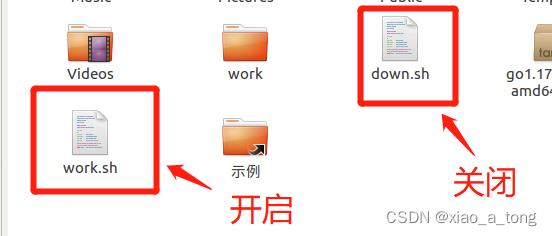

版权声明:本文内容由互联网用户自发贡献,该文观点仅代表作者本人。本站仅提供信息存储空间服务,不拥有所有权,不承担相关法律责任。如发现本站有涉嫌侵权/违法违规的内容, 请联系我们举报,一经查实,本站将立刻删除。
发布者:全栈程序员-站长,转载请注明出处:https://javaforall.net/222660.html原文链接:https://javaforall.net



