
在线商城和商城后台管理系统
1、商城使用了vue2+elementUI
实现了登录注册、浏览商品、购买商品、收藏商品、商品搜索、加入购物车、查看订单、添加收货地址、在线客服、分类查看商品的等功能
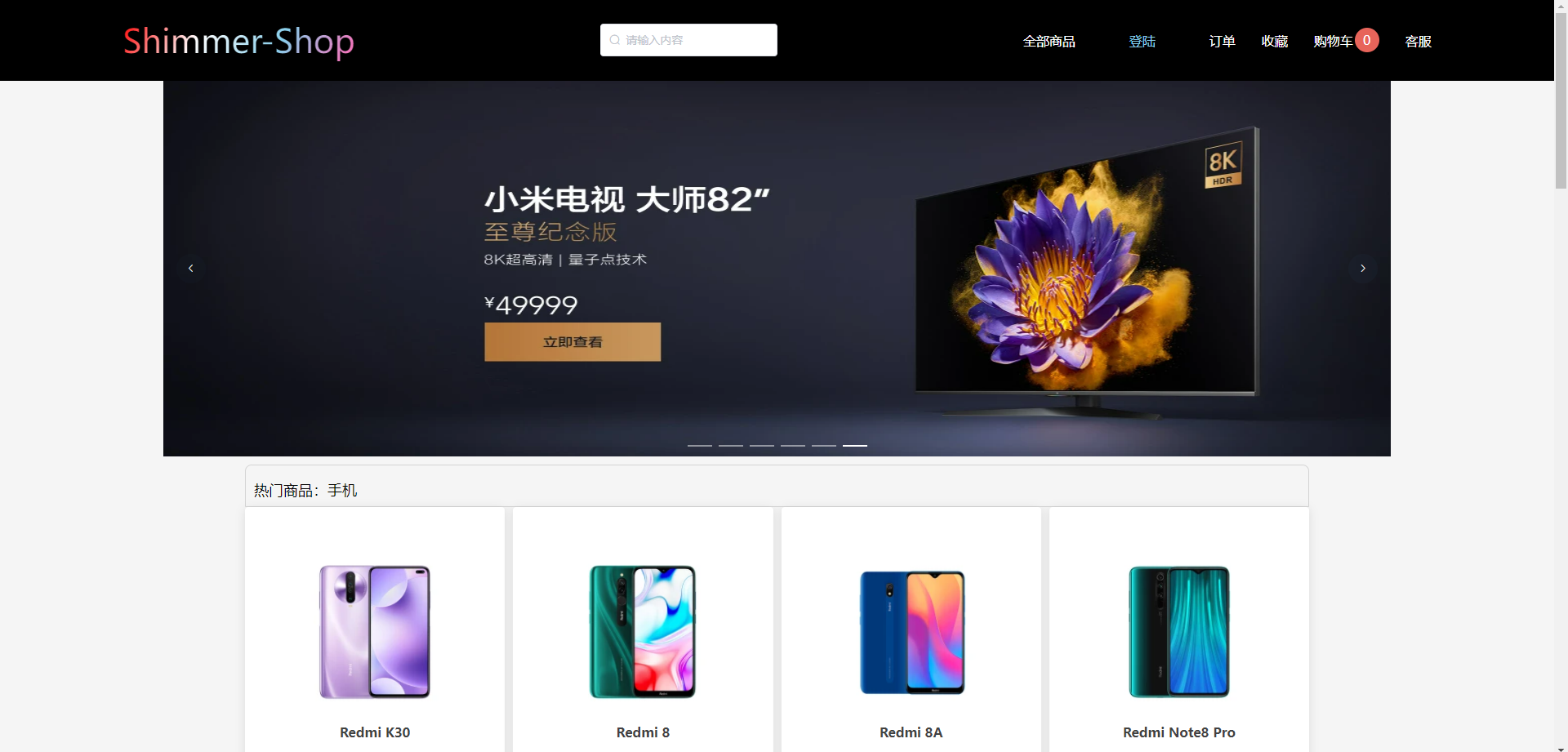

没什么难的地方,都很基本。随便写下功能实现。
查看商品详情把商品id传过去
 // 去商品详情页 async getGoodsDetails (id) {
    this.$router.push(`/goodsDetails?id=${
     id}`) },
详情页使用id获取数据
 // 获取商品数据 async getGoodsInfo () {
    const id = this.$route.query.id const res = await this.$http.get(`/goods/${
     id}`) this.goodsInfo = res.data[0] this.goodsImg = res.data[0].goods_pic1.length !== 0 ? res.data[0].goods_pic1 : [res.data[0].goods_pic] },
导航栏购物车内商品数的显示使用了event-bus
 <!-- 购物车 --> <div class="shopCar" @click="toShopCar"><div>购物车</div><div class="shopCar-num">{
   {
   cartNum}}</div></div> // 获取购物车数量 async getCart () {
    const userId = window.sessionStorage.getItem('userId') const res = await this.$http.get('getCart', {
    params: {
    user_id: userId } }) let total = 0 for (let i = 0; i < res.data.length; i++) {
    total += res.data[i].buy_num } this.cartNum = total }
// 加入购物车 async addShopCar (id) {
const token = window.sessionStorage.getItem('token') const userId = window.sessionStorage.getItem('userId') if (token == null) {
this.dialogVisible = true return } // 加入购物车 const res = await this.$http.post('addCart', {
user_id: userId, goods_id: id, buy_num: 1 }) // 传值到header组件 Bus.$emit('getCartNum') this.$message.success(res.data.message) }, 2、商城后台管理系统使用了react+antd
实现了注册登录、商城整体数据的查看,用户管理、商品管理、订单管理、财务管理、客服服务的功能,其下还分各种小功能对用户商品订单等详细功能进行增删改查的操作
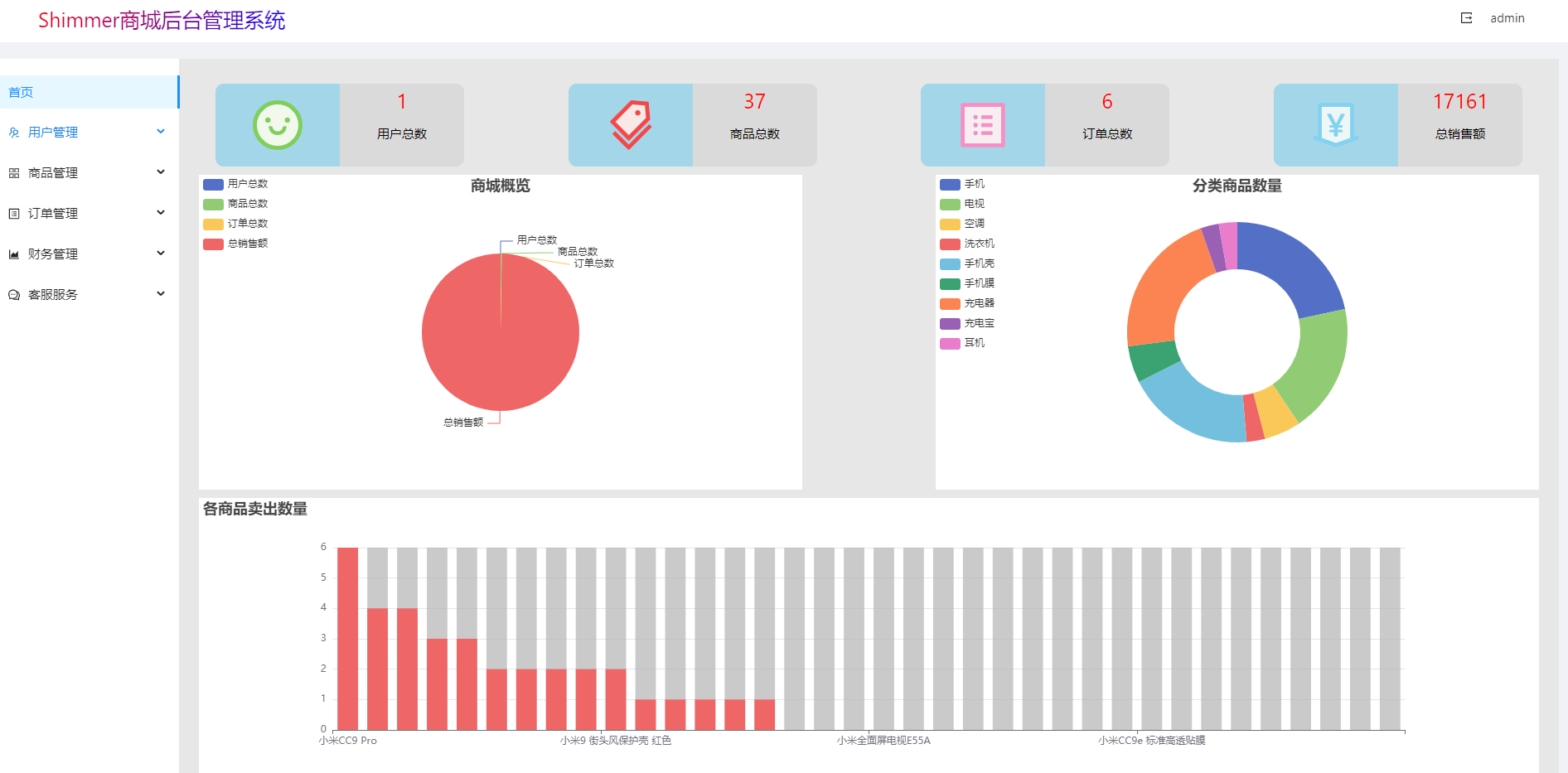
这个也没什么难的
主页代码
import React, {
    Component } from 'react' import './main.css' import * as echarts from "echarts"; import {
    $http } from '../../request' import {
    SmileTwoTone, TagsTwoTone, ProfileTwoTone, MoneyCollectTwoTone } from '@ant-design/icons'; import 'antd/dist/antd.css' import {
    Layout } from 'antd'; const {
    Content } = Layout class Main extends Component {
    constructor(props) {
    super(props) this.state = {
    usersNum: 0, moneyNum: 0, orderNum: 0, goodsNum: 0, option: {
   }, optionGoods: {
   }, optionBuyCount: {
   }, } } componentDidMount() {
    this.getInfo() setTimeout(() => {
    this.getOption(); this.getOptionTwo(); this.getOptionThree(); }, 100) } getInfo = async () => {
    const {
    data: res } = await $http.get('getUser') const {
    data: res1 } = await $http.get('order') const {
    data: res2 } = await $http.get('goods') const {
    data: res3 } = await $http.get('goodsBuyCounts') let goodsNameArr = [] let goodsBuyCountsArr = [] for (let i = 0; i < res3.data.length; i++) {
    goodsNameArr.push(res3.data[i].goods_name) goodsBuyCountsArr.push(res3.data[i].goods_buyCount) } // 各商品数量 let a = 0 let b = 0 let c = 0 let d = 0 let e = 0 let f = 0 let g = 0 let h = 0 let i = 0 res2.map((k, index) => {
    switch (k.cat_id) {
    case 1: a++ break; case 2: b++ break; case 3: c++ break; case 4: d++ break; case 5: e++ break; case 6: f++ break; case 7: g++ break; case 8: h++ break; default: i++ } return null }) // 商城营业额和订单数量 let totalPrice = 0 // 所有的订单编号 var arr = [] // console.log(res1); for (let i = 0; i < res1.length; i++) {
    arr.push(res1[i].order_id) totalPrice = totalPrice + (res1[i].goods_price * res1[i].buy_num) } arr = [...new Set(arr)] // 商城概览饼图 let option2 = {
    title: {
    text: '商城概览', left: 'center' }, tooltip: {
    trigger: 'item' }, legend: {
    orient: 'vertical', left: 'left', }, series: [ {
    name: '商城概览', type: 'pie', radius: '50%', data: [ {
    value: res.length, name: '用户总数' }, {
    value: res2.length, name: '商品总数' }, {
    value: arr.length, name: '订单总数' }, {
    value: totalPrice, name: '总销售额' }, ], emphasis: {
    itemStyle: {
    shadowBlur: 10, shadowOffsetX: 0, shadowColor: 'rgba(0, 0, 0, 0.5)' } } } ] } // 分类商品数量环形图 let optionGoods = {
    tooltip: {
    trigger: 'item' }, title: {
    text: '分类商品数量', left: 'center' }, legend: {
    orient: 'vertical', left: 'left', }, series: [ {
    name: '商品总数', type: 'pie', radius: ['40%', '70%'], avoidLabelOverlap: false, label: {
    show: false, position: 'center' }, emphasis: {
    label: {
    show: true, fontSize: '40', fontWeight: 'bold' } }, labelLine: {
    show: false }, data: [ {
    value: a, name: '手机' }, {
    value: b, name: '电视' }, {
    value: c, name: '空调' }, {
    value: d, name: '洗衣机' }, {
    value: e, name: '手机壳' }, {
    value: f, name: '手机膜' }, {
    value: g, name: '充电器' }, {
    value: h, name: '充电宝' }, {
    value: i, name: '耳机' }, ] } ] } // 各商品卖出数量柱状图 let option = {
    title: {
    text: '各商品卖出数量', }, tooltip: {
    trigger: 'axis', axisPointer: {
    // 坐标轴指示器,坐标轴触发有效 type: 'shadow' // 默认为直线,可选为:'line' | 'shadow' } }, xAxis: {
    type: 'category', data: goodsNameArr, axisTick: {
    alignWithLabel: false } }, yAxis: {
    type: 'value' }, series: [{
    name: "卖出总数量", data: goodsBuyCountsArr, type: 'bar', showBackground: true, backgroundStyle: {
    color: 'rgba(180, 180, 180, 0.7)' }, color: '#ee6666' }] }; this.setState({
    usersNum: res.length, orderNum: arr.length, goodsNum: res2.length, moneyNum: totalPrice, optionBuyCount: option, option: option2, optionGoods: optionGoods }) } // 商城概览 getOption = () => {
    let myChart = echarts.init(document.getElementById("main")); myChart.setOption(this.state.option); // echarts 大小随页面改变 window.onresize = function () {
    myChart.resize(); }; }; // 商品分类数量 getOptionTwo = () => {
    let myChart1 = echarts.init(document.getElementById("main-goods")); myChart1.setOption(this.state.optionGoods); // echarts 大小随页面改变 window.onresize = function () {
    myChart1.resize(); }; }; // 商品卖出数量 getOptionThree = () => {
    let myChart2 = echarts.init(document.getElementById("main-buyCount")); myChart2.setOption(this.state.optionBuyCount); // echarts 大小随页面改变 window.onresize = function () {
    myChart2.resize(); }; }; render() {
    return ( <Content className="site-layout-background" style={
   {
    paddingLeft: 24, marginTop: 80, marginLeft: 230, marginRight: 20, minHeight: 280, }} > <div className="main-top"> <div className="main-top-card"> <div className="card-one"> <SmileTwoTone twoToneColor="#52c41a" style={
   {
    fontSize: "60px" }} /> </div> <div className="card-two"> <div style={
   {
    fontSize: "25px", color: "red" }}>{
   this.state.usersNum}</div> <div style={
   {
    fontSize: "15px", color: "black" }}>用户总数</div> </div> </div> <div className="main-top-card"> <div className="card-one"> <TagsTwoTone twoToneColor="red" style={
   {
    fontSize: "60px" }} /> </div> <div className="card-two"> <div style={
   {
    fontSize: "25px", color: "red" }}>{
   this.state.goodsNum}</div> <div style={
   {
    fontSize: "15px", color: "black" }}>商品总数</div> </div> </div> <div className="main-top-card"> <div className="card-one"> <ProfileTwoTone twoToneColor="hotpink" style={
   {
    fontSize: "60px" }} /> </div> <div className="card-two"> <div style={
   {
    fontSize: "25px", color: "red" }}>{
   this.state.orderNum}</div> <div style={
   {
    fontSize: "15px", color: "black" }}>订单总数</div> </div> </div> <div className="main-top-card"> <div className="card-one"> <MoneyCollectTwoTone twoToneColor="#57c8f2" style={
   {
    fontSize: "60px" }} /> </div> <div className="card-two"> <div style={
   {
    fontSize: "25px", color: "red" }}>{
   this.state.moneyNum}</div> <div style={
   {
    fontSize: "15px", color: "black" }}>总销售额</div> </div> </div> </div> <div className="main-bottom"> <div id='main' style={
   {
    height: "380px", width: "45%", backgroundColor: "#fff" }}> </div> <div id='main-goods' style={
   {
    height: "380px", width: "45%", backgroundColor: "#fff" }}> </div> </div> <div id='main-buyCount' style={
   {
    height: "350px", width: "100%", backgroundColor: "#fff" }}> </div> </Content > ) } } export default Main
2、商城的后端使用了express+mongoDB
使用了node.js的express和mongoDB数据库来写接口和存储数据、有用户表、商品表、商品分类表、用户收藏表、订单表、轮播图表、后台用户表等
登录注册用了密码散列,客服通讯用了websocket,文件上传用formidable模块等
const {
    hashSync } = require('bcrypt') const mongoose = require('mongoose') // 连接数据库 mongoose.connect('mongodb://localhost:27017/storedb', {
    useNewUrlParser: true, useCreateIndex: true, useUnifiedTopology: true }) // 表的初始数据 const {
    goods, cats, banners, expressInfo } = require('./insert') // 用户表 // 随机userID const userId = parseInt(Math.random() * 1458) const UserSchema = new mongoose.Schema({
    user_id: {
    type: String, default: userId, unique: true }, username: {
    type: String, unique: true, required: true, trim: true }, nickname: {
    type: String, }, password: {
    type: String, required: true, set(val) {
    // 密码加密 散列密码 return hashSync(val, 8) } } }) // 商品 const GoodsSchema = new mongoose.Schema({
    goods_id: {
    type: Number }, goods_name: {
    type: String, required: true }, cat_id: {
    type: Number }, goods_title: {
    type: String, required: true }, goods_price: {
    type: String, required: true }, goods_price1: {
    type: String }, goods_subtitle: {
    type: String, required: true }, goods_pic: {
    type: String }, goods_pic1: {
    type: Array }, goods_num: {
    type: Number, required: true } }) // 分类表 const CateSchema = new mongoose.Schema({
    cat_id: {
    type: Number }, cat_name: {
    type: String, required: true } }) // 轮播图 const BannerSchema = new mongoose.Schema({
    id: {
    type: String }, banner_pic: {
    type: String } }) // 订单表 const OrderSchema = new mongoose.Schema({
    order_id: {
    type: String }, order_time: {
    type: String }, goods_id: {
    type: Number, ref: "goods" }, goods_name: {
    type: String }, goods_pic: {
    type: String }, goods_price: {
    type: String }, buy_num: {
    type: Number }, user_id: {
    type: String, required: true, ref: "user" } }) // 热门商品表 const HotGoodsSchema = new mongoose.Schema({
    id: {
    type: String }, hot_name: {
    type: String }, hot_goods: {
    type: Array } }) // 用户收藏表 const UserStarsSchema = new mongoose.Schema({
    user_id: {
    type: String, required: true, ref: "user" }, goods_id: {
    type: Number, ref: "goods" }, goods_name: {
    type: String }, goods_pic: {
    type: String }, goods_price: {
    type: String }, goods_num: {
    type: Number, required: true } }) // 购物车表 const shopCartSchema = new mongoose.Schema({
    user_id: {
    type: String, required: true, ref: "user" }, goods_id: {
    type: Number, ref: "goods" }, goods_name: {
    type: String }, goods_pic: {
    type: String }, goods_price: {
    type: String }, buy_num: {
    type: Number } }) // 用户地址表 const addressSchema = new mongoose.Schema({
    user_id: {
    type: String, required: true, ref: "user" }, add_id: {
    type: String }, user_name: {
    type: String }, user_phone: {
    type: String }, user_address: {
    type: String } }) // 后台管理用户表 const adminId = parseInt(Math.random() * 1266) const adminUserSchema = new mongoose.Schema({
    admin_id: {
    type: String, default: adminId, unique: true }, admin_name: {
    type: String, required: true, unique: true }, admin_password: {
    type: String, required: true, set(val) {
    // 密码加密 散列密码 return hashSync(val, 8) } } }) // 商品购买次数表 const goodsBuyCountSchema = new mongoose.Schema({
    goods_name: {
    type: String }, goods_id: {
    type: Number }, goods_buyCount: {
    type: Number } }) // 快递信息表 const UserExpressInfoSchema = new mongoose.Schema({
    express_id: {
    type: String }, express_info: {
    type: Array } }) const User = mongoose.model('users', UserSchema, 'users') const Goods = mongoose.model('goods', GoodsSchema, 'goods') const Banner = mongoose.model('banners', BannerSchema, 'banners') const Order = mongoose.model('order', OrderSchema, 'order') const Category = mongoose.model('category', CateSchema, 'category') const HotGoods = mongoose.model('hotGoods', HotGoodsSchema, 'hotGoods') const UserStars = mongoose.model('userStars', UserStarsSchema, 'userStars') const ShopCart = mongoose.model('shopCart', shopCartSchema, 'shopCart') const Address = mongoose.model('address', addressSchema, 'address') const Admin = mongoose.model('admin', adminUserSchema, 'admin') const GoodsBuyCount = mongoose.model('goodsBuyCount', goodsBuyCountSchema, 'goodsBuyCount') const UserExpressInfo = mongoose.model("expressInfo", UserExpressInfoSchema, "expressInfo") // 插入商品数据 const insertGoods = async function () {
    for (let i = 0; i < goods.length; i++) {
    const result = await Goods.find({
    goods_id: goods[i].goods_id }) const res = result.toString() if (res === "") {
    Goods.create(goods[i]) } } } insertGoods() // 插入各个商品被买了多少次的数据 const insertGoodsBuyCount = async function () {
    const data = await Goods.find() for (let i = 0; i < data.length; i++) {
    const result = await GoodsBuyCount.find({
    goods_id: data[i].goods_id }) const res = result.toString() if (res === "") {
    await GoodsBuyCount.create({
    goods_name: data[i].goods_name, goods_id: data[i].goods_id, goods_buyCount: 0 }) } } } insertGoodsBuyCount() // 插入分类数据 const insertCats = async function () {
    for (let i = 0; i < cats.length; i++) {
    const result = await Category.find({
    cat_id: cats[i].cat_id }) const res = result.toString() if (res === "") {
    Category.create(cats[i]) } } } insertCats() // 插入快递数据 const insertExpress = async () => {
    UserExpressInfo.create({
    express_id: 1, express_info: expressInfo }) } insertExpress() // 插入轮播图数据 const insertBanners = async function () {
    for (let i = 0; i < banners.length; i++) {
    const result = await Banner.find({
    id: banners[i].id }) const res = result.toString() if (res === "") {
    Banner.create(banners[i]) } } } insertBanners() // 导出 module.exports = {
    User, Goods, Banner, Order, Category, HotGoods, UserStars, ShopCart, Address, Admin, GoodsBuyCount, UserExpressInfo }
版权声明:本文内容由互联网用户自发贡献,该文观点仅代表作者本人。本站仅提供信息存储空间服务,不拥有所有权,不承担相关法律责任。如发现本站有涉嫌侵权/违法违规的内容, 请联系我们举报,一经查实,本站将立刻删除。
发布者:全栈程序员-站长,转载请注明出处:https://javaforall.net/225126.html原文链接:https://javaforall.net



