
SpringBoot 整合 Editormd(完整版)
Editormd 下载
SpringBoot 创建项目
不同的学者可能采用的IDE不同,在这篇推文中使用的是IntelliJ IDEA。
个人采用的是使用Spring Initializr 进行创建SpringBoot项目。如下图:
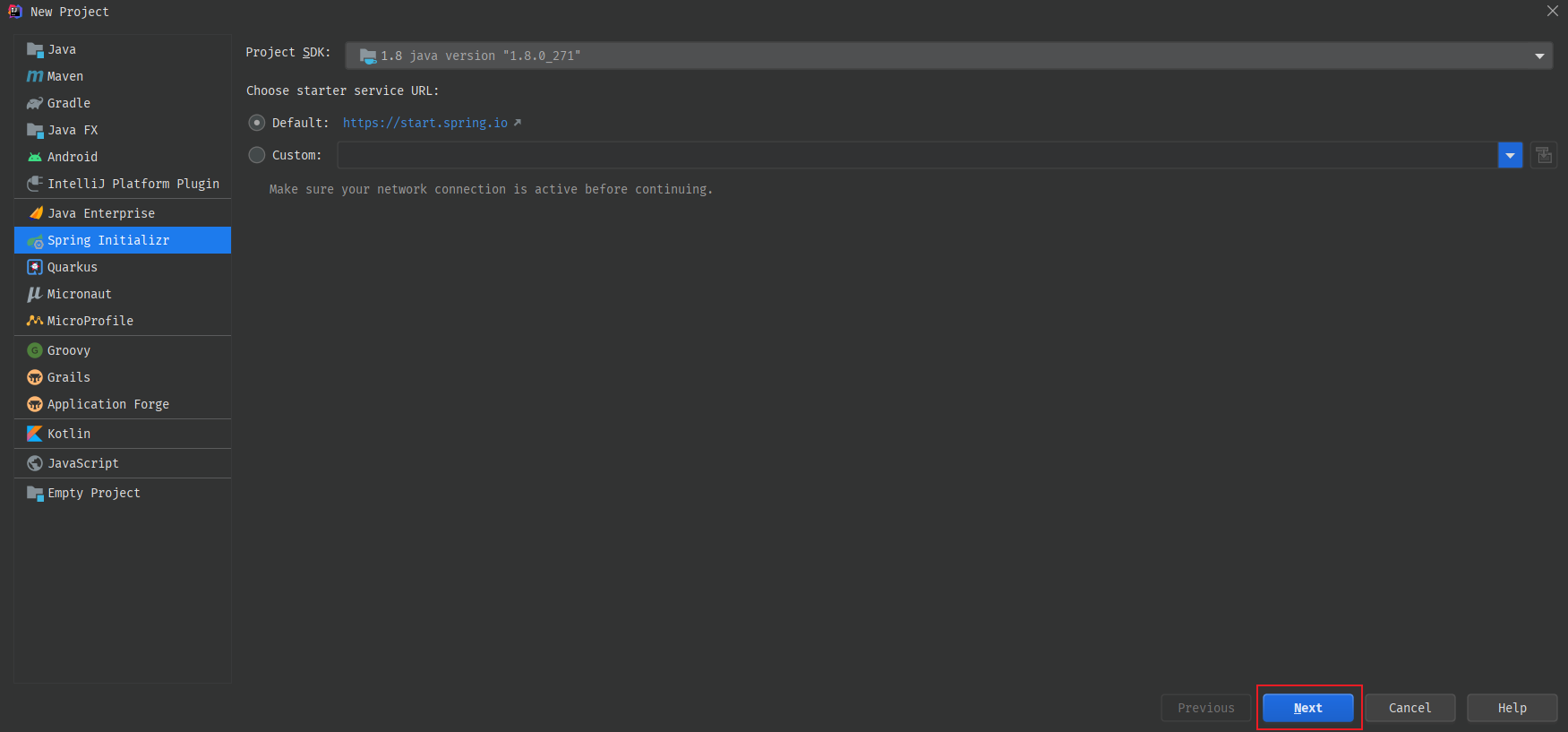

点击Next。
选择依赖,我们只需要添加我们需要用的依赖,后续需要添加一个Alibaba的fastjson依赖即可。如下图:
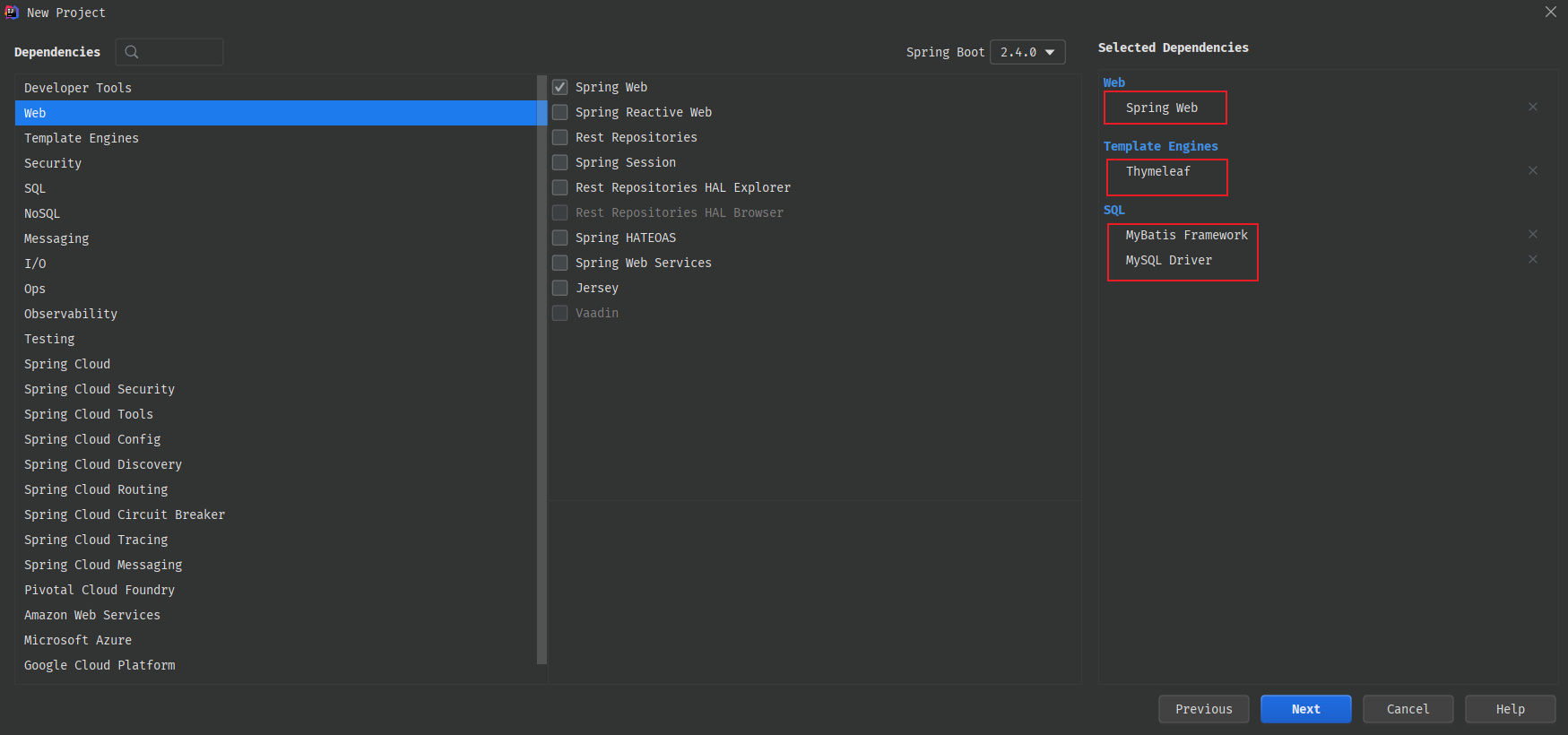
SpringBoot 项目依赖
      org.springframework.boot


      spring-boot-starter-thymeleaf


      org.springframework.boot


      spring-boot-starter-web


      org.mybatis.spring.boot


      mybatis-spring-boot-starter


      2.1.4


      mysql


      mysql-connector-java


      runtime


      org.springframework.boot


      spring-boot-starter-test


      test


      com.alibaba


      fastjson


      1.2.62
SpringBoot 项目配置
我们在这里使用的是yml配置。
server: port: 8081 spring: datasource: driver-class-name: com.mysql.cj.jdbc.Driver # 记得创建自己本地的数据库哦,并修改密码 url: jdbc:mysql://localhost:3306/markdown?useUnicode=true&characterEncoding=utf-8&useSSL=false&serverTimezone=UTC&allowPublicKeyRetrieval=true username: root password: laochou # 这里的配置主要是用来上传文件映射来使用的,这个location就是我们的存放图像的目录。当然这里还是要看你的数据库图片路径是如何设置的。 # 大家仔细的话,我在static目录下有个upload目录,这个目录就是我存放上传图片的目录。但是我们在location里面只到了 static这层,因此我的数据库中存放的便是 "/upload/xxxx.png"。拼接在一起就刚好。 # 图片的绝对路径:F:\JAVA\SpringBoot-MarkDown\src\main\resources\static\upload\0deeac80-6071-45e7-a1f4-d0a077.jpg servlet: multipart: location: F:/JAVA/SpringBoot-MarkDown/src/main/resources/static web: resources: static-locations: classpath:static/, file:${spring.servlet.multipart.location} mybatis: mapper-locations: classpath:/mappers/*.xml type-aliases-package: cn.laochou.markdown.pojo configuration: map-underscore-to-camel-case: true SpringBoot 代码编写
项目会放在百度网盘里面,到时候大家自行下载阅读。这里也会展示,本项目为Demo,所以代码写的比较随意,没有做很多的校验,大家勿怪。
我们先看下代码结构吧
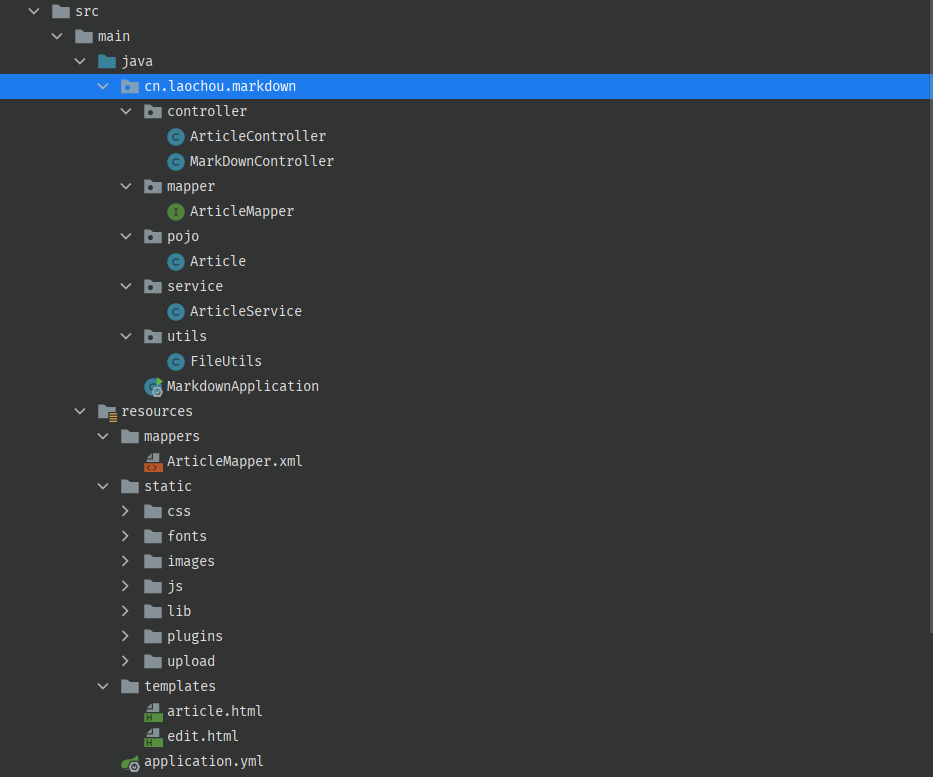
OK,我们先从我们的Article实体来讲
package cn.laochou.markdown.pojo; public class Article { private int id; private String title; private String author; private String content; // 省去了 Get和Set方法。在这里个人建议还是使用原生的Get和Set。 } 然后就看我们的Mapper吧。因为Mapper来操作数据库的,其实这里只有两个方法,一个是插入文章数据,一个便是根据Id获取文章数据。
package cn.laochou.markdown.mapper; import cn.laochou.markdown.pojo.Article; import org.apache.ibatis.annotations.Mapper; @Mapper public interface ArticleMapper { public int insertArticle(Article article); public Article getArticleById(int id); } Ok,ArticleMapper的接口大家看到了,因为我们采用的还是MyBatis,那么肯定是由ArticleMapper.xml。这就来:
insert into article (title, author, content) values(#{title}, #{author}, #{content});
接下来,就是我们的Service层了,其实也就是两个方法。没啥很大的区别
package cn.laochou.markdown.service; import cn.laochou.markdown.mapper.ArticleMapper; import cn.laochou.markdown.pojo.Article; import org.springframework.beans.factory.annotation.Autowired; import org.springframework.stereotype.Service; @Service public class ArticleService { private final ArticleMapper articleMapper; @Autowired public ArticleService(ArticleMapper articleMapper) { this.articleMapper = articleMapper; } public boolean publishArticle(Article article) { int res = articleMapper.insertArticle(article); if(res > 0) { return true; } return false; } public Article getArticleById(int id) { return articleMapper.getArticleById(id); } } 最后就是我们的Controller层了,因为Controller层会用到一个工具类FileUtil,所以先展示我们的FileUtils
package cn.laochou.markdown.utils; import org.springframework.web.multipart.MultipartFile; import java.io.File; import java.io.IOException; import java.util.UUID; / * 文件上传工具类 */ public class FileUtils { // static目录下的upload目录可自己建,也可不建。因为在上传的时候,会判断是否存在,若不存在便自动创建 private static final String prePath = System.getProperty("user.dir") + "/src/main/resources/static/upload/"; / * 上传文件 * @param file * @return 返回文件路径(以相对路径放回) */ public static String uploadFile(MultipartFile file) { if(file.isEmpty()) { return ""; } // 获取原文件名 String originFileName = file.getOriginalFilename(); // 我们通过UUID 来重新重组文件名 String uid = UUID.randomUUID().toString(); assert originFileName != null; String suffix = originFileName.substring(originFileName.lastIndexOf('.') + 1); String path = prePath + uid + "." + suffix; String returnPath = "/upload/" + uid + "." + suffix; File newFile = new File(path); if(newFile.getParentFile() != null && !newFile.getParentFile().exists()) { System.out.println("创建目录ing"); // 上面的 newFile.getParentFile() 已经保证了不为null. if(newFile.getParentFile().mkdirs()) { System.out.println("创建目录成功"); }else { System.out.println("创建目录失败"); return ""; } } try { file.transferTo(newFile); } catch (IOException e) { e.printStackTrace(); return ""; } return returnPath; } } ArticleController:
package cn.laochou.markdown.controller; import cn.laochou.markdown.pojo.Article; import cn.laochou.markdown.service.ArticleService; import cn.laochou.markdown.utils.FileUtils; import com.alibaba.fastjson.JSONObject; import org.springframework.beans.factory.annotation.Autowired; import org.springframework.stereotype.Controller; import org.springframework.web.bind.annotation.PathVariable; import org.springframework.web.bind.annotation.RequestMapping; import org.springframework.web.bind.annotation.RequestParam; import org.springframework.web.bind.annotation.ResponseBody; import org.springframework.web.multipart.MultipartFile; import org.springframework.web.servlet.ModelAndView; @Controller @RequestMapping("/article") public class ArticleController { private final ArticleService articleService; @Autowired public ArticleController(ArticleService articleService) { this.articleService = articleService; } @RequestMapping("/publish") @ResponseBody public String publishArticle(Article article) { boolean res = articleService.publishArticle(article); if(res) { return "success"; } return "false"; } @RequestMapping("/image/upload") @ResponseBody // 注意RequestParam中的name,不可改。 public JSONObject imageUpload(@RequestParam("editormd-image-file") MultipartFile image) { JSONObject jsonObject = new JSONObject(); if(image != null) { String path = FileUtils.uploadFile(image); System.out.println(path); jsonObject.put("url", path); jsonObject.put("success", 1); jsonObject.put("message", "upload success!"); return jsonObject; } jsonObject.put("success", 0); jsonObject.put("message", "upload error!"); return jsonObject; } @RequestMapping("/get/{id}") public ModelAndView getArticleById(@PathVariable(name = "id")int id) { ModelAndView modelAndView = new ModelAndView(); Article article = articleService.getArticleById(id); modelAndView.setViewName("article"); if(article == null) { modelAndView.addObject("article", new Article()); } modelAndView.addObject("article", article); return modelAndView; } } MarkDownController:
package cn.laochou.markdown.controller; import org.springframework.stereotype.Controller; import org.springframework.web.bind.annotation.RequestMapping; @Controller @RequestMapping("/markdown") public class MarkDownController { // 这个接口,主要是进行跳转页面的。 @RequestMapping("/edit") public String edit() { return "edit"; } } 前端页面
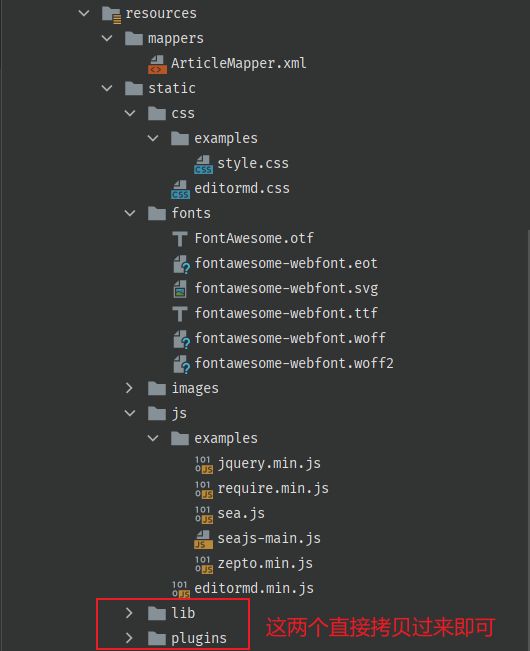
- css : 我们需要将我们下载好的editormd解压后editor.md-master文件夹中的examples目录中的css文件夹中的style.css 拷贝到我们的 static/css/examples/style.css,以及editor.md-master文件夹下的 editormd.css 拷贝到我们的 static/css目录。以上的目录放在哪里,可以根据自己的个性以及想法,但是一定得保证访问的到,你如果觉得有问题,就跟我同样的目录。
- js : 我们需要将我们下载好的editormd解压后editor.md-master文件夹中的examples目录中的js文件夹中的所有js文件 拷贝到我们的 static/css/examples/目录下,以及editor.md-master文件夹下的 editormd.min.js 拷贝到我们的 static/js目录。
- fonts : 这个目录很重要,如果没有这个目录,Markdown的编辑工具栏的icon无法显示。需要将editor.md-master文件夹中的fonts文件夹直接拷贝到static文件夹中。
- lib : 将editor.md-master文件夹中的lib文件拷贝到static文件夹中即可。
- plugins : 将editor.md-master文件夹中的plugin文件拷贝到static文件夹中即可。
Simple example - Editor.md examples
Simple example
article.html :
文章
// 一个JS文件都不能少,少一个便无法渲染。注意静态资源路径问题
网盘文件
效果截图
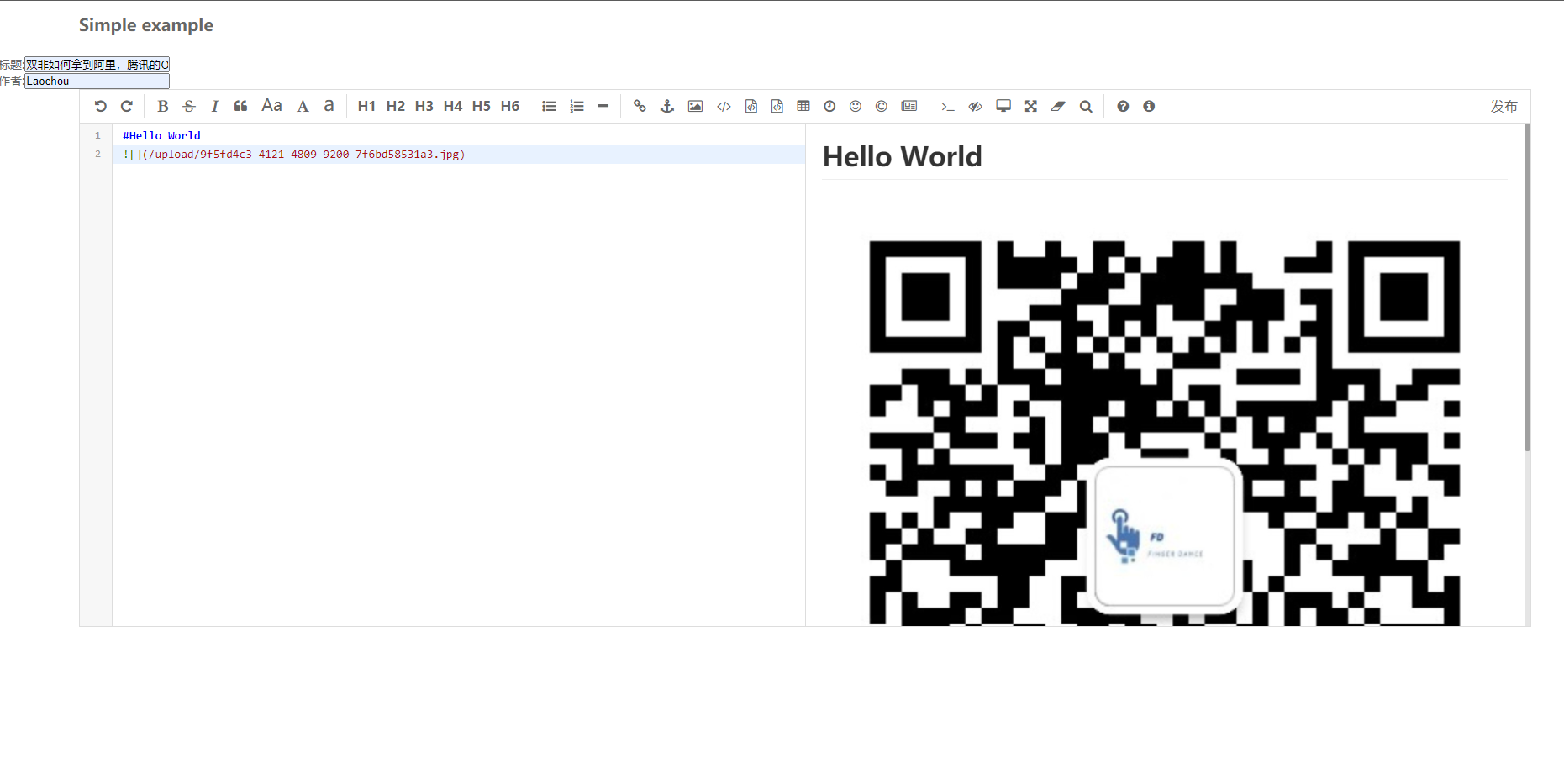
点击发布之后,可以看到数据库多了一条数据

然后通过接口访问
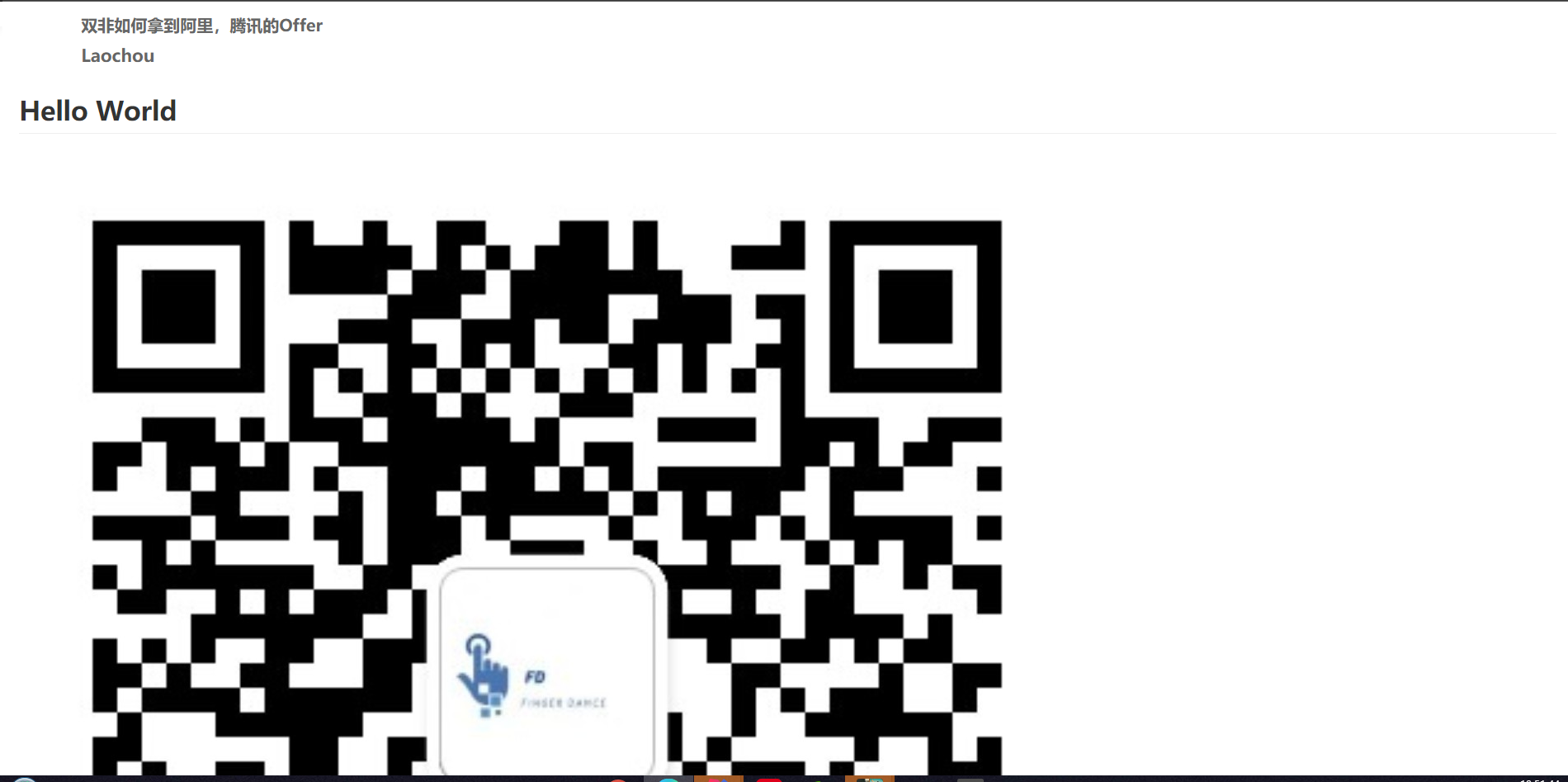
最后
版权声明:本文内容由互联网用户自发贡献,该文观点仅代表作者本人。本站仅提供信息存储空间服务,不拥有所有权,不承担相关法律责任。如发现本站有涉嫌侵权/违法违规的内容, 请联系我们举报,一经查实,本站将立刻删除。
发布者:全栈程序员-站长,转载请注明出处:https://javaforall.net/225127.html原文链接:https://javaforall.net



