
转载自:http://blog.csdn.net/earbao/article/details/
【carolven原创begin】automake使用步骤,下图给出了清晰的流程(图片来自https://en.wikipedia.org/wiki/Automake)
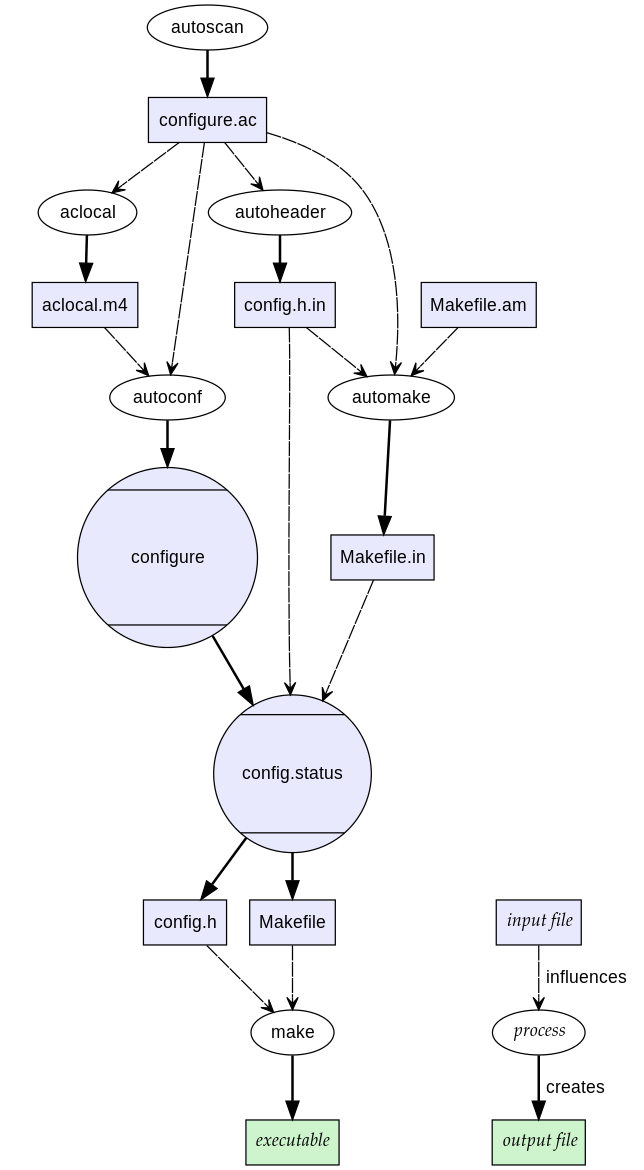
【carolven原创end】
autoconf/automake主要用于创建Makefile,本文主要介绍一下automake的简单用法。
Ubuntu下安装automake:
sudo apt-get install automakeroot@ubuntu:~# mkdir hello root@ubuntu:~# cd hello root@ubuntu:~/hello# vi hello.c root@ubuntu:~/hello# cat hello.c | Source code |    |
[cpp] view plaincopy
class=
“co2” style=
“color:rgb(51,153,0)”>#include
class=
“kw4” style=
“color:rgb(0,0,255)”>
int
class=
“br0” style=
“color:rgb(0,128,0)”>(
class=
“br0” style=
“color:rgb(0,128,0)”>)
class=
“br0” style=
“color:rgb(0,128,0)”>{
-
class=
“kw3” style=
“color:rgb(0,0,221)”>printf
class=
“br0” style=
“color:rgb(0,128,0)”>(
class=
“st0” style=
“color:rgb(255,0,0)”>
“hello world
es1
” style=”color:rgb(0,0,153); font-weight:bold
“>\n”
class=
“br0” style=
“color:rgb(0,128,0)”>)
class=
“sy4” style=
“color:rgb(0,128,128)”>;
-
class=
“kw1” style=
“color:rgb(0,0,255)”>
return
class=
“nu0” style=
“color:rgb(0,0,221)”>0
class=
“sy4” style=
“color:rgb(0,128,128)”>;
class=
“br0” style=
“color:rgb(0,128,0)”>}
2.使用Autoscan工具生成configure.ac文件 Autoscan工具用来扫描源代码以搜寻一般的可移植性问题,比如检查编译器、库和头文件等,并创建configure.scan文件,它会在给定目录及其子目录树中检查源文件,若没有给出目录,就在当前目录及其子目录树中进行检查。
root@ubuntu:~/hello# autoscan //扫描源文件,生成configure.scan root@ubuntu:~/hello# ls autoscan.log configure.scan hello.c root@ubuntu:~/hello# cat configure.scan # -*- Autoconf -*- # Process this file with autoconf to produce a configure script. AC_PREREQ([2.65]) AC_INIT([FULL-PACKAGE-NAME], [VERSION], [BUG-REPORT-ADDRESS]) AC_CONFIG_SRCDIR([hello.c]) AC_CONFIG_HEADERS([config.h]) # Checks for programs. AC_PROG_CC # Checks for libraries. # Checks for header files. # Checks for typedefs, structures, and compiler characteristics. # Checks for library functions. AC_OUTPUT下面给出本文件的简要说明(所有以”#”号开始的行为注释):
(1)AC_PREREQ宏声明本文件要求的autoconf版本,本例使用的版本为2.59。
(2)AC_INIT宏用来定义软件的名称和版本等信息,”FULL-PACKAGE-NAME”为软件包名称,”VERSION”为软件版本号,”BUG-REPORT-ADDRESS”为BUG报告地址(一般为软件作者邮件地址)。
(3)AC_CONFIG_SRCDIR宏用来侦测所指定的源码文件是否存在,来确定源码目录的有效性。此处为当前目录下的hello.c。
(4)AC_CONFIG_HEADER宏用于生成config.h文件,以便autoheader使用。
(5)AC_PROG_CC用来指定编译器,如果不指定,选用默认gcc。
(6)AC_OUTPUT用来设定 configure 所要产生的文件,如果是makefile,configure会把它检查出来的结果带入makefile.in文件产生合适的makefile。使用Automake时,还需要一些其他的参数,这些额外的宏用aclocal工具产生。
此文件只是下面要使用的configure.ac文件的原型,当然我们还要对其做一定的修改:
root@ubuntu:~/hello# cp configure.scan configure.ac root@ubuntu:~/hello# vi configure.ac root@ubuntu:~/hello# cat configure.ac # -*- Autoconf -*- # Process this file with autoconf to produce a configure script. AC_PREREQ([2.65]) //automake版本 AC_INIT(hello, 1.0, ) //设置软件包信息 AM_INIT_AUTOMAKE(hello, 1.0) //这个需要手动添加,它是automake必备的宏 AC_CONFIG_SRCDIR([hello.c]) //源文件名 #AC_CONFIG_HEADERS([config.h]) //config.h 文件, 这个地方我们不需要config.h文件所以把它注释掉 # Checks for programs. AC_PROG_CC # Checks for libraries. # Checks for header files. # Checks for typedefs, structures, and compiler characteristics. # Checks for library functions. AC_OUTPUT(Makefile) //要输出的文件名3.使用aclocal工具生成aclocal.m4
aclocal根据configure.ac生成aclocal.m4
root@ubuntu:~/hello# aclocal root@ubuntu:~/hello# ls aclocal.m4 autom4te.cache autoscan.log configure.ac hello.c4.使用autoconf工具生成configure文件
将configure.ac中的宏展开,生成configure脚本。这个过程可能要用到aclocal.m4中定义的宏。
root@ubuntu:~/hello# autoconf root@ubuntu:~/hello# ls aclocal.m4 autom4te.cache autoscan.log configure configure.ac hello.c5.使用autoheader 工具生成 config.h config.h.inroot@ubuntu:~/hello# autoheader root@ubuntu:~/hello# ls
5.创建Makefile.am文件
Automake工具会根据configure.in中的参量把Makefile.am转换成Makefile.in文件。所以在使用automake之前我们需要自己创建Makefile.am文件
root@ubuntu:~/hello# vi Makefile.am root@ubuntu:~/hello# cat Makefile.am AUTOMAKE_OPTIONS=foreign //软件等级 bin_PROGRAMS=hello //可执行文件名 hello_SOURCES=hello.c //源文件名其中:
(1)AUTOMAKE_OPTIONS为设置Automake的选项。由于GNU对自己发布的软件有严格的规范,比如必须附带许可证声明文件COPYING等,否则Automake执行时会报错。Automake提供了3种软件等级:foreign、gnu和gnits,供用户选择,默认等级为gnu。本例使需用foreign等级,它只检测必须的文件。
(2)bin_PROGRAMS定义要产生的执行文件名。如果要产生多个执行文件,每个文件名用空格隔开。
root@ubuntu:~/hello# automake --add-missing configure.ac:6: installing `./install-sh' configure.ac:6: installing `./missing' Makefile.am: installing `./depcomp' root@ubuntu:~/hello# ls aclocal.m4 autoscan.log configure.ac hello.c Makefile.am missing autom4te.cache configure depcomp install-sh Makefile.in7.执行./configure 生成Makefile
8.测试
root@ubuntu:~/hello# ls aclocal.m4 config.log configure.ac hello.c Makefile missing autom4te.cache config.status depcomp hello.o Makefile.am autoscan.log configure hello install-sh Makefile.in root@ubuntu:~/hello# ./hello hello world使用”make dist”命令将程序和相关的文档打包为一个压缩文档以供发布。
root@ubuntu:~/hello# make dist root@ubuntu:~/hello# ls aclocal.m4 config.status hello install-sh missing autom4te.cache configure hello-1.0.tar.gz Makefile autoscan.log configure.ac hello.c Makefile.am config.log depcomp hello.o Makefile.in hello-1.0.tar.gz为打包过后的文件下面是另一种文档结构
|-- conf | `-- test.conf `-- src |-- test1.c |-- test2.c `-- test2.hsrc为源文件目录,conf为配置文件的目录。创建Makefile的方式和上面有一点点不同
1.执行autoscan命令
root@ubuntu:~/test# autoscan root@ubuntu:~/test# ls autoscan.log conf configure.scan src root@ubuntu:~/test# cat configure.scan # -*- Autoconf -*- # Process this file with autoconf to produce a configure script. AC_PREREQ([2.65]) AC_INIT([FULL-PACKAGE-NAME], [VERSION], [BUG-REPORT-ADDRESS]) AC_CONFIG_SRCDIR([src/test2.h]) AC_CONFIG_HEADERS([config.h]) # Checks for programs. AC_PROG_CC # Checks for libraries. # Checks for header files. AC_CHECK_HEADERS([stdlib.h string.h]) # Checks for typedefs, structures, and compiler characteristics. # Checks for library functions. AC_OUTPUT修改configure.scan为configure.ac
root@ubuntu:~/test# mv configure.scan configure.ac root@ubuntu:~/test# vim configure.ac root@ubuntu:~/test# cat configure.ac # -*- Autoconf -*- # Process this file with autoconf to produce a configure script. AC_PREREQ([2.65]) AC_INIT(test, 1.0) AM_INIT_AUTOMAKE(test, 1.0) AC_CONFIG_SRCDIR([src/test2.h]) # Checks for programs. AC_PROG_CC # Checks for libraries. AC_CHECK_LIB(pthread, pthread_create) //pthread为链接库名字, pthread_create为库中的一个函数 # Checks for header files. AC_CHECK_HEADERS(stdlib.h string.h pthread.h) # Checks for typedefs, structures, and compiler characteristics. # Checks for library functions. AC_OUTPUT(Makefile src/Makefile conf/Makefile) //每一个目录需要输出一个Makefile文件2.使用aclocal工具生成aclocal.m4
3.使用autoconf工具生成configure文件
4. 创建Makefile.am
在顶层目录创建的Makefile.am的内容如下
root@ubuntu:~/test# vi Makefile.am root@ubuntu:~/test# cat Makefile.am SUBDIRS= src conf在src目录下创建的Makefile.am内容如下
root@ubuntu:~/test# cd src/ root@ubuntu:~/test/src# vi Makefile.am root@ubuntu:~/test/src# cat Makefile.am bin_PROGRAMS= test test_SOURCES= test1.c test2.c在conf目录下创建的Makefile.am内容如下
root@ubuntu:~/test/conf# vi Makefile.am root@ubuntu:~/test/conf# cat Makefile.am configdir = /etc //这个数据文件将要移动到的目录 config_DATA = test.conf //数据文件名,如果有多个文件则这样写config_DATA = test1.dat test2.dat5.使用Automake生成Makefile.in文件
root@ubuntu:~/test# automake --add-missing Makefile.am: required file `./NEWS' not found Makefile.am: required file `./README' not found Makefile.am: required file `./AUTHORS' not found Makefile.am: required file `./ChangeLog' not found这里出现了一个问题,NEWS, README这几个文件不存在, 那么我们就手工创建他们
root@ubuntu:~/test# touch NEWS README AUTHORS ChangeLog再次执行automake
root@ubuntu:~/test# automake6.后面的步骤就和上面的例子一样了
发布者:全栈程序员-站长,转载请注明出处:https://javaforall.net/225905.html原文链接:https://javaforall.net



