
说明
- 大部分代码来源于网上,但网上的代码一下子可能难以入门或因版本原因报错,此处整理后进行详细分析。
参考的代码来源1:Attention mechanism Implementation for Keras.网上大部分代码都源于此,直接使用时注意Keras版本,若版本不对应,在merge处会报错,解决办法为:导入Multiply层并将attention_dense.py第17行的:
attention_mul = merge([inputs, attention_probs], output_shape=32, name=‘attention_mul’, mode=‘mul’),改为:attention_mul = Multiply()([inputs, attention_probs])即可。
参考的代码来源2:[深度应用]·Keras极简实现Attention结构。这相当于来源1的简化版本,其将注意力层还做了封装,可直接使用。但此方法运用了两个注意力层,使我有些不太理解,这个问题在后面会进行讨论。
本文主体将在来源1的基础上进行分析探讨。 - Attention机制大致过程就是分配权重,所有用到权重的地方都可以考虑使用它,另外它是一种思路,不局限于深度学习的实现方法,此处仅代码上分析,且为深度学习的实现版本。更多理论请看解读大牛文章深度学习中的注意力机制(2017版),还可以看解读这篇文章的大牛文章:[深度概念]·Attention机制实践解读。
- 此处仅介绍Dense+Attention,进阶篇LSTM+Attention请看【深度学习】 基于Keras的Attention机制代码实现及剖析——LSTM+Attention。
实验目的
- 在简单的分类模型(如最简的全连接网络)基础上实现Attention机制的运用。
- 检验Attention是否真的捕捉到了关键特征,即被Attention分配的关键特征的权重是否更高。
- 在已有的模型基础上适当做些变化,如调参或新加层,看看Attention的稳定性如何。
数据集构造
def get_data(n, input_dim, attention_column=1): """ Data generation. x is purely random except that it's first value equals the target y. In practice, the network should learn that the target = x[attention_column]. Therefore, most of its attention should be focused on the value addressed by attention_column. :param n: the number of samples to retrieve. :param input_dim: the number of dimensions of each element in the series. :param attention_column: the column linked to the target. Everything else is purely random. :return: x: model inputs, y: model targets """ x = np.random.standard_normal(size=(n, input_dim)) y = np.random.randint(low=0, high=2, size=(n, 1)) x[:, attention_column] = y[:, 0] return x, y 模型搭建
下面开始在单隐层全连接网络的基础上用keras搭建注意力层。
def build_model(): K.clear_session() #清除之前的模型,省得压满内存 inputs = Input(shape=(input_dim,)) #输入层 # ATTENTION PART STARTS HERE 注意力层 attention_probs = Dense(input_dim, activation='softmax', name='attention_vec')(inputs) attention_mul = Multiply()([inputs, attention_probs]) # ATTENTION PART FINISHES HERE attention_mul = Dense(64)(attention_mul) #原始的全连接 output = Dense(1, activation='sigmoid')(attention_mul) #输出层 model = Model(input=[inputs], output=output) return model 模型训练及验证
设置随机种子可以调试对比每次结果的异同,输入必要参数,调用模型就可以开始训练了,由于是二分类问题,所以损失函数用二分类交叉熵。训练集测试集8:2进行验证。
if __name__ == '__main__': np.random.seed(1337) # for reproducibility input_dim = 32 #特征数 N = 10000 #数据集总记录数 inputs_1, outputs = get_data(N, input_dim) #构造数据集 m = build_model() #构造模型 m.compile(optimizer='adam', loss='binary_crossentropy', metrics=['accuracy']) m.summary() m.fit([inputs_1], outputs, epochs=20, batch_size=64, validation_split=0.2) def get_activations(model, inputs, print_shape_only=False, layer_name=None): # Documentation is available online on Github at the address below. # From: https://github.com/philipperemy/keras-visualize-activations print('----- activations -----') activations = [] inp = model.input if layer_name is None: outputs = [layer.output for layer in model.layers] else: outputs = [layer.output for layer in model.layers if layer.name == layer_name] # all layer outputs funcs = [K.function([inp] + [K.learning_phase()], [out]) for out in outputs] # evaluation functions layer_outputs = [func([inputs, 1.])[0] for func in funcs] for layer_activations in layer_outputs: activations.append(layer_activations) if print_shape_only: print(layer_activations.shape) else: print(layer_activations) return activations 这个函数有些复杂,但只需要知道它的功能就行,下面我们在main函数里续写如下代码进行调用:
testing_inputs_1, testing_outputs = get_data(1, input_dim) # Attention vector corresponds to the second matrix. # The first one is the Inputs output. attention_vector = get_activations(m, testing_inputs_1, print_shape_only=True, layer_name='attention_vec')[0].flatten() print('attention =', attention_vector) # plot part. pd.DataFrame(attention_vector, columns=['attention (%)']).plot(kind='bar', title='Attention Mechanism as ' 'a function of input' ' dimensions.') plt.show() from keras.models import * from keras.layers import Input, Dense, Multiply import keras.backend as K import numpy as np import matplotlib.pyplot as plt import pandas as pd def get_activations(model, inputs, print_shape_only=False, layer_name=None): # Documentation is available online on Github at the address below. # From: https://github.com/philipperemy/keras-visualize-activations print('----- activations -----') activations = [] inp = model.input if layer_name is None: outputs = [layer.output for layer in model.layers] else: outputs = [layer.output for layer in model.layers if layer.name == layer_name] # all layer outputs funcs = [K.function([inp] + [K.learning_phase()], [out]) for out in outputs] # evaluation functions layer_outputs = [func([inputs, 1.])[0] for func in funcs] for layer_activations in layer_outputs: activations.append(layer_activations) if print_shape_only: print(layer_activations.shape) else: print(layer_activations) return activations def get_data(n, input_dim, attention_column=1): """ Data generation. x is purely random except that it's first value equals the target y. In practice, the network should learn that the target = x[attention_column]. Therefore, most of its attention should be focused on the value addressed by attention_column. :param n: the number of samples to retrieve. :param input_dim: the number of dimensions of each element in the series. :param attention_column: the column linked to the target. Everything else is purely random. :return: x: model inputs, y: model targets """ x = np.random.standard_normal(size=(n, input_dim)) y = np.random.randint(low=0, high=2, size=(n, 1)) x[:, attention_column] = y[:, 0] return x, y def build_model(): K.clear_session() #清除之前的模型,省得压满内存 inputs = Input(shape=(input_dim,)) #输入层 # ATTENTION PART STARTS HERE 注意力层 attention_probs = Dense(input_dim, activation='softmax', name='attention_vec')(inputs) attention_mul = Multiply()([inputs, attention_probs]) # ATTENTION PART FINISHES HERE attention_mul = Dense(64)(attention_mul) #原始的全连接 output = Dense(1, activation='sigmoid')(attention_mul) #输出层 model = Model(inputs=[inputs], outputs=output) return model if __name__ == '__main__': np.random.seed(1337) # for reproducibility input_dim = 32 #特征数 N = 10000 #数据集总记录数 inputs_1, outputs = get_data(N, input_dim) #构造数据集 m = build_model() #构造模型 m.compile(optimizer='adam', loss='binary_crossentropy', metrics=['accuracy']) m.summary() m.fit([inputs_1], outputs, epochs=20, batch_size=64, validation_split=0.2) testing_inputs_1, testing_outputs = get_data(1, input_dim) # Attention vector corresponds to the second matrix. # The first one is the Inputs output. attention_vector = get_activations(m, testing_inputs_1, print_shape_only=True, layer_name='attention_vec')[0].flatten() print('attention =', attention_vector) # plot part. pd.DataFrame(attention_vector, columns=['attention (%)']).plot(kind='bar', title='Attention Mechanism as ' 'a function of input' ' dimensions.') plt.show() 拓展
以上是对别人的代码的学习理解,接下来做一些小改动,看看Attention表现如何。
多分类问题时,Attention效果如何?
以上代码改为多分类,需要注意一下几点:
- 构造数据集时,randint的high置为类别个数。
- 将随机完毕的y由十进制数改为二进制one-hot形式,以待模型输入。
- 模型最后一层的结点个数置为类别个数,同时激活函数改为softmax。
- 损失函数改为:loss=‘categorical_crossentropy’
我们将类别数设置为5,先看看结果:
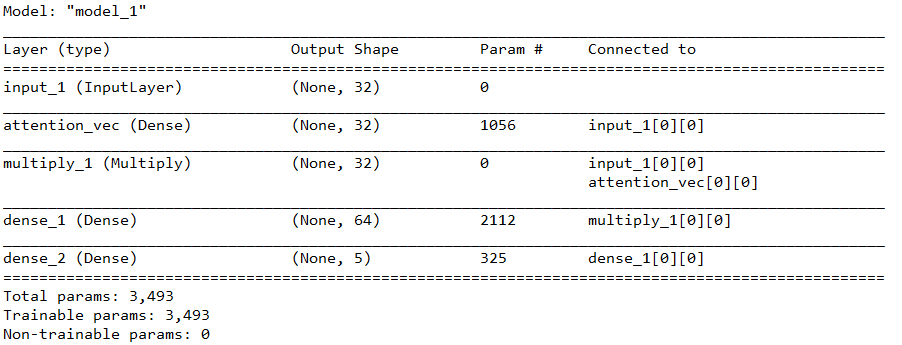

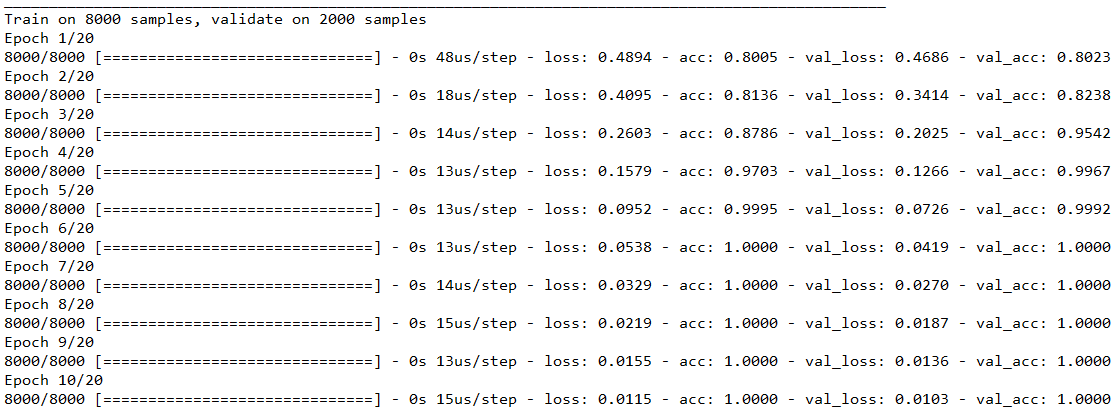
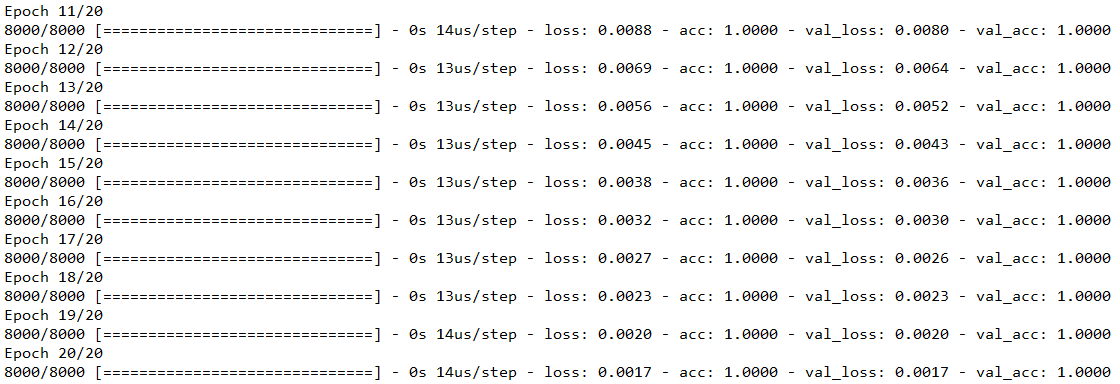
可以看到还是很轻松就学出了规律,再看看可视化的权重:
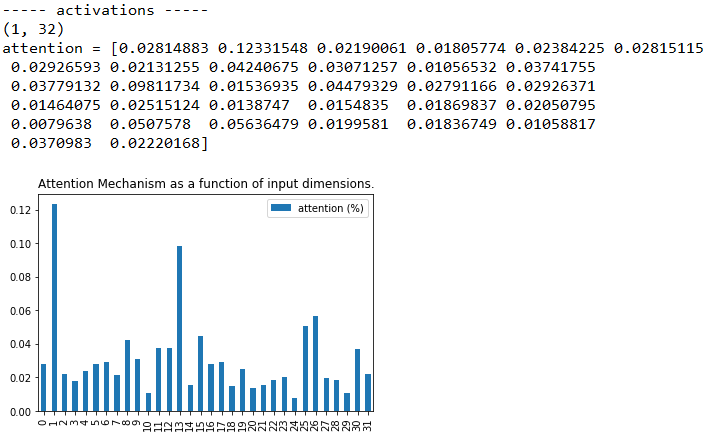
对比可以发现,尽管“第1列”的权重仍是最高的,但这个优势已经不明显了,注意力机制的健壮性如何?是否因为是多分类,效果就下降了呢?那么增大类别个数来看看,我们将类别个数置为20,直接看图:
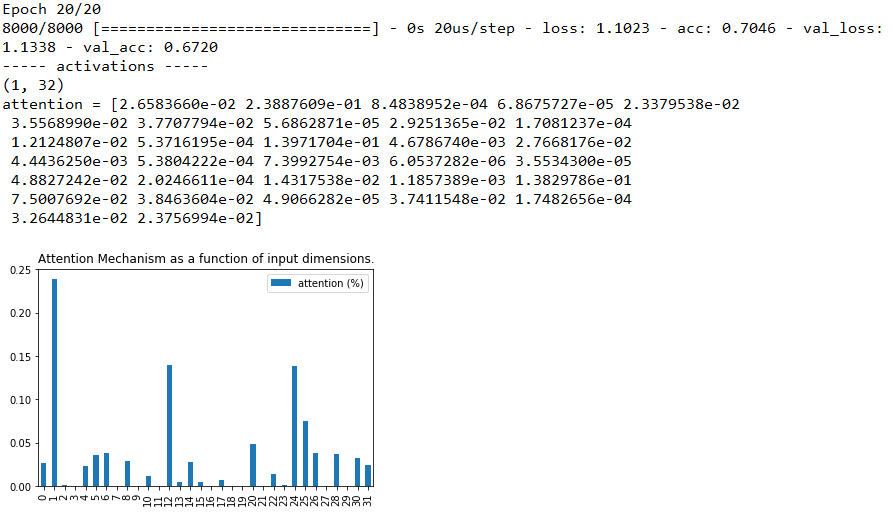
可以观察到,“第1列”仍是最高的权重,并且比5分类时还要高,说明注意力机制确实非常强大,可我还是不死心,那么继续调,30个类的时候如何呢?
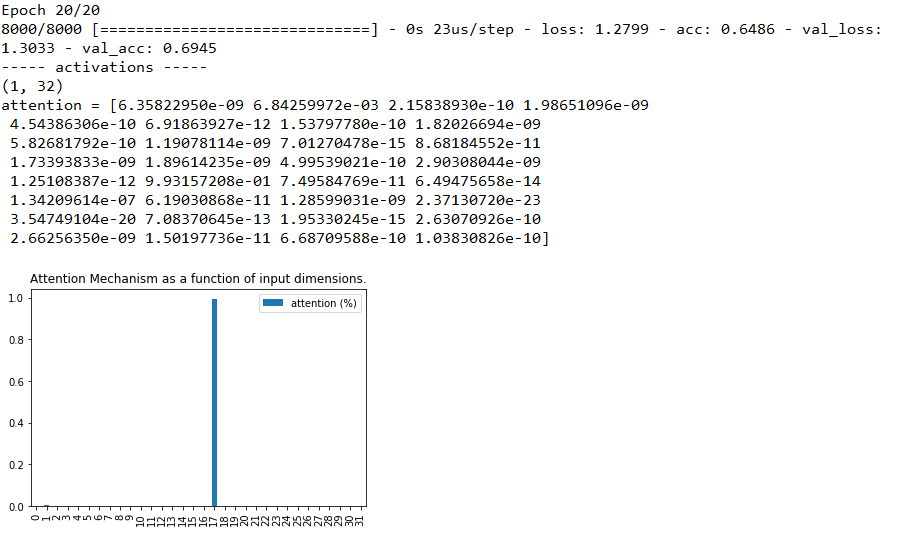
综合这两张图,我们惊奇地发现,准确率下降了,注意力紊乱了!注意力没有集中在本来人工设置最特别的特征“第1列”上,而集中出现在“第17列”上,这是为什么呢?继续尝试看看,设为50,100,图片分别为:
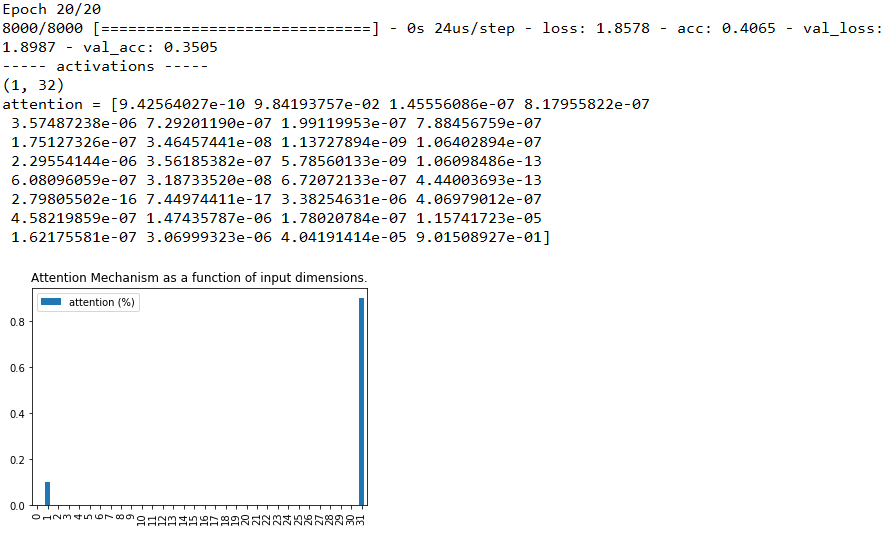
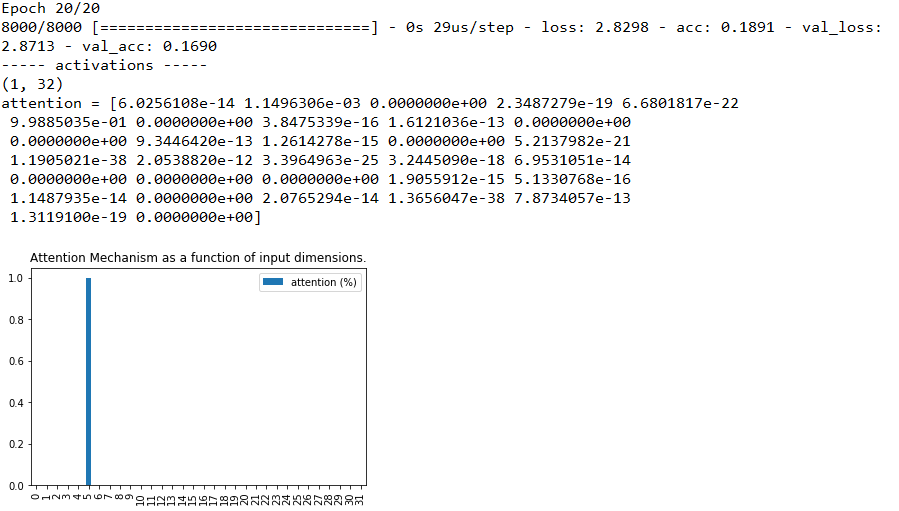
可以发现,“注意力紊乱” 的情况仍存在,即使注意力没有向我们预设的“焦点”集中,分类准确率降低到了16.9% 这种“注意力紊乱”的表现是因为什么呢?
我们可以发现,原模型设置的特征数是32个,当分类数接近或者超过特征数时,注意力才发生紊乱,而特征数对应的就是权重数,也就是注意力层的“算力”。因此我们可以有如下猜测:注意力紊乱是因为问题规模变大,导致原先的学习能力不足,学的不好。
对于做DL的人来讲,很容易能想到,学得不够好怎么办?加层里的结点数量!加网络的深度!我们将分类数设置为50,特征数设置为128看看效果:


果然,注意力又能“集中”了,但分类效果依旧很差。那么再试试加深,我们将注意力里的全连接层,多增加一层,分类数设置为50,特征数设置为32,再看看效果:
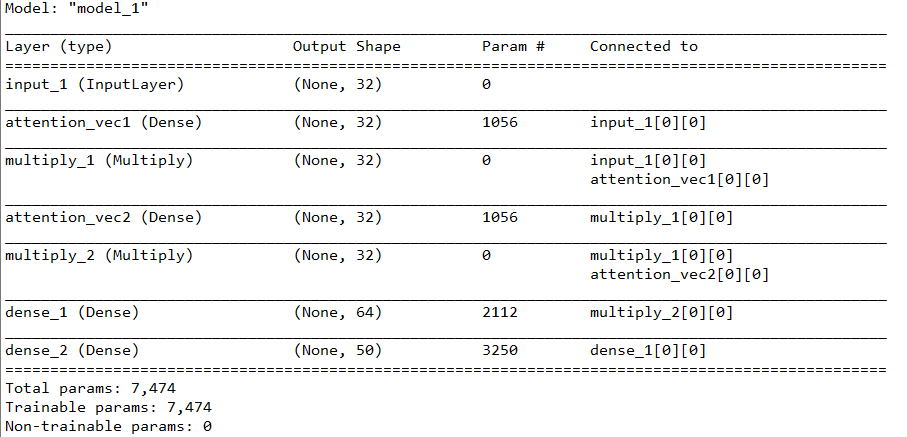
加深注意力网络后不仅注意力回归了,准确率也上升了!(重大发现啊!那是不是可以发文章了呢?),然鹅已经有大佬在2016年就已经发表了,还给了一个好听的名字:多层注意力网络(Hierarchical Attention Networks),论文名字是Hierarchical Attention Networks for Document Classification。还有谷歌大佬也提出了一个方法来增加算力,叫多头注意力机制(multi-headed self-attention),论文名字为:Attention Is All You Need。
拓展总结
在拓展中,我们可以发现,注意力机制的效果在算力充足的情况下,是能很好捕捉重点特征的,而针对注意力算力的不足,可以使用加结点和加层级的方法,但加结点会增加特征,这与现实中客观任务不符(即分类的数据集特征一般是固定的),且准确率没有提升,而加层级已有人进行应用并证实有效,因此可以作为我们搭建自己网络,提高自己指标的一个小技巧。
此次扩展的完整代码(仅到多分类):
from keras.models import * from keras.layers import Input, Dense, Multiply import keras.backend as K import numpy as np import matplotlib.pyplot as plt import pandas as pd from keras.utils import to_categorical def get_activations(model, inputs, print_shape_only=False, layer_name=None): # Documentation is available online on Github at the address below. # From: https://github.com/philipperemy/keras-visualize-activations print('----- activations -----') activations = [] inp = model.input if layer_name is None: outputs = [layer.output for layer in model.layers] else: outputs = [layer.output for layer in model.layers if layer.name == layer_name] # all layer outputs funcs = [K.function([inp] + [K.learning_phase()], [out]) for out in outputs] # evaluation functions layer_outputs = [func([inputs, 1.])[0] for func in funcs] for layer_activations in layer_outputs: activations.append(layer_activations) if print_shape_only: print(layer_activations.shape) else: print(layer_activations) return activations def get_data(n, input_dim, class_num, attention_column=1): """ Data generation. x is purely random except that it's first value equals the target y. In practice, the network should learn that the target = x[attention_column]. Therefore, most of its attention should be focused on the value addressed by attention_column. :param n: the number of samples to retrieve. :param input_dim: the number of dimensions of each element in the series. :param attention_column: the column linked to the target. Everything else is purely random. :return: x: model inputs, y: model targets """ x = np.random.standard_normal(size=(n, input_dim)) y = np.random.randint(low=0, high=class_num, size=(n, 1)) x[:, attention_column] = y[:, 0] y = np.array([to_categorical(yy,class_num) for yy in y]).reshape(n,class_num) return x, y def build_model(input_dim,class_num): K.clear_session() #清除之前的模型,省得压满内存 inputs = Input(shape=(input_dim,)) #输入层 # ATTENTION PART STARTS HERE 注意力层 attention_probs = Dense(input_dim, activation='softmax', name='attention_vec')(inputs) attention_mul = Multiply()([inputs, attention_probs]) # ATTENTION PART FINISHES HERE attention_mul = Dense(64)(attention_mul) #原始的全连接 output = Dense(class_num, activation='softmax')(attention_mul) #输出层 model = Model(inputs=[inputs], outputs=output) return model if __name__ == '__main__': np.random.seed(1337) # for reproducibility input_dim = 32 #特征数 N = 10000 #数据集总记录数 class_num = 20 #类别数 inputs_1, outputs = get_data(N, input_dim, class_num) #构造数据集 m = build_model(input_dim,class_num) #构造模型 m.compile(optimizer='adam', loss='categorical_crossentropy', metrics=['accuracy']) m.summary() m.fit([inputs_1], outputs, epochs=20, batch_size=64, validation_split=0.2) testing_inputs_1, testing_outputs = get_data(1, input_dim, class_num) # Attention vector corresponds to the second matrix. # The first one is the Inputs output. attention_vector = get_activations(m, testing_inputs_1, print_shape_only=True, layer_name='attention_vec')[0].flatten() print('attention =', attention_vector) # plot part. pd.DataFrame(attention_vector, columns=['attention (%)']).plot(kind='bar', title='Attention Mechanism as ' 'a function of input' ' dimensions.') plt.show() 发布者:全栈程序员-站长,转载请注明出处:https://javaforall.net/227391.html原文链接:https://javaforall.net




