
- ? 个人网站:【 海拥】【摸鱼小游戏】
- ? 风趣幽默的人工智能学习网站:?人工智能
- ? 想寻找共同学习交流的小伙伴,请点击【全栈技术交流群】
- ? 免费且实用的计算机相关知识题库:?进来逛逛
给大家安利一个免费且实用的 Python 刷题(面经大全)网站,?点击跳转到网站。
博主前些天发现了一个巨牛的人工智能学习网站,通俗易懂,风趣幽默,忍不住也分享一下给大家,?点击跳转到网站。
直接跳到末尾 去评论区领书
今天,我给大家带来了一些基本的 Python 编程技巧。所有这些技巧都可以帮助您减少代码并优化执行。你可以在处理常规任务时轻松地在实时项目中使用它们。
目录
1.就地交换两个数字
2.比较运算符的链接
3.使用三元运算符进行条件赋值。
4.使用多行字符串。
5.将列表元素存储到新变量中。
6.打印导入模块的文件路径。
7.使用交互式“_”运算符。
8.字典/集合理解。
9.调试脚本。
10.设置文件共享。
11.在 Python 中检查对象。
12.简化 if 语句。
13.在运行时检测 Python 版本。
14.组合多个字符串。
15.反转 string/list 的四种方法。
16.玩枚举。
17.在 Python 中使用枚举。
18.从函数返回多个值。
19.使用 splat 运算符解包函数参数。
20.使用字典来存储 switch。
21.计算一行中任意数字的阶乘。
22.查找列表中出现频率最高的值。
23.重置递归限制。
24.检查对象的内存使用情况。
25.使用 slots 减少内存开销。
26.Lambda 模仿打印功能。
27.从两个相关序列创建字典。
28.在线搜索字符串中的多个前缀。
29.形成一个统一的列表,不使用任何循环。
30.在 Python 中实现真正的 switch-case 语句。
文末送书
技巧1 就地交换两个数字
Python 提供了一种在一行中进行赋值和交换的直观方式。请参考下面的例子。
x, y = 10, 20 print(x, y) x, y = y, x print(x, y) #1 (10, 20) #2 (20, 10) 右边的赋值为一个新的元组播种。而左边的立即将那个(未引用的)元组解包到名称 和 。
分配完成后,新元组将被取消引用并标记为垃圾收集。变量的交换也发生在最终。
技巧2 比较运算符的链接。
比较运算符的聚合是另一个有时可以派上用场的技巧。
n = 10 result = 1 < n < 20 print(result) # True result = 1 > n <= 9 print(result) # False 技巧3 使用三元运算符进行条件赋值。
三元运算符是 if-else 语句的快捷方式,也称为条件运算符。
[on_true] if [expression] else [on_false] 以下是一些示例,您可以使用它们使代码紧凑简洁。
下面的语句与它的意思相同,即“如果 y 为 9,则将 10 分配给 x,否则将 20 分配给 x ”。如果需要,我们可以扩展运算符的链接。
x = 10 if (y == 9) else 20 同样,我们可以对类对象做同样的事情。
x = (classA if y == 1 else classB)(param1, param2) 在上面的例子中,classA 和 classB 是两个类,其中一个类构造函数将被调用。
下面是一个没有的例子。加入评估最小数字的条件。
def small(a, b, c): return a if a <= b and a <= c else (b if b <= a and b <= c else c) print(small(1, 0, 1)) print(small(1, 2, 2)) print(small(2, 2, 3)) print(small(5, 4, 3)) #Output #0 #1 #2 #3 我们甚至可以在列表推导式中使用三元运算符。
[m2 if m > 10 else m4 for m in range(50)] #=> [0, 1, 16, 81, 256, 625, 1296, 2401, 4096, 6561, 10000, 121, 144, 169, 196, 225, 256, 289, 324, 361, 400, 441, 484, 529, 576, 625, 676, 729, 784, 841, 900, 961, 1024, 1089, 1156, 1225, 1296, 1369, 1444, 1521, 1600, 1681, 1764, 1849, 1936, 2025, 2116, 2209, 2304, 2401] 技巧4 使用多行字符串
基本方法是使用从 C 语言派生的反斜杠。
multiStr = "select * from multi_row \ where row_id < 5" print(multiStr) # select * from multi_row where row_id < 5 另一个技巧是使用三引号。
multiStr = """select * from multi_row where row_id < 5""" print(multiStr) #select * from multi_row #where row_id < 5 上述方法的共同问题是缺乏适当的缩进。如果我们尝试缩进,它会在字符串中插入空格。
所以最终的解决方案是将字符串拆分成多行,并将整个字符串括在括号中。
multiStr= ("select * from multi_row " "where row_id < 5 " "order by age") print(multiStr) #select * from multi_row where row_id < 5 order by age 技巧5 将列表元素存储到新变量中
我们可以使用一个列表来初始化一个 no。的变量。在解压列表时,变量的数量不应超过编号。列表中的元素。
testList = [1,2,3] x, y, z = testList print(x, y, z) #-> 1 2 3 技巧6 打印导入模块的文件路径
如果您想知道代码中导入的模块的绝对位置,请使用以下技巧。
import threading import socket print(threading) print(socket) #1-
技巧7 使用交互式“_”运算符
这是一个有用的功能,我们很多人都不知道。
在 Python 控制台中,每当我们测试表达式或调用函数时,结果都会发送到临时名称 _(下划线)。
>>> 2 + 1 3 >>> _ 3 >>> print _ 3 “_”引用上次执行的表达式的输出。
技巧8 字典/集合理解
就像我们使用列表推导一样,我们也可以使用字典/集合推导。它们易于使用且同样有效。这是一个例子。
testDict = {
          i: i * i for i in xrange(10)} testSet = {
          i * 2 for i in xrange(10)} print(testSet) print(testDict) #set([0, 2, 4, 6, 8, 10, 12, 14, 16, 18]) #{0: 0, 1: 1, 2: 4, 3: 9, 4: 16, 5: 25, 6: 36, 7: 49, 8: 64, 9: 81}
注意 -两个语句中只有 <:> 的区别。此外,要在 Python3 中运行上述代码,请将 替换为 。
技巧9 调试脚本
我们可以在 模块的帮助下在 Python 脚本中设置断点。请按照以下示例进行操作。
import pdb pdb.set_trace() 我们可以在脚本的任何地方指定
技巧10 设置文件共享
Python 允许运行 HTTP 服务器,您可以使用它从服务器根目录共享文件。下面是启动服务器的命令。
Python 2
python -m SimpleHTTPServer Python 3
python3 -m http.server 以上命令将在默认端口 8000 上启动服务器。您还可以通过将自定义端口作为最后一个参数传递给上述命令来使用自定义端口。
技巧11 在 Python 中检查对象
我们可以通过调用 dir() 方法来检查 Python 中的对象。这是一个简单的例子。
test = [1, 3, 5, 7] print( dir(test) ) ['__add__', '__class__', '__contains__', '__delattr__', '__delitem__', '__delslice__', '__doc__', '__eq__', '__format__', '__ge__', '__getattribute__', '__getitem__', '__getslice__', '__gt__', '__hash__', '__iadd__', '__imul__', '__init__', '__iter__', '__le__', '__len__', '__lt__', '__mul__', '__ne__', '__new__', '__reduce__', '__reduce_ex__', '__repr__', '__reversed__', '__rmul__', '__setattr__', '__setitem__', '__setslice__', '__sizeof__', '__str__', '__subclasshook__', 'append', 'count', 'extend', 'index', 'insert', 'pop', 'remove', 'reverse', 'sort'] 技巧12 简化 if 语句
要验证多个值,我们可以通过以下方式进行。
if m in [1,3,5,7]: 代替:
if m==1 or m==3 or m==5 or m==7: 或者,我们可以使用 ‘{1,3,5,7}’ 而不是 ‘[1,3,5,7]’ 作为 ‘in’ 运算符,因为 ‘set’ 可以通过 O(1) 访问每个元素。
技巧13 在运行时检测 Python 版本
有时,如果当前运行的 Python 引擎低于支持的版本,我们可能不想执行我们的程序。为此,您可以使用以下代码片段。它还以可读格式打印当前使用的 Python 版本。
import sys #Detect the Python version currently in use. if not hasattr(sys, "hexversion") or sys.hexversion != : print("Sorry, you aren't running on Python 3.5\n") print("Please upgrade to 3.5.\n") sys.exit(1) #Print Python version in a readable format. print("Current Python version: ", sys.version) 或者,您可以在上面的代码中使用sys.version_info >= (3, 5)替换sys.hexversion!= 。这是一位知情读者的建议。
在 Python 2.7 上运行时的输出。
Python 2.7.10 (default, Jul 14 2015, 19:46:27) [GCC 4.8.2] on linux Sorry, you aren't running on Python 3.5 Please upgrade to 3.5. 在 Python 3.5 上运行时的输出。
Python 3.5.1 (default, Dec 2015, 13:05:11) [GCC 4.8.2] on linux Current Python version: 3.5.2 (default, Aug 22 2016, 21:11:05) [GCC 5.3.0] 技巧14 组合多个字符串
如果您想连接列表中所有可用的标记,请参见以下示例。
>>> test = ['I', 'Like', 'Python', 'automation'] 现在,让我们从上面给出的列表中的元素创建一个字符串。
>>> print ''.join(test) 技巧15 反转 string/list 的四种方法
反转列表本身
testList = [1, 3, 5] testList.reverse() print(testList) #-> [5, 3, 1] 在循环中迭代时反转
for element in reversed([1,3,5]): print(element) #1-> 5 #2-> 3 #3-> 1 反转一个字符串
"Test Python"[::-1] 这使输出为“nohtyP tseT”
使用切片反转列表
[1, 3, 5][::-1] 上面的命令将输出 [5, 3, 1]。
技巧16 玩枚举
使用枚举器,在循环中很容易找到索引。
testlist = [10, 20, 30] for i, value in enumerate(testlist): print(i, ': ', value) #1-> 0 : 10 #2-> 1 : 20 #3-> 2 : 30 技巧17 在 Python 中使用枚举。
我们可以使用以下方法来创建枚举定义。
class Shapes: Circle, Square, Triangle, Quadrangle = range(4) print(Shapes.Circle) print(Shapes.Square) print(Shapes.Triangle) print(Shapes.Quadrangle) #1-> 0 #2-> 1 #3-> 2 #4-> 3 技巧18 从函数返回多个值。
支持此功能的编程语言并不多。但是,Python 中的函数确实会返回多个值。
请参考以下示例以查看它的工作情况。
# function returning multiple values. def x(): return 1, 2, 3, 4 # Calling the above function. a, b, c, d = x() print(a, b, c, d) #-> 1 2 3 4
技巧19 使用 splat 运算符解包函数参数。
splat 运算符提供了一种解压参数列表的艺术方式。为清楚起见,请参阅以下示例。
def test(x, y, z): print(x, y, z) testDict = {
'x': 1, 'y': 2, 'z': 3} testList = [10, 20, 30] test(*testDict) test(testDict) test(*testList) #1-> x y z #2-> 1 2 3 #3-> 10 20 30 技巧20 使用字典来存储 switch。
我们可以制作一个字典存储表达式。
stdcalc = {
'sum': lambda x, y: x + y, 'subtract': lambda x, y: x - y } print(stdcalc['sum'](9,3)) print(stdcalc['subtract'](9,3)) #1-> 12 #2-> 6 技巧21 计算一行中任意数字的阶乘。
Python 2.x.
result = (lambda k: reduce(int.__mul__, range(1,k+1),1))(3) print(result) #-> 6 Python 3.x.
import functools result = (lambda k: functools.reduce(int.__mul__, range(1,k+1),1))(3) print(result) 技巧22 查找列表中出现频率最高的值。
test = [1,2,3,4,2,2,3,1,4,4,4] print(max(set(test), key=test.count)) #-> 4 技巧23 重置递归限制。
Python 将递归限制限制为 1000。我们可以重置它的值。
import sys x=1001 print(sys.getrecursionlimit()) sys.setrecursionlimit(x) print(sys.getrecursionlimit()) #1-> 1000 #2-> 1001 请仅在需要时应用上述技巧。
技巧24 检查对象的内存使用情况。
在 Python 2.7 中,32 位整数消耗 24 字节,而在 Python 3.5 中使用 28 字节。为了验证内存使用情况,我们可以调用 方法。
Python 2.7.
import sys x=1 print(sys.getsizeof(x)) #-> 24 Python 3.5.
import sys x=1 print(sys.getsizeof(x)) #-> 28 技巧25 使用 __slots__ 减少内存开销。
你有没有观察到你的 Python 应用程序消耗了大量资源,尤其是内存?这是使用<__slots__>类变量在一定程度上减少内存开销的一种技巧。
import sys class FileSystem(object): def __init__(self, files, folders, devices): self.files = files self.folders = folders self.devices = devices print(sys.getsizeof( FileSystem )) class FileSystem1(object): __slots__ = ['files', 'folders', 'devices'] def __init__(self, files, folders, devices): self.files = files self.folders = folders self.devices = devices print(sys.getsizeof( FileSystem1 )) #In Python 3.5 #1-> 1016 #2-> 888 显然,您可以从结果中看到内存使用量有所节省。但是当一个类的内存开销不必要地大时,你应该使用 __slots__ 。仅在分析应用程序后执行此操作。否则,您将使代码难以更改并且没有真正的好处。
技巧26 Lambda 模仿打印功能。
import sys lprint=lambda *args:sys.stdout.write(" ".join(map(str,args))) lprint("python", "tips",1000,1001) #-> python tips 1000 1001 技巧27 从两个相关序列创建字典。
t1 = (1, 2, 3) t2 = (10, 20, 30) print(dict (zip(t1,t2))) #-> {1: 10, 2: 20, 3: 30} 技巧28 在线搜索字符串中的多个前缀。
print("http://www.baidu.com".startswith(("http://", "https://"))) print("https://juejin.cn".endswith((".com", ".cn"))) #1-> True #2-> True 技巧29 形成一个统一的列表,不使用任何循环。
import itertools test = [[-1, -2], [30, 40], [25, 35]] print(list(itertools.chain.from_iterable(test))) #-> [-1, -2, 30, 40, 25, 35] 如果您有一个包含嵌套列表或元组作为元素的输入列表,请使用以下技巧。但是,这里的限制是它使用了 for 循环。
def unifylist(l_input, l_target): for it in l_input: if isinstance(it, list): unifylist(it, l_target) elif isinstance(it, tuple): unifylist(list(it), l_target) else: l_target.append(it) return l_target test = [[-1, -2], [1,2,3, [4,(5,[6,7])]], (30, 40), [25, 35]] print(unifylist(test,[])) #Output => [-1, -2, 1, 2, 3, 4, 5, 6, 7, 30, 40, 25, 35] 统一包含列表和元组的列表的另一种更简单的方法是使用 Python 的 < more_itertools > 包。它不需要循环。只需执行 < pip install more_itertools >,如果还没有的话。
import more_itertools test = [[-1, -2], [1, 2, 3, [4, (5, [6, 7])]], (30, 40), [25, 35]] print(list(more_itertools.collapse(test))) #Output=> [-1, -2, 1, 2, 3, 4, 5, 6, 7, 30, 40, 25, 35] 技巧30 在 Python 中实现真正的 switch-case 语句。
这是使用字典来模仿 switch-case 构造的代码。
def xswitch(x): return xswitch._system_dict.get(x, None) xswitch._system_dict = {
'files': 10, 'folders': 5, 'devices': 2} print(xswitch('default')) print(xswitch('devices')) #1-> None #2-> 2 ? 评论区抽粉丝送书啦
? 欢迎大家在评论区提出意见和建议!(抽两位幸运儿送书,实物图如下)?
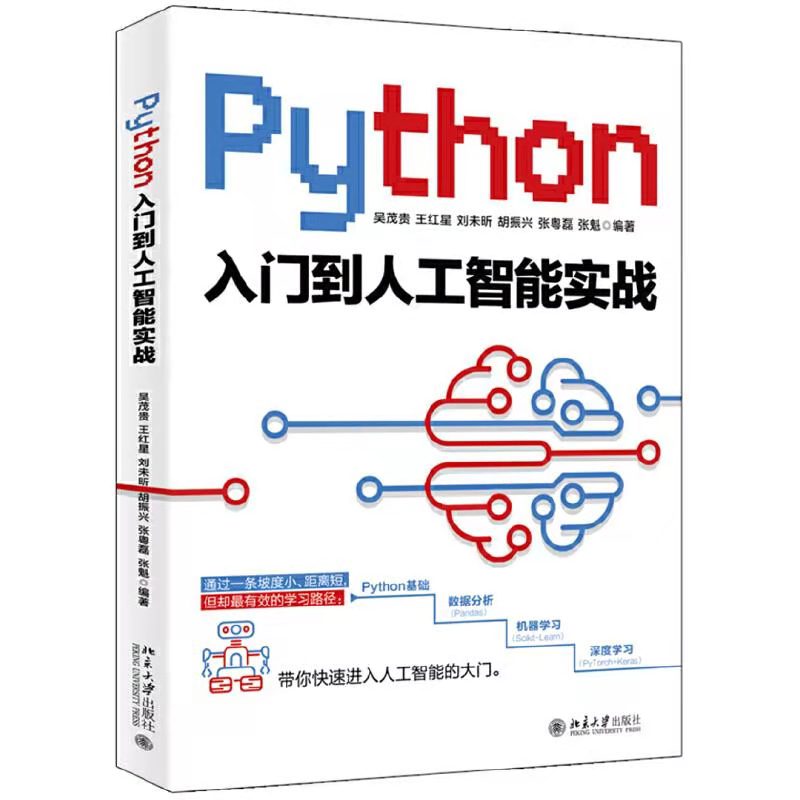

《Python 入门到人工智能实战》
【内容简介】
《Python 入门到人工智能实战》是针对零基础编程学习者编写的教程。从初学者角度出发,每章以问题为导向,辅以大量的实例,详细地介绍了Python 基础、机器学习,以及最好也最易学习的两个平台PyTorch 和Keras。
全书共20 章,包括Python 安装配置、Python 语言基础、流程控制语句、序列、函数、对象、文件及异常处理、数据处理和分析的重要模块(NumPy、Pandas)、机器学习基础、机器学习常用调优方法、神经网络、卷积神经网络,以及使用PyTorch、Keras 实现多个人工智能实战案例等。书中所有知识都结合具体实例进行讲解,涉及的程序代码给出了详细的注释,使读者可以轻松领会。
也有不想靠抽,想自己买的同学可以参考下面的链接
京东自营购买链接:
《Python入门到人工智能实战》(吴茂贵,等) – 京东图书
当当自营购买链接:
《Python入门到人工智能实战》(吴茂贵,等) – 当当图书
? 注意:
大家点赞关注,三天后也就是 10月6日 从评论区留言的同学中抽取两位送书
? 面试题库:Java、Python、前端核心知识点大全和面试真题资料
? 电子图书:图灵程序丛书 300本、机械工业出版社6000册免费正版图书
? 办公用品:精品PPT模板几千套,简历模板一千多套
? 学习资料:2300套PHP建站源码,微信小程序入门资料
如果中奖了联系不上则视为放弃,可以从下方公众号里找到作者的联系方式,每周都会送四本书,后面送书力度还会加大,一年送几百上千本不是问题,回复【进群】领书不迷路,群内 每位成员 我都会送一本。回复【资源】可获取上面的资料??????
发布者:全栈程序员-站长,转载请注明出处:https://javaforall.net/227544.html原文链接:https://javaforall.net


![activity_main.xml: java.lang.NullPointerException[通俗易懂]](https://javaforall.net/wp-content/uploads/2020/11/2020110817443450-480x300.jpg)
