
前言
一、vuex
这个相信大家用的很多了,简单回顾一下:
- State:放状态的地方
- Mutation:唯一修改状态的地方,不支持异步
- Action:通过调用Mutation中的方法来达到修改状态的目的,支持异步
- Getter:可以理解为计算属性
- Module:模块,每个模块拥有自己的 state、mutation、action、getter
简单的使用这里不赘述,提一下module里面的命名空间。
如果希望你的模块具有更高的封装度和复用性,你可以通过添加 namespaced: true 的方式使其成为带命名空间的模块。当模块被注册后,它的所有 getter、action 及 mutation 都会自动根据模块注册的路径调整命名
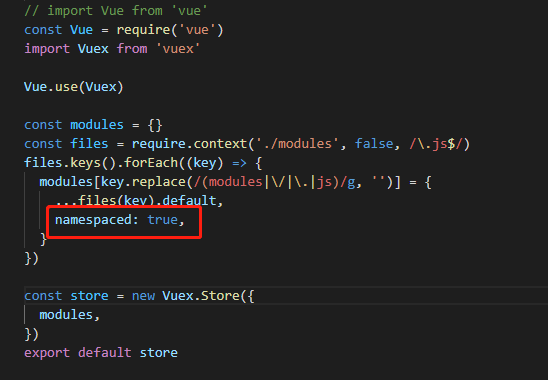

这样,在使用的时候我们就可以这样用了:
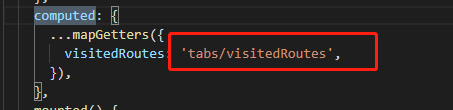
二、eventBus
这个称为‘事件总线’,简单看下是怎么使用的:
- 初始化
首先是初始化一个eventBus,可以绑定到vue原型上,也可以绑定到window对象上,还可以抽出来当做一个模块,在需要的时候再引入。这里直接绑定到vue原型上:

- 创建事件和删除事件
在需要的组件上创建和删除事件:
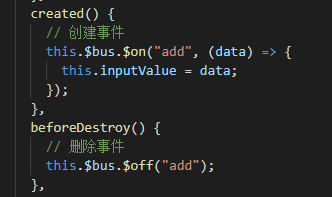
- 触发事件
最后就是在需要的地方触发事件了
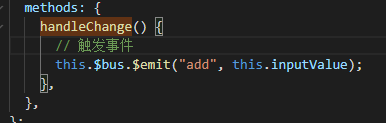
三、props/emit
这个不用多说了,父子通信用的最多的应该就是这个了。当然,如果以子组件为跳板,也可以做到祖孙之间通信,不过比较麻烦。不建议这样操作。
四、$parent/$children
$parent直接访问的就是父实例,而$children则返回的是实例数组。所以我一般都是$parent搭配$refs使用。
五、$attrs/$listeners
<template> <div> <p>父组件</p> <input type="text" v-model="formData.inputValue" /> <p>子组件</p> <Son :inputValue="formData.inputValue" :otherValue="otherValue" @success="success" @input.native="handleInput" v-bind="$attrs" v-on="$listeners" ></Son> </div> </template> <script> import Son from "./son.vue"; export default {
    components: {
    Son }, provide() {
    return {
    father: this.formData, }; }, data() {
    return {
    formData: {
    inputValue: "123", }, otherValue: 999, }; }, methods: {
    success(data) {
    console.log(data); }, handleInput() {
}, }, }; </script> <template> <div> <input type="text" v-model="inputValue" @change="handleChange" /> </div> </template> <script> export default {
props: {
inputValue: String, }, created() {
console.log(this.$attrs, "son---$attrs"); console.log(this.$listeners, "son---$listeners"); }, methods: {
handleChange() {
this.father.inputValue = this.inputValue; }, }, }; </script> <template> <div> <input type="text" v-model="inputValue" @change="handleChange" /> <GrandSon v-bind="$attrs" v-on="$listeners"></GrandSon> </div> </template> <script> import GrandSon from "./grandSon.vue"; export default {
components: {
GrandSon }, props: {
inputValue: String, }, created() {
console.log(this.$attrs, "son---$attrs"); console.log(this.$listeners, "son---$listeners"); }, methods: {
handleChange() {
this.father.inputValue = this.inputValue; }, }, }; </script> <template> <div> <input type="text" v-model="inputValue" @change="handleChange" /> </div> </template> <script> export default {
props: {
inputValue: String, }, created() {
console.log(this.$attrs, "grandSon---$attrs"); console.log(this.$listeners, "grandSon---$listeners"); }, methods: {
handleChange() {
this.father.inputValue = this.inputValue; }, }, }; </script> 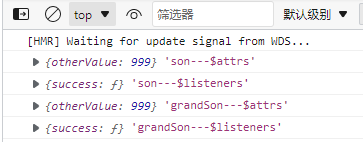
通过这种方式,祖孙之间也实现了通信。
六、provide/inject
provide/inject可以在一个祖先组件中向它的所有后辈组件注入一个依赖,只要上下游关系成立就能生效。简单的理解就是provide是注入数据,inject是获取数据。所以provide是用于父组件,inject是用于子孙组件。provide应该是一个对象或者返回一个对象的函数,inject应该是一个字符串数组或者一个对象。官网提到这么一句话:
提示:provide 和 inject 绑定并不是可响应的。这是刻意为之的。然而,如果你传入了一个可监听的对象,那么其对象的 property 还是可响应的。
<template> <div> <p>父组件</p> <input type="text" v-model="inputValue" /> <p>子组件</p> <Son></Son> <p>孙组件</p> <GrandSon></GrandSon> </div> </template> <script> import Son from "./son.vue"; import GrandSon from "./grandSon.vue"; export default {
    components: {
    Son, GrandSon }, provide() {
    return {
    father: this.inputValue, }; }, data() {
    return {
    inputValue: "123", }; }, }; </script>
子组件:
<template> <div> <input type="text" v-model="inputValue" @change="handleChange" /> </div> </template> <script> export default {
    inject: ["father"], data() {
    return {
    inputValue: "", }; }, watch: {
    father(val) {
    console.log(val, "val"); this.inputValue = val; }, }, created() {
    console.log(this, "this"); }, methods: {
    handleChange() {
this.father.inputValue = this.inputValue; }, }, }; </script> <template> <div> <p>父组件</p> <input type="text" v-model="formData.inputValue" /> <p>子组件</p> <Son></Son> <p>孙组件</p> <GrandSon></GrandSon> </div> </template> <script> import Son from "./son.vue"; import GrandSon from "./grandSon.vue"; export default {
components: {
Son, GrandSon }, provide() {
return {
father: this.formData, }; }, data() {
return {
formData: {
inputValue: "123", }, }; }, }; </script> <template> <div> <input type="text" v-model="inputValue" @change="handleChange" /> </div> </template> <script> export default {
inject: ["father"], data() {
return {
inputValue: "", }; }, watch: {
'father.inputValue'(val){
console.log(val, "val"); this.inputValue = val; }, }, created() {
console.log(this, "this"); }, methods: {
handleChange() {
this.father.inputValue = this.inputValue; }, }, }; </script> father: {
handler(val) {
console.log(val); }, deep: true, }, 版权声明:本文内容由互联网用户自发贡献,该文观点仅代表作者本人。本站仅提供信息存储空间服务,不拥有所有权,不承担相关法律责任。如发现本站有涉嫌侵权/违法违规的内容, 请联系我们举报,一经查实,本站将立刻删除。
发布者:全栈程序员-站长,转载请注明出处:https://javaforall.net/230010.html原文链接:https://javaforall.net



