
Ubuntu开机自动运行自定义的命令,可以采用两种方式:
第一种shell脚本方式
1、进入 /etc/init.d/ 目录
[root@Ubuntu ~]# cd /etc/init.d/2、新建一个自定义名称的sh脚本,这里以 xxx 名称为例建立一个 xxx.sh 的脚本
[root@Ubuntu /etc/init.d/]# vi XXX.sh # xxx为你的脚本文件名XXX.sh 脚本内容,编辑好以后保存退出 :wq
BEGIN INIT INFO # Provides: svnd.sh # Required-start: $local_fs $remote_fs $network $syslog # Required-Stop: $local_fs $remote_fs $network $syslog # Default-Start: 2 3 4 5 # Default-Stop: 0 1 6 # Short-Description: starts the svnd.sh daemon # Description: starts svnd.sh using start-stop-daemon END INIT INFO bt restart # 这里为需要执行的命令注:脚本内容必须包含 BEGIN INIT INFO …… END INIT INFO
不然会报错误:missing LSB tags and overrides
3、赋予脚本权限
[root@Ubuntu /etc/init.d/]# sudo chmod 775 ./XXX.sh # xxx为你的脚本文件名 4、然后执行以下命令
[root@Ubuntu /etc/init.d/]# sudo update-rc.d XXX.sh defaults 90 # xxx为你的脚本文件名 System start/stop links for /etc/init.d/bt.sh already exist.5、最后重启系统即可:reboot
附:取消开机启动脚本
[root@Ubuntu ~]# cd /etc/init.d # 进入/etc/init.d目录 [root@Ubuntu /etc/init.d/]# sudo update-rc.d -f XXX.sh remove # 移除脚本,XXX为你的脚本文件名
第二种添加系统启动脚本方式:
1、编辑/etc/下的rc.local脚本
vi /etc/rc.local2、然后把对应的需要执行的脚本写在 exit 0 前面,如下图所示
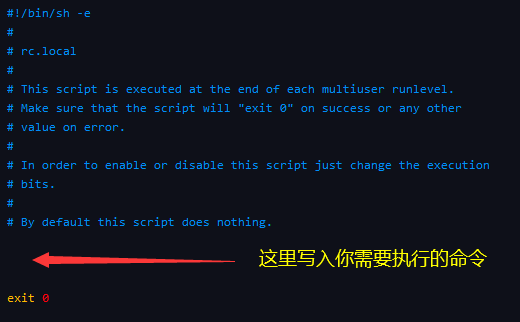

编辑好以后保存退出即可 :wq
版权声明:本文内容由互联网用户自发贡献,该文观点仅代表作者本人。本站仅提供信息存储空间服务,不拥有所有权,不承担相关法律责任。如发现本站有涉嫌侵权/违法违规的内容, 请联系我们举报,一经查实,本站将立刻删除。
发布者:全栈程序员-站长,转载请注明出处:https://javaforall.net/230076.html原文链接:https://javaforall.net



