
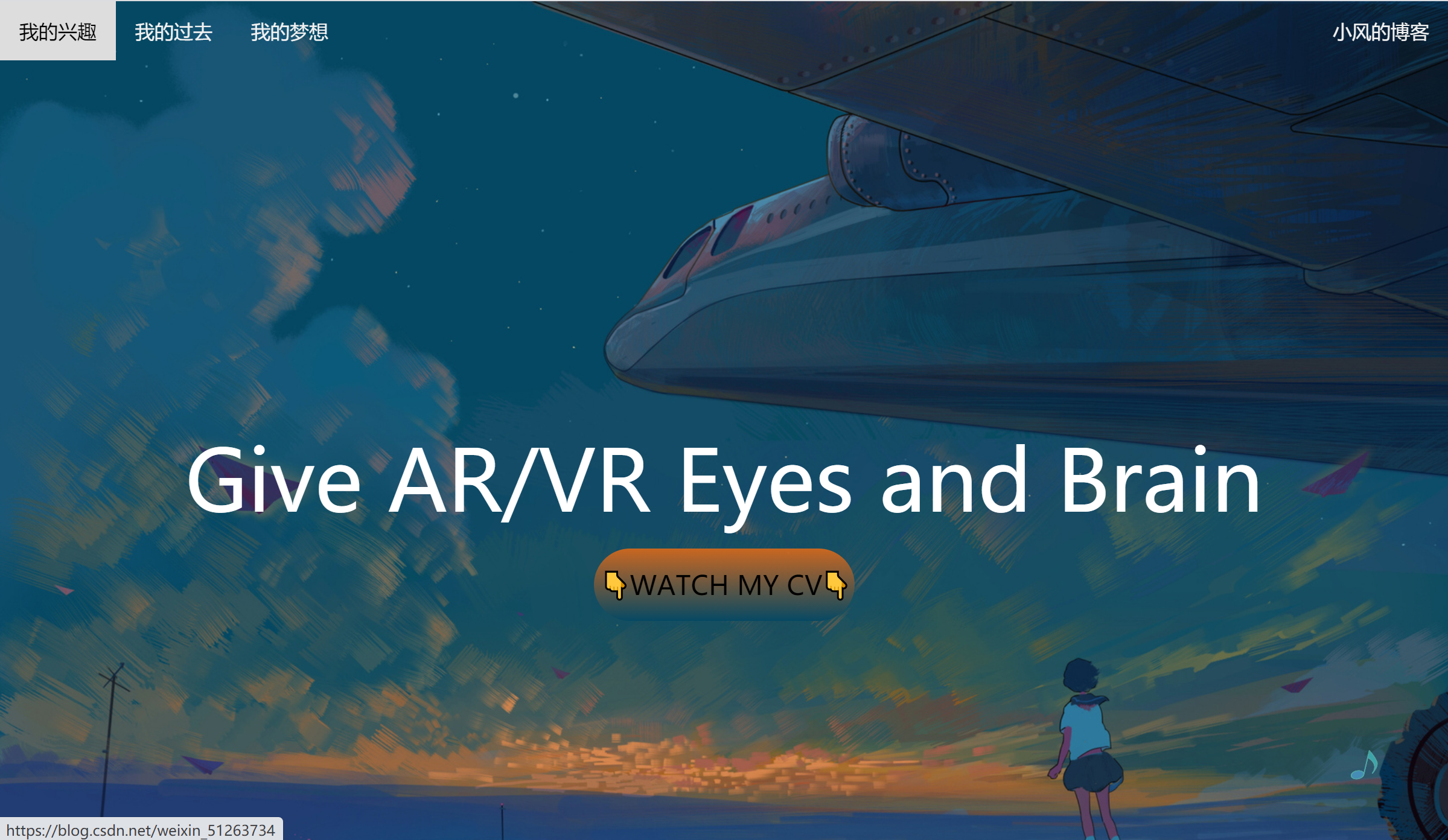
最后的效果如下


index.html
<!DOCTYPE html> <html> <head> <meta charset="utf-8"> <title>沙雕小星星</title> <link rel="stylesheet" type="text/css" href="style.css"> </head> <body> <div class="btn"> <p> ?WATCH MY CV?</p> </div> <div class="top"> <a href="https://blog.csdn.net/weixin_" target="_blank">我的兴趣</a> <a href="https://blog.csdn.net/weixin_" target="_blank">我的过去</a> <a href="https://blog.csdn.net/weixin_" target="_blank">我的梦想</a> <a href="https://blog.csdn.net/weixin_" target="_blank" style="float:right">小风的博客</a> </div> <div class="content"> <h1 class="avr">Give AR/VR Eyes and Brain</h1> </div> <div class="yinyue"> <img class="music" src="./33.png" alt=""> <audio autoplay="autoplay" id="audio" loop="loop"> <source src="./music1.mp3" type="audio/MP3"> </audio> </div> <div class="row"> <div class="centercolumn"> <div class="card"> <h2 id="biaoti">浮生六记卷一</h2><br /> <hr /> <h4 id="qita">2021 年 1 月 29日</h4> <p style="text-indent:2em">我生于乾降二十八年(1763年)的冬天ー月十ニ日。那时天下承平,国家安泰。我生于读书人家家在苏州城沧浪亭畔,上天待我何等厚爱。</p> <p style="text-indent:2em">回想这一生,真如东坡先生所说“事如春梦了无痕”,如果不将之记下来,未免辜负了天赋幸运。</p> <p style="text-indent:2em"> 而我总觉得,《诗三百》以《关》为开篇,这是将世间夫妇之爱放在卷首。那么我何妨也将之放在最开始, 余下的再慢慢道来。只是惭愧自己年少失学,文字粗浅,所写所记,皆是真情实事而已。如果一定要挑剔其中的文法错漏,那就是对着待磨的铜镜,却希冀它明察秋毫。 </p> <p style="text-indent:2em"> 小时候我与金沙于家的女儿有过婚约。那女孩子八岁夭折。后来娶妻陈氏,名芸,字淑珍,她的父亲陈心馀是我舅舅,舅母金氏,还有一个表弟名为克昌。 芸天性聪慧,牙牙学语时,其父教她《琵琶行》,一学能便能背诵。她四岁时父亲去世,弱母幼弟,家徒四壁。所幸芸女红针 线十分出色,到她年纪稍长,一家三口的生计便着落在她针指间的辛劳,不仅家人衣食周全,还能供克昌读书。 </p> <p style="text-indent:2em"> 有一天,她在克昌的书箱里翻到《琵琶行》,回想儿时背诵的内容,逐字辨识,学会了识字。刺绣的闲暇她自学不辍,渐渐通晓诗词,曾写过“秋侵人影瘦,霜染菊花肥” 这样清丽的诗句。十三岁时,母亲带我回娘家小住。芸比我大十个月,我一直把她叫作“淑姐姐”。我们两小无猜,她悄悄给我看自己的诗句 我感叹她才思清雅灵秀,却也暗暗担心,如此的聪慧敏感,恐怕不是福泽深厚之相。 </p> <p style="text-indent:2em"> 尽管如此,我已倾心于芸,不能释怀。私下对母亲说:“我若娶妻,一定要娶淑姐姐。”母亲也喜欢她的温柔和顺,便摘下金指环相赠,作为信物与陈家订下婚约。 </p> </div> <br /><br /> <div class="card"> <h2 id="biaoti">闺房之乐</h2><br /> <hr /> <h4 id="qita">2020 年 1 月 30日</h4> <p style="text-indent:2em"> 那一天是乾隆四十年(1775年)七月十六日,我与芸订婚。 </p> <p style="text-indent:2em"> 这一年冬天,芸的堂姐出嫁,我又跟着母亲前去观礼。族中 组妹都来送嫁,满室新裁衣裳的鲜亮颜色,唯有芸衣着淡雅,只 双鞋是新的。我偷看她的新鞋,刺绣精巧美丽,悄悄问她,她 说是自己做的,这才知道芸的聪慧敏捷,不止在诗词一道 这时的芸清秀瘦弱,窄窄的肩,脖颈修长,弯弯的眉毛,眼 睛灵秀俏丽,顾盼间神韵动人。唯是上唇略短,微露出两颗牙 齿,虽然这似乎不是有福之相,但别有一种妩媚娇柔之感,让人怦然心动。 </p> <p style="text-indent:2em"> 央她再给我看她的诗稿,发现多是未能成篇的残句,或是一 联,或是三四行。问她为何,她笑着说:“自己随手写的,也没人 指点,留待懂诗的知己教我,一起推敲完成。” 我开玩笑地把她的诗稿题作“锦囊佳句”,却不知这一个玩 笑,已经预示了芸日后的命运。 </p> <p style="text-indent:2em"> “锦囊佳句” </p> <p style="text-indent:2em"> (此处用唐代诗人李贺故事。李贺少年时出游,常有一仆僮背 着锦囊跟随。每有诗兴,他就把所得诗句记下来,投入锦囊中 称为“锦囊佳句”。据说其祖母见到这锦囊,感叹道:“这孩子写 诗是要把心呕出来啊。”而李贺果然早夭。所以沈复题“锦囊佳 句”,虽然贴切,却非佳兆。) </p> <p style="text-indent:2em"> 这一夜,和兄弟们到城外送亲,回来时已过半夜,我觉得 饿了,仆妇呈上蜜枣,正嫌太甜,芸出来,悄悄拽我的袖子。我心领神会,跟她回房, 原来她在房中藏着粥和几样小菜,还是热的。 </p> </div> </div> </div> <br /><br /> <button class="bt" onclick="window.open('https://blog.csdn.net/weixin_')">MY CSDN BLOG</button> <script> let mucics = document.getElementById('audio') document.body.addEventListener('mousemove', function() {
setTimeout(() => {
mucics.play(); }, 2000); }, false); </script> <div class="footer"> <br /> <p>希望能成为有梦想 有温度的教技人</p><br /> <p>你好 我是风小风</p><br /> <a href="https://blog.csdn.net/weixin_" target="_blank"><img class="someimg" src="./hou.png" alt="" width="30"></a> <abbr title="账号:"><img class="someimg" src="./.png" alt="" width="30"></abbr> <abbr title="邮箱:"><img class="someimg" src="./mail.png" alt="" width="30"></abbr> </div> <script> //鼠标点击出现爱心特效 这部分特效是从一个网页搬过来的 觉得挺好看的 (function (window, document, undefined) {
var hearts = []; window.requestAnimationFrame = (function () {
return window.requestAnimationFrame || window.webkitRequestAnimationFrame || window.mozRequestAnimationFrame || window.oRequestAnimationFrame || window.msRequestAnimationFrame || function (callback) {
setTimeout(callback, 1000 / 60); } })(); init(); function init() {
css(".heart{width: 10px;height: 10px;position: fixed;background: #f00;transform: rotate(45deg);-webkit-transform: rotate(45deg);-moz-transform: rotate(45deg);}.heart:after,.heart:before{content: '';width: inherit;height: inherit;background: inherit;border-radius: 50%;-webkit-border-radius: 50%;-moz-border-radius: 50%;position: absolute;}.heart:after{top: -5px;}.heart:before{left: -5px;}"); attachEvent(); gameloop(); } function gameloop() {
for (var i = 0; i < hearts.length; i++) {
if (hearts[i].alpha <= 0) {
document.body.removeChild(hearts[i].el); hearts.splice(i, 1); continue; } hearts[i].y--; hearts[i].scale += 0.004; hearts[i].alpha -= 0.013; hearts[i].el.style.cssText = "left:" + hearts[i].x + "px;top:" + hearts[i].y + "px;opacity:" + hearts[i].alpha + ";transform:scale(" + hearts[i].scale + "," + hearts[i].scale + ") rotate(45deg);background:" + hearts[i].color; } requestAnimationFrame(gameloop); } function attachEvent() {
var old = typeof window.onclick === "function" && window.onclick; window.onclick = function (event) {
old && old(); createHeart(event); } } function createHeart(event) {
var d = document.createElement("div"); d.className = "heart"; hearts.push({
el: d, x: event.clientX - 5, y: event.clientY - 5, scale: 1, alpha: 1, color: randomColor() }); document.body.appendChild(d); } function css(css) {
var style = document.createElement("style"); style.type = "text/css"; try {
style.appendChild(document.createTextNode(css)); } catch (ex) {
style.styleSheet.cssText = css; } document.getElementsByTagName('head')[0].appendChild(style); } function randomColor() {
return "rgb(" + (~~(Math.random() * 255)) + "," + (~~(Math.random() * 255)) + "," + (~~(Math.random() * 255)) + ")"; } })(window, document); </script> </body> </html> style.css * { margin: 0px;/*设置四周边距都为0*/ box-sizing: border-box;/*宽高的设置值包括border等*/ } body { background: url("44.jpg");/*设置背景图片*/ background-repeat: no-repeat; background-attachment: fixed;/*设置背景图不随网页滑动而改变*/ background-size: cover; } .content { perspective: 400px; width: 100%; height: 620px; position: relative; } /* 顶部导航条 */ .top { overflow: hidden; background-color: rgba(0, 0, 0, 0); } .top a { float: left; display: block;/*将链接变为块元素*/ color: #f2f2f2; text-align: center; padding: 14px 16px; text-decoration: none;/*去掉链接的下划线*/ } /* 链接颜色修改 */ .top a:hover { background-color: #ddd; color: black; } /*正中间的字*/ .avr{ position: absolute; display: flex; justify-content: center; left: 0; right: 0; top: 300px; margin: auto; bottom: 0; color: #fff; font-size: 70px; font-weight: 500; } audio { position: fixed; bottom: 50px; right: 0; } /* 创建三列 本来是想做三列的,后来没做也懒得改了 */ /* center column */ .leftcolumn { float: left; width: 10%; } .centercolumn { margin: auto; width: 80%; height:1000px; padding: 10px; } .rightcolumn { float: left; width: 10%; } /* 文章卡片 */ .card { background-color:rgba(255,255,255,0.5); padding: 20px; margin-top: 20px; border-radius: 50px; } #biaoti { text-align: center; } #qita { text-align: right; } /* 列后面清除浮动 */ .row:after { content: ""; display: table; clear: both; } /*旋转的音符效果*/ .music { position: fixed; bottom: 50px; right: 50px; width: 40px; height: 30px; animation: muscis 5s linear infinite; } @keyframes muscis { from { transform: rotate (0deg); opacity: .6; } to { transform: rotate(360deg); opacity: .8; } } .yinyue { display: flex; justify-content: space-between; padding: 0 400px; box-sizing: border-box; overflow: hidden; } /* 底部 */ .footer { background-image: linear-gradient(rgba(211, 104, 29, 0.80),rgba(5,72,99,0.80)); text-align: center; margin-top: 50px; } /*中间的字效果*/ .btn { width: 18%; height: 60px; position: absolute; top: 65%; left: 41%; background-image: linear-gradient(rgba(211, 104, 29, 0.95),rgba(5,72,99,0.95)); border-radius: 40px; border-color: dodgerblue; } .btn p{ line-height: 60px; font-size: 22px; color: black; } .bt { cursor: pointer; /*使鼠标放上边显示手指形状*/ width: 25%; /*设置宽*/ height: 50px; /*设置高*/ display: block; /*行内元素设置宽高不生效,使用display:block;可以将行内元素设置为块集元素 */ text-align: center; /*文字在容器中横向居中*/ line-height: 40px; /*当数值与height一样的时候文字垂直居中*/ text-decoration: none; /*将文字下划线去除*/ background-image: linear-gradient(rgba(211, 104, 29, 0.95),rgba(5,72,99,0.95)); /*设置元素背景颜色:渐变*/ color: rgba(0, 0, 0, 0.60); /*设置文字颜色*/ border: none; /*去除边框*/ margin-bottom: 10px; /*下部外边框距离10像素*/ margin: auto; /*使按钮居中*/ font-size: 20px; /*设置字体大小*/ } 版权声明:本文内容由互联网用户自发贡献,该文观点仅代表作者本人。本站仅提供信息存储空间服务,不拥有所有权,不承担相关法律责任。如发现本站有涉嫌侵权/违法违规的内容, 请联系我们举报,一经查实,本站将立刻删除。
发布者:全栈程序员-站长,转载请注明出处:https://javaforall.net/230724.html原文链接:https://javaforall.net




