
Html 自定义标签
前言
customElements.define('user-line', Line,, {
    extends: "ul" }); //{ extends: "ul" }为继承与非继承的差别
class ExpandingList extends HTMLUListElement {
constructor() {
// 必须首先调用 super 方法 super(); // 元素的功能代码写在这里 ... } } 如果是非继承,则extern HTMLElement.
这里主要介绍非继承的方式。
非继承的实现方法
js 代码如下
//方法1 不继承自原有的html class Line extends HTMLElement{
    constructor(){
    //类的构造函数constructor总是先调用super()来建立正确的原型链继承关系。 super(); //Shadow DOM 允许将隐藏的 DOM 树附加到常规的 DOM 树中——它以 shadow root 节点为起始根节点,在这个根节点的下方,可以是任意元素,和普通的 DOM 元素一样 //open 表示可以通过页面内的 JavaScript 方法来获取 Shadow DOM const shadow = this.attachShadow({
   mode: 'open'}); const divparent = document.createElement('div'); divparent.setAttribute('class','div_parent'); const doc_lable_sign_div = document.createElement('div'); doc_lable_sign_div.setAttribute('class','lable_sign'); doc_lable_sign_div.textContent="医生签名:"; this.doc_name_sign_div = document.createElement('div'); this.doc_name_sign_div.setAttribute('class','doc_name_sign_div'); const patient_lable_sign_div = document.createElement('div'); patient_lable_sign_div.setAttribute('class','lable_sign'); patient_lable_sign_div.textContent="患者签名:"; this.patient_name_sign_div = document.createElement('div'); this.patient_name_sign_div.setAttribute('class','patient_name_sign_div'); const style = document.createElement('style'); console.log(style.isConnected); const span1 = document.createElement('span'); span1.setAttribute('class','span'); const span2 = document.createElement('span'); span2.setAttribute('class','span'); const attr_doc = document.createAttribute("docname"); const attr_patient = document.createAttribute("patientname"); style.textContent = ` .div_parent{ display:flex; justify-content:flex-end; } .lable_sign{ font-style:italic; font-weight:bold; font-size:16px; } .doc_name_sign_div{ font-weight:normal; } .patient_name_sign_div{ font-weight:normal; } .span{ min-width:50px; } ` shadow.appendChild(style); console.log(style.isConnected); shadow.appendChild(divparent); divparent.appendChild(doc_lable_sign_div); divparent.appendChild(this.doc_name_sign_div); divparent.appendChild(span1); divparent.appendChild(patient_lable_sign_div); divparent.appendChild(this.patient_name_sign_div); divparent.appendChild(span2); } //指定观察属性,属性发生变化时调用 attributeChangedCallback static get observedAttributes() {
    return ['docname', 'patientname']; } //当元素插入到 DOM 中时,connectedCallback()函数将会执行 connectedCallback(){
    console.log("..connectedCallback"); } attributeChangedCallback(name, oldValue, newValue) {
    console.log(`element attributes changed. oldvalue:${
     oldValue} newValue:${
     newValue}`); switch(name){
    case 'docname': this.doc_name_sign_div.textContent=newValue; break; case 'patientname': this.patient_name_sign_div.textContent=newValue; break; } } } customElements.define('user-line', Line);
代码说明:这里创建了二个属性
docname ,patientname
其中有对二个属性进行操作,留意这里
//指定观察属性,属性发生变化时调用 attributeChangedCallback static get observedAttributes() {
return ['docname', 'patientname']; } attributeChangedCallback(name, oldValue, newValue) {
console.log(`element attributes changed. oldvalue:${
oldValue} newValue:${
newValue}`); switch(name){
case 'docname': this.doc_name_sign_div.textContent=newValue; break; case 'patientname': this.patient_name_sign_div.textContent=newValue; break; } } 与下面html中的属性(docname,patientname)有关
<body> <user-line docname="Doc" patientname="xxxx"></user-line> </body> 完整的Html代码如下,要注意的地方有注释(defer)
<!DOCTYPE html> <html lang="en"> <head> <meta charset="UTF-8"> <meta http-equiv="X-UA-Compatible" content="IE=edge"> <meta name="viewport" content="width=device-width, initial-scale=1.0"> <title>Document</title> <!-- 必须在script标签上添加defer属性 --> <script src="./custom_elements1.js" defer></script> </head> <body> <user-line docname="Doc" patientname="xxxx"></user-line> </body> </html> 显示效果


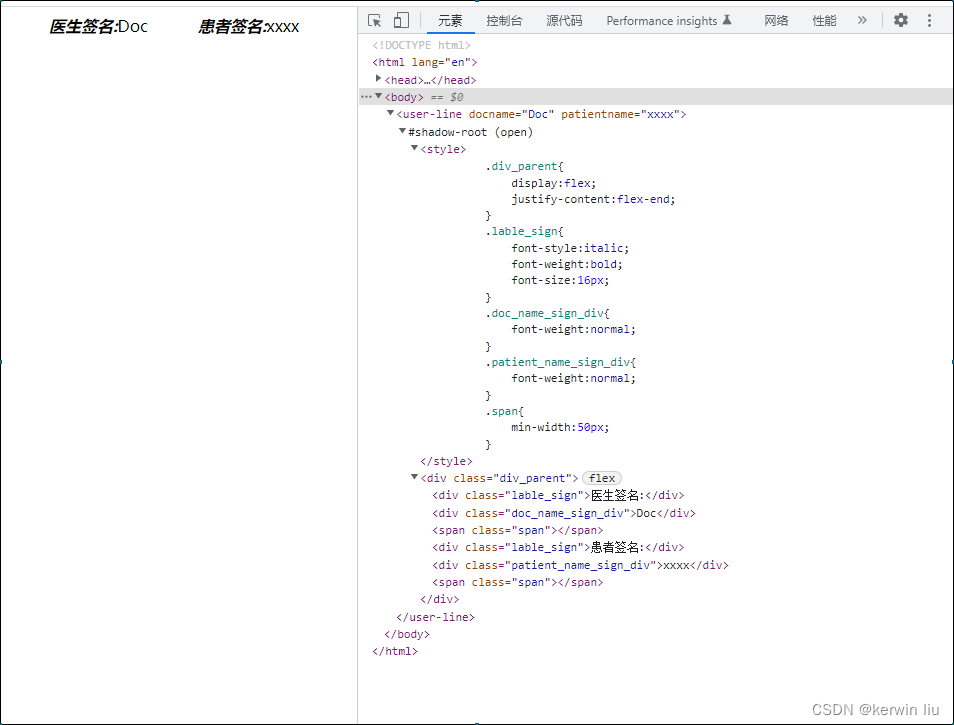
在浏览器生成的元素
版权声明:本文内容由互联网用户自发贡献,该文观点仅代表作者本人。本站仅提供信息存储空间服务,不拥有所有权,不承担相关法律责任。如发现本站有涉嫌侵权/违法违规的内容, 请联系我们举报,一经查实,本站将立刻删除。
发布者:全栈程序员-站长,转载请注明出处:https://javaforall.net/231783.html原文链接:https://javaforall.net



