
❤️ 如果你也关注 AI 的发展现状,且对 AI 应用开发感兴趣,我会每日分享大模型与 AI 领域的开源项目和应用,提供运行实例和实用教程,帮助你快速上手AI技术!
「别让AI当偏科生!通义千问让模型眼耳口脑全打通」
大家好,我是蚝油菜花。这些多模态交互的魔幻现场你是否经历过——
- 开会录屏让AI做纪要,结果字幕和PPT内容完美错位
- 用语音问「图片里的裙子链接」,AI回答「已为您播放周杰伦《七里香》」
- 视频客服同时处理文字+语音+画面时,CPU燃烧到能煎鸡蛋…
今天要重塑人机交互的 Qwen2.5-Omni ,正在重写智能边界!阿里这剂十全大补丸:
- ✅ 「感官全开」:文本/图像/语音/视频四模态同步处理,比人类感官还多一维
- ✅ 流式神经网:生成响应比眨眼快3倍,直播级实时对话
- ✅ 时空矫正术:TMRoPE编码让音画同步误差小于人类感知阈值
已有企业用它做跨国会议同传,主播靠AI实现跨模态带货——你的交互界面,是时候进化成「数字六边形战士」了!
Qwen2.5-Omni是阿里开源的多模态大模型最新力作。
1. 核心功能:支持文本/图像/音频/视频输入,实时语音合成输出
2. 技术原理:独创Thinker-Talker架构+TMRoPE位置编码,三阶段训练策略
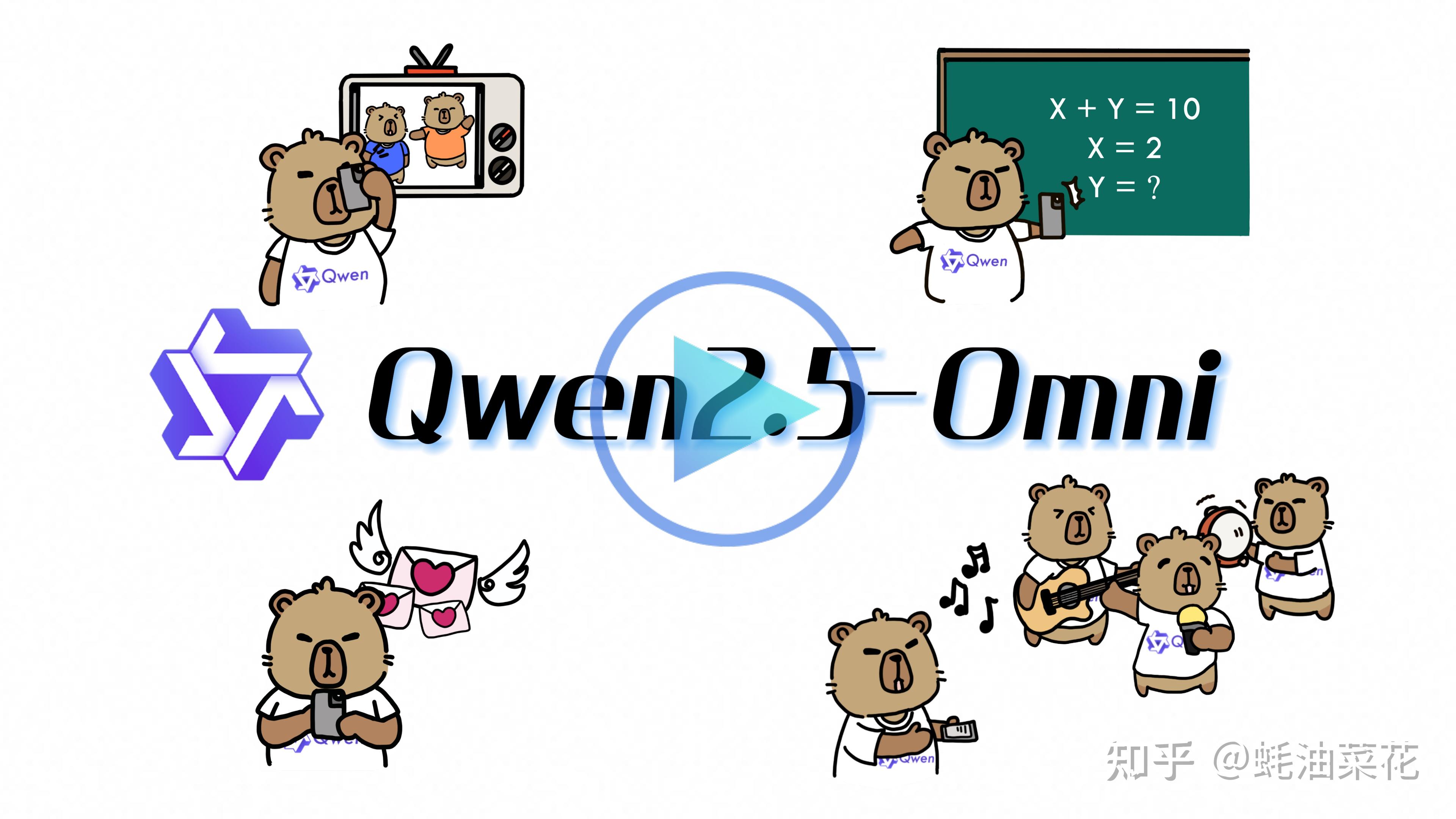

Qwen2.5-Omni 是阿里通义千问系列的最新旗舰多模态模型,拥有70亿参数规模。作为端到端的全能感知模型,它能同时处理文本、图像、音频和视频输入,并通过流式生成技术实现实时文本与语音输出。
该模型采用创新的Thinker-Talker双模块架构:Thinker模块负责多模态信息的理解与语义表示生成,Talker模块则将文本转化为自然流畅的语音。在训练策略上,模型经历三阶段优化过程,先固定语言模型参数训练编码器,再解冻全参数训练,最后通过长序列数据增强模型能力。
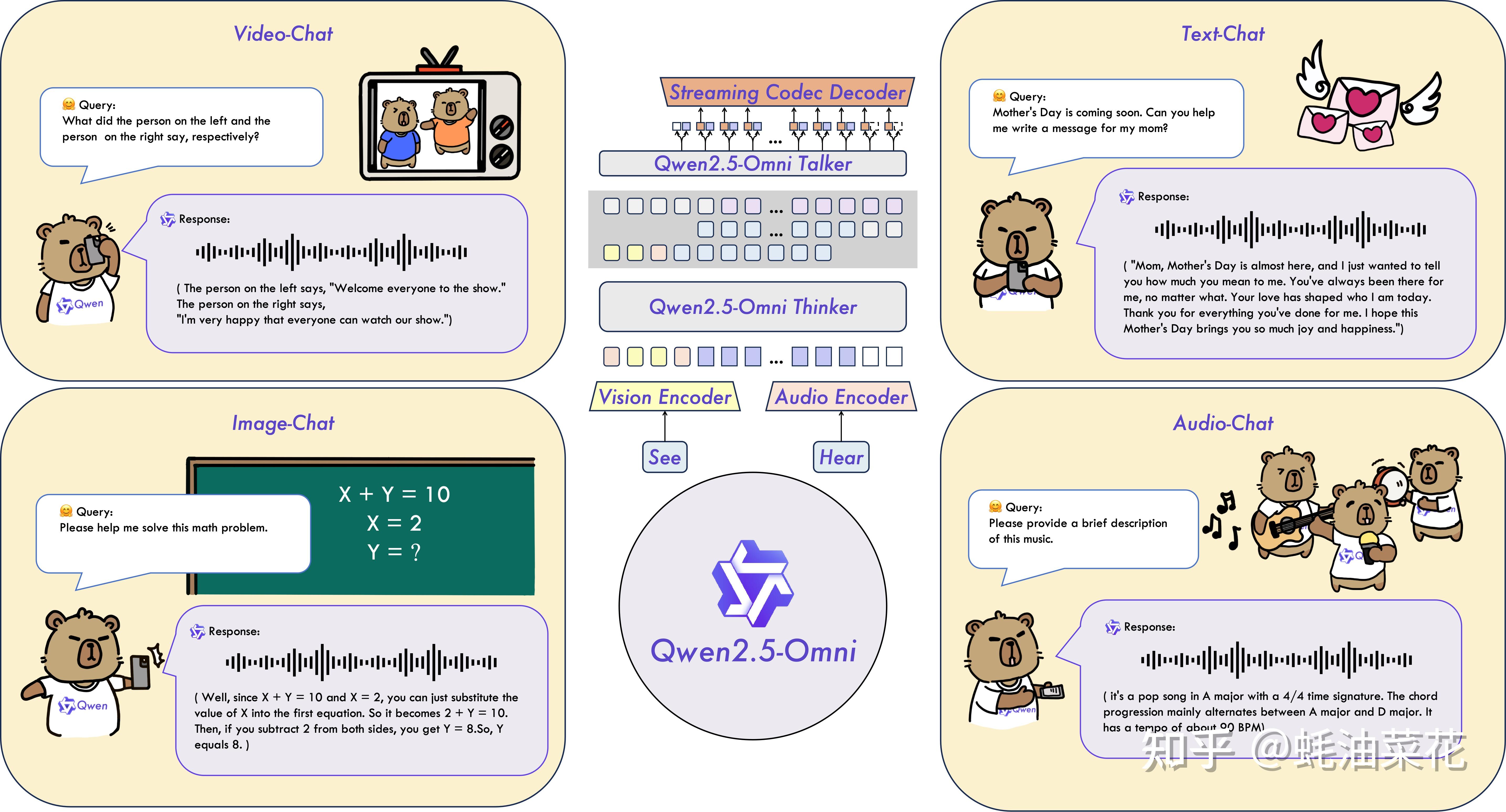
- 文本处理:支持多语言对话、指令执行和长文本理解
- 图像识别:精准理解图像内容,支持视觉问答
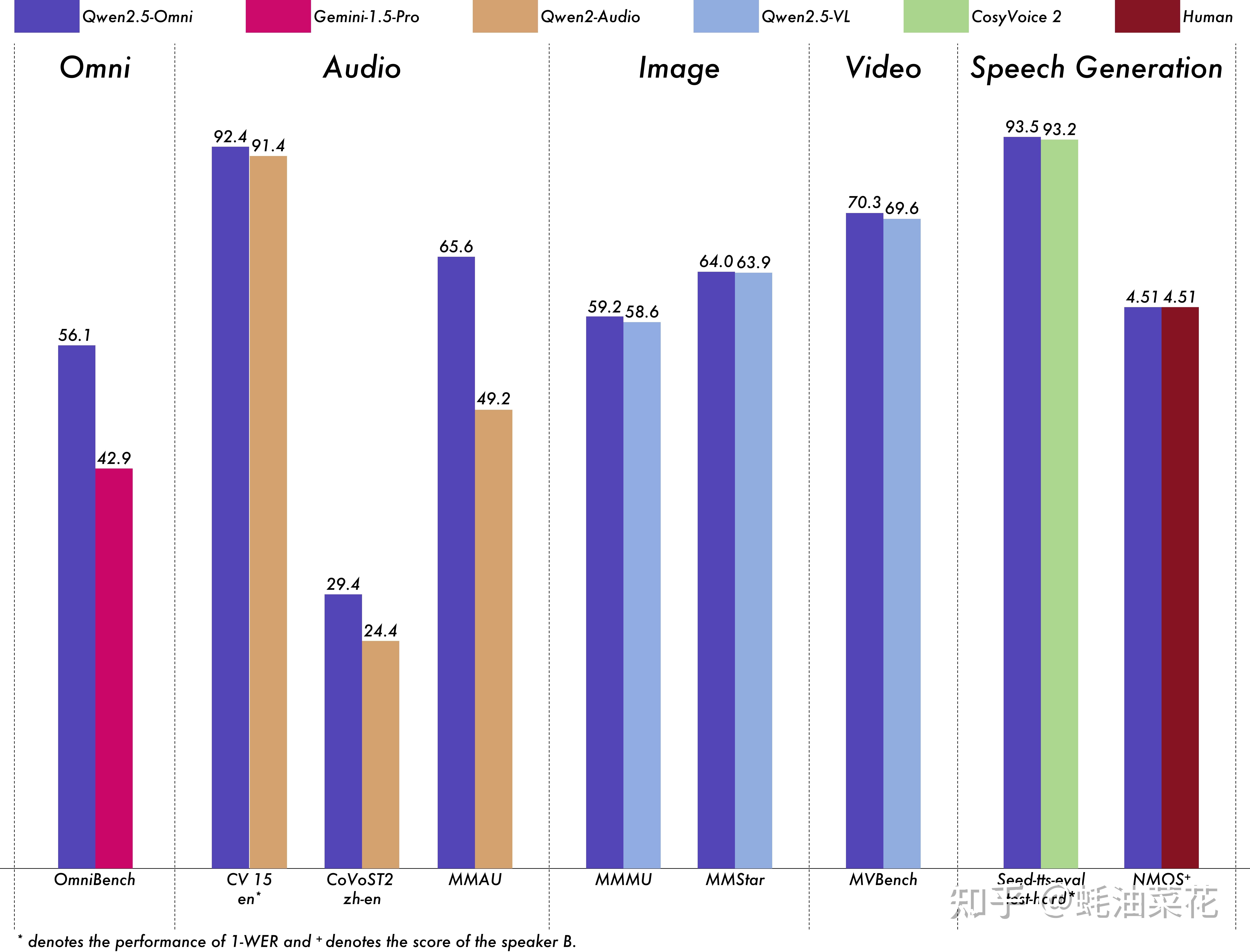
- 音频处理:语音识别准确率超越Whisper-large-v3,支持语音指令理解
- 视频理解:同步分析视频画面与音频信息,在MVBench测试达到70.3%准确率
- 实时交互:流式处理技术实现毫秒级响应的语音视频聊天
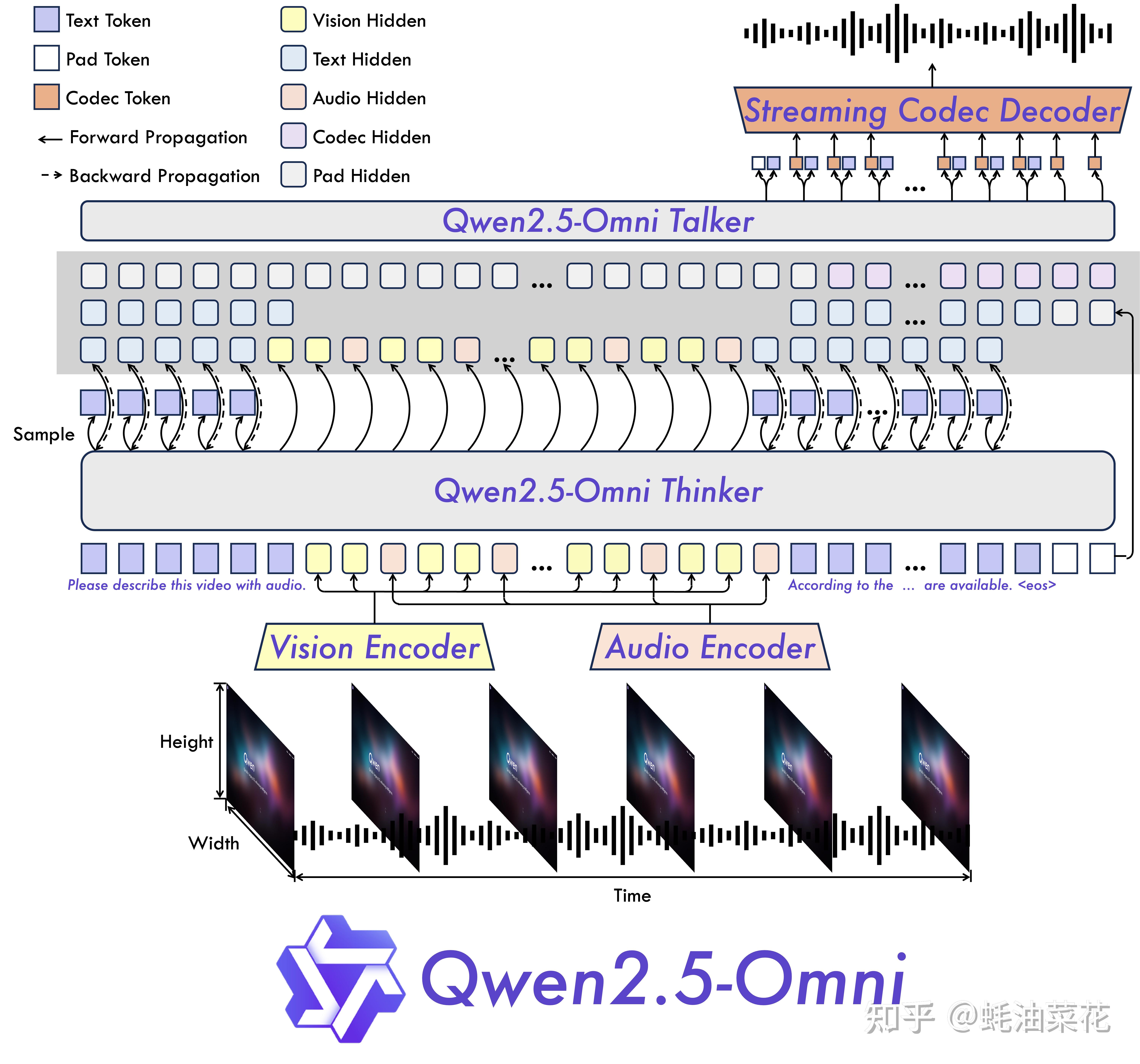
- Thinker-Talker架构:分离式设计实现理解与生成的专项优化
- TMRoPE编码:时间对齐的多模态位置嵌入,解决音视频同步难题
- 块状处理:将长序列数据分块处理,2秒/块的实时处理效率
- 三阶段训练:从单模态到多模态的渐进式能力提升
阿里开源Qwen2.5-Omni多模态大模型,支持文本、图像、音频和视频输入,具备实时语音合成与流式响应能力,在OmniBench等基准测试中全面超越Gemini-1.5-Pro等竞品:
下面教程将指导您如何运行 Qwen2.5-Omni,涵盖基础使用方法和代码示例。
在运行 Qwen2.5-Omni 之前,您需要安装以下依赖库:
# 安装 transformers 和 accelerate pip uninstall transformers pip install git+https://github.com/huggingface/transformers@3a1ead0aabed473eafeeea8c197d pip install accelerate # 安装 Qwen2.5-Omni 工具包 pip install qwen-omni-utils[decord]如果您的系统不支持 decord,可以使用以下命令回退到 torchvision:
pip install qwen-omni-utils以下代码示例展示了如何使用 transformers 和 qwen_omni_utils 运行 Qwen2.5-Omni 模型:
import soundfile as sf from transformers import Qwen2_5OmniModel, Qwen2_5OmniProcessor from qwen_omni_utils import process_mm_info # 加载模型和处理器 model = Qwen2_5OmniModel.from_pretrained("Qwen/Qwen2.5-Omni-7B", torch_dtype="auto", device_map="auto") processor = Qwen2_5OmniProcessor.from_pretrained("Qwen/Qwen2.5-Omni-7B") # 定义对话内容 conversation = [ { "role": "system", "content": "You are Qwen, a virtual human developed by the Qwen Team, Alibaba Group, capable of perceiving auditory and visual inputs, as well as generating text and speech.", }, { "role": "user", "content": [ {"type": "video", "video": "https://qianwen-res.oss-cn-beijing.aliyuncs.com/Qwen2.5-Omni/draw.mp4"}, ], }, ] # 数据预处理 text = processor.apply_chat_template(conversation, add_generation_prompt=True, tokenize=False) audios, images, videos = process_mm_info(conversation, use_audio_in_video=True) inputs = processor(text=text, audios=audios, images=images, videos=videos, return_tensors="pt", padding=True) inputs = inputs.to(model.device).to(model.dtype) # 模型推理 text_ids, audio = model.generate(inputs, use_audio_in_video=True) # 解码输出 text = processor.batch_decode(text_ids, skip_special_tokens=True, clean_up_tokenization_spaces=False) print("生成的文本:", text) # 保存生成的音频 sf.write("output.wav", audio.reshape(-1).detach().cpu().numpy(), samplerate=24000)代码解释: 1. 加载模型和处理器:使用 from_pretrained 方法加载预训练模型和处理器。 2. 定义对话内容:conversation 包含系统提示和用户输入的视频。 3. 数据预处理:将对话内容转换为模型可接受的格式。 4. 模型推理:调用 generate 方法生成文本和音频。 5. 解码和保存结果:将生成的文本和音频分别输出和保存。
为了提升推理速度和降低内存占用,您可以使用 FlashAttention-2:
pip install -U flash-attn --no-build-isolation在加载模型时指定 attn_implementation="flash_attention_2":
from transformers import Qwen2_5OmniModel model = Qwen2_5OmniModel.from_pretrained( "Qwen/Qwen2.5-Omni-7B", device_map="auto", torch_dtype=torch.bfloat16, attn_implementation="flash_attention_2", )Qwen2.5-Omni 支持批量处理多种输入类型,例如文本、图像、音频和视频。以下是一个批量推理的示例:
# 示例对话 conversation1 = [{"role": "user", "content": [{"type": "video", "video": "/path/to/video.mp4"}]}] conversation2 = [{"role": "user", "content": [{"type": "audio", "audio": "/path/to/audio.wav"}]}] conversation3 = [{"role": "user", "content": "who are you?"}] conversation4 = [ {"role": "user", "content": [ {"type": "image", "image": "/path/to/image.jpg"}, {"type": "video", "video": "/path/to/video.mp4"}, {"type": "audio", "audio": "/path/to/audio.wav"}, {"type": "text", "text": "What are the elements can you see and hear in these medias?"} ]} ] # 批量处理 conversations = [conversation1, conversation2, conversation3, conversation4] text = processor.apply_chat_template(conversations, add_generation_prompt=True, tokenize=False) audios, images, videos = process_mm_info(conversations, use_audio_in_video=True) inputs = processor(text=text, audios=audios, images=images, videos=videos, return_tensors="pt", padding=True) inputs = inputs.to(model.device).to(model.dtype) # 批量推理 text_ids = model.generate(inputs, use_audio_in_video=True, return_audio=False) text = processor.batch_decode(text_ids, skip_special_tokens=True, clean_up_tokenization_spaces=False) print("批量生成的文本:", text)您还可以使用 OpenAI API 与 Qwen2.5-Omni 进行交互:
import base64 import numpy as np import soundfile as sf from openai import OpenAI # 初始化客户端 client = OpenAI( api_key="your_api_key", base_url="https://dashscope.aliyuncs.com/compatible-mode/v1", ) # 定义对话内容 messages = [ { "role": "system", "content": "You are Qwen, a virtual human developed by the Qwen Team, Alibaba Group, capable of perceiving auditory and visual inputs, as well as generating text and speech.", }, { "role": "user", "content": [ {"type": "video_url", "video_url": "https://qianwen-res.oss-cn-beijing.aliyuncs.com/Qwen2.5-Omni/draw.mp4"}, ], }, ] # 流式推理 completion = client.chat.completions.create( model="qwen-omni-turbo", messages=messages, modalities=["text", "audio"], audio={"voice": "Chelsie", "format": "wav"}, stream=True, stream_options={"include_usage": True} ) # 处理流式输出 text, audio_string = [], "" for chunk in completion: if chunk.choices: if hasattr(chunk.choices[0].delta, "audio"): try: audio_string += chunk.choices[0].delta.audio["data"] except Exception as e: text.append(chunk.choices[0].delta.audio["transcript"]) else: print(chunk.usage) # 保存生成的文本和音频 print("".join(text)) wav_bytes = base64.b64decode(audio_string) wav_array = np.frombuffer(wav_bytes, dtype=np.int16) sf.write("output.wav", wav_array, samplerate=24000)如果您希望使用 Web 界面与 Qwen2.5-Omni 交互,可以运行以下命令:
# 安装依赖 pip install -r requirements_web_demo.txt # 启动 Web 演示 python web_demo.py --flash-attn2启动后,您可以通过浏览器访问生成的链接(例如 http://127.0.0.1:7860/)进行交互。
为了快速部署 Qwen2.5-Omni,推荐使用 vLLM 或 Docker 容器。以下是使用 Docker 的示例:
# 启动 Docker 容器 docker run --gpus all --ipc=host --network=host --rm --name qwen2.5-omni -it qwenllm/qwen-omni:2.5-cu121 bash # 启动 Web 演示 bash docker/docker_web_demo.sh --checkpoint /path/to/Qwen2.5-Omni-7B --flash-attn2- 项目主页:https://qwenlm.github.io/blog/qwen2.5-omni/
- GitHub 仓库:https://github.com/QwenLM/Qwen2.5-Omni
- HuggingFace 仓库:https://huggingface.co/Qwen/Qwen2.5-Omni-7B
- 在线Demo:https://huggingface.co/spaces/Qwen/Qwen2.5-Omni-7B-Demo
千问 Qwen 教程
❤️ 如果你也关注 AI 的发展现状,且对 AI 应用开发感兴趣,我会每日分享大模型与 AI 领域的开源项目和应用,提供运行实例和实用教程,帮助你快速上手AI技术!
发布者:全栈程序员-站长,转载请注明出处:https://javaforall.net/259544.html原文链接:https://javaforall.net




