
大家好,又见面了,我是全栈君。
1、概述
如下SQL语句发生严重消耗资源的问题,使得OS’s load average会在30以上,一条语句需要执行上百秒。
/*
PIXPatient 184176条
DomainPatient 184189条
PersonName 184189条
*/
捕获的SQL语句:
select *
from PIXPatient where PIXPatientTID
in (select distinct PIXPatientTID from DomainPatient where DomainPatientTID
in ( select DomainPatientTID from DomainPatient
where PatientBirthday = ‘1994-01-09’ or PatientBirthday = ‘1994-01-01’
union select DomainPatientTID from PersonName where FamilyName = ‘倪’ or GivenName = ‘界’));
2、优化
a.优化前执行效率:
mysql>
select * from PIXPatient where PIXPatientTID
in (select distinct PIXPatientTID from DomainPatient where DomainPatientTID
in ( select DomainPatientTID from DomainPatient
where PatientBirthday = ‘1994-01-09’ or PatientBirthday = ‘1994-01-01’
union select DomainPatientTID from PersonName where FamilyName = ‘倪’ or GivenName = ‘界’));

b.加索引
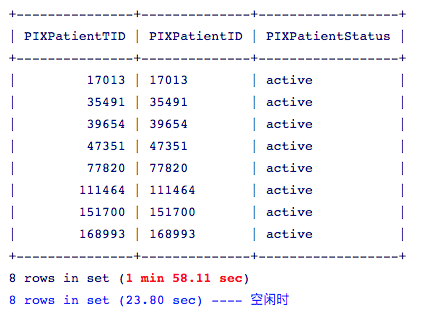
alter table PersonName add index Index_FamilyName (FamilyName), add index Index_GivenName (GivenName);
alter table DomainPatient add index Index_PatientBirthday (PatientBirthday);
效果不明显
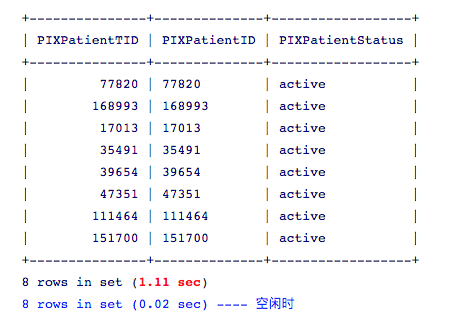
c.重构SQL语句(优化)
mysql>
select * from PIXPatient inner join (
-> select distinct PIXPatientTID from DomainPatient inner join (
-> select DomainPatientTID from DomainPatient where PatientBirthday = ‘1994-01-09’
-> union select DomainPatientTID from DomainPatient where PatientBirthday = ‘1994-01-01’
-> union select DomainPatientTID from PersonName where FamilyName = ‘倪’
-> union select DomainPatientTID from PersonName where GivenName = ‘界’ ) a using(DomainPatientTID) ) b using(PIXPatientTID) ;
效果明显
3、结论
SQL语句中,尽量避免使用or,in关键字,因为执行效率低。
规律:
join > exists > in
union > or
发布者:全栈程序员-站长,转载请注明出处:https://javaforall.net/108652.html原文链接:https://javaforall.net



