
大家好,又见面了,我是全栈君。
一.环境准备
php7.1+NGINX+ci框架环境,需要注册有pexels api_key
二.html页面
<!DOCTYPE html>
<html lang="en">

<head>
    <meta charset="UTF-8">
    <meta name="viewport" content="width=device-width, initial-scale=1.0">
    <title>Document</title>

</head>
<style>
    * {
        margin: 0;
        padding: 0;
    }
    body {
        font-size: 16px;
    }

    a {
        text-decoration: none;
        color: #FFFFFF;
    }
    .successful_end {
        width: 100%;
        height: 3rem;
        background-color: #363;
        margin-bottom: 2px;
    }
    td, th {
        border: 1px dotted #99a9bf;
    }
    th {
        background-color: #995300;
    }

    td > a, strong {
        margin-left: 10px;
    }

</style>
<?php $this->load->helper('url');?>
<script src="<?= base_url().'/static/js/jquery-3.2.1.min.js'?>"></script>
<body>
<div class="successful">
    <table style="text-align: center;">
        <tr>
            <th>图片ID</th>
            <th>宽度</th>
            <th>高度</th>
            <th>作者</th>
            <th>作者ID</th>
            <th>色调</th>
            <th>原始图</th>
            <th>2X图</th>
            <th>大图</th>
            <th>中图</th>
            <th>小图</th>
            <th>竖向图</th>
            <th>横向图</th>
            <th>极小图</th>
        </tr>

        <?php
        foreach ($photos as $imgs) {
            ?>
            <tr>
                <td><?= $imgs['id'] ?></td>
                <td><?= $imgs['width'] ?></td>
                <td><?= $imgs['height'] ?></td>
                <td><?= $imgs['photographer'] ?></td>
                <td><?= $imgs['photographer_id'] ?></td>
                <td>
                    <div style="background-color: <?= $imgs['avg_color']; ?>;width: 50px;height: 35px">颜色块</div>
                </td>

                <td><img src="<?= $imgs['src']['original'] ?>" alt="" width="100%" height="auto"></td>
                <td><img src="<?= $imgs['src']['large2x'] ?>" alt="" width="100%" height="auto"></td>
                <td><img src="<?= $imgs['src']['large'] ?>" alt="" width="50%" height="auto"></td>
                <td><img src="<?= $imgs['src']['medium'] ?>" alt="" width="50%" height="auto"></td>
                <td><img src="<?= $imgs['src']['small'] ?>" alt="" width="50%" height="auto"></td>
                <td><img src="<?= $imgs['src']['portrait'] ?>" alt="" width="50%" height="auto"></td>
                <td><img src="<?= $imgs['src']['landscape'] ?>" alt="" width="50%" height="auto"></td>
                <td><img src="<?= $imgs['src']['tiny'] ?>" alt=""></td>
            </tr>
            <?php
        }
        ?>

        <tr class="successful_end">
            <td colspan="3">当前页码:<?= $current_page; ?></td>
            <td colspan="3">当前分类:
                <select name="style" onchange="window.open(this.options[this.selectedIndex].value,'_self')">
                    <option value="<?=  current_url() . '?style=People&per_page='.$per_page ?>"<?= ($this->input->get('style')=='People')? 'selected':''?>>People</option>
                    <option value="<?= current_url() . '?style=Ocean&per_page='.$per_page  ?>" <?= ($this->input->get('style')=='Ocean')? 'selected':''?>>Ocean</option>
                    <option value="<?= current_url() . '?style=Tigers&per_page='.$per_page  ?>"<?= ($this->input->get('style')=='Tigers')? 'selected':''?>>Tigers</option>
                    <option value="<?= current_url() . '?style=nature&per_page='.$per_page  ?>"<?= ($this->input->get('style')=='nature')? 'selected':''?>>nature</option>
                </select>
            </td>
            <td colspan="2">每页图片数据量:<?= $per_page; ?></td>
            <td colspan="4">该类图片总数:<?= $total_results; ?></td>
            <td colspan="4"><?= $pagenation; ?></td>
            <td></td>
        </tr>
    </table>

</div>
</body>

</html>
三.控制器
<?php


class Image extends Base_Controller
{

    public function __construct()
    {
        parent::__construct();
        $this->load->library('pagination');
        $this->load->helper('url');
        $this->redis = $this->connectredis();
    }

    public function getImageLists()
    {
        $per_page = $this->input->get('per_page') ?? 1;
        $page = $this->input->get('page') ?? 1;
        $style = $this->input->get('style') ?? 'people';

        $image_key = 'images_page_' . $page . '_style_' . $style;
        $imageList = $this->redis->get($image_key);

        if (!$imageList) {
            $ch = curl_init();
            //https://api.pexels.com/v1/search/?page=2&per_page=15&query=people
            $url = 'https://api.pexels.com/v1/search?query=' . $style . '&page=' . $page . '&per_page=' . $per_page;
            curl_setopt($ch, CURLOPT_URL, $url);
            curl_setopt($ch, CURLOPT_RETURNTRANSFER, 1);
            curl_setopt($ch, CURLOPT_CUSTOMREQUEST, 'GET');
            $headers = array();
            $headers[] = 'Authorization:api_key'; //todo:此处换为你的api_key
            curl_setopt($ch, CURLOPT_HTTPHEADER, $headers);
            $result = curl_exec($ch);
            if (curl_errno($ch)) {
                echo 'Error:' . curl_error($ch);
            }
            curl_close($ch);

            $imageList = $result;
            $this->redis->set($image_key, $result,3600);
        }
        //echo $result;//输出json

        //处理json数据
        extract(json_decode($imageList, true));

        //分页
        $config['base_url'] = base_url().'/v1/image/getImageLists';
        $config['total_rows'] = $total_results;
        $config['per_page'] = $per_page;
//        $config['uri_segment'] = 2;
        $config['num_links'] = 2;//当前页码的前面和后面的“数字”链接的数量
        $config['enable_query_strings']=true;//链接将自动地被重写成查询字符串格式
        $config['page_query_string'] = TRUE;
        $config['reuse_query_string'] = true;
        $config['query_string_segment']='page';
        $config['cur_page'] = ' 1';
        $config['first_link'] = ' 第一页';
        $config['last_link'] = '最后一页 ';

        $this->pagination->initialize($config);
        $pagenation=$this->pagination->create_links();

        $this->load->view('image/image',
            array('current_page' => ceil($page/$per_page)+1,
                'per_page' => $per_page,
                "photos" => $photos,
                'next_page' => $next_page,
                'total_results' => $total_results,
                'pagenation'=>$pagenation
            )
        );
    }

}四.效果图
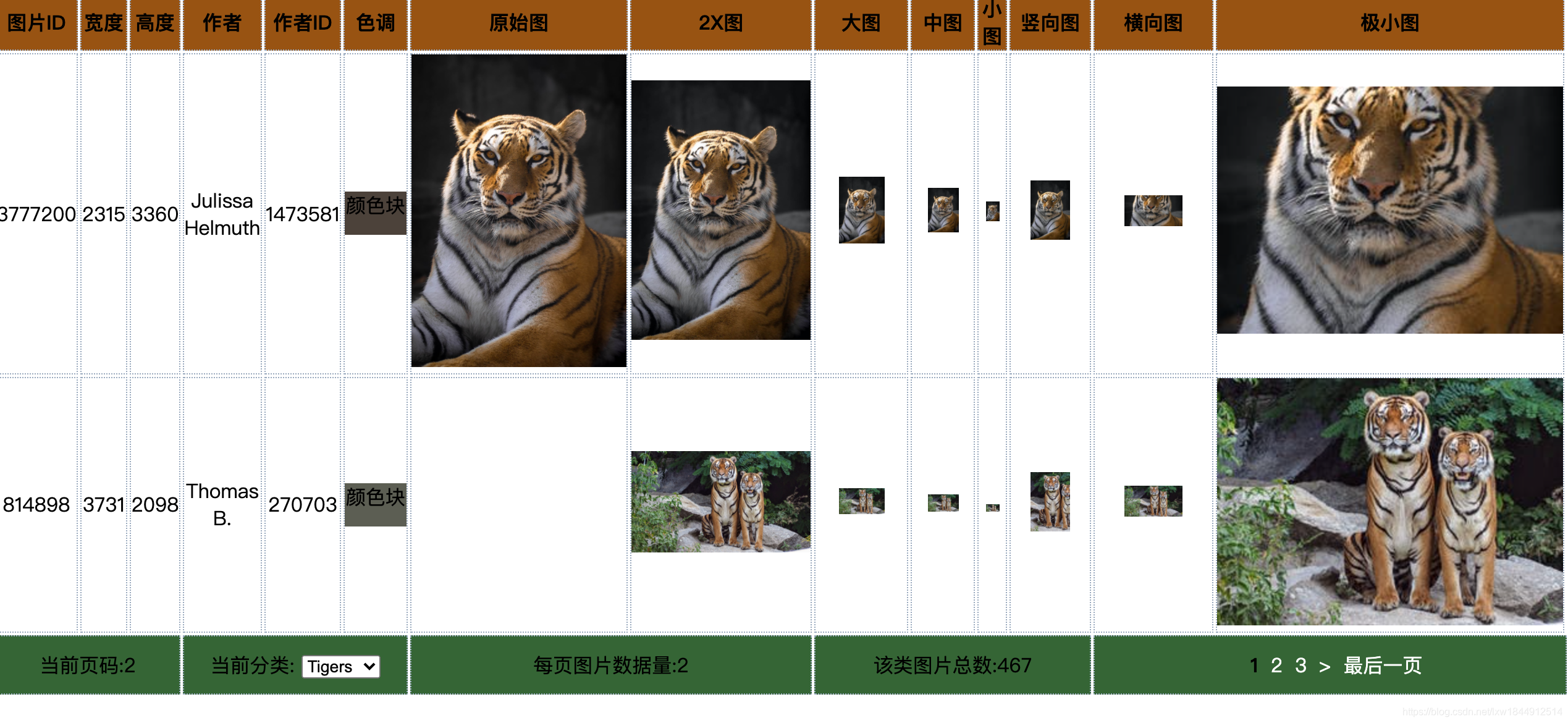

五.pexels 文档: https://www.pexels.com/zh-cn/api/documentation/?
每当你提交一个 API 请求时,请确保一定要显示到 Pexels 的醒目链接。你可以使用文本链接(如“照片由 Pexels 提供”)或带有我们徽标的链接。
在可能的情况下,请始终注明我们的摄影作者(如“Pexels 上由 John Doe 拍摄的照片”,并附带可转至 Pexels 照片页的链接)。
你不得拷贝或复制 Pexels 的核心功能(包括提供 Pexels 内容作为壁纸应用)。
请勿滥用该 API。默认情况下,API 的使用率上限为每小时 200 个请求和每月 20000 个请求。你可以联系我们,申请提高此限制,但请提供示例,或做好准备提供演示文件,确保清晰展示你使用该 API 时已注明归属。如果你符合我们的 API 条款,可以免费获得无限次请求。
如有滥用 Pexels API 的行为(包括但不限于试图规避使用率限制),将导致你的 API 使用权限被终止。
版权声明:本文内容由互联网用户自发贡献,该文观点仅代表作者本人。本站仅提供信息存储空间服务,不拥有所有权,不承担相关法律责任。如发现本站有涉嫌侵权/违法违规的内容, 请联系我们举报,一经查实,本站将立刻删除。
发布者:全栈程序员-站长,转载请注明出处:https://javaforall.net/111545.html原文链接:https://javaforall.net



