
大家好,又见面了,我是你们的朋友全栈君。
原创作品,出自 “深蓝的blog” 博客,欢迎转载,转载时请务必注明以下出处,否则追究版权法律责任。
深蓝的blog:http://blog.csdn.net/huangyanlong/article/details/44086869
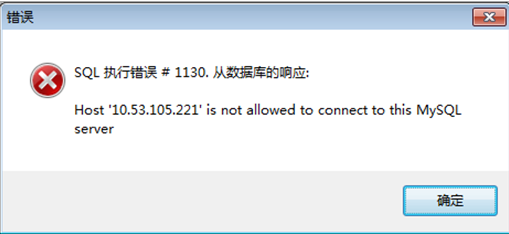
使用mysql远程连接软件(MySQL-Front),远程连接报错:

[root@master ~]# mysql -u root@localhost
Welcome to the MySQL monitor. Commands end with ; or \g.
Your MySQL connection id is 8
Server version: 5.1.66 Source distribution
Copyright (c) 2000, 2012, Oracle and/or its affiliates. All rights reserved.
Oracle is a registered trademark of Oracle Corporation and/or its
affiliates. Other names may be trademarks of their respective
owners.
Type ‘help;’ or ‘\h’ for help. Type ‘\c’ to clear the current input statement.
mysql>quit
解决远程无法连接:
[root@master ~]# mysql -u root -p
Enter password:
Welcome to the MySQL monitor. Commands end with ; or \g.
Your MySQL connection id is 11
Server version: 5.1.66 Source distribution
Copyright (c) 2000, 2012, Oracle and/or its affiliates. All rights reserved.
Oracle is a registered trademark of Oracle Corporation and/or its
affiliates. Other names may be trademarks of their respective
owners.
Type ‘help;’ or ‘\h’ for help. Type ‘\c’ to clear the current input statement.
mysql> use mysql;
Reading table information for completion of table and column names
You can turn off this feature to get a quicker startup with -A
Database changed
mysql> select user,password,host from user;
—需要将远程访问主机的IP添加进去
+——+——————————————-+—————–+
| user | password | host |
+——+——————————————-+—————–+
| root | *81F5E21E35407D884A6CD4A731AEBFB6AF209E1B | localhost |
| root | *D997577481B722A2996B58BCE11EF3C312AC0B89 | master.cloudera |
| root | | 127.0.0.1 |
| | | localhost |
| | | master.cloudera |
+——+——————————————-+—————–+
5 rows in set (0.00 sec)
mysql> grant all privileges on *.* to root@”10.53.105.221″ identified by “root”;
—赋予IP地址为10.53.105.221主机拥有所有权限(其中包括远程访问、远程操作权限)
Query OK, 0 rows affected (0.04 sec)
mysql> flush privileges;
—重新加载权限设置
Query OK, 0 rows affected (0.05 sec)
mysql> select user,password,host from user;
—再次查询,IP为10.53.105.221主机已经添加到host文件中
+——+——————————————-+—————–+
| user | password | host |
+——+——————————————-+—————–+
| root | *81F5E21E35407D884A6CD4A731AEBFB6AF209E1B | localhost |
| root | *D997577481B722A2996B58BCE11EF3C312AC0B89 | master.cloudera |
| root | | 127.0.0.1 |
| | | localhost |
| | | master.cloudera |
| root | *81F5E21E35407D884A6CD4A731AEBFB6AF209E1B | 10.53.105.221 |
+——+——————————————-+—————–+
6 rows in set (0.00 sec)
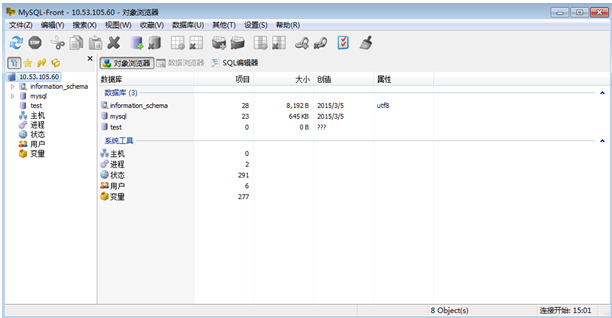
再次远程登陆,成功连接了,如下图:
原创作品,出自 “深蓝的blog” 博客,欢迎转载,转载时请务必注明以下出处,否则追究版权法律责任。
深蓝的blog:http://blog.csdn.net/huangyanlong/article/details/44086869
发布者:全栈程序员-站长,转载请注明出处:https://javaforall.net/128300.html原文链接:https://javaforall.net


![Qwen-Image-Edit-F2P C++调用指南[可运行源码]](https://javaforall.net/wp-content/uploads/2020/11/2020110817443450-480x300.jpg)
