
大家好,又见面了,我是你们的朋友全栈君。
Okio库是一个由square公司开发的,其官方简介为,Okio complements java.io and java.nio to make it much easier to access, store, and process your data.。它补充了java.io和java.nio的不足以更方便的访问、存储及处理数据。
1.最新版本及Gradle引用
compile ‘com.squareup.okio:okio:1.9.0’
官方API地址:OkioAPI
2.核心
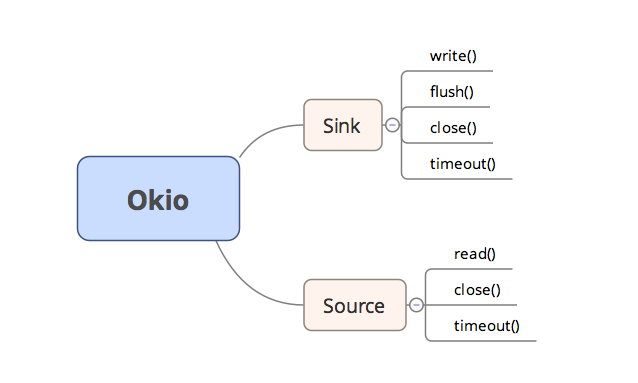
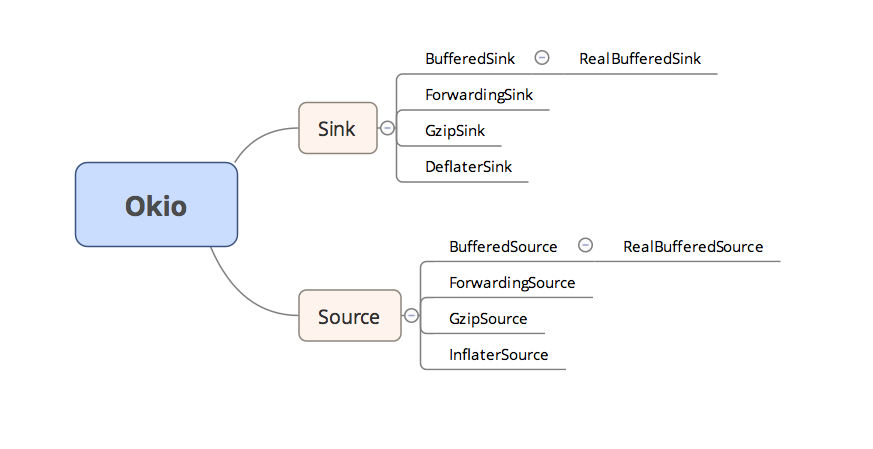
Okio库的核心是两个接口Sink和Source,这两个接口都继承了Closeable接口;而Sink可以简单的看做OutputStream(将流写入文件),Source可以简单的看做InputStream(从文件读取至流)。而这两个接口都是支持读写超时设置的。其中,Sink声明了write()、flush()、close()、timeout()等方法,Source中声明了read()、close()、timeout(),这些方法包含了对文件的读写及资源的释放。它们各自有一个支持缓冲区的子类接口,BufferedSink和BufferedSource,这两个子接口有一个共同的实现类Buffer,对缓冲区操作。

Sink和Source它门还各自有一个支持gzip压缩的实现类GzipSink和GzipSource;一个具有委托功能的抽象类ForwardingSink和ForwardingSource;还有一个实现类便是InflaterSource和DeflaterSink,这两个类主要用于压缩,为GzipSink和GzipSource服务
3.BufferedSink及BufferedSource
BufferedSink中定义了一系列写入缓存区的方法,当然其一定定义了与Buffer相关的方法,具体方法相见官方API。
BufferedSink     write(byte[] source) 将字符数组source 写入
BufferedSink     write(byte[] source, int offset, int byteCount)  将字符数组的从offset开始的byteCount个字符写入
BufferedSink     write(ByteString byteString)  将字符串写入
BufferedSink     write(Source source, long byteCount) 从Source写入byteCount个长度的
long                 writeAll(Source source) 将Source中的所有数据写入
BufferedSink     writeByte(int b) 写入一个byte整型
BufferedSink     writeDecimalLong(long v) 写入一个十进制的长整型
BufferedSink     writeHexadecimalUnsignedLong(long v) 写入一个十六进制无符号的长整型
BufferedSink     writeInt(int i) 写入一个整型
BufferedSink     writeIntLe(int i)
BufferedSink     writeLong(long v) 写入一个长整型
BufferedSink     writeLongLe(long v)
BufferedSink     writeShort(int s) 写入一个短整型
BufferedSink     writeShortLe(int s)
BufferedSink     writeString(String string, Charset charset) 写入一个String,并以charset格式编码
BufferedSink     writeString(String string, int beginIndex, int endIndex, Charset charset) 将String中从beginIndex到endIndex写入,并以charset格式编码
BufferedSink     writeUtf8(String string)  将String 以Utf - 8编码形式写入
BufferedSink     writeUtf8(String string, int beginIndex, int endIndex) 将String中从beginIndex到endIndex写入,并以Utf - 8格式编码
BufferedSink     writeUtf8CodePoint(int codePoint) 以Utf - 8编码形式写入的节点长度
BufferedSource定义的方法和BufferedSink极为相似,只不过一个是写一个是读,基本上都是一一对应的。
int 		read(byte[] sink) 将缓冲区中读取字符数组sink 至sink
int 		read(byte[] sink, int offset, int byteCount)  将缓冲区中从offst开始读取byteCount个字符 至sink
long 		readAll(Sink sink) 读取所有的Sink
byte 		readByte()  从缓冲区中读取一个字符
byte[] 		readByteArray()  从缓冲区中读取一个字符数组
byte[] 		readByteArray(long byteCount) 从缓冲区中读取一个长度为byteCount的字符数组
ByteString 	readByteString() 将缓冲区全部读取为字符串
ByteString 	readByteString(long byteCount) 将缓冲区读取长度为byteCount的字符串
long 	        readDecimalLong()  读取十进制数长度
void 	        readFully(Buffer sink, long byteCount) 读取byteCount个字符至sink
void 	        readFully(byte[] sink)   读取所有字符至sink
long 	        readHexadecimalUnsignedLong() 读取十六进制数长度
int 		readInt() 从缓冲区中读取一个整数
int 		readIntLe()
long 	        readLong() 从缓冲区中读取Long 整数
long 		readLongLe()
short 		readShort() 从缓冲区中读取一个短整形
short 		readShortLe()
String 		readString(Charset charset) 从缓冲区中读取一个String
String 		readString(long byteCount, Charset charset) 读取一个长度为byteCount的String,并以charset形式编码
String 		readUtf8() 读取编码格式为Utf-8的String
String 		readUtf8(long byteCount) 读取编码格式为Utf-8且长度为byteCount的String
int 		readUtf8CodePoint() 读取一个Utf-8编码节点,长度在1-4之间
String 		readUtf8Line() 读取一行Utf-8 编码的String,碰到换行时停止
String 		readUtf8LineStrict()
4.Okio类
Okio类作为OkIo库暴露给外部使用的类,其内部有大量的静态方法,包括通过一个Source获得BufferedSource,通过一个Sink获得一个BufferedSink。
static Sink appendingSink(File file) 将Sink追加 file
static BufferedSink buffer(Sink sink) 通过一个Sink获得BufferedSink
static BufferedSource buffer(Source source) 通过一个Source获得BufferedSource
static Sink sink(File file) 通过一个文件file获得Sink
static Sink sink(OutputStream out)通过一个输出流out获得Sink
static Sink sink(java.nio.file.Path path, java.nio.file.OpenOption… options)
static Sink sink(Socket socket)通过一个套接字socket获得Sink
static Source source(File file) 通过一个文件file获得Source
static Source source(InputStream in) 通过一个输入流in获得Source
static Source source(java.nio.file.Path path, java.nio.file.OpenOption… options)
static Source source(Socket socket) 通过一个套接字socket获得source
5.具体使用
现在对Okio库的整体框架有了基本了解,那么就该实际操作了。之初就已经说过OKio操作十分的简单,具体步骤如下:
1.调用Okio类的静态方法获取Source(Sink)
2.调用Okio类库的静态方法,通过刚才获取的Source(Sink)获取BufferedSink(BufferedSink)
3.对缓冲区根据实际需求做相应操作
4.若是Source,须将调用flush()
5.最后close掉,避免内存泄漏
例如:
        String fileName = "tea.txt";
        Source source;
        BufferedSource bufferedSource = null;

        try {
            String path = Environment.getExternalStorageDirectory().getPath();
            File file = new File(path, fileName);
            source = Okio.source(file);
            bufferedSource = Okio.buffer(source);

            String read = bufferedSource.readString(Charset.forName("GBK"));
            Logger.d(read);

        } catch (IOException e) {
            e.printStackTrace();
        } finally {
            try {
                if (null != bufferedSource) {
                    bufferedSource.close();
                }
            } catch (IOException e) {
                e.printStackTrace();
            }
        }
        String fileName = "tea.txt";
        boolean isCreate = false;
        Sink sink;
        BufferedSink bufferedSink = null;

        String path = Environment.getExternalStorageDirectory().getPath();
        try {

            File file = new File(path, fileName);
            if (!file.exists()) {
                isCreate = file.createNewFile();
            } else {
                isCreate = true;
            }

            if (isCreate) {
                sink = Okio.sink(file);
                bufferedSink = Okio.buffer(sink);
                bufferedSink.writeInt(90002);
                bufferedSink.writeString("aaa12352345234523452233asdfasdasdfas大家可能觉得我举的例子有些太简单了,好吧,我来说一个难的。让byte变量b等于-1。",
                        Charset.forName("GBK"));

                bufferedSink.flush();

            }
        } catch (IOException e) {
            e.printStackTrace();
        } finally {
            try {
                if (null != bufferedSink) {
                    bufferedSink.close();
                }
            } catch (IOException e) {
                e.printStackTrace();
            }

        }
6.工具类 – ByteString
ByteString作为一个工具类,功能十分强大,它可以把byte转为String,这个String可以是utf8的值,也可以是base64后的值,也可以是md5的值,也可以是sha256的值
String 	base64()
String 	base64Url()
String 	utf8()
ByteString 	sha1()
ByteString 	sha256()

static ByteString 	decodeBase64(String base64)
static ByteString 	decodeHex(String hex)
static ByteString 	encodeUtf8(String s)
参考资料
1.OkioAPI
发布者:全栈程序员-站长,转载请注明出处:https://javaforall.net/132561.html原文链接:https://javaforall.net


![goland激活码永久 3月最新注册码[通俗易懂]](https://javaforall.net/wp-content/uploads/2020/11/2020110817443450-480x300.jpg)
