
大家好,又见面了,我是你们的朋友全栈君。
目录
scheduleWithFixedDelay 周期性执行任务
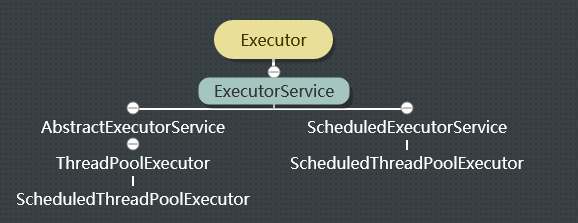

ScheduledExecutorService 简述
1、public interface ScheduledExecutorService extends ExecutorService 延迟或定期执行任务。
2、schedule 方法使用各种延迟创建任务,并返回一个可用于取消或检查执行的任务对象
3、scheduleAtFixedRate 和 scheduleWithFixedDelay 方法创建并执行某些在取消前一直定期运行的任务
4、所有的 schedule 方法都接受相对延迟和周期作为参数,而不是绝对的时间或日期
5、SheduleExecutorService 是JDK 1.5出来的,比以前的 Timer 性能好
| Method Description |
|---|
<V> ScheduledFuture<V> schedule(Callable<V> callable, long delay, TimeUnit unit)
创建并执行在给定延迟后启用的单次操作。 |
ScheduledFuture<?> schedule(Runnable command, long delay, TimeUnit unit)
创建并执行在给定延迟后启用的单次操作。 |
ScheduledFuture<?> scheduleAtFixedRate(Runnable command, long initialDelay, long period, TimeUnit unit)
创建并执行在给定的初始延迟之后,以给定的时间间隔执行周期性动作。即在 |
ScheduledFuture<?> scheduleWithFixedDelay(Runnable command, long initialDelay, long delay, TimeUnit unit)
创建并执行在给定的初始延迟之后首先启用的定期动作,随后上一个执行的终止和下一个执行的开始之间给定的延迟。 |
对象创建方式
1、此实例最快捷的方式是使用 Executors 工具来创建:
| ScheduledExecutorService newScheduledThreadPool(int corePoolSize) | 创建一个线程池,它可安排在给定延迟后运行任务或者定期地执行任务。 corePoolSize – 池中所保存的线程数,即使线程是空闲的也包括在内。 |
| ScheduledExecutorService newSingleThreadScheduledExecutor() | 创建一个单线程执行程序,它可安排在给定延迟后运行命令或者定期地执行任务。可保证顺序地执行各个任务,并且在任意给定的时间不会有多个线程是活动的。 同样这是一个无界的任务队列,即虽然线程只有一个,但是新增的任务会在队列中排队等待执行 |
2、此外除了使用 Executors 创建之外,推荐使用 ScheduledExecutorService 的实现类 ScheduledThreadPoolExecutor
schedule + Runnable 延迟执行任务
1、ScheduledFuture<?> schedule(Runnable command,long delay,TimeUnit unit) :创建并执行在给定延迟后启用的一次性操作。
2、参数:command – 要执行的任务;delay – 从现在开始延迟执行的时间;unit – 延迟参数的时间单位
import java.util.Date;
import java.util.Random;
import java.util.concurrent.Executors;
import java.util.concurrent.ScheduledExecutorService;
import java.util.concurrent.TimeUnit;
/**
 * @author wangmaoxiong
 * Created by Administrator on 2018/6/28 0028.
 * 自定义任务
 */
public class MyThread implements Runnable {
    private Random random = null;

    public MyThread() {
        random = new Random();
    }
    @Override
    public void run() {
        try {
            System.out.println("任务执行开始:" + new Date());
            /**使用随机延时[0-3]秒来模拟执行任务*/
            int sleepNumber = random.nextInt(3);
            TimeUnit.SECONDS.sleep(sleepNumber);
            System.out.println("任务执行完毕:" + new Date());
        } catch (Exception e) {
            e.printStackTrace();
        }
    }
    public static void main(String[] args) {
        /**使用Executors工具快速构建对象*/
        ScheduledExecutorService scheduledExecutorService =
                Executors.newScheduledThreadPool(1);
        System.out.println("3秒后开始执行计划线程池服务..." + new Date());
        scheduledExecutorService.schedule(new MyThread(), 3, TimeUnit.SECONDS);
    }
}
schedule + Callable 延迟执行任务
1、ScheduledFuture<V> schedule(Callable<V> callable, long delay,TimeUnit unit):创建并执行在给定延迟后启用的 一次性操作
2、参数:callable – 要执行的功能;delay – 从现在开始延迟执行的时间;unit – 延迟参数的时间单位
import java.util.Date;
import java.util.Random;
import java.util.concurrent.*;

/**
 * Created by Administrator on 2018/6/28 0028.
 * @author wangmaoxiong
 */
public class MyCall implements Callable {
    private Random random = null;

    public MyCall() {
        random = new Random();
    }
    @Override
    public Object call() throws Exception {
        try {
            String threadName = Thread.currentThread().getName();
            System.out.println("任务执行开始:" + new Date() + ":" + threadName);
            /**使用随机延时[0-6]秒来模拟执行任务*/
            int sleepNumber = random.nextInt(6);
            TimeUnit.SECONDS.sleep(sleepNumber);
            System.out.println("任务执行完毕:" + new Date() + ":" + threadName);
        } catch (Exception e) {
            e.printStackTrace();
        }
        return null;
    }
    public static void main(String[] args) {
        /**使用Executors工具快速构建对象*/
        ScheduledExecutorService scheduledExecutorService = new ScheduledThreadPoolExecutor(1);
        System.out.println("3秒后开始执行计划线程池服务..." + new Date());
        Random random = new Random();
        /**计划任务线程池最大个数为2
         * 下面开启3个任务,则执行不过来的任务会排队等待执行*/
        for (int i = 0; i < 3; i++) {
            scheduledExecutorService.schedule(new MyCall(),
                    random.nextInt(3), TimeUnit.SECONDS);
        }
    }
}
scheduleAtFixedRate 周期性执行任务
1、ScheduledFuture<?> scheduleAtFixedRate(Runnable command,long initialDelay, long period, TimeUnit unit):创建并执行一个在给定初始延迟后首次启用的定期操作,后续操作具有给定的周期;
2、在 initialDelay 后开始执行,然后在 initialDelay+period 后执行,接着在 initialDelay + 2 * period 后执行,依此类推。意思是下一次执行任务的时间与任务执行过程花费的时间无关,只与period有关!
3、如果此任务的任何一个执行要花费比其周期更长的时间,则将推迟后续执行,但不会同时执行。
4、如果任务的任何一个执行遇到异常,则后续执行都会被取消。否则,只能通过执行程序的取消或终止方法来终止该任务。
5、参数:command – 要执行的任务;initialDelay – 首次执行的延迟时间;period – 连续执行之间的周期;unit – initialDelay 和 period 参数的时间单位
import java.util.Date;
import java.util.Random;
import java.util.concurrent.TimeUnit;
import java.util.concurrent.atomic.AtomicInteger;
/**
 * Created by Administrator on 2018/6/28 0028.
 * 自定义任务
 */
public class MyRunable implements Runnable {
    private AtomicInteger atomicInteger = null;
    private Random random = null;
    public MyRunable() {
        atomicInteger = new AtomicInteger(0);
        random = new Random();
    }
    @Override
    public void run() {
        try {
            String threadName = Thread.currentThread().getName();
            System.out.println("1-任务执行开始:" + new Date() + ":" + threadName);
            /**使用随机延时[0-3]秒来模拟执行任务*/
            int sleepNumber = random.nextInt(5);
            TimeUnit.SECONDS.sleep(sleepNumber);
            if (atomicInteger.getAndAdd(1) == 3) {
                /** 故意抛出一个异常*/
                int error = 10 / 0;
            }
            System.out.println("2-任务执行完毕:" + new Date() + ":" + threadName);
        } catch (Exception e) {
            e.printStackTrace();
        }
    }
}
1)上面 run 方法中如果没有去捕获异常,即没有 try-catch 时,一旦抛出异常却没有捕获到,则后续的定时任务不会再继续执行,这就和 Timer 是一样的,可以参考《Java 定时器Timer与TimeTask》
2)try-catch 时一定要完全捕获到异常,例如果里面抛的是空指针异常,你捕获的却是数组下标越界异常,则仍然会中断计划任务,后续的任务仍然不再执行,所以建议:1)try-catch 包含 run 方法中的所有代码,2)catch 异常最外围使用 “Exception”,以免某些异常未捕获而导致计划失败。
import java.util.Date;
import java.util.Random;
import java.util.concurrent.Executors;
import java.util.concurrent.ScheduledExecutorService;
import java.util.concurrent.TimeUnit;
/**
 * Created by Administrator on 2018/6/28 0028.
 */
public class Test {
    public static void main(String[] args) {
        /**使用Executors工具快速构建对象*/
        ScheduledExecutorService scheduledExecutorService =
                Executors.newSingleThreadScheduledExecutor();
        System.out.println("3秒后开始执行计划线程池服务..." + new Date());
        /**每间隔4秒执行一次任务*/
        scheduledExecutorService.scheduleAtFixedRate(new MyRunable(),
                3, 4, TimeUnit.SECONDS);
    }
}

scheduleWithFixedDelay 周期性执行任务
1、ScheduledFuture<?> scheduleWithFixedDelay(Runnable command, long initialDelay, long delay,TimeUnit unit):创建并执行一个在给定初始延迟后首次启用的定期操作,随后,在每一次执行终止和下一次执行开始之间都存在给定的延迟。
2、与 scheduleFixedDelay 区别仅仅在于前后两次任务执行的时间间隔不同而已
import java.util.Date;
import java.util.Random;
import java.util.concurrent.Executors;
import java.util.concurrent.ScheduledExecutorService;
import java.util.concurrent.TimeUnit;
/**
 * Created by Administrator on 2018/6/28 0028.
 */
public class Test {
    public static void main(String[] args) {
        /**使用Executors工具快速构建对象*/
        ScheduledExecutorService scheduledExecutorService =
                Executors.newSingleThreadScheduledExecutor();
        System.out.println("3秒后开始执行计划线程池服务..." + new Date());
        /**每间隔4秒执行一次任务*/
        scheduledExecutorService.scheduleWithFixedDelay(new MyRunable(),
                3, 4, TimeUnit.SECONDS);
    }
}
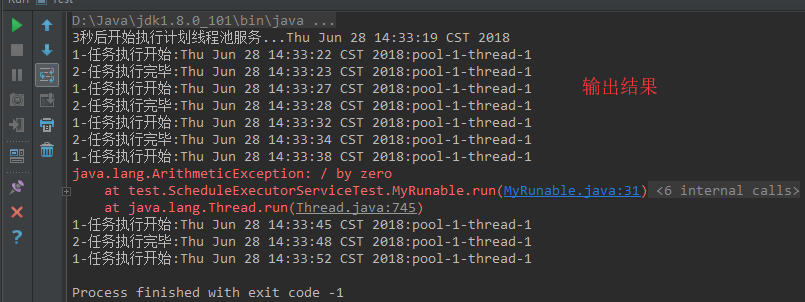
在 scheduleFixedDelay 的例子上仅改变上面一行代码,运行结果如下
try-catch 时一定要完全捕获到异常,例如果里面抛的是空指针异常,你捕获的却是数组下标越界异常,则仍然会中断计划任务,后续的任务仍然不再执行,所以建议:1)try-catch 包含 run 方法中的所有代码,2)catch 异常最外围使用 “Exception”,以免某些异常未捕获而导致计划失败。
发布者:全栈程序员-站长,转载请注明出处:https://javaforall.net/136955.html原文链接:https://javaforall.net


