
大家好,又见面了,我是你们的朋友全栈君。
一、查阅文档
Enumerable.Distinct 方法 是常用的LINQ扩展方法,属于System.Linq的Enumerable方法,可用于去除数组、集合中的重复元素,还可以自定义去重的规则。
有两个重载方法:
//
        // 摘要:
        //     通过使用默认的相等比较器对值进行比较返回序列中的非重复元素。
        //
        // 参数:
        //   source:
        //     要从中移除重复元素的序列。
        //
        // 类型参数:
        //   TSource:
        //     source 中的元素的类型。
        //
        // 返回结果:
        //     一个 System.Collections.Generic.IEnumerable<T>,包含源序列中的非重复元素。
        //
        // 异常:
        //   System.ArgumentNullException:
        //     source 为 null。
        public static IEnumerable<TSource> Distinct<TSource>(this IEnumerable<TSource> source);
        //
        // 摘要:
        //     通过使用指定的 System.Collections.Generic.IEqualityComparer<T> 对值进行比较返回序列中的非重复元素。
        //
        // 参数:
        //   source:
        //     要从中移除重复元素的序列。
        //
        //   comparer:
        //     用于比较值的 System.Collections.Generic.IEqualityComparer<T>。
        //
        // 类型参数:
        //   TSource:
        //     source 中的元素的类型。
        //
        // 返回结果:
        //     一个 System.Collections.Generic.IEnumerable<T>,包含源序列中的非重复元素。
        //
        // 异常:
        //   System.ArgumentNullException:
        //     source 为 null。
        public static IEnumerable<TSource> Distinct<TSource>(this IEnumerable<TSource> source, IEqualityComparer<TSource> comparer);
第一个方法不带参数,第二个方法需要传一个System.Collections.Generic.IEqualityComparer<T>的实现对象
二、简单实现
1.值类型元素集合去重
List<int> list = new List<int> { 1, 1, 2, 2, 3, 4, 5, 5 };
list.Distinct().ToList().ForEach(s => Console.WriteLine(s));
执行结果是:1 2 3 4 5
注意
.ForEach(s => Console.WriteLine(s));
这段代码仅为了控制台输出显示,实际应用中应该删除。
2.引用类型元素集合去重
首先自定义一个Student类
public class Student
    {
        public string Name { get; private set; }
        public int Id { get; private set; }
        public string Hobby { get; private set; }
        public Student(string name, int id, string hobby)
        {
            this.Name = name;
            this.Id = id;
            this.Hobby = hobby;
        }
        /// <summary>
        /// 方便输出,重写ToString方法
        /// </summary>
        /// <returns></returns>
        public override string ToString()
        {
            return string.Format("{0}\t{1}\t{2}", this.Name, this.Id, this.Hobby);
        }
    }
1)不带参数的Distinct方法去重
List<Student> list = new List<Student>() {
                new Student("James",1,"Basketball"),
                new Student("James",1,"Basketball"),
                new Student("Kobe",2,"Basketball"),
                new Student("Curry",3,"Football"),
                new Student("Curry",3,"Yoga")
            };
            list.Distinct().ToList().ForEach(s => Console.WriteLine(s.ToString()));
执行结果:
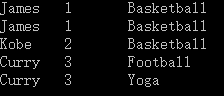

可见,并没有去除重复的记录。
不带comparer参数的Distinct方法是使用的IEqualityComparer接口的默认比较器进行比较的,对于引用类型,默认比较器比较的是其引用地址,程序中集合里的每一个元素都是个新的实例,引用地址都是不同的,所以不会被作为重复记录删除掉。
2)带参数的Distinct方法去重
新建一个类,实现IEqualityComparer接口。注意GetHashCode方法的实现,只有HashCode相同才会去比较
只有一个比较条件
public class Compare:IEqualityComparer<Student>
    {
        public bool Equals(Student x,Student y)
        {
            return x.Id == y.Id;//可以自定义去重规则,此处将Id相同的就作为重复记录,不管学生的爱好是什么
        }
        public int GetHashCode(Student obj)
        {
            return obj.Id.GetHashCode();
        }
    }
然后调用
list.Distinct(new Compare()).ToList().ForEach(s => Console.WriteLine(s.ToString()));
执行结果:
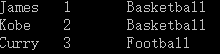
我们按照Id去给这个集合去重成功!
二、复杂应用
1只有一个比较条件,比较稳妥的写法:
新建一个对象:
public class Product
{  public string Id {get;set}
    public string Name { get; set; }
    public int Code { get; set; }
}
集合
Product[] list = {
     new Product { Name = "apple", Code = 9 ,ID=1},
     new Product { Name = "orange", Code = 4  ,ID=2}
     new Product { Name = "orange", Code = 4  ,ID=3}
     new Product { Name = "orange", Code = 4  ,ID=3}
};
//如果对象存在唯一主键,例如:从数据库里查询出来的数据存在 ID

class ProductComparer : IEqualityComparer<Product>
{
    // Products are equal if their names and product numbers are equal.
    public bool Equals(Product x, Product y)
    {

        //Check whether the compared objects reference the same data.
        if (Object.ReferenceEquals(x, y)) return true;

        //Check whether any of the compared objects is null.
        if (Object.ReferenceEquals(x, null) || Object.ReferenceEquals(y, null))
            return false;

        //Check whether the products' properties are equal.
        return x.ID == y.ID;
    }

    // If Equals() returns true for a pair of objects
    // then GetHashCode() must return the same value for these objects.

    public int GetHashCode(Product product)
    {
        //Check whether the object is null
        if (Object.ReferenceEquals(product, null)) return 0;


        //Get hash code for the Code field.
        int hashID = product.ID.GetHashCode();

        //Calculate the hash code for the product.
        return hashID;
    }

}
调用
list.Distinct(new ProcuctComparar()).ToList()
2多个比较条件写法
// 如果存在组合主键或组合唯一索引,即多个字段组合才能确定唯一性。 这里是Code和Name
// Custom comparer for the Product class
class ProductComparer2 : IEqualityComparer<Product>
{
    // Products are equal if their names and product numbers are equal.
    public bool Equals(Product x, Product y)
    {

        //Check whether the compared objects reference the same data.
        if (Object.ReferenceEquals(x, y)) return true;

        //Check whether any of the compared objects is null.
        if (Object.ReferenceEquals(x, null) || Object.ReferenceEquals(y, null))
            return false;

        //Check whether the products' properties are equal.
        return x.Code == y.Code && x.Name == y.Name;
    }

    // If Equals() returns true for a pair of objects
    // then GetHashCode() must return the same value for these objects.

    public int GetHashCode(Product product)
    {
        //Check whether the object is null
        if (Object.ReferenceEquals(product, null)) return 0;

        //Get hash code for the Name field if it is not null.
        int hashProductName = product.Name == null ? 0 : product.Name.GetHashCode();

        //Get hash code for the Code field.
        int hashProductCode = product.Code.GetHashCode();

        //Calculate the hash code for the product.
        return hashProductName ^ hashProductCode;
    }

}
调用
list.Distinct(new ProcuctComparar2()).ToList()
三、如何编写一个具有扩展性的去重方法
public class Compare<T, C> : IEqualityComparer<T>
    {
        private Func<T, C> _getField;
        public Compare(Func<T, C> getfield)
        {
            this._getField = getfield;
        }
        public bool Equals(T x, T y)
        {
            return EqualityComparer<C>.Default.Equals(_getField(x), _getField(y));
        }
        public int GetHashCode(T obj)
        {
            return EqualityComparer<C>.Default.GetHashCode(this._getField(obj));
        }
    }
    public static class CommonHelper
    {
        /// <summary>
        /// 自定义Distinct扩展方法
        /// </summary>
        /// <typeparam name="T">要去重的对象类</typeparam>
        /// <typeparam name="C">自定义去重的字段类型</typeparam>
        /// <param name="source">要去重的对象</param>
        /// <param name="getfield">获取自定义去重字段的委托</param>
        /// <returns></returns>
        public static IEnumerable<T> MyDistinct<T, C>(this IEnumerable<T> source, Func<T, C> getfield)
        {
            return source.Distinct(new Compare<T, C>(getfield));
        }
    }
调用
1单个比较条件
list.MyDistinct(s=>s.Id).ToList();
Id 是用于较的属性(或字段),它是可以是任何一个属性。
2多个比较条件如何实现呢?
思路: list.MyDistinct(s=>s.Id&&s.Name).ToList();
四、拓展应用:
C# List 集合 交集、并集、差集、去重,都是实现接口IEqualityComparer
https://www.cnblogs.com/hao-1234-1234/p/10408602.html
用到了泛型、委托、扩展方法等知识点。可以用于任何集合的各种去重场景
发布者:全栈程序员-站长,转载请注明出处:https://javaforall.net/141574.html原文链接:https://javaforall.net


