
大家好,又见面了,我是你们的朋友全栈君。
1、列表实例:由字符串创建一个作业评分列表,做增删改查询统计遍历操作。例如,查询第一个3分的下标,统计1分的同学有多少个,3分的同学有多少个等。
m=list('123223121321312')
print('成绩:',m)
m.append('3')
print('增加:',m)
m.pop()
print('删除:',m)
m.insert(2,'2')
print('插入:',m)
m[2]='1'
print('修改:',m)
print('第一个3分index:',m.index('3'))
print('1分人数:',m.count('1'))
print('3分人数:',m.count('3'))
2、字典实例:建立学生学号成绩字典,做增删改查遍历操作。
a={'周周':98,'张四':93,'李三':87,'李五':92,'周六':96}
print('学生成绩字典',a)
a['吴沟']=78
print('增加一个学生')
print(a)
a.pop('孙十一')
print('删除孙十一')
print(a)
a['吴沟']=87
print('修改吴沟的成绩')
print(a)
print('查找周周的成绩:',a.get('周周'))
3、列表,元组,字典,集合的遍历。
总结列表,元组,字典,集合的联系与区别。
m = list('123484123413216')
n = tuple('161231313535')
i = {'01':12,'03':546,'03':123456,'04':8524,'05':1546,'06':679}
j = {1, 2, 3, 4, 5}
print("列表遍历:",m)
print("元组遍历:",n)
print("字典遍历:",i)
print("集合遍历:",j)
列表:可读可修改,符号为[],可进行增删改查等操作。
元组:只读不可修改,符号为()。
字典:有键-值组,无序,符号为{}。
集合:可通过set函数实现集合,无序,可修改,符号为{}。
4、英文词频统计实例
待分析字符串分解提取单词
- 待分析字符串
- 分解提取单词
- 大小写 txt.lower()
- 分隔符’.,:;?!-_’
- 计数字典
-
排除语法型词汇,代词、冠词、连词
-
- 排序list.sort()
- 输出TOP(10)
news = '''For years, British explorer William Lindesay’s inquiries about a possible
extension of the Great Wall in Mongolia turned up nothing, but the researcher
recently had a breakthrough. Seeking insight from Professor Baasan Tudevin, a
lauded but hard-to-find expert on the region, Lindesay posted an advertisement
in a local newspaper. It was a long shot, but the two connected and the Mongolian
geographer said he knew of several such structures in the Gobi desert, the Telegraph reports.
Lindesay formed an expedition in August and with two Land Cruisers, 44 gallons of water,
12 gallons of extra gasoline and a lead from Google Earth, began poking around about 25 miles
from the sensitive Chinese-Mongolian border. Two days into the exploration, his team
discovered what is thought to be the first section of the Great Wall to exist outside
of China. Lost for nearly 1,000 years, the wall’s 62-mile-long arm is made mostly of shrubs
and dirt. Lindesay told the Telegraph much of the wall is about shin-level, but there is
also a stretch that reaches up to his shoulders.'''

exc ={'','the','of','a','but','two','about','in','is'}
news = news.lower()
for i in ',.':
    news = news.replace(i,' ')
words = news.split(' ')
dic = {}
keys = set(words)
for w in exc:
    keys.remove(w)
for i in keys:
    dic[i]=words.count(i)
wc = list(dic.items())
wc.sort(key=lambda x:x[1],reverse=True)
for i in range(10):
    print(wc[i])
5、文本操作
fo=open('/Users/Administrator/Desktop/test.txt','r')
news=fo.read()
fo.close()
exc={'','the','of','a','but','two','about','in','is'}
news =news.lower()
for i in ''',.?!"''':
    news=news.replace(i,' ')

print(news)
words=news.split(' ')
print(words)
d={}
keys = set(words)
for r in exc:
    keys.remove(r)
for i in keys:
    d[i]=words.count(i)
wc=list(d.items())
wc.sort(key=lambda x:x[1],reverse=True)
for i in range(10):
    print(wc[i])
(补交)大数据之NBA 2017-09-04
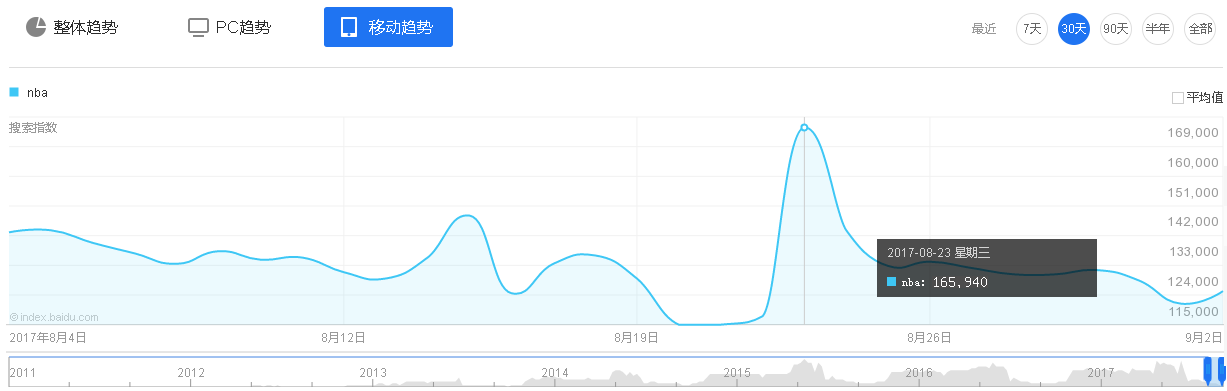
2017年NBA季后赛落幕后,网络上仍有大量关于NBA关键词的搜索。
这是近30天来,通过PC端和移动端搜索的趋势,可以看到有些日期的搜索指数是猛增的,因为NBA有大新闻爆出,比如8月23日,骑士与凯尔特人正式达成交易,小托马斯与欧文互换东家。


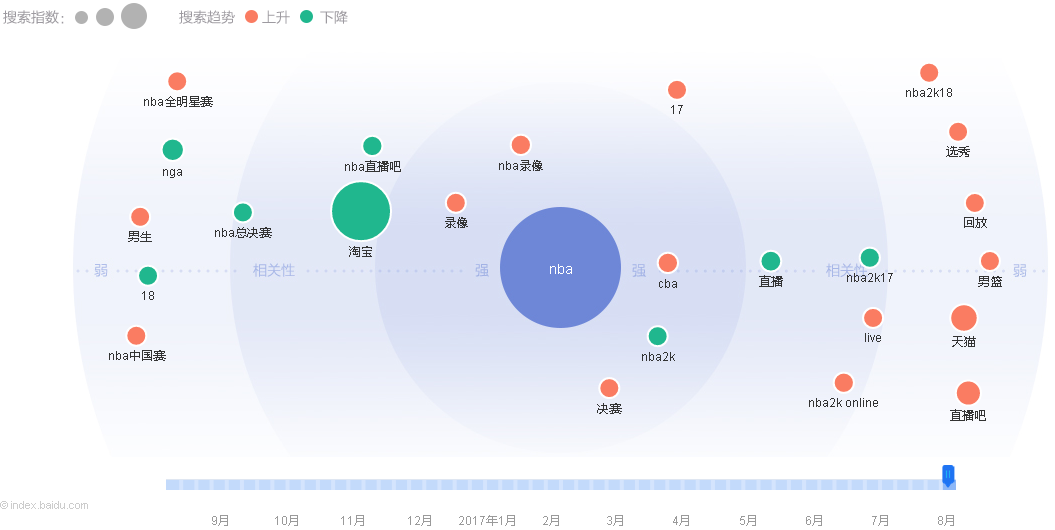
下面是8月份的搜索需求图谱。
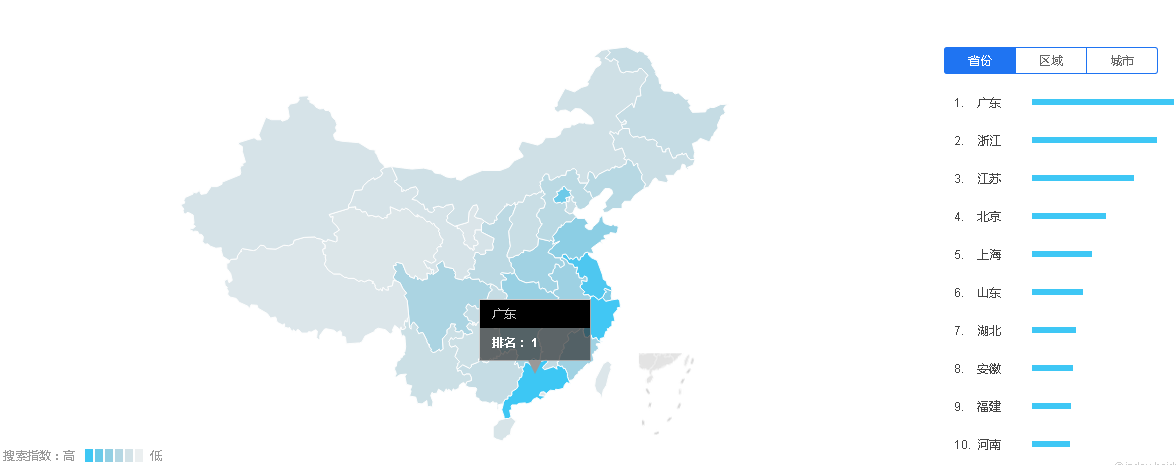
下面是暑假期间的关于NBA搜索的地域分布,广东的搜索量全国第一。
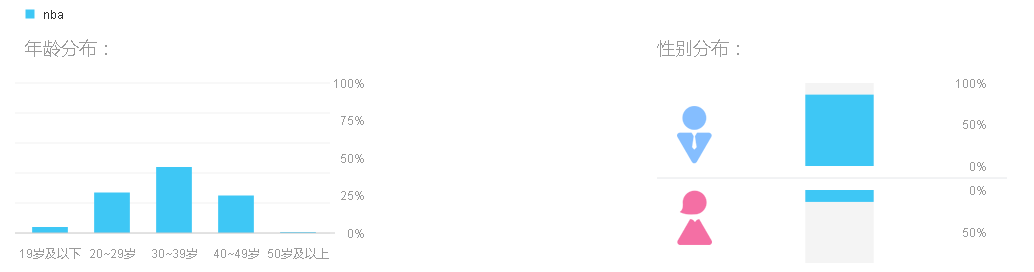
下面是对NBA感兴趣的人群属性,女性只占极少数,而20至50岁的男性是NBA观众的主力军。
(补交)Python练习 2017-09-07
1、Hello World
print('hello world')
2、简单交换
name = input("输入姓名:")
print("{}同学,学好python,前途无量!".format(name))
print("{}大侠,学好python,前途无量!".format(name[0]))
print("{}哥哥,学好python,前途无量!".format(name[1:]))
3、输入两个数,计算两数之和(一行代码)
print('结果:%.0f'%float(float(input('输入第一个数字:'))+float(input('输入第二个数字:'))))
4、输入三角形三边长度,计算三角形面积(海伦公式)

l1 = float(input('请输入第一条边的长度:'))
l2 = float(input('请输入第二条边的长度:'))
l3 = float(input('请输入第三条边的长度:'))
p = (l1+l2+l3) / 2
s = (p*(p-l1)*(p-l2)*(p-l3))**0.5
print('三角形的面积为:%.2f'%s)
5、输入半径,计算圆的面积
radius = float(input("半径:"))
area = float(3.1415 * radius * radius)
print("面积:%.2f"%area)
6、画一组同切圆
import turtle
turtle.circle(10)
turtle.circle(20)
turtle.circle(30)
turtle.circle(40)
turtle.circle(50)
7、画一个五角星
import turtle
turtle.forward(200)
turtle.right(144)
turtle.forward(200)
turtle.right(144)
turtle.forward(200)
turtle.right(144)
turtle.forward(200)
turtle.right(144)
turtle.forward(200)
8、画一个全黄色五角星
import turtle
turtle.color('yellow')
turtle.fillcolor('yellow')
turtle.begin_fill()
turtle.forward(200)
turtle.right(144)
turtle.forward(200)
turtle.right(144)
turtle.forward(200)
turtle.right(144)
turtle.forward(200)
turtle.right(144)
turtle.forward(200)
turtle.end_fill()
9、画一组同心圆
import turtle
turtle.penup()
turtle.goto(0,-200)
turtle.pendown()
turtle.circle(200)
turtle.penup()
turtle.goto(0,-150)
turtle.pendown()
turtle.circle(150)
turtle.penup()
turtle.goto(0,-100)
turtle.pendown()
turtle.circle(100)
10、画国旗
import turtle
turtle.color('yellow')
turtle.bgcolor('red')
turtle.fillcolor('yellow')

turtle.begin_fill()

turtle.up()
turtle.goto(-200,100)
turtle.down()

turtle.forward(150)
turtle.right(144)
turtle.forward(150)
turtle.right(144)
turtle.forward(150)
turtle.right(144)
turtle.forward(150)
turtle.right(144)
turtle.forward(150)
turtle.end_fill()

turtle.begin_fill()

turtle.up()
turtle.goto(-80,160)
turtle.down()

turtle.forward(50)
turtle.right(144)
turtle.forward(50)
turtle.right(144)
turtle.forward(50)
turtle.right(144)
turtle.forward(50)
turtle.right(144)
turtle.forward(50)
turtle.end_fill()

turtle.begin_fill()

turtle.up()
turtle.goto(-22,68)
turtle.down()

turtle.forward(50)
turtle.right(144)
turtle.forward(50)
turtle.right(144)
turtle.forward(50)
turtle.right(144)
turtle.forward(50)
turtle.right(144)
turtle.forward(50)
turtle.end_fill()

turtle.begin_fill()

turtle.up()
turtle.goto(-30,110)
turtle.down()

turtle.forward(50)
turtle.right(144)
turtle.forward(50)
turtle.right(144)
turtle.forward(50)
turtle.right(144)
turtle.forward(50)
turtle.right(144)
turtle.forward(50)
turtle.end_fill()

turtle.begin_fill()

turtle.up()
turtle.goto(-45,-10)
turtle.down()

turtle.forward(50)
turtle.right(144)
turtle.forward(50)
turtle.right(144)
turtle.forward(50)
turtle.right(144)
turtle.forward(50)
turtle.right(144)
turtle.forward(50)
turtle.end_fill()

发布者:全栈程序员-站长,转载请注明出处:https://javaforall.net/156170.html原文链接:https://javaforall.net


