
大家好,又见面了,我是你们的朋友全栈君。
Custom Value Drawer Attribute 特性,允许用户自定义一个绘制方法,字段将以自定的绘制方式展示在Inspector中,非常灵活。
含有Label和不含有Label的字段
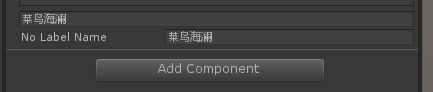

    [CustomValueDrawer("HaveLabelNameFunction")]
    public string HaveLabelName;
    [CustomValueDrawer("NoLabelNameFunction")]
    public string NoLabelName;

    public string HaveLabelNameFunction(string tempName, GUIContent label)
    {
        return EditorGUILayout.TextField(tempName);
    }
    public string NoLabelNameFunction(string tempName, GUIContent label)
    {
        return EditorGUILayout.TextField(label,tempName);
    }
绘制Slider滑动条
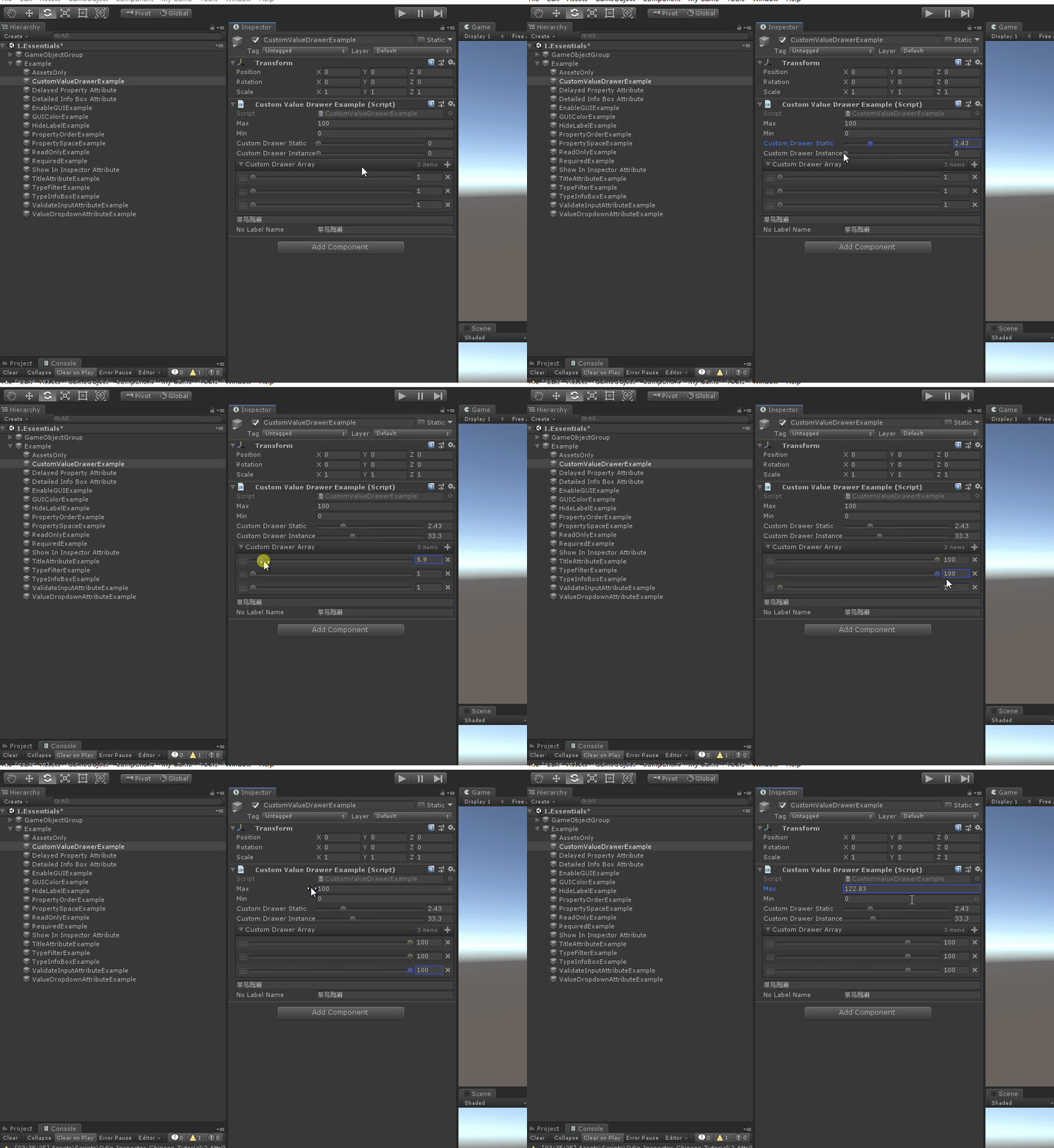
    public float Max = 100, Min = 0;

    [CustomValueDrawer("MyStaticCustomDrawerStatic")]
    public float CustomDrawerStatic;
    private static float MyStaticCustomDrawerStatic(float value, GUIContent label)
    {
        return EditorGUILayout.Slider(label, value, 0f, 10f);
    }

    [CustomValueDrawer("MyStaticCustomDrawerInstance")]
    public float CustomDrawerInstance;

    private float MyStaticCustomDrawerInstance(float value, GUIContent label)
    {
        return EditorGUILayout.Slider(label, value, this.Min, this.Max);
    }

    [CustomValueDrawer("MyStaticCustomDrawerArray")]
    public float[] CustomDrawerArray = new float[] { 3f, 5f, 6f };


    private float MyStaticCustomDrawerArray(float value, GUIContent label)
    {
        return EditorGUILayout.Slider(value, this.Min, this.Max);
    }
完整示例代码
using Sirenix.OdinInspector;
using UnityEditor;
using UnityEngine;

public class CustomValueDrawerExample : MonoBehaviour
{
    public float Max = 100, Min = 0;

    [CustomValueDrawer("MyStaticCustomDrawerStatic")]
    public float CustomDrawerStatic;
    private static float MyStaticCustomDrawerStatic(float value, GUIContent label)
    {
        return EditorGUILayout.Slider(label, value, 0f, 10f);
    }

    [CustomValueDrawer("MyStaticCustomDrawerInstance")]
    public float CustomDrawerInstance;

    private float MyStaticCustomDrawerInstance(float value, GUIContent label)
    {
        return EditorGUILayout.Slider(label, value, this.Min, this.Max);
    }

    [CustomValueDrawer("MyStaticCustomDrawerArray")]
    public float[] CustomDrawerArray = new float[] { 3f, 5f, 6f };


    private float MyStaticCustomDrawerArray(float value, GUIContent label)
    {
        return EditorGUILayout.Slider(value, this.Min, this.Max);
    }

    [CustomValueDrawer("HaveLabelNameFunction")]
    public string HaveLabelName;
    [CustomValueDrawer("NoLabelNameFunction")]
    public string NoLabelName;

    public string HaveLabelNameFunction(string tempName, GUIContent label)
    {
        return EditorGUILayout.TextField(tempName);
    }
    public string NoLabelNameFunction(string tempName, GUIContent label)
    {
        return EditorGUILayout.TextField(label,tempName);
    }
}
更多教程内容详见:革命性Unity 编辑器扩展工具 — Odin Inspector 系列教程
版权声明:本文内容由互联网用户自发贡献,该文观点仅代表作者本人。本站仅提供信息存储空间服务,不拥有所有权,不承担相关法律责任。如发现本站有涉嫌侵权/违法违规的内容, 请联系我们举报,一经查实,本站将立刻删除。
发布者:全栈程序员-站长,转载请注明出处:https://javaforall.net/162813.html原文链接:https://javaforall.net



