
大家好,又见面了,我是你们的朋友全栈君。如果您正在找激活码,请点击查看最新教程,关注关注公众号 “全栈程序员社区” 获取激活教程,可能之前旧版本教程已经失效.最新Idea2022.1教程亲测有效,一键激活。
Jetbrains全系列IDE稳定放心使用
AVAudioEngine录音频时偶发崩溃
报错信息大致如下:
2021-12-15 20:12:38.429028+0800 *[1659:708511] NSURLConnection finished with error – code -1002
“AudioRecorder 创建Audio缓存文件夹成功 /var/mobile/Containers/Data/Application//Library/Caches/Audio”
2021-12-15 20:13:30.762736+0800 ***[1659:708411] [avae] AVAEInternal.h:76 required condition is false: [AVAudioIONodeImpl.mm:1158:SetOutputFormat: (format.sampleRate == hwFormat.sampleRate)]
2021-12-15 20:13:30.764037+0800 ***[1659:708411] *** Terminating app due to uncaught exception ‘com.apple.coreaudio.avfaudio’, reason: ‘required condition is false: format.sampleRate == hwFormat.sampleRate’
*** First throw call stack:
(0x1989799d8 0x1accffb54 0x19888850c 0x1a88e2984 0x1a898c998 0x1a8923038 0x1a892945c 0x1a89a4f4c 0x1a899f414 0x10626bad4 0x10626b130 0x10627f8bc 0x10480ecc0 0x10480e8f4 0x10621e100 0x10621b720 0x10621dcf8 0x10480e8a0 0x10480ed20 0x19b1eaf38 0x19ab80184 0x19ab804c8 0x19ab7ee00 0x19ad65350 0x19ad634e0 0x19b2274cc 0x19b202b0c 0x19b285078 0x19b289818 0x19b280afc 0x1988f9bf0 0x1988f9af0 0x1988f8e38 0x1988f33e0 0x1988f2ba0 0x1af65b598 0x19b1e42f4 0x19b1e9874 0x1ac073b54 0x104a54194 0x104a5410c 0x104a5425c 0x1985d1568)
libc++abi.dylib: terminating with uncaught exception of type NSException
*** Terminating app due to uncaught exception ‘com.apple.coreaudio.avfaudio’, reason: ‘required condition is false: format.sampleRate == hwFormat.sampleRate’
terminating with uncaught exception of type NSException
*** Terminating app due to uncaught exception ‘com.apple.coreaudio.avfaudio’, reason: ‘required condition is false: format.sampleRate == hwFormat.sampleRate’
terminating with uncaught exception of type NSException
排查发现是inputNode和mainMixerNode的format不一致
(lldb) po inputFormat
<AVAudioFormat ***: 1 ch, 48000 Hz, Float32>
(lldb) po outputFormat
<AVAudioFormat 0x282b95a40: 2 ch, 44100 Hz, Float32, non-inter>
原代码:
 let audioEngine = AVAudioEngine()
 let filePlayer = AVAudioPlayerNode()
 let rateEffect = AVAudioUnitTimePitch()

 audioEngine.attach(filePlayer)
 audioEngine.attach(rateEffect)

 let outputFormat = audioEngine.mainMixerNode.outputFormat(forBus: 0)

 //崩溃在这行代码
 audioEngine.connect(audioEngine.inputNode, to: audioEngine.mainMixerNode, fromBus: 0, toBus: 0, format: outputFormat)

        audioEngine.mainMixerNode.installTap(onBus: 0, bufferSize: 4096, format: outputFormat) {
    [weak self] pcmBuffer, when in
        ...
        }
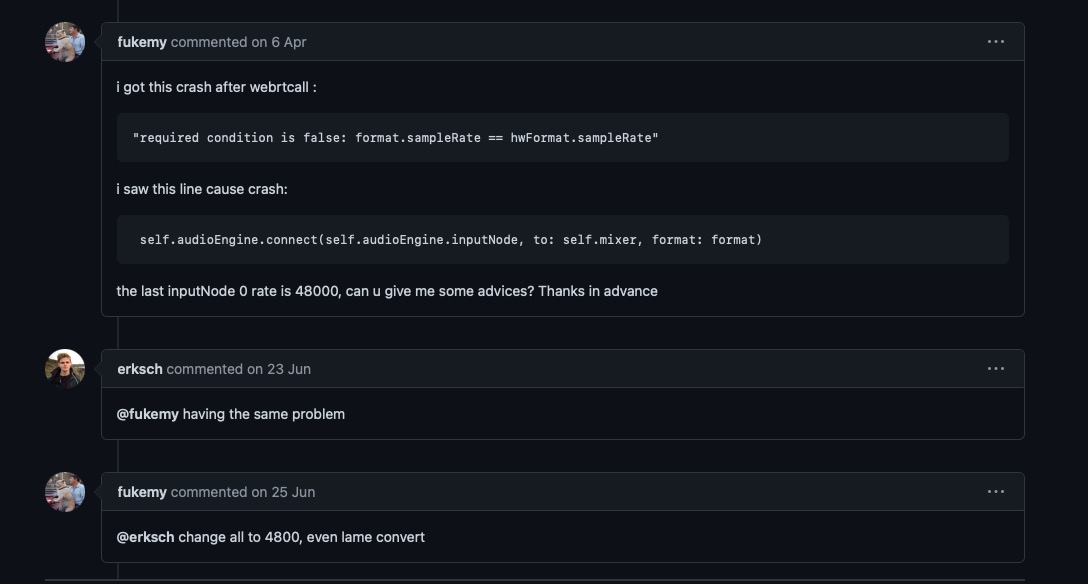
解决办法:将format都改成48000
参考:https://gist.github.com/tad-iizuka/1ca07ca2045a8c6d11e22d15812f7e15

修改后代码
        let audioEngine = AVAudioEngine()
        let filePlayer = AVAudioPlayerNode()
        let rateEffect = AVAudioUnitTimePitch()

        audioEngine.attach(filePlayer)
        audioEngine.attach(rateEffect)

        let inputFormat = audioEngine.inputNode.inputFormat(forBus: 0)
        let outputFormat = audioEngine.mainMixerNode.outputFormat(forBus: 0)

        //修改format为inputNode的format,防止录音崩溃
        audioEngine.connect(audioEngine.inputNode, to: audioEngine.mainMixerNode, fromBus: 0, toBus: 0, format: inputFormat)

        audioEngine.mainMixerNode.installTap(onBus: 0, bufferSize: 4096, format: outputFormat) {
    [weak self] pcmBuffer, when in
        ...
        }
发布者:全栈程序员-站长,转载请注明出处:https://javaforall.net/181074.html原文链接:https://javaforall.net




