
Bit-banding
Bit-banding maps a complete word of memoryonto a single bit in the bit-band region. For example, writing to one of thealias words will set or clear the corresponding bit in the bitband region.
This allows every individual bit in thebit-banding region to be directly accessible from a word-aligned address usinga single LDR instruction. It also allows individual bits to be toggled from Cwithout performing a read-modify-write sequence of instructions.
Address translation
The Cortex-M3 has two 32MB regions that maponto the two 1MB bit-band regions. The two regions are separate, one in theSRAM region and one in the peripheral region.
Each bit in the bit-band region is addressedsequentially in the 32MB alias region. For example, the eighth bit in thebit-band region can be accessed using the eighth word in the 32MB alias region.
Reading and writing to the bit-bandingregion
When writing to the alias regions bit 0 ofthe 32 bit word is used to set the value at the bit-banding region. Readingfrom the alias address will return the value from the bit-band region in bit 0and the other bits will be cleared.
You can also access the base bit-bandregion itself in the same way as normal memory, using word, half word, and byteaccesses.

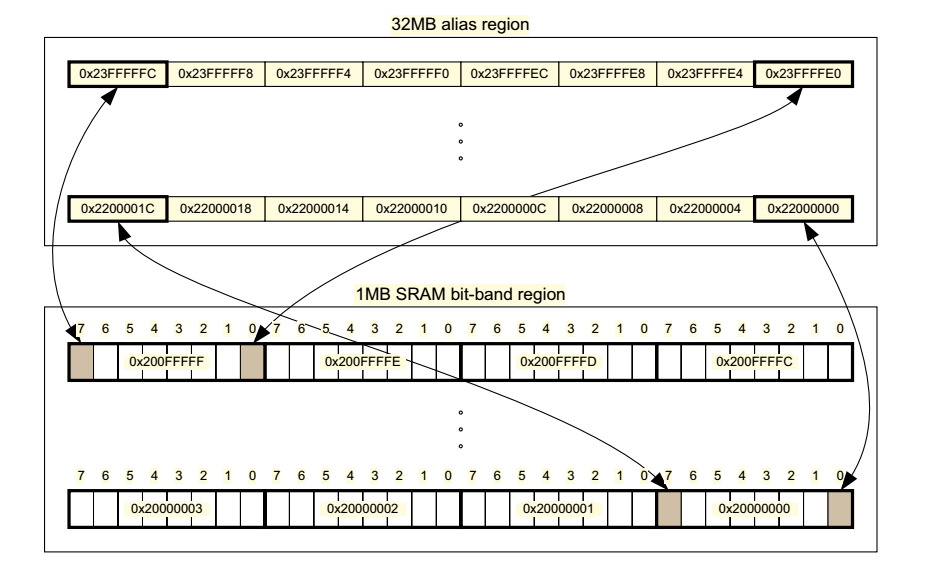
The internal SRAM of the Stellaris® devicesis located at address 0x2000.0000 of the device memory
map. To reduce the number of time consuming read-modify-write (RMW) operations,ARM has
introduced bit-banding technology in the Cortex-M3 processor. With abit-band-enabled processor,
certain regions in the memory map (SRAM and peripheral space) can use addressaliases to access
individual bits in a single, atomic operation. The bit-band base is located ataddress 0x2200.0000.
The bit-band alias is calculated by usingthe formula:
bit-band alias = bit-band base + (byte offset * 32) + (bit number * 4)
For example, if bit 3 at address 0x2000.1000 is to be modified, the bit-bandalias is calculated as:
0x2200.0000 + (0x1000 * 32) + (3 * 4) = 0x2202.000C
With the alias address calculated, an instruction performing a read/write toaddress 0x2202.000C
allows direct access to only bit 3 of the byte at address 0x2000.1000.
//Hw_types.h 以Bit-banding方式访问双字寄存器x中的第b位
#define HWREGBITW(x, b) \
HWREG(((unsigned long)(x) & 0xF0000000) | 0x02000000 | \
(((unsigned long)(x) &0x000FFFFF) << 5) | ((b) << 2))
#define HWREG(x) \
(*((volatile unsigned long *)(x)))
Example:
ulValue = 1234;
for(ulIdx = 0; ulIdx < 32; ulIdx++)
{
//set every bitof ulValue(word) to 1
HWREGBITW(&ulValue,31 – ulIdx) = (0xFFFFFFFF >> (31-ulIdx)) & 1;
UARTprintf(“\r%08x”,ulValue);
Delay(1);
}
发布者:全栈程序员-站长,转载请注明出处:https://javaforall.net/182482.html原文链接:https://javaforall.net



