
大家好,又见面了,我是你们的朋友全栈君。如果您正在找激活码,请点击查看最新教程,关注关注公众号 “全栈程序员社区” 获取激活教程,可能之前旧版本教程已经失效.最新Idea2022.1教程亲测有效,一键激活。
Jetbrains全系列IDE稳定放心使用
本文通过参考网上资源做的一个例子。
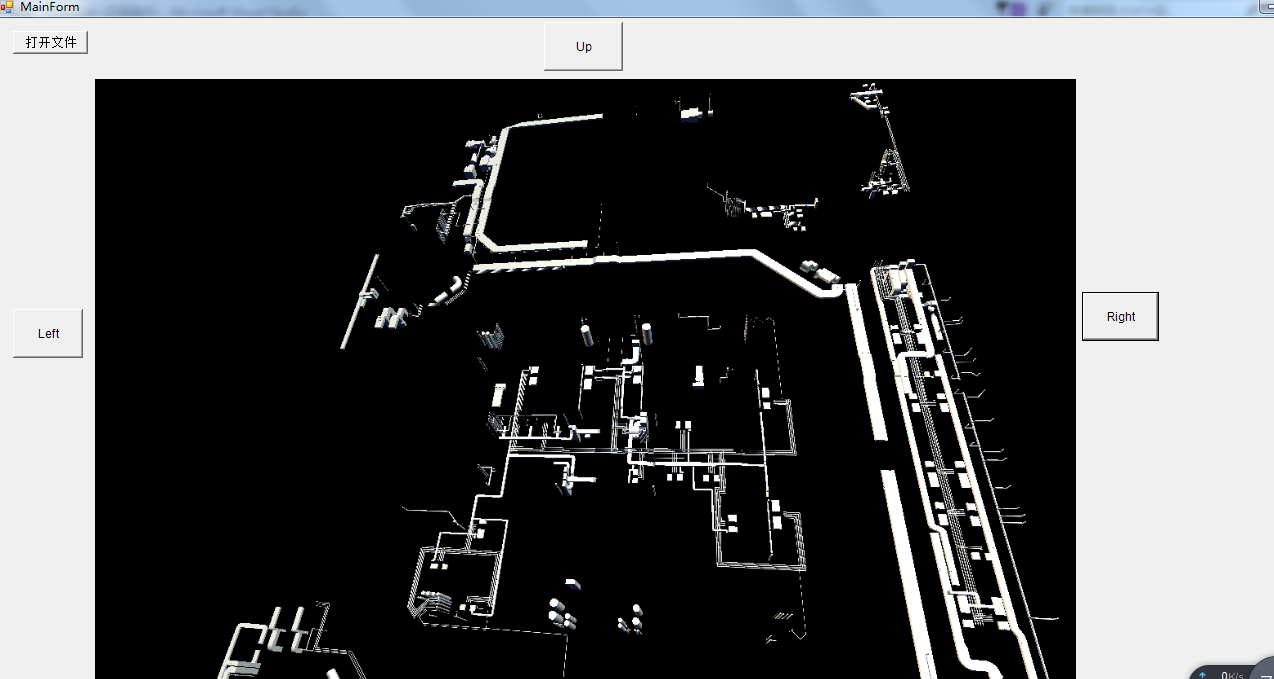
本程序的功能就是通过xna 将3d 图像显示到winfrom 对他进行旋转操作。
首先我们先准备好两个文件夹
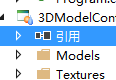

model 文件夹放fbx文件,textures 放渲染文件,操作步骤都是添加现有项,准备好资源文件后,先检查下是否有以下引用
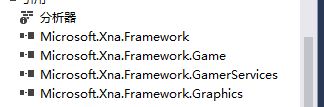
下面将定义Game类的实现方法
//本代码以网上参考稍作修改,使用请注明非本人原创,因未知是谁原创特此声明非本人原创
using System;
using Microsoft.Xna.Framework;
using Microsoft.Xna.Framework.Graphics;
using Microsoft.Xna.Framework.Input;
using System.Runtime.Remoting.Messaging;

namespace _3DModel
{
    /// <summary>
    /// This is the main type for your game
    /// </summary>
    public class Game1 : Microsoft.Xna.Framework.Game
    {

        #region 变量
        GraphicsDeviceManager graphics;    //声明一个图形设备管理器//define a graphics manage
        SpriteBatch spriteBatch;           //声明一个精灵集群.可以以相同的设置操纵(draw)一组精灵//define a SpriteBatch
        Model myModel;                     //定义一个Model//define a model
        float aspectRatio;                 //屏幕高宽比,控制3D世界的视图怎样转换成屏幕上的2D图象(投射)用到//control the screen,make the 3d model show in 2d sreen
        Vector3 modelPosition = Vector3.Zero;        //模型在屏幕上的位置(世界坐标系),屏幕中心为坐标原点//define a world coordinate,the origin is the center of screen
        //float modelRotationY = 0.0f;                  //模型旋转角度 //rotate the angle
        //float modelRotationX = 0.0f;                  //模型旋转角度 //rotate the angle
        /*******************************************************************************
         *                       +Y
         *                       |    -Z
         *                       |    /
         *                       |   /
         *                       |  /
         *                       | /
         *                (0,0,0) ------------+X
        /*******************************************************************************/
        Vector3 cameraPosition = new Vector3(1000.0f, 0.0f, 5000.0f);       //摄像机(眼睛)的位置和方向//vidicon location

        #endregion 变量
        System.Windows.Forms.Form xnaWindow;  //保存原始的窗体对象
        MainForm mainform;
        public Game1(MainForm form)
        {

            graphics = new GraphicsDeviceManager(this);
            graphics.PreferredBackBufferHeight = 760;
            graphics.PreferredBackBufferWidth = 1200;
            Content.RootDirectory = "Content";
            //窗体对换
            this.mainform  = form;
            graphics.PreparingDeviceSettings += new EventHandler<PreparingDeviceSettingsEventArgs>(graphics_PreparingDeviceSettings);
            xnaWindow = (System.Windows.Forms.Form)System.Windows.Forms.Control.FromHandle((this.Window.Handle));
            xnaWindow.GotFocus += new EventHandler(delegate(object sender, EventArgs e)
            {
                ((System.Windows.Forms.Form)sender).Visible = false;
                form.TopMost = false;
            });

        }

        public Game1()
        {
        }

        private void graphics_PreparingDeviceSettings(object sender, PreparingDeviceSettingsEventArgs e)
        {
            e.GraphicsDeviceInformation.PresentationParameters.DeviceWindowHandle = mainform.Panel.Handle;
        }


        SpriteBatch sprites;

        protected override void Initialize()
        {

         //   backgroundTexture = Content.Load<Texture2D>("akqm");

            sprites = new SpriteBatch(graphics.GraphicsDevice);


            base.Initialize();
        }

      protected override void LoadContent()
        {

            //spriteBatch = new SpriteBatch(GraphicsDevice);
            //myModel = Content.Load<Model>("Models\\"+mainform.filename);         //素材管道载入3D模型//download the 3d model
            //aspectRatio = (float)graphics.GraphicsDevice.Viewport.Width /(float)graphics.GraphicsDevice.Viewport.Height;
            loade();
            // TODO: use this.Content to load your game content here
        }


        public void loade()
        {

            spriteBatch = new SpriteBatch(GraphicsDevice);
            myModel = Content.Load<Model>("Models\\" + mainform.filename);         //素材管道载入3D模型//download the 3d model
            aspectRatio = (float)graphics.GraphicsDevice.Viewport.Width / (float)graphics.GraphicsDevice.Viewport.Height;

        }


        protected override void UnloadContent()
        {
            // TODO: Unload any non ContentManager content here
        }

       /// <summary>
       ///
       /// </summary>
       /// <param name="gameTime"></param>


        protected override void Update(GameTime gameTime)
        {
            // Allows the game to exi
            GamePadState gamePad = GamePad.GetState(PlayerIndex.One);

            KeyboardState keyboard = Keyboard.GetState();
            if (GamePad.GetState(PlayerIndex.One).Buttons.Back == ButtonState.Pressed || keyboard.IsKeyDown(Keys.Escape))
                     this.Exit();
            if (keyboard.IsKeyDown (Keys.Right ))
                Program.modelRotationY += (float)gameTime.ElapsedGameTime.TotalMilliseconds * MathHelper.ToRadians(0.1f);
             else if (keyboard.IsKeyDown (Keys.Left  ))
                Program.modelRotationY -= (float)gameTime.ElapsedGameTime.TotalMilliseconds * MathHelper.ToRadians(0.1f);
            else if (keyboard.IsKeyDown(Keys.Up ))
               Program.modelRotationX -= (float)gameTime.ElapsedGameTime.TotalMilliseconds * MathHelper.ToRadians(0.1f);
            else if (keyboard.IsKeyDown(Keys.Down ))
                Program.modelRotationX += (float)gameTime.ElapsedGameTime.TotalMilliseconds * MathHelper.ToRadians(0.1f);
            //if (mainform.filename != mainform.filename)
            //{
            //    base.Update(gameTime);
            //}


            base.Update(gameTime);
        }

       /// <summary>
       /// /
       /// </summary>
       /// <param name="gameTime"></param>
        protected override void Draw(GameTime gameTime)
        {
            GraphicsDevice.Clear(Color.Black);
            Matrix[] transforms = new Matrix[myModel.Bones.Count];
            myModel.CopyAbsoluteBoneTransformsTo(transforms);

            // 绘制模型
            foreach (ModelMesh mesh in myModel.Meshes)   //遍历模型mesh// for() all the mesh
            {
                //BasicEffect类可以简单的通过设置属性,包含光照、纹理等等就可以在“五分钟”内实现对一个物体的呈现。
                string aaa = mesh.Name;
                //if (aaa.ToString().IndexOf("矩形")>0 ) {


                    foreach (BasicEffect effect in mesh.Effects)
                    {

                    effect.EnableDefaultLighting();        //光照 //light
                    effect.World = transforms[mesh.ParentBone.Index] * Matrix.CreateRotationY(Program.modelRotationY) * Matrix.CreateRotationX(Program.modelRotationX) * Matrix.CreateTranslation(modelPosition);     //使用World矩阵来改变模型在世界坐标系中的位置//use the World Matrix change the world coordinate
                        effect.View = Matrix.CreateLookAt(cameraPosition, Vector3.Zero, Vector3.Up);
                        effect.Projection = Matrix.CreatePerspectiveFieldOfView(MathHelper.ToRadians(60.0f), aspectRatio, 1.0f, 10000.0f);
                    //Color[] colors = new Color[3];

                    //for (int i = 0; i < 3; i++)
                    //{
                    //    colors.SetValue(new Color(0, 1, 0), i);
                    //}


                }

                    mesh.Draw();
                //}
            }


            //sprites.Begin();
            //sprites.Draw(backgroundTexture, Vector2.Zero, Color.White);
            //sprites.End();
            base.Draw(gameTime);
        }
    }
}
然后进行 winfrom 的编写
using System;
using System.Collections.Generic;
using System.ComponentModel;
using System.Data;
using System.Drawing;
using System.IO;
using System.Linq;
using System.Reflection;
using System.Text;
using System.Threading;
using System.Windows.Forms;

namespace _3DModel
{
    public partial class MainForm : Form
    {
        public MainForm()
        {
            InitializeComponent();
        }

//xna form 接入
        public Control Panel
        {
            get { return XnaPanel; }
        }


        public string  strRotate="";
        private void bt_Up_MouseDown(object sender, MouseEventArgs e)
        {
            Button bt = (Button)sender;
            strRotate = bt.Text;
            timer1.Enabled = true;
        }

        private void bt_Up_MouseUp(object sender, MouseEventArgs e)
        {
            strRotate = "";
            timer1.Enabled = false ;
        }

        private void timer1_Tick(object sender, EventArgs e)
        {if(strRotate =="Up")
            Program.modelRotationX += (float)(-0.03);
            else if(strRotate =="Down")
            Program.modelRotationX -= (float)(-0.03);
          else if (strRotate == "Left")
            Program.modelRotationY -= (float)(-0.03);
          else if (strRotate == "Right")
            Program.modelRotationY += (float)(-0.03);
        }

        private void bt_Left_Click(object sender, EventArgs e)
        {

        }
        public static MainForm form;
        static Game1 game=new Game1(form);

        public void button1_Click(object sender, EventArgs e)
        {
            OpenFileDialog fileDialog = new OpenFileDialog();


            game.Exit();
            fileDialog.Title = "Load Model";

            fileDialog.Filter = "Model Files (*.fbx;*.x)|*.fbx;*.x|" +
                                "FBX Files (*.fbx)|*.fbx|" +
                                "X Files (*.x)|*.x|" +
                                "All Files (*.*)|*.*";

            if (fileDialog.ShowDialog() == DialogResult.OK)
            {


                string[] strName = fileDialog.SafeFileName.Split('.');
                filename = strName[0];
                game.loade();
            }


        }


        public string filename = "1";

    }
}
效果如下
注:本文代码只做学习参考不得用作商业用途。违反引起的法律责任将由违反本声明的承担
转载于:https://www.cnblogs.com/mlhelloworld/p/6971062.html
版权声明:本文内容由互联网用户自发贡献,该文观点仅代表作者本人。本站仅提供信息存储空间服务,不拥有所有权,不承担相关法律责任。如发现本站有涉嫌侵权/违法违规的内容, 请联系我们举报,一经查实,本站将立刻删除。
发布者:全栈程序员-站长,转载请注明出处:https://javaforall.net/184290.html原文链接:https://javaforall.net




