
LINQ 查询简介TOC
LINQ 通过提供处理各种数据源和数据格式的数据的一致模型,简化了这一情况。 在 LINQ 查询中,始终会用到对象。 可以使用相同的基本编码模式来查询和转换 XML 文档、SQL 数据库、ADO.NET 数据集、.NET 集合中的数据以及 LINQ 提供程序可用的任何其他格式的数据。
查询操作的三个部分
所有 LINQ 查询操作都由以下三个不同的操作组成:
- 获取数据源
- 创建查询
- 执行查询。
下面的示例演示如何用源代码表示查询操作的三个部分。 为方便起见,此示例将一个整数数组用作数据源;但其中涉及的概念同样适用于其他数据源。 本主题的其余部分也会引用此示例。
class IntroToLINQ {
static void Main() {
// The Three Parts of a LINQ Query: // 1. Data source. int[] numbers = new int[7] {
0, 1, 2, 3, 4, 5, 6 }; // 2. Query creation. // numQuery is an IEnumerable
下图演示完整的查询操作。 在 LINQ 中,查询的执行不同于查询本身。 换句话说,仅通过创建查询变量不会检索到任何数据。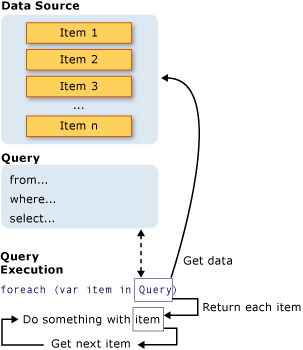

using System; using System.Collections.Generic; using System.Linq; namespace test {
    class Program {
    private static List<Customer> customers = new List<Customer>() {
    new Customer{
    City="London",Name="Devon"}, new Customer{
    City="London",Name="Steve"} , new Customer{
    City="Paris",Name="Jane"} }; static void Main(string[] args) {
    Console.WriteLine("Hello World!"); } } public class Customer {
    public string Name {
    get; set; } public string City {
    get; set; } } }
基本 LINQ 查询操作
在 LINQ 查询中,第一步是指定数据源。 和大多数编程语言相同,在使用 C# 时也必须先声明变量,然后才能使用它。 在 LINQ 查询中,先使用 from 子句引入数据源 (customers) 和范围变量 (cust)。
//queryAllCustomers is an IEnumerable
筛选 (where )
或许,最常见的查询操作是以布尔表达式的形式应用筛选器。 筛选器使查询仅返回表达式为 true 的元素。 将通过使用 where 子句生成结果。 筛选器实际指定要从源序列排除哪些元素。 在下列示例中,仅返回地址位于“London”的 customers。
var queryLondonCustomers = from cust in customers where cust.City == "London" select cust; 可使用熟悉的 C# 逻辑 AND 和 OR 运算符,在 where 子句中根据需要应用尽可能多的筛选器表达式。 例如,若要仅返回来自“London”的客户 AND 该客户名称为“Devon”,可编写以下代码:
where cust.City == "London" && cust.Name == "Devon" 要返回来自 London 或 Paris 的客户,可编写以下代码:
where cust.City == "London" || cust.City == "Paris" 中间件排序 (orderby)
对返回的数据进行排序通常很方便。 orderby 子句根据要排序类型的默认比较器,对返回序列中的元素排序。 例如,基于 Name 属性,可将下列查询扩展为对结果排序。 由于 Name 是字符串,默认比较器将按字母顺序从 A 到 Z 进行排序
var queryLondonCustomers3 = from cust in customers where cust.City == "London" orderby cust.Name ascending select cust; 要对结果进行从 Z 到 A 的逆序排序,请使用 orderby…descending 子句
分组(group)
group 子句用于对根据您指定的键所获得的结果进行分组。 例如,可指定按 City 对结果进行分组,使来自 London 或 Paris 的所有客户位于单独的组内。 在这种情况下,cust.City 是Key。
// queryCustomersByCity is an IEnumerable
>
var queryCustomersByCity = from cust in customers group cust by cust.City; // customerGroup is an IGrouping
联接(join)
联接操作在不同序列间创建关联,这些序列在数据源中未被显式模块化。 例如,可通过执行联接来查找所有位置相同的客户和分销商。 在 LINQ 中,join 子句始终作用于对象集合,而非直接作用于数据库表。
var innerJoinQuery = from cust in customers join dist in distributors on cust.City equals dist.City select new {
    CustomerName = cust.Name, DistributorName = dist.Name };
选择(select)
select 子句生成查询结果并指定每个返回的元素的“形状”或类型。 例如,可以指定结果包含的是整个 Customer 对象、仅一个成员、成员的子集,还是某个基于计算或新对象创建的完全不同的结果类型。 当 select 子句生成除源元素副本以外的内容时,该操作称为投影。 使用投影转换数据是 LINQ 查询表达式的一种强大功能
标准查询运算符概述
string sentence = "the quick brown fox jumps over the lazy dog"; // Split the string into individual words to create a collection.  string[] words = sentence.Split(' '); // Using query expression syntax.  var query = from word in words group word.ToUpper() by word.Length into gr orderby gr.Key select new {
    Length = gr.Key, Words = gr }; // Using method-based query syntax.  var query2 = words. GroupBy(w => w.Length, w => w.ToUpper()). Select(g => new {
    Length = g.Key, Words = g }). OrderBy(o => o.Length); foreach (var obj in query) {
    Console.WriteLine("Words of length {0}:", obj.Length); foreach (string word in obj.Words) Console.WriteLine(word); } // This code example produces the following output:  //  // Words of length 3:  // THE  // FOX  // THE  // DOG  // Words of length 4:  // OVER  // LAZY  // Words of length 5:  // QUICK  // BROWN  // JUMPS
查询表达式语法表
下表列出包含等效查询表达式子句的标准查询运算符。
| 方法 | C# 查询表达式语法 |
|---|---|
| Cast | 使用显式类型化范围变量,例如:from int i in numbers |
| GroupBy | group … by 或 group … by … into |
| GroupJoin | join … in … on … equals … into … |
| Join | join … in … on … equals … |
| OrderBy | orderby |
| OrderByDescending | orderby … descending |
| Select | select |
| SelectMany | 多个 from 子句。 |
| ThenBy | orderby …, … |
| ThenByDescending | orderby …, … descending |
| Where | where |
对数据排序
方法
| 方法名 | 描述 | C# 查询表达式语法 |
|---|---|---|
| OrderBy | 按升序对值排序。 | orderby |
| OrderByDescending | 按降序对值排序 | orderby … descending |
| ThenBy | 按升序执行次要排序 | orderby …, … |
| ThenByDescending | 按降序执行次要排序。 | orderby …, … descending |
| Reverse | 反转集合中元素的顺序。 | 不适用。 |
主要升序排序
下面的示例演示如何在 LINQ 查询中使用 orderby 子句按字符串长度对数组中的字符串进行升序排序。
string[] words = {
    "the", "quick", "brown", "fox", "jumps" }; IEnumerable<string> query = from word in words orderby word.Length select word; foreach (string str in query) Console.WriteLine(str); /* This code produces the following output: the fox quick brown jumps */
主要降序排序
下面的示例演示如何在 LINQ 查询中使用 orderby descending 子句按字符串的第一个字母对字符串进行降序排序
string[] words = {
    "the", "quick", "brown", "fox", "jumps" }; IEnumerable<string> query = from word in words orderby word.Substring(0, 1) descending select word; foreach (string str in query) Console.WriteLine(str); /* This code produces the following output: the quick jumps fox brown */
次要升序排序
下面的示例演示如何在 LINQ 查询中使用 orderby 子句对数组中的字符串执行主要和次要排序。 首先按字符串长度,其次按字符串的第一个字母,对字符串进行升序排序。
string[] words = {
    "the", "quick", "brown", "fox", "jumps" }; IEnumerable<string> query = from word in words orderby word.Length, word.Substring(0, 1) select word; foreach (string str in query) Console.WriteLine(str); /* This code produces the following output: fox the brown jumps quick */
次要降序排序
下面的示例演示如何在 LINQ 查询中使用 orderby descending 子句按升序执行主要排序,按降序执行次要排序。 首先按字符串长度,其次按字符串的第一个字母,对字符串进行排序。
string[] words = {
    "the", "quick", "brown", "fox", "jumps" }; IEnumerable<string> query = from word in words orderby word.Length, word.Substring(0, 1) descending select word; foreach (string str in query) Console.WriteLine(str); /* This code produces the following output: the fox quick jumps brown */
Set 运算
| 方法名 | 描述 |
|---|---|
| Distinct | 删除集合中的重复值。 |
| Except | 返回差集,差集指位于一个集合但不位于另一个集合的元素。 |
| Intersect | 返回交集,交集指同时出现在两个集合中的元素 。 |
| Union | 返回并集,并集指位于两个集合中任一集合的唯一的元素。 |
Distinct
string[] planets = {
    "Mercury", "Venus", "Venus", "Earth", "Mars", "Earth" }; IEnumerable<string> query = from planet in planets.Distinct() select planet; foreach (var str in query) {
    Console.WriteLine(str); } /* This code produces the following output: * * Mercury * Venus * Earth * Mars */
Except
string[] planets1 = {
    "Mercury", "Venus", "Earth", "Jupiter" }; string[] planets2 = {
    "Mercury", "Earth", "Mars", "Jupiter" }; IEnumerable<string> query = from planet in planets1.Except(planets2) select planet; foreach (var str in query) {
    Console.WriteLine(str); } /* This code produces the following output: * * Venus */
Intersect
string[] planets1 = {
    "Mercury", "Venus", "Earth", "Jupiter" }; string[] planets2 = {
    "Mercury", "Earth", "Mars", "Jupiter" }; IEnumerable<string> query = from planet in planets1.Intersect(planets2) select planet; foreach (var str in query) {
    Console.WriteLine(str); } /* This code produces the following output: * * Mercury * Earth * Jupiter */
Union
string[] planets1 = {
    "Mercury", "Venus", "Earth", "Jupiter" }; string[] planets2 = {
    "Mercury", "Earth", "Mars", "Jupiter" }; IEnumerable<string> query = from planet in planets1.Union(planets2) select planet; foreach (var str in query) {
    Console.WriteLine(str); } /* This code produces the following output: * * Mercury * Venus * Earth * Jupiter * Mars */
筛选数据 (Where/OfType)
| 方法名 | 描述 | C# 查询表达式语法 |
|---|---|---|
| OfType | 根据其转换为特定类型的能力选择值 | 不适用。 |
| Where | 选择基于谓词函数的值。 | where |
示例
string[] words = {
    "the", "quick", "brown", "fox", "jumps" }; IEnumerable<string> query = from word in words where word.Length == 3 select word; foreach (string str in query) Console.WriteLine(str); /* This code produces the following output: the fox */
限定符运算
| 方法名 | 描述 | C# 查询表达式语法 |
|---|---|---|
| All | 确定是否序列中的所有元素都满足条件 | 不适用。 |
| Any | 确定序列中是否有元素满足条件。 | 不适用。 |
| Contains | 确定序列是否包含指定的元素。 | 不适用。 |
All
以下示例使用 All 检查所有字符串是否为特定长度。
class Market {
    public string Name {
    get; set; } public string[] Items {
    get; set; } } public static void Example() {
    List<Market> markets = new List<Market> {
    new Market {
    Name = "Emily's", Items = new string[] {
    "kiwi", "cheery", "banana" } }, new Market {
    Name = "Kim's", Items = new string[] {
    "melon", "mango", "olive" } }, new Market {
    Name = "Adam's", Items = new string[] {
    "kiwi", "apple", "orange" } }, }; // Determine which market have all fruit names length equal to 5 IEnumerable<string> names = from market in markets where market.Items.All(item => item.Length == 5) select market.Name; foreach (string name in names) {
    Console.WriteLine($"{name} market"); } // This code produces the following output: // // Kim's market }
Any
以下示例使用 Any 检查所有字符串是否以“o”开头。
class Market {
    public string Name {
    get; set; } public string[] Items {
    get; set; } } public static void Example() {
    List<Market> markets = new List<Market> {
    new Market {
    Name = "Emily's", Items = new string[] {
    "kiwi", "cheery", "banana" } }, new Market {
    Name = "Kim's", Items = new string[] {
    "melon", "mango", "olive" } }, new Market {
    Name = "Adam's", Items = new string[] {
    "kiwi", "apple", "orange" } }, }; // Determine which market have any fruit names start with 'o' IEnumerable<string> names = from market in markets where market.Items.Any(item => item.StartsWith("o")) select market.Name; foreach (string name in names) {
    Console.WriteLine($"{name} market"); } // This code produces the following output: // // Kim's market // Adam's market }
Contains
以下示例使用 Contains 检查所有数组是否具有特定元素。
class Market {
    public string Name {
    get; set; } public string[] Items {
    get; set; } } public static void Example() {
    List<Market> markets = new List<Market> {
    new Market {
    Name = "Emily's", Items = new string[] {
    "kiwi", "cheery", "banana" } }, new Market {
    Name = "Kim's", Items = new string[] {
    "melon", "mango", "olive" } }, new Market {
    Name = "Adam's", Items = new string[] {
    "kiwi", "apple", "orange" } }, }; // Determine which market contains fruit names equal 'kiwi' IEnumerable<string> names = from market in markets where market.Items.Contains("kiwi") select market.Name; foreach (string name in names) {
    Console.WriteLine($"{name} market"); } // This code produces the following output: // // Emily's market // Adam's market }
投影运算
投影是指将对象转换为一种新形式的操作,该形式通常只包含那些将随后使用的属性。 通过使用投影,您可以构造从每个对象生成的新类型。 可以投影属性,并对该属性执行数学函数。 还可以在不更改原始对象的情况下投影该对象。
| 方法名 | 描述 | C# 查询表达式语法 |
|---|---|---|
| Select | 投影基于转换函数的值。 | select。 |
| SelectMany | 投影基于转换函数的值序列,然后将它们展平为一个序列 | 使用多个 from 子句 |
Select
下面的示例使用 select 子句来投影字符串列表中每个字符串的第一个字母。
List<string> words = new List<string>() {
    "an", "apple", "a", "day" }; var query = from word in words select word.Substring(0, 1); foreach (string s in query) Console.WriteLine(s); /* This code produces the following output: a a a d */
SelectMany
下面的示例使用多个 from 子句来投影字符串列表中每个字符串中的每个单词。
List<string> phrases = new List<string>() {
    "an apple a day", "the quick brown fox" }; var query = from phrase in phrases from word in phrase.Split(' ') select word; foreach (string s in query) Console.WriteLine(s); /* This code produces the following output: an apple a day the quick brown fox */
Select() 和 SelectMany()比较
下面的示例比较 Select() 和 SelectMany() 的行为。 代码通过从源集合的每个花卉名称列表中提取前两项来创建一个“Flowers”。 此示例中,transform 函数 Select
(IEnumerable, Func
) 使用的“单值”本身即是值的集合。 这需要额外的 foreach 循环,以便枚举每个子序列中的每个字符串。
class Bouquet {
    public List<string> Flowers {
    get; set; } } static void SelectVsSelectMany() {
    List<Bouquet> bouquets = new List<Bouquet>() {
    new Bouquet {
    Flowers = new List<string> {
    "sunflower", "daisy", "daffodil", "larkspur" }}, new Bouquet{
    Flowers = new List<string> {
    "tulip", "rose", "orchid" }}, new Bouquet{
    Flowers = new List<string> {
    "gladiolis", "lily", "snapdragon", "aster", "protea" }}, new Bouquet{
    Flowers = new List<string> {
    "larkspur", "lilac", "iris", "dahlia" }} }; // * Select * IEnumerable<List<string>> query1 = bouquets.Select(bq => bq.Flowers); // * SelectMany *  IEnumerable<string> query2 = bouquets.SelectMany(bq => bq.Flowers); Console.WriteLine("Results by using Select():"); // Note the extra foreach loop here.  foreach (IEnumerable<String> collection in query1) foreach (string item in collection) Console.WriteLine(item); Console.WriteLine("\nResults by using SelectMany():"); foreach (string item in query2) Console.WriteLine(item); /* This code produces the following output: Results by using Select(): sunflower daisy daffodil larkspur tulip rose orchid gladiolis lily snapdragon aster protea larkspur lilac iris dahlia Results by using SelectMany(): sunflower daisy daffodil larkspur tulip rose orchid gladiolis lily snapdragon aster protea larkspur lilac iris dahlia */ }
数据分区
| 运算符名称 | 描述 | C# 查询表达式语法 |
|---|---|---|
| Skip | 跳过序列中指定位置之前的元素。 | 不适用。 |
| SkipWhile | 基于谓词函数跳过元素,直到元素不符合条件。 | 不适用 |
| Take | 获取序列中指定位置之前的元素。 | 不适用。 |
| TakeWhile | 基于谓词函数获取元素,直到元素不符合条件。 | 不适用。 |
Join 操作
| 运算符名称 | 描述 | C# 查询表达式语法 |
|---|---|---|
| Join | 根据键选择器函数 Join 两个序列并提取值对。 | join … in … on … equals … |
| GroupJoin | 根据键选择器函数 Join 两个序列,并对每个元素的结果匹配项进行分组。 | join … in … on … equals … into … |
Join
下面的示例使用 join … in … on … equals … 子句基于特定值联接两个序列:
class Product {
    public string Name {
    get; set; } public int CategoryId {
    get; set; } } class Category {
    public int Id {
    get; set; } public string CategoryName {
    get; set; } } public static void Example() {
    List<Product> products = new List<Product> {
    new Product {
    Name = "Cola", CategoryId = 0 }, new Product {
    Name = "Tea", CategoryId = 0 }, new Product {
    Name = "Apple", CategoryId = 1 }, new Product {
    Name = "Kiwi", CategoryId = 1 }, new Product {
    Name = "Carrot", CategoryId = 2 }, }; List<Category> categories = new List<Category> {
    new Category {
    Id = 0, CategoryName = "Beverage" }, new Category {
    Id = 1, CategoryName = "Fruit" }, new Category {
    Id = 2, CategoryName = "Vegetable" } }; // Join products and categories based on CategoryId var query = from product in products join category in categories on product.CategoryId equals category.Id select new {
    product.Name, category.CategoryName }; foreach (var item in query) {
    Console.WriteLine($"{item.Name} - {item.CategoryName}"); } // This code produces the following output: // // Cola - Beverage // Tea - Beverage // Apple - Fruit // Kiwi - Fruit // Carrot - Vegetable }
GroupJoin
下面的示例使用 join … in … on … equals … into … 子句基于特定值联接两个序列,并对每个元素的结果匹配项进行分组
class Product {
    public string Name {
    get; set; } public int CategoryId {
    get; set; } } class Category {
    public int Id {
    get; set; } public string CategoryName {
    get; set; } } public static void Example() {
    List<Product> products = new List<Product> {
    new Product {
    Name = "Cola", CategoryId = 0 }, new Product {
    Name = "Tea", CategoryId = 0 }, new Product {
    Name = "Apple", CategoryId = 1 }, new Product {
    Name = "Kiwi", CategoryId = 1 }, new Product {
    Name = "Carrot", CategoryId = 2 }, }; List<Category> categories = new List<Category> {
    new Category {
    Id = 0, CategoryName = "Beverage" }, new Category {
    Id = 1, CategoryName = "Fruit" }, new Category {
    Id = 2, CategoryName = "Vegetable" } }; // Join categories and product based on CategoryId and grouping result var productGroups = from category in categories join product in products on category.Id equals product.CategoryId into productGroup select productGroup; foreach (IEnumerable<Product> productGroup in productGroups) {
    Console.WriteLine("Group"); foreach (Product product in productGroup) {
    Console.WriteLine($"{product.Name,8}"); } } // This code produces the following output: // // Group // Cola // Tea // Group // Apple // Kiwi // Group // Carrot }
对数据分组
| 运算符名称 | 描述 | C# 查询表达式语法 |
|---|---|---|
| GroupBy | 对共享通用属性的元素进行分组。 每组由一个 IGrouping 对象表示。 |
group … by或group … by … into … |
| ToLookup | 将元素插入基于键选择器函数的 Lookup (一种一对多字典)。 |
不适用 |
List<int> numbers = new List<int>() {
    35, 44, 200, 84, 3987, 4, 199, 329, 446, 208 }; IEnumerable<IGrouping<int, int>> query = from number in numbers group number by number % 2; foreach (var group in query) {
    Console.WriteLine(group.Key == 0 ? "\nEven numbers:" : "\nOdd numbers:"); foreach (int i in group) Console.WriteLine(i); } /* This code produces the following output: Odd numbers: 35 3987 199 329 Even numbers: 44 200 84 4 446 208 */
Generation Operations
Generation 是指创建新的值序列。
| 运算符名称 | 描述 | C# 查询表达式语法 |
|---|---|---|
| DefaultIfEmpty | 用默认值单一实例集合替换空集合。 | 不适用。 |
| Empty | 返回一个空集合。 | 不适用。 |
| Range | 生成包含数字序列的集合。 | 不适用。 |
| Repeat 生成包含一个重复值的集合。 | 不适用。 |
Equality Operations
两个序列,其相应元素相等且具有被视为相等的相同数量的元素。
| 运算符名称 | 描述 | C# 查询表达式语法 |
|---|---|---|
| SequenceEqual | 通过以成对方式比较元素确定两个序列是否相等。 | 不适用。 |
Element Operations (元素运算)
元素运算从序列中返回唯一、特定的元素。
| 运算符名称 | 描述 | C# 查询表达式语法 |
|---|---|---|
| ElementAt | 返回集合中指定索引处的元素。 | 不适用。 |
| ElementAtOrDefault | 返回集合中指定索引处的元素;如果索引超出范围,则返回默认值。 | 不适用。 |
| First | 返回集合的第一个元素或满足条件的第一个元素。 | 不适用。 |
| FirstOrDefault | 返回集合的第一个元素或满足条件的第一个元素。 如果此类元素不存在,则返回默认值。 | 不适用。 |
| Last | 返回集合的最后一个元素或满足条件的最后一个元素。 | 不适用 |
| LastOrDefault | 返回集合的最后一个元素或满足条件的最后一个元素。 如果此类元素不存在,则返回默认值。 | 不适用。 |
| Single | 返回集合的唯一一个元素或满足条件的唯一一个元素。 如果没有要返回的元素或要返回多个元素,则引发 InvalidOperationException。 | 不适用。 |
| SingleOrDefault | 返回集合的唯一一个元素或满足条件的唯一一个元素。 如果没有要返回的元素,则返回默认值。 如果要返回多个元素,则引发 InvalidOperationException。 | 不适用 |
Converting Data Types ( 转换数据类型)
- Enumerable.AsEnumerable 方法可用于隐藏类型的标准查询运算符自定义实现。
//Enumerable.AsEnumerable

     (IEnumerable

      ) 方法

    //public static System.Collections.Generic.IEnumerable

     AsEnumerable

      (this System.Collections.Generic.IEnumerable

       source);


    //下面的代码示例演示 AsEnumerable

     (IEnumerable

      ) Where 当需要标准查询运算符实现时,如何使用隐藏类型的自定义方法。

    // Custom class. class Clump<T> : List<T> {
    // Custom implementation of Where(). public IEnumerable<T> Where(Func<T, bool> predicate) {
    Console.WriteLine("In Clump's implementation of Where()."); return Enumerable.Where(this, predicate); } } static void AsEnumerableEx1() {
    // Create a new Clump

     object.
    Clump<string> fruitClump = new Clump<string> {
"apple", "passionfruit", "banana", "mango", "orange", "blueberry", "grape", "strawberry" }; // First call to Where(): // Call Clump's Where() method with a predicate. IEnumerable<string> query1 = fruitClump.Where(fruit => fruit.Contains("o")); Console.WriteLine("query1 has been created.\n"); // Second call to Where(): // First call AsEnumerable() to hide Clump's Where() method and thereby // force System.Linq.Enumerable's Where() method to be called. IEnumerable<string> query2 = fruitClump.AsEnumerable().Where(fruit => fruit.Contains("o")); // Display the output. Console.WriteLine("query2 has been created."); } // This code produces the following output: // // In Clump's implementation of Where(). // query1 has been created. // // query2 has been created. - Enumerable.OfType 方法可用于为 LINQ 查询启用非参数化集合。
//根据指定类型筛选 IEnumerable 的元素。 //public static System.Collections.Generic.IEnumerable

     OfType

      (this System.Collections.IEnumerable source);

    System.Collections.ArrayList fruits = new System.Collections.ArrayList(4); fruits.Add("Mango"); fruits.Add("Orange"); fruits.Add("Apple"); fruits.Add(3.0); fruits.Add("Banana"); // Apply OfType() to the ArrayList. IEnumerable<string> query1 = fruits.OfType<string>(); Console.WriteLine("Elements of type 'string' are:"); foreach (string fruit in query1) {
    Console.WriteLine(fruit); } // The following query shows that the standard query operators such as // Where() can be applied to the ArrayList type after calling OfType(). IEnumerable<string> query2 = fruits.OfType<string>().Where(fruit => fruit.ToLower().Contains("n")); Console.WriteLine("\nThe following strings contain 'n':"); foreach (string fruit in query2) {
    Console.WriteLine(fruit); } // This code produces the following output: // // Elements of type 'string' are: // Mango // Orange // Apple // Banana // // The following strings contain 'n': // Mango // Orange // Banana
3.Enumerable.ToArray、Enumerable.ToDictionary、Enumerable.ToList 和 Enumerable.ToLookup 方法可用于强制执行即时的查询,而不是将其推迟到枚举该查询时。
//从 IEnumerable

     中创建数组。
    //public static TSource[] ToArray

     (this System.Collections.Generic.IEnumerable

      source);

    class Package {
    public string Company {
    get; set; } public double Weight {
    get; set; } } public static void ToArrayEx1() {
    List<Package> packages = new List<Package> {
    new Package {
    Company = "Coho Vineyard", Weight = 25.2 }, new Package {
    Company = "Lucerne Publishing", Weight = 18.7 }, new Package {
    Company = "Wingtip Toys", Weight = 6.0 }, new Package {
    Company = "Adventure Works", Weight = 33.8 } }; string[] companies = packages.Select(pkg => pkg.Company).ToArray(); foreach (string company in companies) {
    Console.WriteLine(company); } } /* This code produces the following output: Coho Vineyard Lucerne Publishing Wingtip Toys Adventure Works */
Enumerable.ToDictionary 方法
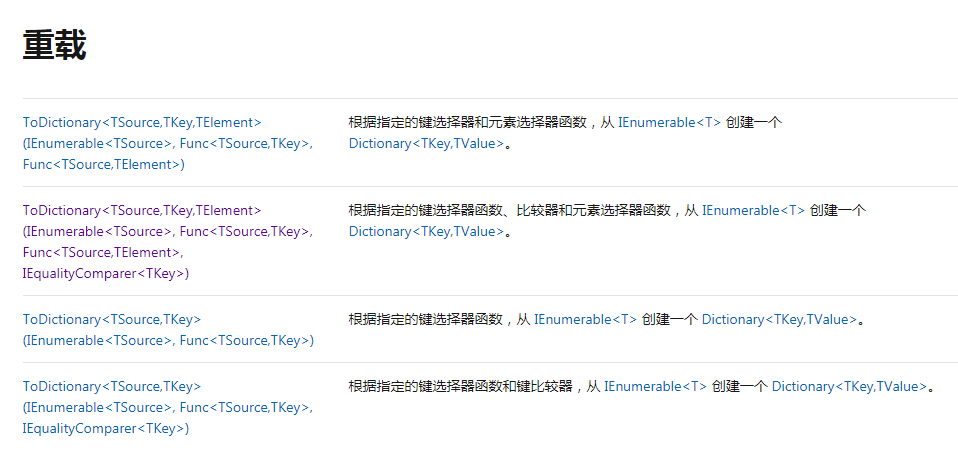
| 方法名 | 描述 | C# 查询表达式语法 |
|---|---|---|
| AsEnumerable | 返回类型化为 IEnumerable 的输入。 | 不适用。 |
| AsQueryable | 将(泛型)IEnumerable 转换为(泛型)IQueryable。 | 不适用。 |
| Cast | 将集合中的元素转换为指定类型。 | 使用显式类型化的范围变量。 例如:from string str in words |
| OfType | 根据其转换为指定类型的能力筛选值。 | 不适用。 |
| ToArray | 将集合转换为数组。 此方法强制执行查询。 | 不适用。 |
| ToDictionary | 根据键选择器函数将元素放入 Dictionary 。 此方法强制执行查询。 |
不适用。 |
| ToList | 将集合转换为 List。 此方法强制执行查询。 | 不适用。 |
| ToLookup | 根据键选择器函数将元素放入 Lookup (一对多字典)。 此方法强制执行查询。 |
不适用。 |
示例
下面的代码示例使用显式类型化的范围变量将类型转换为子类型,然后才访问仅在此子类型上可用的成员。
class Plant {
    public string Name {
    get; set; } } class CarnivorousPlant : Plant {
    public string TrapType {
    get; set; } } static void Cast() {
    Plant[] plants = new Plant[] {
    new CarnivorousPlant {
    Name = "Venus Fly Trap", TrapType = "Snap Trap" }, new CarnivorousPlant {
    Name = "Pitcher Plant", TrapType = "Pitfall Trap" }, new CarnivorousPlant {
    Name = "Sundew", TrapType = "Flypaper Trap" }, new CarnivorousPlant {
    Name = "Waterwheel Plant", TrapType = "Snap Trap" } }; var query = from CarnivorousPlant cPlant in plants where cPlant.TrapType == "Snap Trap" select cPlant; foreach (Plant plant in query) Console.WriteLine(plant.Name); /* This code produces the following output: Venus Fly Trap Waterwheel Plant */ }
Concat Operations (串联运算)
| 方法名 | 描述 | C# 查询表达式语法 |
|---|---|---|
| Concat | 连接两个序列以组成一个序列。 | 不适用。 |
Aggregation Operations(集合运算)
| 方法名 | 描述 | C# 查询表达式语法 |
|---|---|---|
| Aggregate | 不适用。 | |
| Average | 不适用。 | |
| Count | 不适用。 | |
| LongCount | 不适用。 | |
| Max | 不适用。 | |
| Min | 不适用。 | |
| Sum | 不适用。 |
发布者:全栈程序员-站长,转载请注明出处:https://javaforall.net/203333.html原文链接:https://javaforall.net




