
一、问题描述
我查看了下gitlab在线的信息


这台服务器消耗了31.3GB内存。
后面一直想去连接这台服务器,一直连接失败

Jenkins任务也是编译失败,连接不上Gitlab服务器,拉取不到代码进行编译。

好吧,糟糕透了,为什么Gitlab会占这么多的内存呢?
二、解决问题
2.1 临时解决方法
没办法了,我这边使用XShell无法远程登录服务器,无法查看原因了,后来只能联系公司的网管人员去机房,将这台服务器进行重启。
现在大家的工作都暂时恢复正常了,所有的push和fetch操作速度都很快了,因为内存是充足的。
但是网管告知我,这台服务器后面又会内存飙上来的。下面是网管说今天早上的监控数据,负载很高的。

我们从重启之后,Gitlab占用内存降低下来,然后整个系统内存也降低下来了,因此这个内存占用的元凶肯定就是gitlab。

随着人员用的越来越多,内存肯定又会飙升上来的,如何解决GitLab占用内存大的难题呢??
2.2 解决GitLab内存消耗大的问题
2.2.1 查找相关的文章
使用google了一下,找到以下的文章。
- GitLab问题小结

- https://docs.gitlab.com/ee/install/requirements.html

有句话写的 :
Notice: The 25 workers of Sidekiq will show up as separate processes in your process overview (such as top or htop) but they share the same RAM allocation since Sidekiq is a multithreaded application. Please see the section below about Unicorn workers for information about how many you need of those
翻译中文的意思是:
注意:Sidekiq的25名工作人员将在您的流程概述(例如top或htop)中显示为单独的进程,但由于Sidekiq是一个多线程应用程序,因此它们共享相同的RAM分配。请参阅以下有关Unicorn工作人员的部分,了解您需要多少人。
- Understanding Unicorn and unicorn-worker-killer
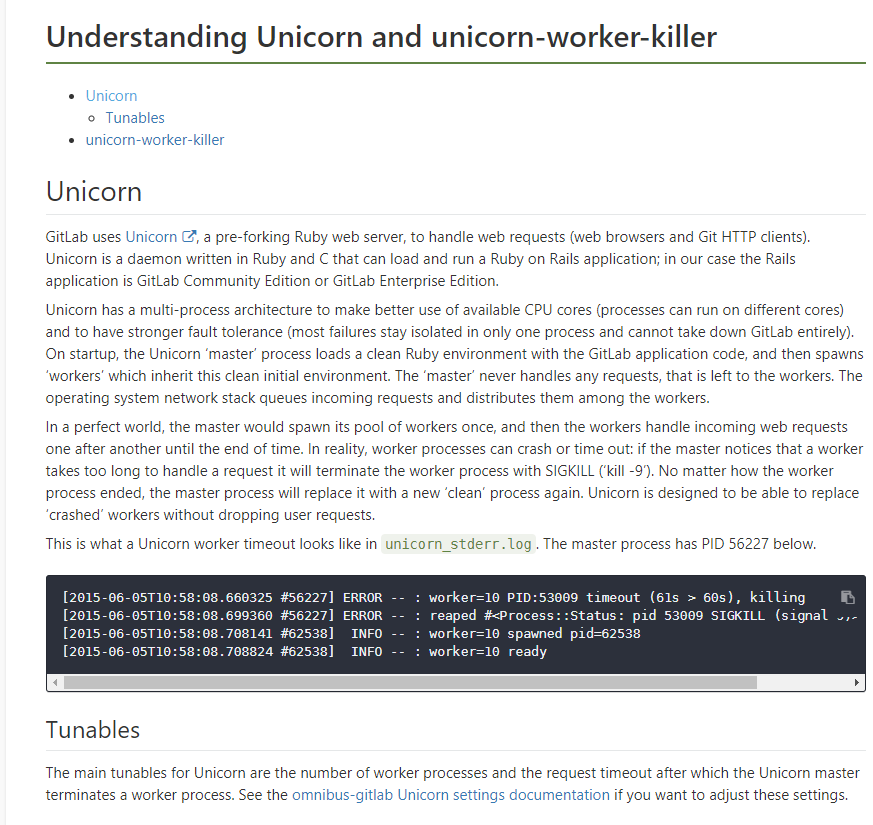

其中 omnibus-gitlab Unicorn settings documentation 链接为:https://gitlab.com/gitlab-org/omnibus-gitlab/blob/master/doc/settings/unicorn.md

- GitLab took too much memory
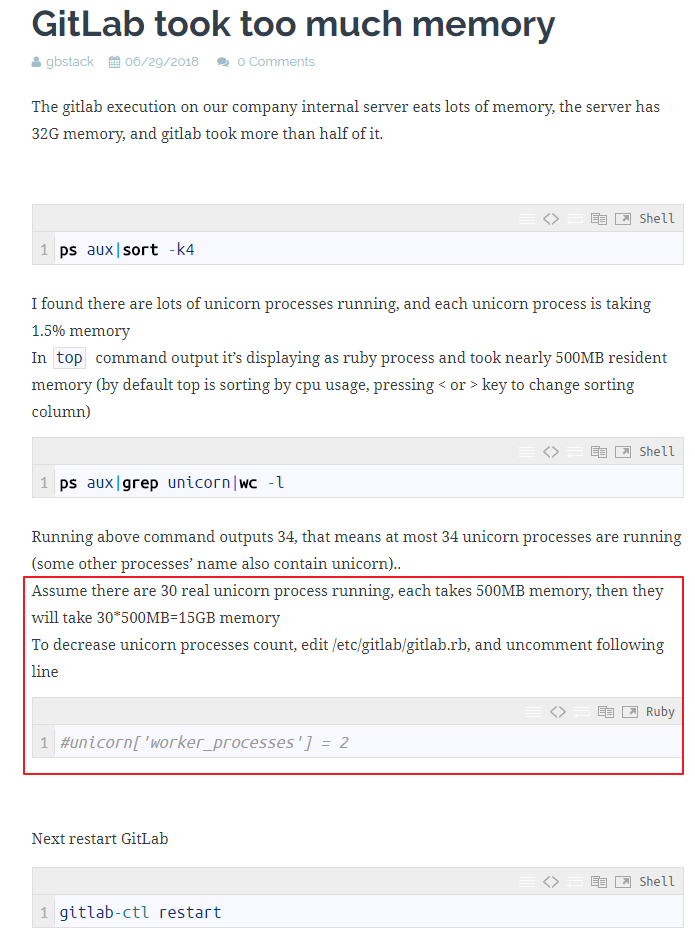
有段描述
翻译成中文
- High memory usage for Gitlab CE
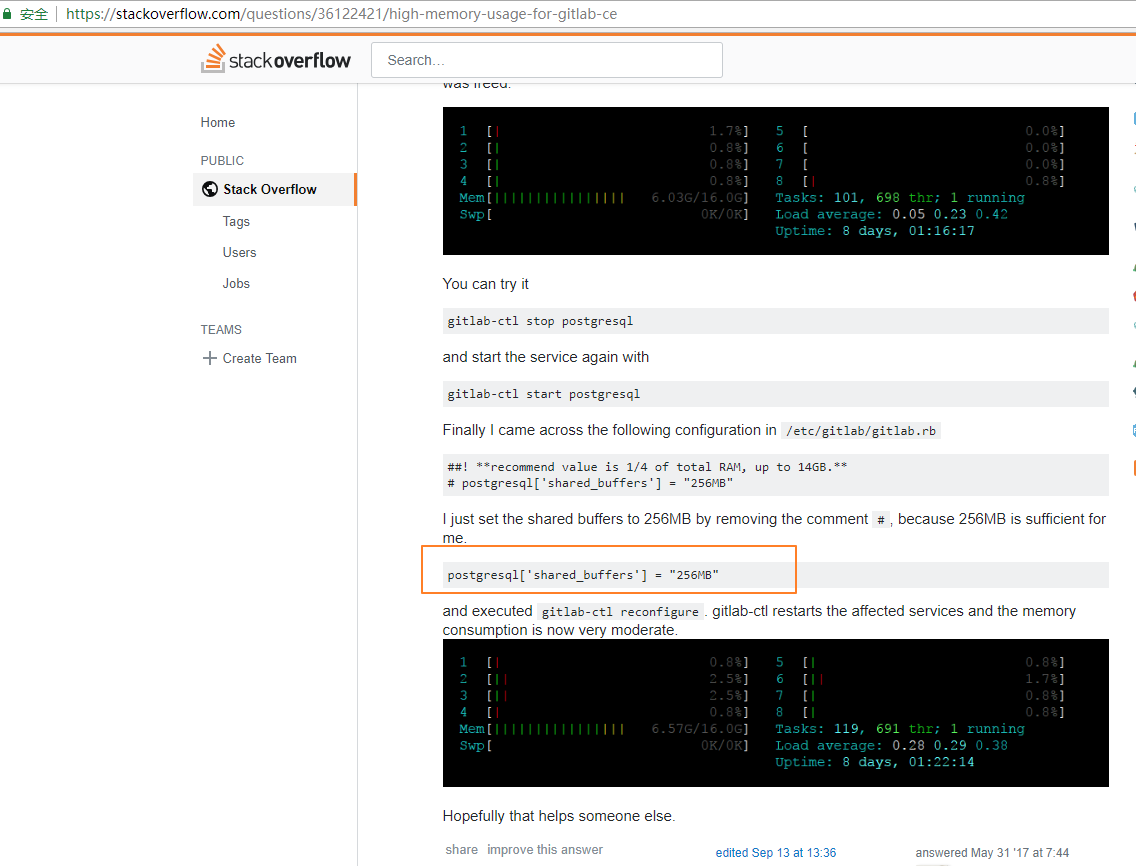

从上面查找到的信息,貌似都是需要去修改Unicorn的设置。因此我们就去修改下这个配置文件吧。
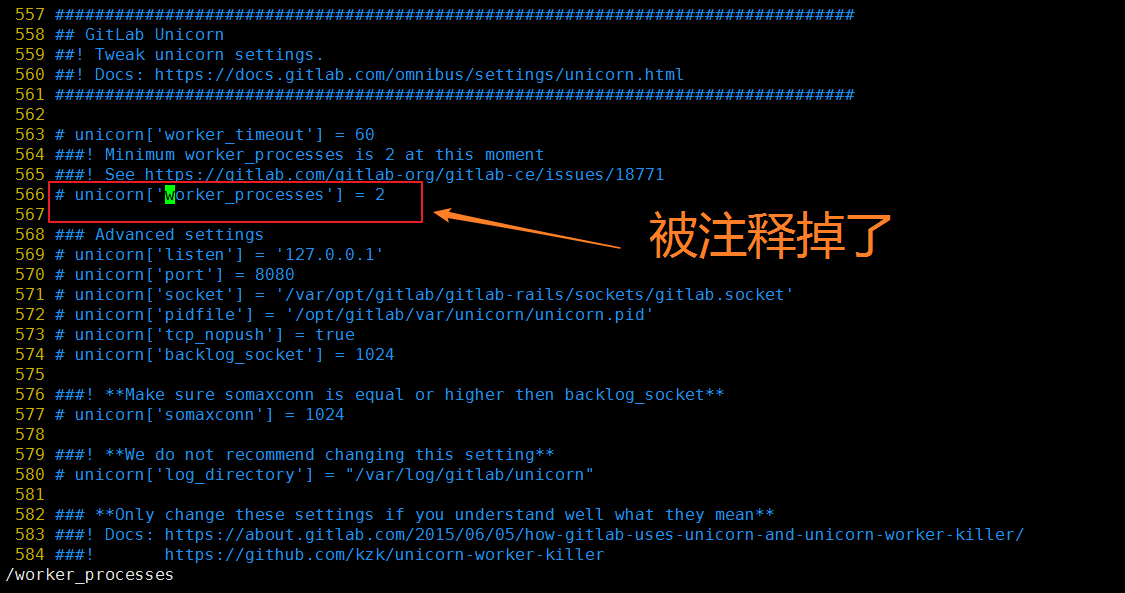
2.2.2 编辑/etc/gitlab/gitlab.rb文件,修改Unicorn的设置
 558  GitLab Unicorn
 559 ! Tweak unicorn settings.
 560 ! Docs: https://docs.gitlab.com/omnibus/settings/unicorn.html
 561
 562
 563 # unicorn['worker_timeout'] = 60
 564 ! Minimum worker_processes is 2 at this moment
 565 ! See https://gitlab.com/gitlab-org/gitlab-ce/issues/18771
 566 # unicorn['worker_processes'] = 2
 567
 568  Advanced settings
 569 # unicorn['listen'] = '127.0.0.1'
 570 # unicorn['port'] = 8080
 571 # unicorn['socket'] = '/var/opt/gitlab/gitlab-rails/sockets/gitlab.socket'
 572 # unicorn['pidfile'] = '/opt/gitlab/var/unicorn/unicorn.pid'
 573 # unicorn['tcp_nopush'] = true
 574 # unicorn['backlog_socket'] = 1024
 575
 576 ! Make sure somaxconn is equal or higher then backlog_socket
 577 # unicorn['somaxconn'] = 1024
 578
 579 ! We do not recommend changing this setting
 580 # unicorn['log_directory'] = "/var/log/gitlab/unicorn"
 581
 582  Only change these settings if you understand well what they mean
 583 ! Docs: https://about.gitlab.com/2015/06/05/how-gitlab-uses-unicorn-and-unicorn-worker-killer/
 584 !       https://github.com/kzk/unicorn-worker-killer
 585 # unicorn['worker_memory_limit_min'] = "400 * 1 << 20"
 586 # unicorn['worker_memory_limit_max'] = "650 * 1 << 20"
因此我们要修改这个被注释掉的内容为一个合理的值。

 557
 558  GitLab Unicorn
 559 ! Tweak unicorn settings.
 560 ! Docs: https://docs.gitlab.com/omnibus/settings/unicorn.html
 561
 562
 563 # unicorn['worker_timeout'] = 60
 564
 565 # 根据链接来修改:https://gitlab.com/gitlab-org/omnibus-gitlab/blob/master/doc/settings/unicorn.md
 566 # 2018-11-14  欧阳鹏修改
 567 unicorn['worker_timeout'] = 60
 568
 569 ! Minimum worker_processes is 2 at this moment
 570 ! See https://gitlab.com/gitlab-org/gitlab-ce/issues/18771
 571 # unicorn['worker_processes'] = 2
 572 # 2018-11-14  欧阳鹏修改的   worker=CPU核数+1
 573 unicorn['worker_processes'] = 17
修改完之后,我们执行下面的命令
- gitlab-ctl reconfigure


- gitlab-ctl restart

现在使用了14G,似乎比之前重启Gitlab服务器之后的16G占用小,希望有用。 后续持续观察内存占用情况,如果还有问题,持续在此篇博客更新记录。

这个10.1Gb也比之前的11.3Gb小了一些,希望是稳定的。
2.2.3 继续监控
root@ubuntu116:~# date 2018年 11月 15日 星期四 09:27:20 CST root@ubuntu116:~# free -h total used free shared buffers cached Mem: 62G 47G 14G 1.0G 310M 35G -/+ buffers/cache: 12G 50G Swap: 63G 25M 63G root@ubuntu116:~# 然后看Gitlab后台管理界面,显示只是有了15GB,但是更新时间是18小时前的。

重启下gitlab,重启后发现系统使用的内存还是40G。
root@ubuntu116:~# date 2018年 11月 15日 星期四 09:27:20 CST root@ubuntu116:~# free -h total used free shared buffers cached Mem: 62G 47G 14G 1.0G 310M 35G -/+ buffers/cache: 12G 50G Swap: 63G 25M 63G root@ubuntu116:~# gitlab-ctl restart ok: run: gitaly: (pid 23080) 1s ok: run: gitlab-monitor: (pid 23091) 0s ok: run: gitlab-workhorse: (pid 23094) 1s ok: run: logrotate: (pid 23110) 0s ok: run: nginx: (pid 23116) 0s ok: run: node-exporter: (pid 23139) 1s ok: run: postgres-exporter: (pid 23155) 0s ok: run: postgresql: (pid 23290) 0s ok: run: prometheus: (pid 23333) 0s ok: run: redis: (pid 23379) 0s ok: run: redis-exporter: (pid 23383) 0s ok: run: sidekiq: (pid 23398) 0s ok: run: unicorn: (pid 23407) 1s 您在 /var/mail/root 中有新邮件 root@ubuntu116:~# free -h total used free shared buffers cached Mem: 62G 40G 22G 363M 311M 34G -/+ buffers/cache: 6.3G 56G Swap: 63G 21M 63G root@ubuntu116:~# 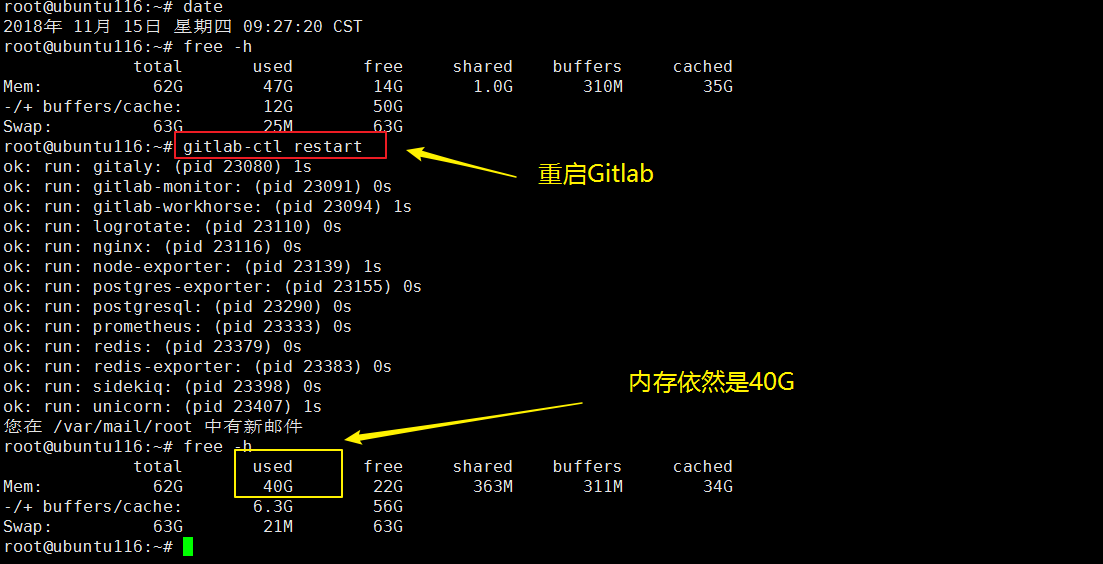
通过下面的链接,学习 Linux下如何查看哪些进程占用的CPU内存资源最多?
- Linux下如何查看哪些进程占用的CPU内存资源最多

linux下获取占用CPU资源最多的10个进程,可以使用如下命令组合:
ps aux|head -1;ps aux|grep -v PID|sort -rn -k +3|head root@ubuntu116:~# ps aux|head -1;ps aux|grep -v PID|sort -rn -k +3|head USER PID %CPU %MEM VSZ RSS TTY STAT START TIME COMMAND git 23398 3.7 0.9 ? Ssl 09:30 0:39 sidekiq 5.0.0 gitlab-rails [0 of 25 busy] git 23094 3.4 0.0 25852 ? Ssl 09:29 0:36 /opt/gitlab/embedded/bin/gitlab-workhorse -listenNetwork unix -listenUmask 0 -listenAddr /var/opt/gitlab/gitlab-workhorse/socket -authBackend http://localhost:8080 -authSocket /var/opt/gitlab/gitlab-rails/sockets/gitlab.socket -documentRoot /opt/gitlab/embedded/service/gitlab-rails/public -pprofListenAddr -secretPath /opt/gitlab/embedded/service/gitlab-rails/.gitlab_workhorse_secret -config config.toml git 31171 3.3 0.7 ? Sl 09:43 0:06 unicorn worker[12] -D -E production -c /var/opt/gitlab/gitlab-rails/etc/unicorn.rb /opt/gitlab/embedded/service/gitlab-rails/config.ru gitlab-+ 23129 3.1 0.0 46800 6536 ? S 09:29 0:32 nginx: worker process git 29993 2.7 0.8 ? Sl 09:41 0:10 unicorn worker[16] -D -E production -c /var/opt/gitlab/gitlab-rails/etc/unicorn.rb /opt/gitlab/embedded/service/gitlab-rails/config.ru git 23577 2.5 0.8 ? Sl 09:30 0:25 unicorn worker[14] -D -E production -c /var/opt/gitlab/gitlab-rails/etc/unicorn.rb /opt/gitlab/embedded/service/gitlab-rails/config.ru git 29526 2.3 0.8 ? Sl 09:40 0:10 unicorn worker[8] -D -E production -c /var/opt/gitlab/gitlab-rails/etc/unicorn.rb /opt/gitlab/embedded/service/gitlab-rails/config.ru git 24747 2.3 0.8 ? Sl 09:32 0:20 unicorn worker[2] -D -E production -c /var/opt/gitlab/gitlab-rails/etc/unicorn.rb /opt/gitlab/embedded/service/gitlab-rails/config.ru git 23534 2.3 0.8 ? Sl 09:30 0:23 unicorn worker[1] -D -E production -c /var/opt/gitlab/gitlab-rails/etc/unicorn.rb /opt/gitlab/embedded/service/gitlab-rails/config.ru git 23531 2.3 0.7 ? Sl 09:30 0:23 unicorn worker[0] -D -E production -c /var/opt/gitlab/gitlab-rails/etc/unicorn.rb /opt/gitlab/embedded/service/gitlab-rails/config.ru root@ubuntu116:~# linux下获取占用内存资源最多的10个进程,可以使用如下命令组合:
ps aux|head -1;ps aux|grep -v PID|sort -rn -k +4|head root@ubuntu116:~# ps aux|head -1;ps aux|grep -v PID|sort -rn -k +4|head USER PID %CPU %MEM VSZ RSS TTY STAT START TIME COMMAND git 23398 3.6 1.0 ? Ssl 09:30 0:41 sidekiq 5.0.0 gitlab-rails [0 of 25 busy] git 29993 2.8 0.8 ? Sl 09:41 0:13 unicorn worker[16] -D -E production -c /var/opt/gitlab/gitlab-rails/etc/unicorn.rb /opt/gitlab/embedded/service/gitlab-rails/config.ru git 29526 2.3 0.8 ? Sl 09:40 0:11 unicorn worker[8] -D -E production -c /var/opt/gitlab/gitlab-rails/etc/unicorn.rb /opt/gitlab/embedded/service/gitlab-rails/config.ru git 27297 2.0 0.8 ? Sl 09:36 0:15 unicorn worker[6] -D -E production -c /var/opt/gitlab/gitlab-rails/etc/unicorn.rb /opt/gitlab/embedded/service/gitlab-rails/config.ru git 24747 2.3 0.8 ? Sl 09:32 0:23 unicorn worker[2] -D -E production -c /var/opt/gitlab/gitlab-rails/etc/unicorn.rb /opt/gitlab/embedded/service/gitlab-rails/config.ru git 24732 2.1 0.8 ? Sl 09:32 0:21 unicorn worker[7] -D -E production -c /var/opt/gitlab/gitlab-rails/etc/unicorn.rb /opt/gitlab/embedded/service/gitlab-rails/config.ru git 23580 2.1 0.8 ? Sl 09:30 0:23 unicorn worker[15] -D -E production -c /var/opt/gitlab/gitlab-rails/etc/unicorn.rb /opt/gitlab/embedded/service/gitlab-rails/config.ru git 23577 2.5 0.8 ? Sl 09:30 0:28 unicorn worker[14] -D -E production -c /var/opt/gitlab/gitlab-rails/etc/unicorn.rb /opt/gitlab/embedded/service/gitlab-rails/config.ru git 23574 2.0 0.8 ? Sl 09:30 0:22 unicorn worker[13] -D -E production -c /var/opt/gitlab/gitlab-rails/etc/unicorn.rb /opt/gitlab/embedded/service/gitlab-rails/config.ru git 23568 1.7 0.8 ? Sl 09:30 0:19 unicorn worker[11] -D -E production -c /var/opt/gitlab/gitlab-rails/etc/unicorn.rb /opt/gitlab/embedded/service/gitlab-rails/config.ru 您在 /var/mail/root 中有新邮件 root@ubuntu116:~# - 查看占用cpu最高的进程
ps aux|head -1;ps aux|grep -v PID|sort -rn -k +3|head
或者top (然后按下M,注意这里是大写)

- 查看占用内存最高的进程
ps aux|head -1;ps aux|grep -v PID|sort -rn -k +4|head
或者top (然后按下P,注意这里是大写)
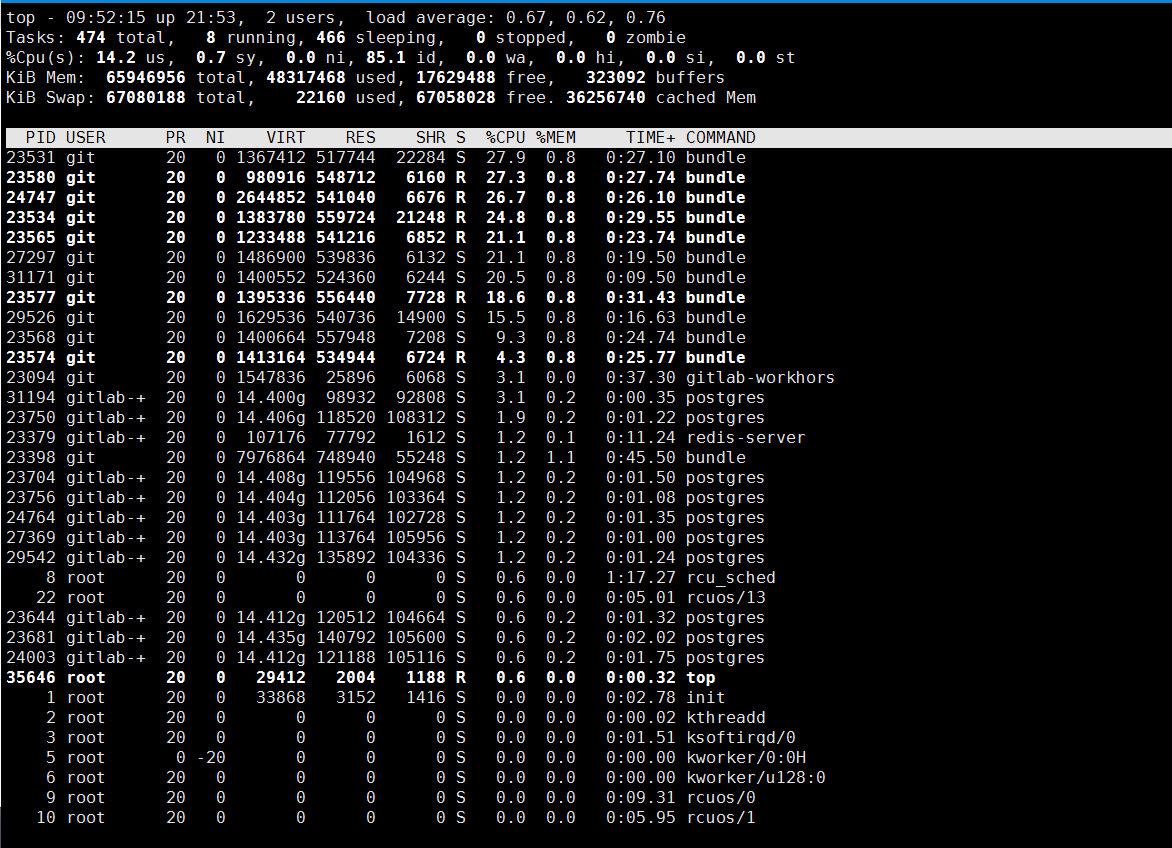
看来问题还是没有解决,Gitlab依然是占用CPU和内存的最大头!
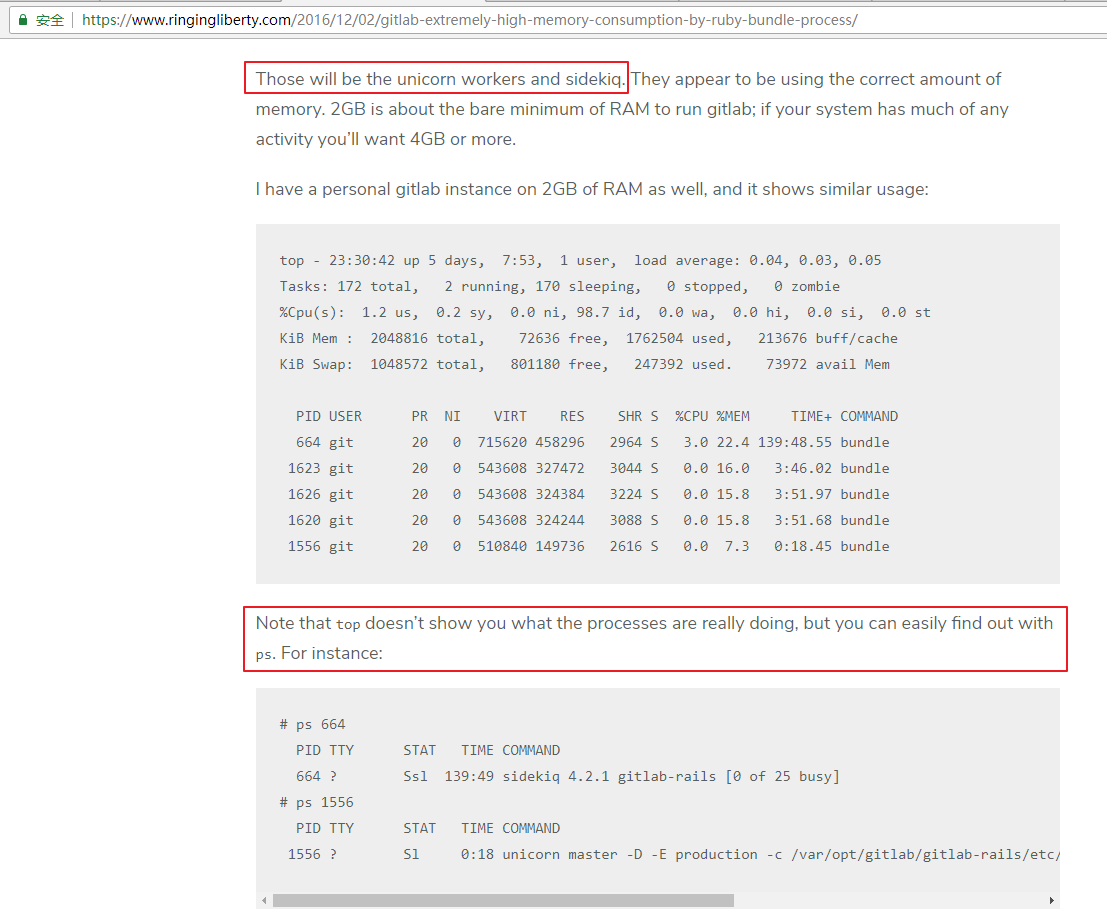
这个bundle到底是什么?

这个bundle占用内存太多了
- Gitlab: Extremely high memory consumption by ruby “bundle” process
- 一路小跑 - GitLab内存占用过高解决方法 http://www.127n.com/?id=81

- https://edspencer.me.uk/2017/07/30/reducing-the-amount-of-memory-used-by-gitlab/

三、最终修改




2018-11-19 15:16:39 经过一轮修改,重启服务器之后
而系统真正使用的内存只有5.9G,剩余了57G内存。和Gitlab后台显示基本一致


因此,我的优化效果还是有的,从最开始Gitlab服务占用了30多G的内存到现在只占用7G左右!
关于 free命令的用法可以参考链接:
- 【Linux学习】Linux free 命令学习
https://blog.csdn.net//article/details/

发布者:全栈程序员-站长,转载请注明出处:https://javaforall.net/208432.html原文链接:https://javaforall.net


![讯飞星火怎么做ppt[多图]](https://javaforall.net/wp-content/uploads/2020/11/2020110817443450-480x300.jpg)

