
springboot+mybatis整合过程中,开启控制台sql语句打印的多种方式:
附:mybatis官方文档
方法一:
1>(spring+mybatis)在mybatis的配置文件中添加:
mybatis的配置文件—-mybatis-config.xml如下:
2> (springboot+mybatis)在springboot的配置文件—-appcation.yml中添加:
mybatis: configuration: log-impl: org.apache.ibatis.logging.stdout.StdOutImpl ps:
IDEA中,springboot默认配置文件是application.properties文件,但是yml文件在语法上更加简洁,更有层次感,所以此处是用yml语法,properties中好像是这么写的:mybatis.configuration.log-impl= org.apache.ibatis.logging.stdout.StdOutImpl
控制台可以打印了。。。。。

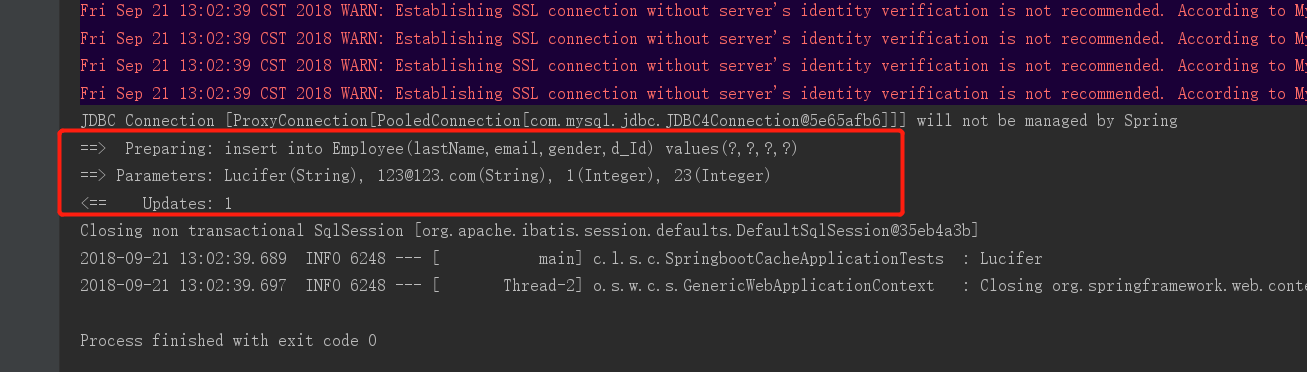
方法二:
在springboot+mybatis整合中,可以将springboot的配置文件添加如下一段也可:
logging: level: com.lucifer.springboot.cache.mapper: debug

ps: com.lucifer.springboot.cache.mapper是包名
方法三:
如果你使用的是springboot+mybatis-plus的话:
     com.baomidou


     mybatis-plus-boot-starter


     3.3.1
application.yml:
mybatis-plus: configuration: log-impl: org.apache.ibatis.logging.stdout.StdOutImpl控制台打印:
JDBC Connection [HikariProxyConnection@ wrapping com.mysql.cj.jdbc.ConnectionImpl@37cccae8] will not be managed by Spring ==> Preparing: SELECT id,user_name,age FROM user WHERE (user_name = ?) ==> Parameters: 张三(String) <== Columns: id, user_name, age <== Row: 1, 张三, 18 <== Total: 1版权声明:本文内容由互联网用户自发贡献,该文观点仅代表作者本人。本站仅提供信息存储空间服务,不拥有所有权,不承担相关法律责任。如发现本站有涉嫌侵权/违法违规的内容, 请联系我们举报,一经查实,本站将立刻删除。
发布者:全栈程序员-站长,转载请注明出处:https://javaforall.net/214622.html原文链接:https://javaforall.net




