
1.pure_pursuit的launch文件如下。
<!-- -->


     "is_linear_interpolation" default=
    "True"
    />

      "publishes_for_steering_robot" default=
     "False"
     /> <
     !-
     - rosrun waypoint_follower pure_pursuit
     -->

       "waypoint_follower"
      type=
      "pure_pursuit" name=
      "pure_pursuit" output=
      "log"> <
      param name=
      "is_linear_interpolation" value=
      "$(arg is_linear_interpolation)"
      /> <
      param name=
      "publishes_for_steering_robot" value=
      "$(arg publishes_for_steering_robot)"
      /> <
      /node> <
      /launch>
从launch文件可以看出只启动了waypoint_follower功能包下的pure_pursuit节点,其中启动参数”is_linear_interpolation”(默认值为True),“publishes_for_steering_robot” (默认值为False)
2.pure_pursuit节点的cpp文件如下
int main(int argc, char **argv) {
ros::init(argc, argv, "pure_pursuit"); //初始化并创建节点名“pure_pursuit” waypoint_follower::PurePursuitNode ppn; //声明对象ppn ppn.run(); return 0; }(1)通过ros::init函数初始化并指定“pure_pursuit” 节点,
(2)定义PurePursuitNode 类对象ppn
(3)ppn对象调用run()函数
3.构造函数
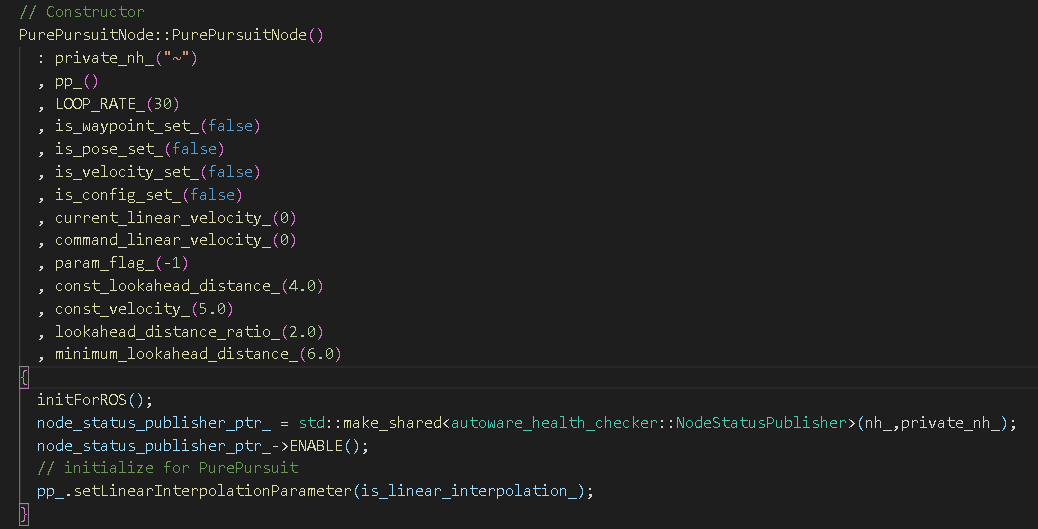

此构造函数完成对其成员的初始化,调用void PurePursuitNode::initForROS()函数初始化ROS中一些参数,包括获取参数,设置订阅和发布的函数并对“nh_”和"private_nh_"句柄分配动态内存空间并初始化。
对参数进行设置:is_linear_interpolation_(是否线性插值:true), publishes_for_steering_robot_(是否发布转向:false),wheel_base_(轴距:2.7m)
private_nh_.param("is_linear_interpolation", is_linear_interpolation_, bool(true)); private_nh_.param("publishes_for_steering_robot", publishes_for_steering_robot_, bool(false)); nh_.param("vehicle_info/wheel_base", wheel_base_, double(2.7));订阅”final_waypoints”(路径点),“current_pose”(当前位置),“config/waypoint_follower”(追踪配置),“current_velocity”(当前速度)话题并调用与之对应的回调函数。
sub1_ = nh_.subscribe("final_waypoints", 10, &PurePursuitNode::callbackFromWayPoints, this); sub2_ = nh_.subscribe("current_pose", 10, &PurePursuitNode::callbackFromCurrentPose, this); sub3_ = nh_.subscribe("config/waypoint_follower", 10, &PurePursuitNode::callbackFromConfig, this); sub4_ = nh_.subscribe("current_velocity", 10, &PurePursuitNode::callbackFromCurrentVelocity, this);当接收到”final_waypoints”话题之后调用callbackFromWayPoints(),当waypoint(路径点)中是空的话则线速度为0,接受到的容器中有路径点时其目标速度为第一个路径点的线速度值。然后设置追踪的路径点,路径点配置状态为正常。
void PurePursuitNode::callbackFromWayPoints(const autoware_msgs::LaneConstPtr &msg) {
if (!msg->waypoints.empty()) command_linear_velocity_ = msg->waypoints.at(0).twist.twist.linear.x; else command_linear_velocity_ = 0; pp_.setCurrentWaypoints(msg->waypoints); is_waypoint_set_ = true; }剩下的回调函数也同样功能。callbackFromCurrentVelocity()得到current_linear_velocity_,callbackFromCurrentPose()得到current_pose_。
void PurePursuitNode::initForROS()函数下面也定义了一些发布者,其发布话题也较为明确,在下面的run()函数中也有说明。
void PurePursuitNode::run() {
    ROS_INFO_STREAM("pure pursuit start"); ros::Rate loop_rate(LOOP_RATE_); while (ros::ok()) {
    ros::spinOnce(); if (!is_pose_set_ || !is_waypoint_set_ || !is_velocity_set_ || !is_config_set_) {
ROS_WARN("Necessary topics are not subscribed yet ... "); loop_rate.sleep(); continue; } pp_.setLookaheadDistance(computeLookaheadDistance()); pp_.setMinimumLookaheadDistance(minimum_lookahead_distance_); double kappa = 0; bool can_get_curvature = pp_.canGetCurvature(&kappa); publishTwistStamped(can_get_curvature, kappa); publishControlCommandStamped(can_get_curvature, kappa); node_status_publisher_ptr_->NODE_ACTIVATE(); node_status_publisher_ptr_->CHECK_RATE("/topic/rate/vehicle/slow",8,5,1,"topic vehicle_cmd publish rate low."); // for visualization with Rviz pub11_.publish(displayNextWaypoint(pp_.getPoseOfNextWaypoint())); pub13_.publish(displaySearchRadius(pp_.getCurrentPose().position, pp_.getLookaheadDistance())); pub12_.publish(displayNextTarget(pp_.getPoseOfNextTarget())); pub15_.publish(displayTrajectoryCircle( waypoint_follower::generateTrajectoryCircle(pp_.getPoseOfNextTarget(), pp_.getCurrentPose()))); std_msgs::Float32 angular_gravity_msg; angular_gravity_msg.data = computeAngularGravity(computeCommandVelocity(), kappa); pub16_.publish(angular_gravity_msg); publishDeviationCurrentPosition(pp_.getCurrentPose().position, pp_.getCurrentWaypoints()); is_pose_set_ = false; is_velocity_set_ = false; is_waypoint_set_ = false; loop_rate.sleep(); } }其中通过if函数判断确保其运行状态是否正常,pose, waypoint, velocity, config但凡有一个状态为false则报错。
if (!is_pose_set_ || !is_waypoint_set_ || !is_velocity_set_ || !is_config_set_) {
ROS_WARN("Necessary topics are not subscribed yet ... "); loop_rate.sleep(); continue; }调用setLookaheadDistance()和setMinimumLookaheadDistance()两个函数分别设置前视距离和最小前视距离。
其中通过computeLookaheadDistance()函数计算前视距离,最大前视距离 (m) 为10倍当前行驶速度(m/s),ld 为函数返回值,程序中值为当前行驶速度乘以系数lookahead_distance_ratio_(系数为2),ld与最大前视距离中取较小值,ld与最小前视距离中取较大值。
double PurePursuitNode::computeLookaheadDistance() const {
    if (param_flag_ == enumToInteger(Mode::dialog)) // 0 = waypoint, 1 = Dialog  return const_lookahead_distance_; double maximum_lookahead_distance = current_linear_velocity_ * 10; double ld = current_linear_velocity_ * lookahead_distance_ratio_; return ld < minimum_lookahead_distance_ ? minimum_lookahead_distance_ : ld > maximum_lookahead_distance ? maximum_lookahead_distance : ld; }
bool can_get_curvature = pp_.canGetCurvature(&kappa)计算是否可以得到曲率,其中bool PurePursuit::canGetCurvature()函数的主要内容如下。
 void PurePursuit::getNextWaypoint() {
    int path_size = static_cast<int>(current_waypoints_.size()); // if waypoints are not given, do nothing.  if (path_size == 0) {
    next_waypoint_number_ = -1; return; } // look for the next waypoint.  for (int i = 0; i < path_size; i++) {
    // if search waypoint is the last  if (i == (path_size - 1)) {
    ROS_INFO("search waypoint is the last"); next_waypoint_number_ = i; return; } // if there exists an effective waypoint  if (getPlaneDistance(current_waypoints_.at(i).pose.pose.position, current_pose_.position) > lookahead_distance_) {
next_waypoint_number_ = i; return; } } // if this program reaches here , it means we lost the waypoint! 丢失了路径点 next_waypoint_number_ = -1; return; }getNextWaypoint()函数中path_size表示当前路径序列中路径点的个数,正常情况下其值为非零整数。通过for()函数遍历路径序列中的点并调用getPlaneDistance()函数计算路径序列中的点到车辆当前位置之间的距离,若距离大于预瞄距离(lookahead_distance_),则返回此点在序列中的下标next_waypoint_number_。当调用函数返回下标next_waypoint_number_(非-1)后表明成功在路径序列中找到下一个目标点(注意:在这的下一个目标点并非是车辆要直接到达的点,后面线性插值的结果会提供真正的下一目标点)。
for (const auto &el : current_waypoints_)检查路径序列中的点到当前车辆位置的距离是否大于minimum_lookahead_distance_(最小预瞄距离),大于则说明可以形成有效的曲线路径。
canGetCurvature()函数中也给出了下面三种情况的处理方式:
1.is_linear_interpolation_的值为flase:
不线性插值,此时上面getNextWaypoint()函数中所返回的next_waypoint_number_就是真正的下一个目标点。
2. next_waypoint_number_值为零
寻找的下一个目标点是路径序列中的第一个点
3. next_waypoint_number_值为path_size – 1
寻找的下一个目标点是路径序列中的最后一个点
这三种情况是可能遇到的正常情况,进行如下处理
路径序列中的next_waypoint_number_处的点就是下一个目标点 ( next_target_position_)
上面函数中的getNextWaypoint()函数时用来获取下一个路径点.首先判断当前接收到的轨迹点的数量,如果为0直接中断并返回调用函数;若不为0则遍历轨迹点,通过getPlaneDistance()函数获取轨迹点与当前位置点的距离并判断是否大于前视距离,成立的话返回轨迹点下标并退出。
double getPlaneDistance(geometry_msgs::Point target1, geometry_msgs::Point target2) {
tf::Vector3 v1 = point2vector(target1); v1.setZ(0); tf::Vector3 v2 = point2vector(target2); v2.setZ(0); return tf::tfDistance(v1, v2); }下述函数根据getNextWaypoint()寻找下一路径点后,getPlaneDistance()计算当前位置与下一路径点的距离与最小前视距离比较从而确定是否可形成有效曲线轨迹,如果is_linear_interpolation_为false或下一个航路点为第一个或最后一个,获取下一个路径点并计算下一个路径点和当前位置规划圆弧的曲率,参考公式R=L^2/(2*x),接着线性插值和计算角速度,详见src\autoware\common\waypoint_follower\nodes\pure_pursuit\pure_pursuit.cpp
bool PurePursuit::canGetCurvature(double *output_kappa) {
    // search next waypoint  getNextWaypoint(); if (next_waypoint_number_ == -1) {
    ROS_INFO("lost next waypoint"); return false; } // check whether curvature is valid or not  bool is_valid_curve = false; for (const auto &el : current_waypoints_) {
    if (getPlaneDistance(el.pose.pose.position, current_pose_.position) > minimum_lookahead_distance_) {
    is_valid_curve = true; break; } } if (!is_valid_curve) {
    return false; } // if is_linear_interpolation_ is false or next waypoint is first or last  if (!is_linear_interpolation_ || next_waypoint_number_ == 0 || next_waypoint_number_ == (static_cast<int>(current_waypoints_.size() - 1))) {
    next_target_position_ = current_waypoints_.at(next_waypoint_number_).pose.pose.position; *output_kappa = calcCurvature(next_target_position_); return true; } // linear interpolation and calculate angular velocity  bool interpolation = interpolateNextTarget(next_waypoint_number_, &next_target_position_); if (!interpolation) {
ROS_INFO_STREAM("lost target! "); return false; } // ROS_INFO("next_target : ( %lf , %lf , %lf)", next_target.x, next_target.y,next_target.z); *output_kappa = calcCurvature(next_target_position_); return true; }下面详细解释interpolateNextTarget()函数中如何线性插值的内容。首先给出search_radius(搜索半径),其值等于lookahead_distance_(预瞄距离)。在纯跟踪理论中便是以车辆后轴为中心,预瞄距离为半径做圆,搜寻圆外的路径点。
设置两个点start和end,其中end表示在getNextWaypoint()函数中获取的下一个目标点,start表示在路径点序列中end前面的点,为了便于理解我们假设end为路径点序列中下标3的点(next_waypoint_number_=3),其位置坐标为(x3, y3),则start为路径点序列中下标2的点(next_waypoint_number_=3-1=2),其位置坐标为(x2, y2)。根据数学知识,已知两点坐标求直线方程得到:Ax+By+C=0。由函数 getLinearEquation()实现求解
getLinearEquation()函数中通过计算end(x3, y3)和start(x2 , y2)沿x方向的距离sub_x和沿y方向的距离sub_y,若sub_x和sub_y同时小于参考误差error(0.00001),则认为end(x3, y3)和start(x2 , y2)为同一个点,否则求解有这两点构成的直线方程的a, b, c 的值。
接着计算车辆当前位置到之前的距离d,
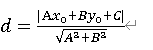
此时车辆位置到直线的距离d与搜索半径search_radius(图中用r表示)关系可由下图示意
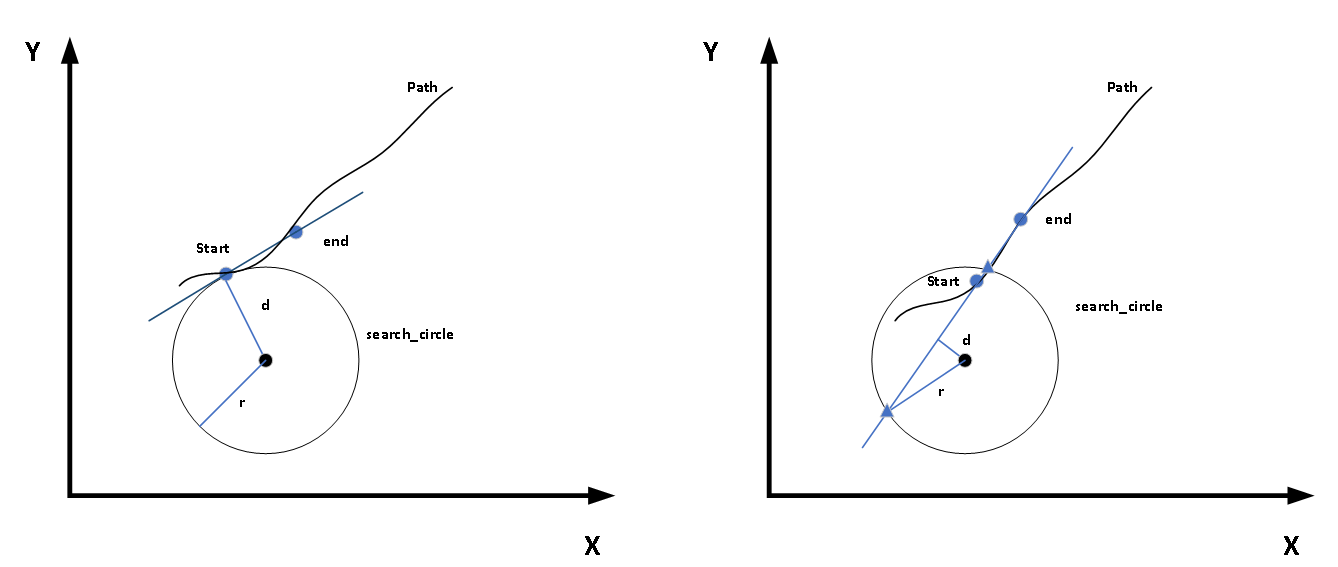
左图表明d = search_radius的情况,右图表明d < search_radius。
在求得距离d后我们还需要为在这条直线上线性插值进行一定准备,如程序中先求得车辆到直线的垂足思路如下:
1获取start点到end点的向量v,并把v单位化得到unit_v。
2获取单位向量unit_v的法向量,一个在逆时针90度方向unit_w1,另一个在顺时针90度unit_w2.
3获取垂足点的坐标,可以看到程序中按照法向量的两个方向进行计算,求出h1和h2两个点,这样可以保证这两个点是有一个在直线上。
4把h1和h2两个坐标点带入 式子Ax+By+C中,对结果取绝对值后与参考误差ERROR比较,小于ERROR的点即为直线上的垂足点h。
此时我们回到上图的两种情况:
(1)当d = search_radius时即直线与搜索圆相切时,next_target=h,直接把垂足点h作为真正的下一个目标点,并返回true。
(2)当d < search_radius时即直线与搜索圆相交时,在图中可以看到直线与搜索圆有两个交点,分别算出两点的坐标target1和target2(计算思想同上面计算垂足类似)。有了交点坐标之后我们需判断哪个点是在我们车辆前方的点,在这里用距离大小来筛选,首先用getPlaneDistance()函数计算出start到end两点间的距离interval。分别计算target1和target2到end点的距离与interval进行比较,选择距离近的点为下一个追踪的目标点,并返回true。至此我们根据代码完成车辆下一个追踪的路径点的寻找工作。
计算曲率
double PurePursuit::calcCurvature(geometry_msgs::Point target) const //计算曲率 {
    double kappa; double denominator = pow(getPlaneDistance(target, current_pose_.position), 2); //分母为getPlaneDistance得到当前位置到目标点的二维距离的平方  double numerator = 2 * calcRelativeCoordinate(target, current_pose_).y; // 分子为2倍的相对坐标位置的y值 if (denominator != 0) kappa = numerator / denominator; else {
if (numerator > 0) kappa = KAPPA_MIN_; else kappa = -KAPPA_MIN_; } ROS_INFO("kappa : %lf", kappa); return kappa; }分母Denominator的值表示车辆当前位置到目标点的距离的平方,分子numerator表示2倍的目标点在车辆坐标系中沿y方向上的距离。根据分子和分母的值计算出曲率Kappa。
下述函数根据发布的路径点,更新current waypoint ,读取用户设定的速度,发布线速度和角速度
void PurePursuitNode::publishTwistStamped(const bool &can_get_curvature, const double &kappa) const {
geometry_msgs::TwistStamped ts; ts.header.stamp = ros::Time::now(); ts.twist.linear.x = can_get_curvature ? computeCommandVelocity() : 0; ts.twist.angular.z = can_get_curvature ? kappa * ts.twist.linear.x : 0; node_status_publisher_ptr_->CHECK_MAX_VALUE("/value/twist",ts.twist.linear.x,2.2,3.3,4.4,"linear twist_cmd is too high"); pub1_.publish(ts); }其中computeCommandVelocity()函数如下,把速度转化为m/s.
double PurePursuitNode::computeCommandVelocity() const {
if (param_flag_ == enumToInteger(Mode::dialog)) return kmph2mps(const_velocity_); return command_linear_velocity_; }上面command_linear_velocity_通过sub1_ = nh_.subscribe("final_waypoints", 10, &PurePursuitNode::callbackFromWayPoints, this)订阅final_waypoints话题获得。回调函数callbackFromWayPoints()在上面void PurePursuitNode::initForROS()中已经解释。
publishControlCommandStamped()函数如下:在话题ctrl_cmd发布机器人的速度和转向角度
void PurePursuitNode::publishControlCommandStamped(const bool &can_get_curvature, const double &kappa) const {
if (!publishes_for_steering_robot_) return; autoware_msgs::ControlCommandStamped ccs; ccs.header.stamp = ros::Time::now(); ccs.cmd.linear_velocity = can_get_curvature ? computeCommandVelocity() : 0; ccs.cmd.linear_acceleration = can_get_curvature ? computeCommandAccel() : 0; ccs.cmd.steering_angle = can_get_curvature ? convertCurvatureToSteeringAngle(wheel_base_, kappa) : 0; pub2_.publish(ccs);}上述函数中第一个是计算速度的函数和上面一样,第二个是计算加速度的函数computeCommandAccel(),第三个是把曲率转化为转向角度的函数convertCurvatureToSteeringAngle()
double PurePursuitNode::computeCommandAccel() const {
const geometry_msgs::Pose current_pose = pp_.getCurrentPose(); const geometry_msgs::Pose target_pose = pp_.getCurrentWaypoints().at(1).pose.pose; const double x = std::hypot(current_pose.position.x - target_pose.position.x, current_pose.position.y - target_pose.position.y); const double v0 = current_linear_velocity_; const double v = computeCommandVelocity(); const double a = (v * v - v0 * v0) / (2 * x); return a; }上述函数首先获取当前位置current_pose和目标轨迹点位置target_pose。通过std::hypot()计算两点间的距离x,根据命令目标速度和当前速度带入运动学公式得到加速度a.
double convertCurvatureToSteeringAngle(const double &wheel_base, const double &kappa) {
return atan(wheel_base * kappa); }上述函数用来计算方向转角,根据公式arctan(L/R)
run()函数中还包含一些在rviz中的可视化:显示下一个路径点,显示搜索半径,显示下一个目标,显示追踪轨迹。具体实现见src\autoware\common\waypoint_follower\nodes\pure_pursuit\pure_pursuit_viz.cpp
计算角加速度V2/R(多除以一个重力加速度不明白,希望大佬赐教),并发布出去。
double PurePursuitNode::computeAngularGravity(double velocity, double kappa) const {
    const double gravity = 9.80665; return (velocity * velocity) / (1.0 / kappa * gravity); }
void PurePursuitNode::publishDeviationCurrentPosition(const geometry_msgs::Point &point, const std::vector<autoware_msgs::Waypoint> &waypoints) const {
if (waypoints.size() < 3) {
return; } double a, b, c; double linear_flag_in = getLinearEquation(waypoints.at(2).pose.pose.position, waypoints.at(1).pose.pose.position, &a, &b, &c); std_msgs::Float32 msg; msg.data = getDistanceBetweenLineAndPoint(point, a, b, c); pub17_.publish(msg); }其中getLinearEquation()函数如下:首先判断当前位置点与路径点是否是同一个点,是直接返回false,否的话返回true并返回a,b,c的值。线性方程的公式为:"ax + by + c = 0",其中a = "y2-y1, b = "(-1) * x2 - x1" ,c = "(-1) * (y2-y1)x1 + (x2-x1)y1"
bool getLinearEquation(geometry_msgs::Point start, geometry_msgs::Point end, double *a, double *b, double *c) {
    //(x1, y1) = (start.x, star.y), (x2, y2) = (end.x, end.y)  double sub_x = fabs(start.x - end.x); double sub_y = fabs(start.y - end.y); double error = pow(10, -5); // 0.00001 if (sub_x < error && sub_y < error) // {
ROS_INFO("two points are the same point!!"); return false; } *a = end.y - start.y; *b = (-1) * (end.x - start.x); *c = (-1) * (end.y - start.y) * start.x + (end.x - start.x) * start.y; return true; }getDistanceBetweenLineAndPoint()函数获得当前位置到路径点的距离
double getDistanceBetweenLineAndPoint(geometry_msgs::Point point, double a, double b, double c) {
double d = fabs(a * point.x + b * point.y + c) / sqrt(pow(a, 2) + pow(b, 2)); return d; }最后pub17_.publish(msg)把距离偏差发布出去。
以上便是pure_pursuit节点的代码实现部分基本介绍完全,还有一篇代码流程框图见另一篇博客。
pure_pursuit节点代码框图:https://blog.csdn.net/weixin_/article/details/
由于水平有限以上内容仅是自己学习理解过程,各位读者朋友发现问题之处还请帮忙提出,不胜感激。
有问题还请指正,不胜感激。
共同交流,共同进步!
发布者:全栈程序员-站长,转载请注明出处:https://javaforall.net/227017.html原文链接:https://javaforall.net



