
2013年1月10号注:
今天更新代码之后,突然出现一个问题:Tomcat启动时,总是会出现jvm fatal error错误导致tomcat无法正常启动,以下是错误信息:
# # A fatal error has been detected by the Java Runtime Environment: # # Internal Error (c1_Optimizer.cpp:271), pid=6048, tid=5404 # guarantee(x_compare_res != Constant::not_comparable) failed: incomparable constants in IfOp # # JRE version: 6.0_29-b11 # Java VM: Java HotSpot(TM) Client VM (20.4-b02 mixed mode windows-x86 ) 2013-01-10 13:47:34,671 INFO hibernate.cfg.AnnotationBinder:419 -> Binding entity from annotated class: com.estone.www.spis.model.po.zd.sys.DPossession 2013-01-10 13:47:34,671 INFO cfg.annotations.EntityBinder:422 -> Bind entity com.estone.www.spis.model.po.zd.sys.DPossession on table d_possession 2013-01-10 13:47:34,671 INFO hibernate.cfg.AnnotationBinder:419 -> Binding entity from annotated class: com.estone.www.spis.model.po.zd.writ.DWritTemplate 2013-01-10 13:47:34,671 INFO cfg.annotations.EntityBinder:422 -> Bind entity com.estone.www.spis.model.po.zd.writ.DWritTemplate on table d_writ_template 2013-01-10 13:47:34,671 INFO hibernate.cfg.AnnotationBinder:419 -> Binding entity from annotated class: com.estone.www.spis.model.po.zd.writ.DWritType 2013-01-10 13:47:34,671 INFO cfg.annotations.EntityBinder:422 -> Bind entity com.estone.www.spis.model.po.zd.writ.DWritType on table d_writ_type # An error report file with more information is saved as: # D:\Program Files\apache-tomcat-6.0.20\bin\hs_err_pid6048.log # # If you would like to submit a bug report, please visit: # http://java.sun.com/webapps/bugreport/crash.jsp #在这里,导致本次错误的是这个方法:
org.hibernate.cfg.annotations.SimpleValueBinder.setType1.如果是eclipse下启动服务,则在myeclipse-preference-java-installed jres 里面设置, 在 defalt vm arguments 填入下边的代码就可以了!如图:
代码:
-XX:CompileCommand=exclude,org/hibernate/cfg/annotations/SimpleValueBinder,setType
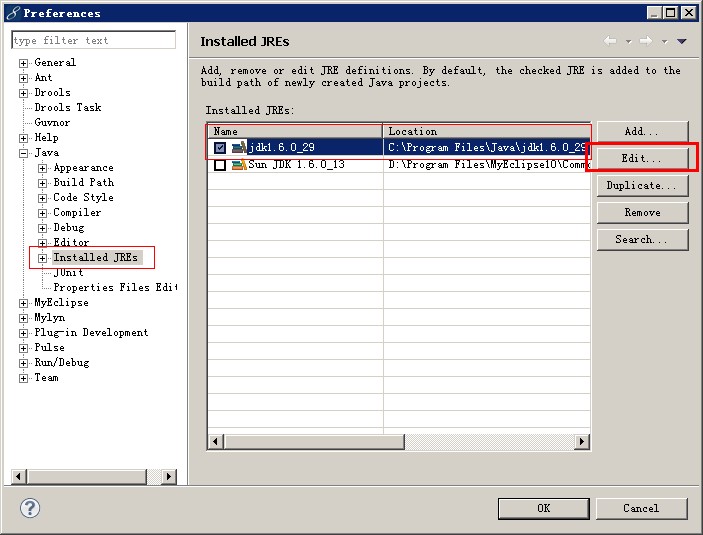

选择使用的JRE,,点击编辑edit
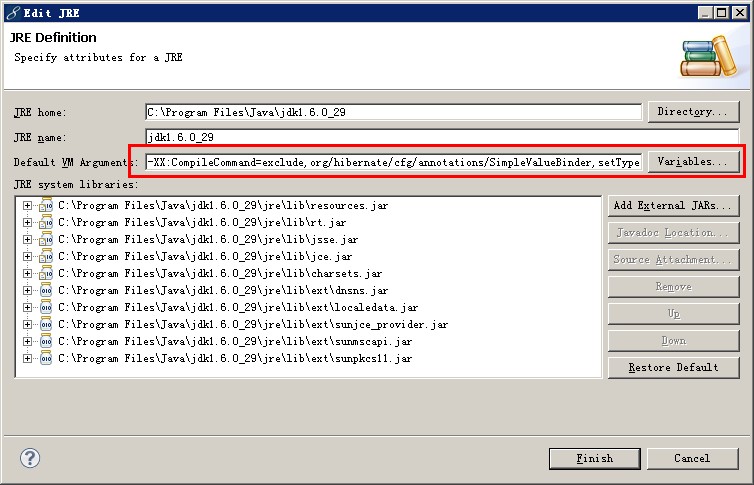
将上边代码粘贴到此处,OK
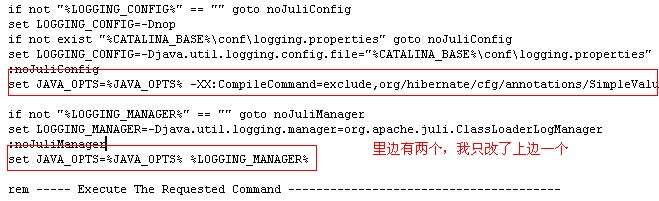
2.如果是直接通过startup 启动tomcat,则需要修改以下文件 Windows下,在文件/bin/catalina.bat,Unix下,在文件/bin/catalina.sh找到
set JAVA_OPTS=%JAVA_OPTS% %LOGGING_CONFIG% 修改为以下内容即可:
set JAVA_OPTS=%JAVA_OPTS% -XX:CompileCommand=exclude,org/hibernate/cfg/annotations/SimpleValueBinder,setType %LOGGING_CONFIG%如图:
参考资料:感谢以下链接的朋友
http://seanhe.iteye.com/blog/
http://eric-flower.iteye.com/blog/
http://sind.iteye.com/blog/

iLife’s 博客Thinking in life_我和1988_CSDN博客
版权声明:本文内容由互联网用户自发贡献,该文观点仅代表作者本人。本站仅提供信息存储空间服务,不拥有所有权,不承担相关法律责任。如发现本站有涉嫌侵权/违法违规的内容, 请联系我们举报,一经查实,本站将立刻删除。
发布者:全栈程序员-站长,转载请注明出处:https://javaforall.net/233579.html原文链接:https://javaforall.net



