
大家好,又见面了,我是你们的朋友全栈君。
1.学习目标
通过几天来大家对Nhiberate的反映,很多人对它的性能非常的担心,本文便着手从最直观的角度和方法中逐步改善nhiberate的性能。改善性能是需要做出很多分析和测试的,本文试图从最表层的对象入手,以后逐渐增加其他方面的性能分析。希望各位看官莫要着急。
2. 分析:
ISession和ISessionFactory对象的产生,使用,和销毁对性能的影响。
ISessionFactory对象是线程安全的,它可以被程序的任意线程所适用,但是创建它的性能开销是比较大的。所以不要频繁创建ISessionFactroy对象
ISession对象是非线程安全的,创建它的开销比较小
创建一个ISessionFactory对象的主要流程有:


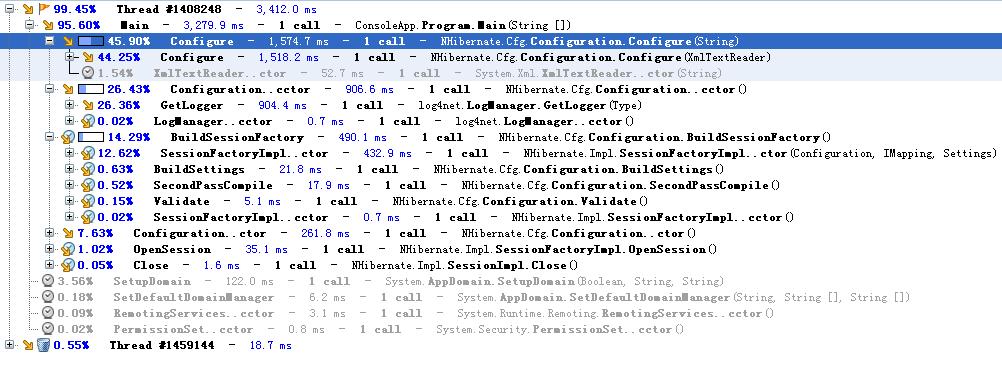
这期间,包括对多个xml文件的解析和格式验证,验证的过程还包括对对象的反射。这些对性能损失非常大。用dottrace跟踪程序执行,如下
在web应用程序里面,将ISessionFactory对象放到预缓存里面,可以避免频繁创建ISessionFactory对象。如

using
System;
using
System.Data;
using
System.Configuration;
using
System.Web;
using
System.Web.Security;
using
System.Web.UI;
using
System.Web.UI.WebControls;
using
System.Web.UI.WebControls.WebParts;
using
System.Web.UI.HtmlControls;
using
NHibernate;
using
NHibernate.Cfg;
namespace
WebApp


{
 public sealed class NHibernateHelper
 {
{
private const string CurrentSessionKey = “nhibernate.current_session“;
private static readonly ISessionFactory sessionFactory;
static NHibernateHelper()
{
string cfgPath = @”E:\my project\nhibernate study\simle 1\NHibernateStudy1\NhibernateSample1\hibernate.cfg.xml“;
sessionFactory = new NHibernate.Cfg.Configuration().Configure(cfgPath).BuildSessionFactory();
 }
}
public static ISession GetCurrentSession()
{
HttpContext context = HttpContext.Current;
ISession currentSession = context.Items[CurrentSessionKey] as ISession;
if (currentSession == null)
{
currentSession = sessionFactory.OpenSession();
context.Items[CurrentSessionKey] = currentSession;
}
return currentSession;
}
public static void CloseSession()
{
HttpContext context = HttpContext.Current;
ISession currentSession = context.Items[CurrentSessionKey] as ISession;
if (currentSession == null)
{
// No current session
return;
}
currentSession.Close();
context.Items.Remove(CurrentSessionKey);
}
public static void CloseSessionFactory()
{
if (sessionFactory != null)
{
sessionFactory.Close();
}
}
}
 }
}
System.Diagnostics.Stopwatch sw
=
new
System.Diagnostics.Stopwatch();
sw.Start();
ISession session
=
NHibernateHelper.GetCurrentSession();
session.Close();
sw.Stop();
Response.Write(sw.ElapsedTicks
+
“
<br>
“
);
sw.Reset();
sw.Start();
session
=
NHibernateHelper.GetCurrentSession();
session.Close();
sw.Stop();
Response.Write(sw.ElapsedTicks
+
“
<br>
“
);
sw.Reset();
sw.Start();
session
=
NHibernateHelper.GetCurrentSession();
session.Close();
sw.Stop();
Response.Write(sw.ElapsedTicks
+
“
<br>
“
);
通过几天来大家对Nhiberate的反映,很多人对它的性能非常的担心,本文便着手从最直观的角度和方法中逐步改善nhiberate的性能。改善性能是需要做出很多分析和测试的,本文试图从最表层的对象入手,以后逐渐增加其他方面的性能分析。希望各位看官莫要着急。
2. 分析:
ISession和ISessionFactory对象的产生,使用,和销毁对性能的影响。
ISessionFactory对象是线程安全的,它可以被程序的任意线程所适用,但是创建它的性能开销是比较大的。所以不要频繁创建ISessionFactroy对象
ISession对象是非线程安全的,创建它的开销比较小
创建一个ISessionFactory对象的主要流程有:
这期间,包括对多个xml文件的解析和格式验证,验证的过程还包括对对象的反射。这些对性能损失非常大。用dottrace跟踪程序执行,如下
在web应用程序里面,将ISessionFactory对象放到预缓存里面,可以避免频繁创建ISessionFactory对象。如
using
System;
using
System.Data;
using
System.Configuration;
using
System.Web;
using
System.Web.Security;
using
System.Web.UI;
using
System.Web.UI.WebControls;
using
System.Web.UI.WebControls.WebParts;
using
System.Web.UI.HtmlControls;
using
NHibernate;
using
NHibernate.Cfg;
namespace
WebApp
{
public sealed class NHibernateHelper { private const string CurrentSessionKey = “nhibernate.current_session“; private static readonly ISessionFactory sessionFactory; static NHibernateHelper() { string cfgPath = @”E:\my project\nhibernate study\simle 1\NHibernateStudy1\NhibernateSample1\hibernate.cfg.xml“; sessionFactory = new NHibernate.Cfg.Configuration().Configure(cfgPath).BuildSessionFactory(); } public static ISession GetCurrentSession() { HttpContext context = HttpContext.Current; ISession currentSession = context.Items[CurrentSessionKey] as ISession; if (currentSession == null) { currentSession = sessionFactory.OpenSession(); context.Items[CurrentSessionKey] = currentSession; } return currentSession; } public static void CloseSession() { HttpContext context = HttpContext.Current; ISession currentSession = context.Items[CurrentSessionKey] as ISession; if (currentSession == null) { // No current session return; } currentSession.Close(); context.Items.Remove(CurrentSessionKey); } public static void CloseSessionFactory() { if (sessionFactory != null) { sessionFactory.Close(); } } }}
用dottrace跟踪结果为:
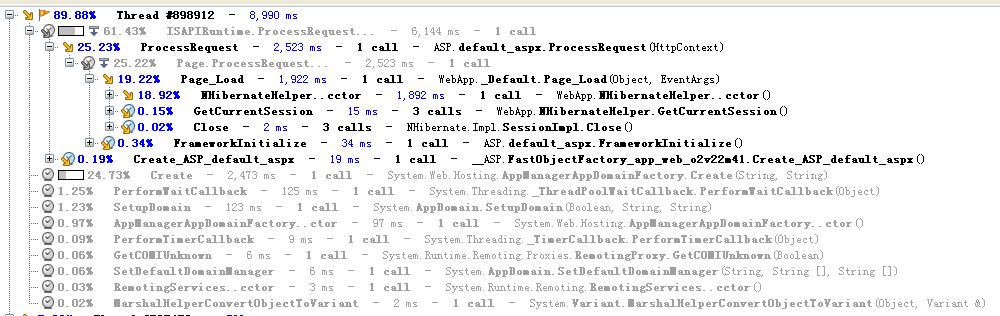
从执行时间来看
System.Diagnostics.Stopwatch sw
=
new
System.Diagnostics.Stopwatch();
sw.Start(); ISession session =
NHibernateHelper.GetCurrentSession();
session.Close(); sw.Stop(); Response.Write(sw.ElapsedTicks+
“
<br>
“
);
sw.Reset(); sw.Start(); session =
NHibernateHelper.GetCurrentSession();
session.Close(); sw.Stop(); Response.Write(sw.ElapsedTicks +
“
<br>
“
);
sw.Reset(); sw.Start(); session =
NHibernateHelper.GetCurrentSession();
session.Close(); sw.Stop(); Response.Write(sw.ElapsedTicks +
“
<br>
“
);
执行结果为:

版权声明:本文内容由互联网用户自发贡献,该文观点仅代表作者本人。本站仅提供信息存储空间服务,不拥有所有权,不承担相关法律责任。如发现本站有涉嫌侵权/违法违规的内容, 请联系我们举报,一经查实,本站将立刻删除。
发布者:全栈程序员-站长,转载请注明出处:https://javaforall.net/107093.html原文链接:https://javaforall.net




