
|
版权声明:原创作品,允许转载,转载时请务必以超链接形式标明文章
原始出处 、作者信息和本声明。否则将追究法律责任。 http://xiaoxiang.blog.51cto.com/88051/26928 |
|
本文大部分内容翻译自Gil Gribb和Klaus Hartmann合写的《Fast Extraction of Viewing Frustum Planes from the World-View-Projection Matrix》这篇文章,有兴趣的朋友可以搜索看下原文,里面DirectX下和OpenGL下的实现过程都说的很清楚,这里只说DirectX部分。
这里介绍的算法,可以直接从世界、观察以及投影矩阵中计算出Viewing Frustum的六个面。它快速,准确,并且允许我们在相机空间(camera space)、世界空间(world space)或着物体空间(object space)快速确定Frustum planes。
我们先仅仅从投影矩阵(project)开始,也就是假设世界矩阵(world)和观察矩阵(view)都是单位化了的矩阵。这就意味着相机位于世界坐标系下的原点,并且朝向Z轴的正方向。
定义一个顶点v(x y z w=1)和一个4*4的投影矩阵M=m(i,j),然后我们使用该矩阵M对顶点v进行转换,转换后的顶点为v’= (x’ y’ z’ w’),可以写成这样:
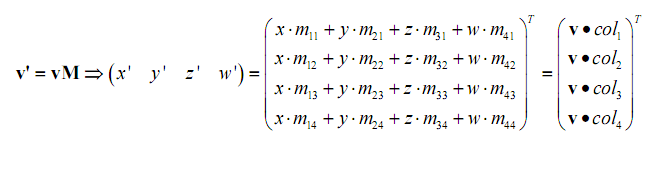 
转换后,viewing frustum实际上就变成了一个与轴平行的盒子,如果顶点 v’ 在这个盒子里,那么转换前的顶点 v 就在转换前的viewing frustum里。在Direct3D下,如果下面的几个不等式都成立的话,那么 v’ 就在这个盒子里。
-w’ < x’ < w’
-w’ < y’ < w’
0 < z’ < w’
可得到如下结论,列在下表里:
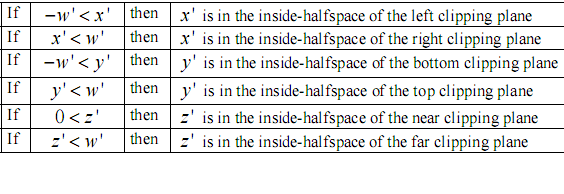
现在假设,我们要测试x’是否在左半空间内,根据上表,也就是判断
-w’ < x’ 是否成立。用我们开始提到的信息,可将不等式写成如下形式:
-( v * col4 ) < ( v * col1 )
即:
0 < ( v * col4 ) + ( v * col1 )
得到最后形式:
0 < v * ( col1 + col4 )
写到这里,其实已经等于描绘出了转换前的viewing frustum的左裁剪面的平面方程:
x * ( m14 + m11 ) + y * ( m24 + m21 ) + z * ( m34 + m31) + w * ( m44 + m41 ) = 0
当W = 1,我们可简单成如下形式:
x * ( m14 + m11 ) + y * ( m24 + m21 ) + z * ( m34 + m31) + ( m44 + m41 ) = 0
这就给出了一个基本平面方程:
ax + by + cz + d = 0
其中,
a = ( m14 + m11 ) , b = ( m24 + m21 ), c = ( m34 + m31) , d = ( m44 + m41 )
ok,到这里左裁剪面就得到了。重复以上几步,可推导出到其他的几个裁剪面,具体见下表:
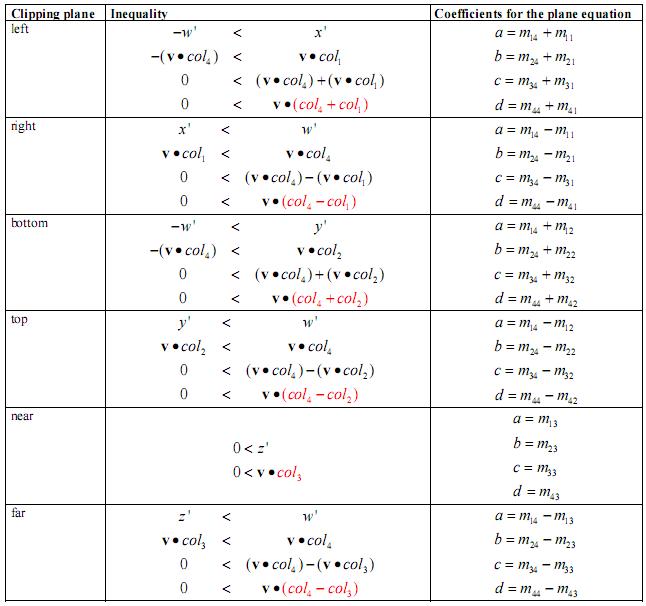
需要注意的是:最终得到的平面方程都是没有单位化的(平面的法向量不是单位向量),并且法向量指向空间的内部。这就是说,如果要判断 v 在空间内部,那么6个面必须都满足ax + by + cz + d > 0
到目前为止,我们都是假设世界矩阵( world )和观察矩阵( view )都是单位化了的矩阵。但是,本算法并不想受这种条件的限制,而是希望可以在任何条件下都能使用。实际上,这也并不复杂,并且简单得令人难以置信。如果你仔细想一下就会立刻明白了,所以我们不再对此进行详细解释了,下面给出3个结论:
1. 如果矩阵 M 等于投影矩阵 P ( M = P ),那么算法给出的裁剪面是在相机空间(camera space)
2. 如果矩阵 M 等于观察矩阵 V 和投影矩阵 P 的组合( M = V * P ),那么算法给出的裁剪面是在世界空间(world space)
3.如果矩阵 M 等于世界矩阵 W,观察矩阵 V 和投影矩阵 P 的组合( M = W* V * P ),呢么算法给出的裁剪面是在物体空间(object space)
好,到此为止,理论知识就全部说完了,下面给出具体的实现代码:
===============================
Frustum.h==============================
#ifndef __FrustumH__
#define __FrustumH__
#include <d3dx9.h>
class Frustum
{ public:
Frustum();
~Frustum(); // Call this every time the camera moves to update the frustum void CalculateFrustum( D3DXMATRIX ViewMatrix, D3DXMATRIX ProjectMatrix ); // This takes a 3D point and returns TRUE if it’s inside of the frustum bool PointInFrustum( D3DXVECTOR3 Point );
private:
// This holds the A B C and D values for each side of our frustum. D3DXPLANE FrustumPlane[6]; };
#endif // __FrustumH
=============================Frustum.cpp============================
#include “Frustum.h”
#include <D3dx9math.h> enum FrustumSide { RIGHT, LEFT, BOTTOM, TOP, FRONT, BACK }; Frustum::Frustum() { }
Frustum::~Frustum()
{ }
/ CALCULATE FRUSTUM
\\\\\\\\\\\\\\\\\\\\\\\\\\\\\\\\ * / / This extracts our frustum from the projection and view matrix. / / CALCULATE FRUSTUM \\\\\\\\\\\\\\\\\\\\\\\\\\\\\\\\ *
void Frustum::CalculateFrustum( D3DXMATRIX ViewMatrix, D3DXMATRIX ProjectMatrix )
{ D3DXMATRIX ComboMatrix; D3DXMatrixMultiply( &ComboMatrix, &ViewMatrix, &ProjectMatrix ); //right clipping plane FrustumPlane[RIGHT].a = ComboMatrix._14 – ComboMatrix._11; FrustumPlane[RIGHT].b = ComboMatrix._24 – ComboMatrix._21; FrustumPlane[RIGHT].c = ComboMatrix._34 – ComboMatrix._31; FrustumPlane[RIGHT].d = ComboMatrix._44 – ComboMatrix._41; //normalize D3DXPlaneNormalize( &FrustumPlane[RIGHT], &FrustumPlane[RIGHT] );
//left clipping plane
FrustumPlane[LEFT].a = ComboMatrix._14 + ComboMatrix._11; FrustumPlane[LEFT].b = ComboMatrix._24 + ComboMatrix._21; FrustumPlane[LEFT].c = ComboMatrix._34 + ComboMatrix._31; FrustumPlane[LEFT].d = ComboMatrix._44 + ComboMatrix._41;
//normalize
D3DXPlaneNormalize( &FrustumPlane[LEFT], &FrustumPlane[LEFT] );
//bottom clipping plane
FrustumPlane[BOTTOM].a = ComboMatrix._14 + ComboMatrix._12; FrustumPlane[BOTTOM].b = ComboMatrix._24 + ComboMatrix._22; FrustumPlane[BOTTOM].c = ComboMatrix._34 + ComboMatrix._32; FrustumPlane[BOTTOM].d = ComboMatrix._44 + ComboMatrix._42;
//normalize
D3DXPlaneNormalize( &FrustumPlane[BOTTOM], &FrustumPlane[BOTTOM] );
//top clipping plane
FrustumPlane[TOP].a = ComboMatrix._14 – ComboMatrix._12; FrustumPlane[TOP].b = ComboMatrix._24 – ComboMatrix._22; FrustumPlane[TOP].c = ComboMatrix._34 – ComboMatrix._32; FrustumPlane[TOP].d = ComboMatrix._44 – ComboMatrix._42;
//normalize
D3DXPlaneNormalize( &FrustumPlane[TOP], &FrustumPlane[TOP] );
//near clipping plane
FrustumPlane[FRONT].a = ComboMatrix._14 + ComboMatrix._13; FrustumPlane[FRONT].b = ComboMatrix._24 + ComboMatrix._23; FrustumPlane[FRONT].c = ComboMatrix._34 + ComboMatrix._33; FrustumPlane[FRONT].d = ComboMatrix._44 + ComboMatrix._43;
//normalize
D3DXPlaneNormalize( &FrustumPlane[FRONT], &FrustumPlane[FRONT] );
//far clipping plane
FrustumPlane[BACK].a = ComboMatrix._14 – ComboMatrix._13; FrustumPlane[BACK].b = ComboMatrix._24 – ComboMatrix._23; FrustumPlane[BACK].c = ComboMatrix._34 – ComboMatrix._33; FrustumPlane[BACK].d = ComboMatrix._44 – ComboMatrix._43;
//normalize
D3DXPlaneNormalize( &FrustumPlane[BACK], &FrustumPlane[BACK] ); } / POINT IN FRUSTUM \\\\\\\\\\\\\\\\\\\\\\\\\\\\\\\\ * / / This determines if a point is inside of the frustum / / POINT IN FRUSTUM \\\\\\\\\\\\\\\\\\\\\\\\\\\\\\\\ *
bool Frustum::PointInFrustum( D3DXVECTOR3 Point )
{ for( int i = 0; i < 6; i++ ) { float x = D3DXPlaneDotCoord( &FrustumPlane[i], & Point ); if( x < 0 ) return false; } // The point was inside of the frustum (In front of ALL the sides of the frustum) return true; } 本文出自 “小祥” 博客,请务必保留此出处http://xiaoxiang.blog.51cto.com/88051/26928 |
转载于:https://www.cnblogs.com/lancidie/archive/2010/10/11/1847764.html
版权声明:本文内容由互联网用户自发贡献,该文观点仅代表作者本人。本站仅提供信息存储空间服务,不拥有所有权,不承担相关法律责任。如发现本站有涉嫌侵权/违法违规的内容, 请联系我们举报,一经查实,本站将立刻删除。
发布者:全栈程序员-站长,转载请注明出处:https://javaforall.net/110713.html原文链接:https://javaforall.net




