
大家好,又见面了,我是你们的朋友全栈君。如果您正在找激活码,请点击查看最新教程,关注关注公众号 “全栈程序员社区” 获取激活教程,可能之前旧版本教程已经失效.最新Idea2022.1教程亲测有效,一键激活。
Jetbrains全系列IDE稳定放心使用
背景
为了解决函数计算本地环境差异和配置繁琐的问题,在此背景下,就有了我们的 WebIDE 产品,WebIDE 能让函数的开发、测试和部署更加流畅,降低了函数计算的学习成本和缩短了函数的开发周期。
WebIDE 入口地址:https://ide.fc.aliyun.com
介绍
WebIDE 是一个基于 H5 支持多语言的集成开发环境。相当于 VS Code 的网页版。
功能特色:
- 文件树,支持拖拽移动、拖拽上传、打包下载、重命名、搜索、同名覆盖确认提醒和多选批量操作。
- 代码编辑器,集成 Monaco Editor,与 VS Code 同款编辑器
- 快捷键,与 VS Code 保持一致。
- 偏好设置,支持工作空间级别的偏好设置。
- 命令面板,通过快捷键
F1,唤出快捷打开功能搜索框,搜索想要的快捷功能 - 窗口管理,支持自由分窗和拖拽,并能保存布局。
- Web Terminal,前端集成 XTerm.js,后端运行在 docker container 内部,随意安装软件,不会影响宿主机环境。预制 ubuntu 16.04 和 oh-my-zsh 开箱即用。
- 预制黑白两款主题。
- 可以将 Mac、Linux 和 windows (能支持安装 docker for windows) 系统主机注册成工作主机,所有数据都存储于用户所属的工作主机。
- 引入工作空间概念,支持多项目管理
- 内置函数计算创建向导,支持 fun 模板,内置了函数计算运行,调试和发布工具。
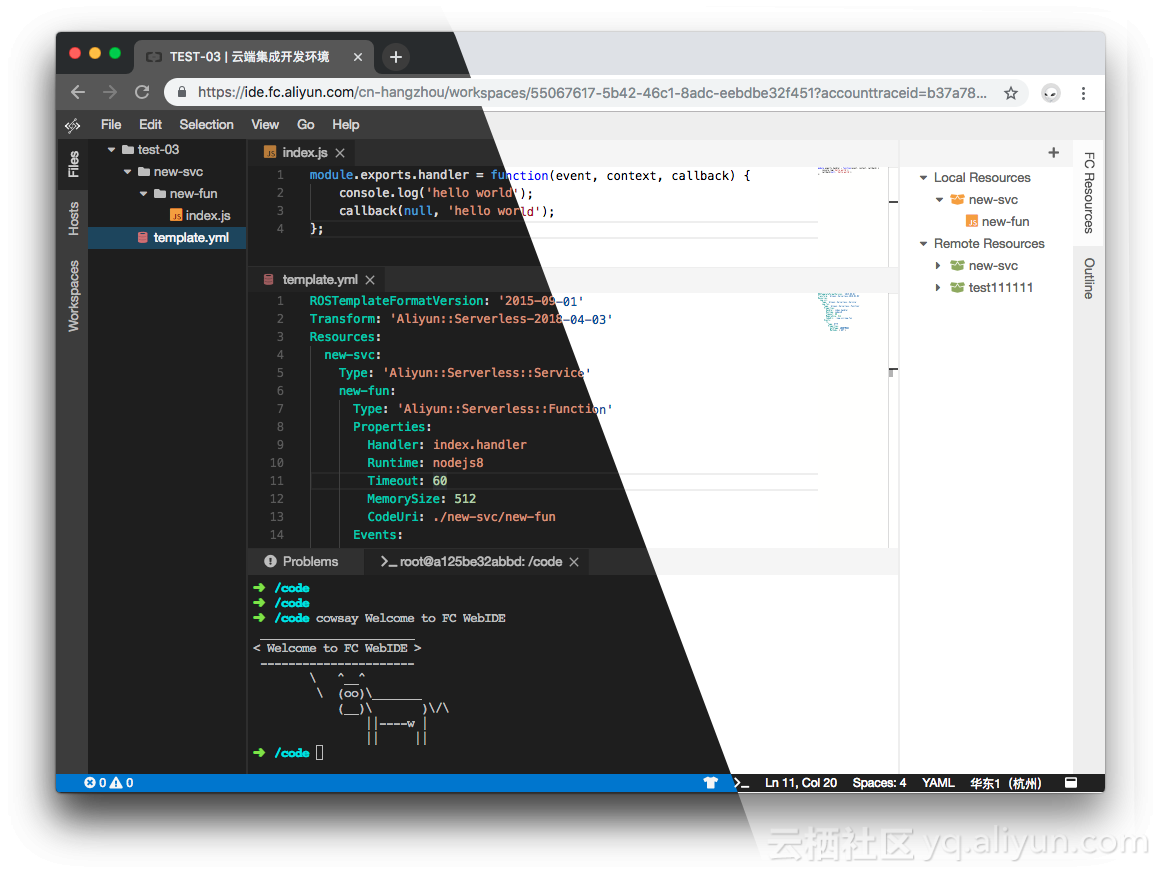
效果图:

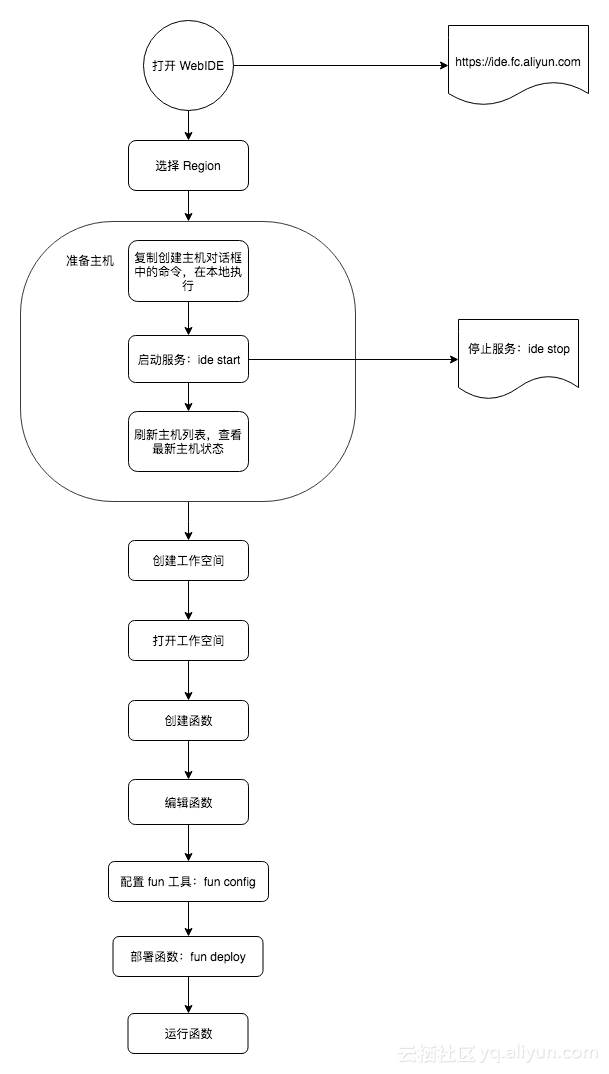
初次使用流程
WebIDE 概览图
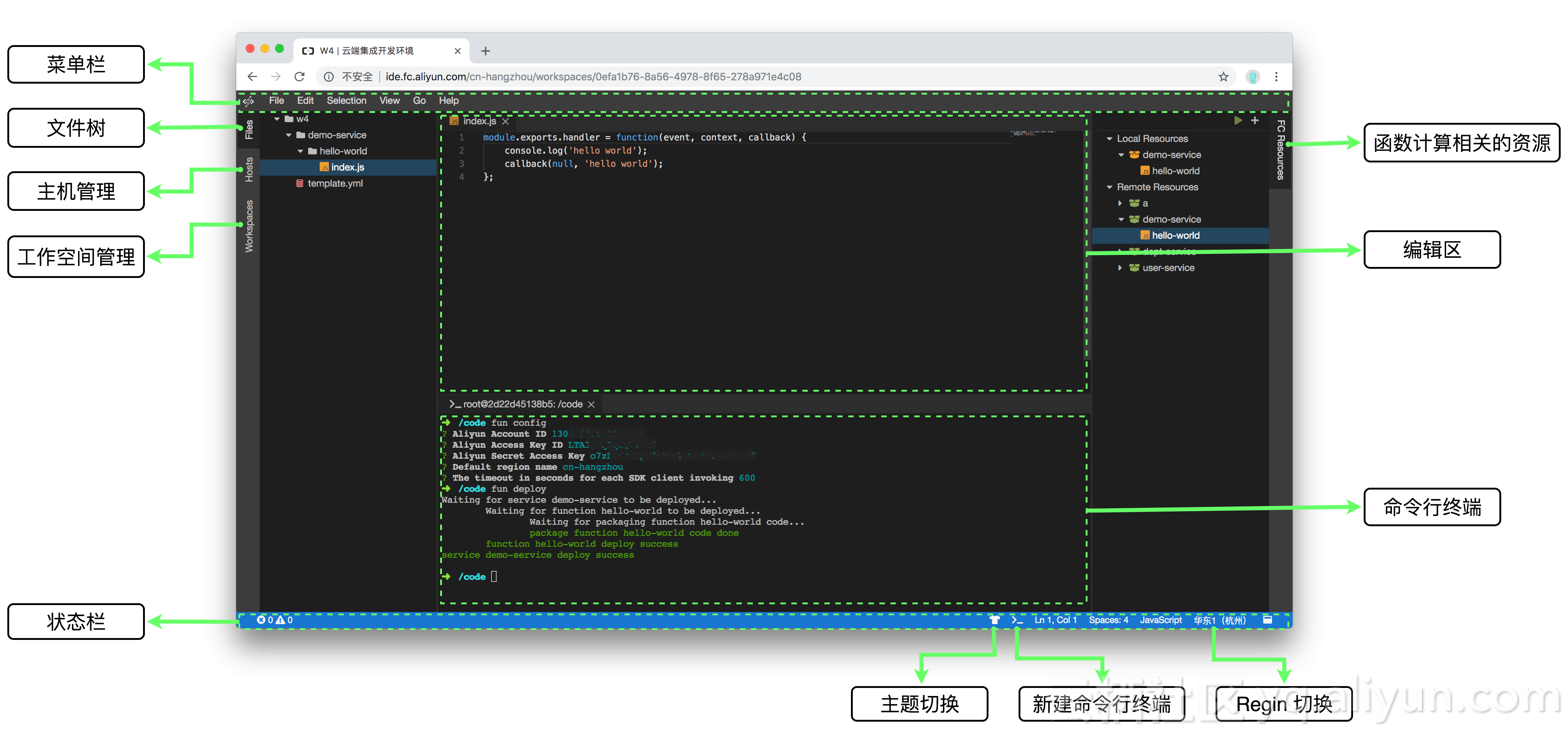
说明:WebIDE 上的每一个标签页,我们称之为视图窗口,也叫视图。
视图布局管理
视图相当于 WebIDE 上的标签页,例如:Files 视图、Hosts 视图和 Workspaces 视图等等。视图布局效果和 eclipse 的视图布局差不多。支持自由分窗和拖拽,刷新页面后,布局状态能还原到上一次的状态。如下图所示:
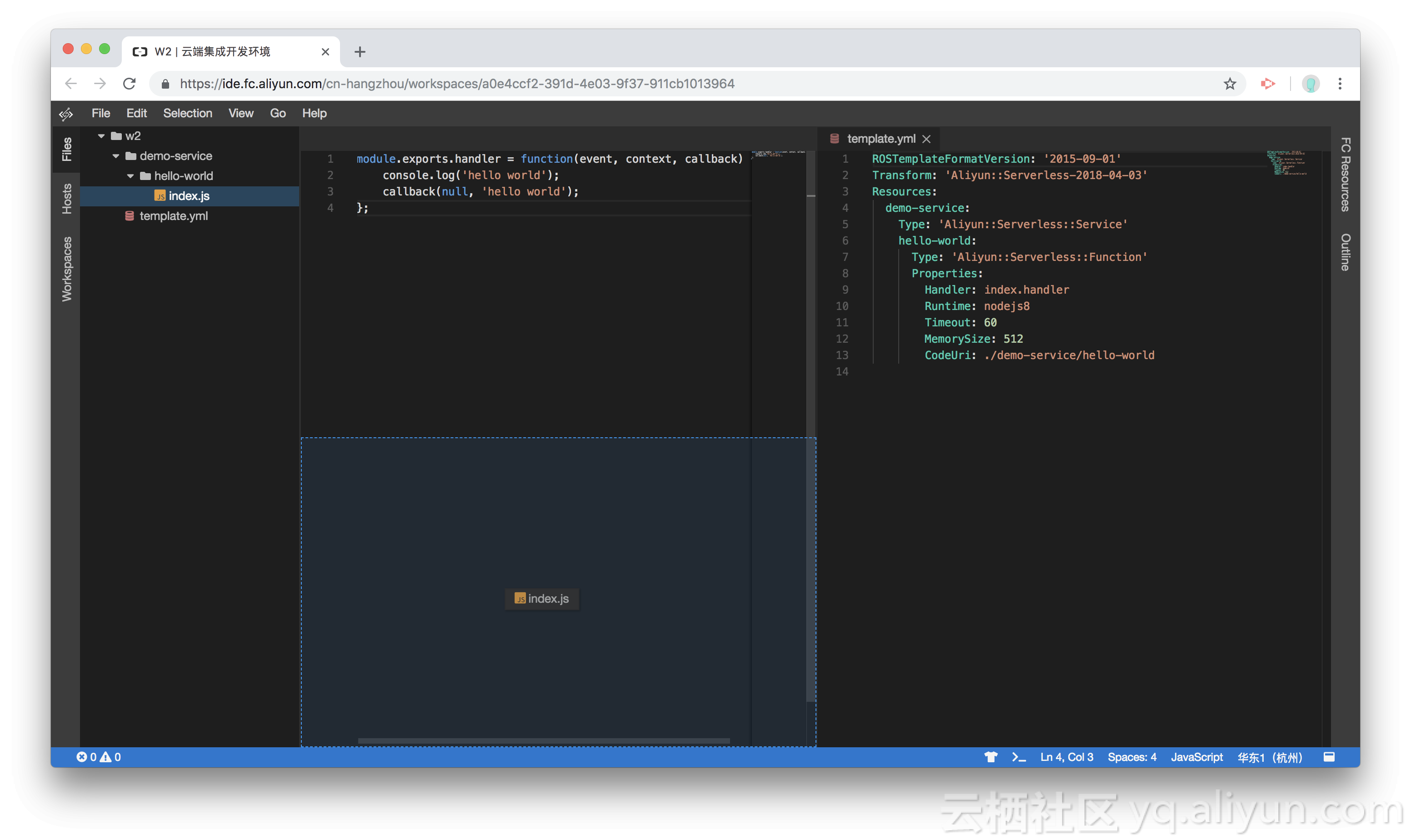
注意:当我们想还原到默认布局,可以通过快捷键 F1 打开命令面板,在命令面板中模糊搜索命令:Reset Workbench Layout,执行该命令即可。
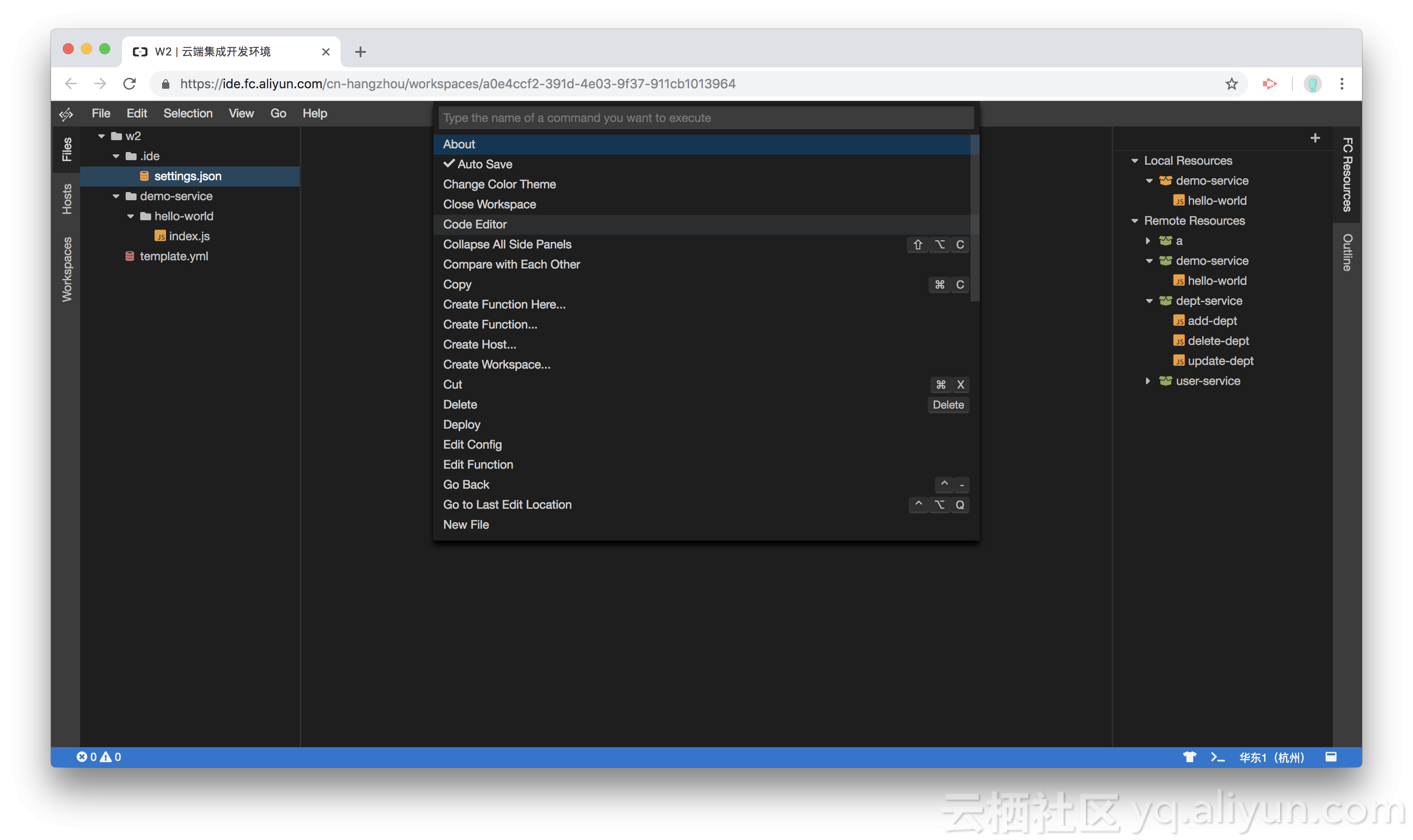
命令面板
通过快捷键 F1 唤出命令面板,可以模糊搜索想要的命令,如下图所示:
菜单栏
菜单栏功能如下:
- File 菜单,包含:创建文件、创建文件夹、创建函数、创建主机、创建工作空间、打开工作空间偏好设置、打开工作空间、切换 Regin、保存和关闭当前工作空间。
- Edit 菜单,和代码编辑器相关,包含:撤销、重做、复制、粘贴、剪切、查找和替换。
- Selection 菜单,和代码编辑器相关,各种代码选择操作。
- View 菜单,包含所有视图状态的控制。通过 View 菜单,我们能够看到 WebIDE 拥有的所有视图,并打开或关闭视图。
- Go 菜单,和代码编辑器相关,在曾经编辑过的位置跳转,跳转方式包括:前进(Forword)、后退(Back)和最后编辑的位置(Last Edit Location)。
- Help 菜单。
文件树(Files)
文件树在 IDE 中是操作最频繁的视图,文件树与 VS Code 的文件树的操作大致相同。文件树主要功能:
- 新建文件。
- 新建文件夹。
- 复制,支持多选
- 粘贴,不支持右键菜单粘贴(浏览器限制),只能通过快捷键粘贴,支持同名覆盖确认。
- 下载,支持多选。
- 上传,支持将本地的一个文件夹拖拽到文件树区域上传。
- 移动,支持拖拽方式在文件树上任意移动,支持同名覆盖确认。
- 单击打开文件。
- 反向定位文件树上的文件,当选择编辑区的文件,文件树会同步选择该文件在文件树中的位置。
- 文件树搜索,选中文件树,让文件树获得焦点,直接输入字母,就可以对展开的树节点进行搜索。
- 文件树同步,树节点每次展开,都会同步当前节点下的子节点信息(只同步看得见的,也就是说展开过的),以确保用户看到的文件树的状态尽可能最新。大部分情况下,文件树会自动同步。比如,通过文件树的右键菜单,新增删除文件等。当您通过 Terminal 去创建文件时,文件树是无法感知的,需要您自己去重新展开该文件的父目录或者刷新页面。
- 文件树状态保持,当刷新页面时,文件树的状态将会是上一次展开和收起的状态,需要注意的是:文件树只会还原展开和收起的状态,文件树的信息数据将会是最新的。举一个例子,小明在 A 电脑上对文件树进行了增删改,小明通过 B 电脑打开 WebIDE 时,将会看到小明在 A 电脑上的变更情况,并且未变更的文件状态依然保持。所以请放心刷新页面。
- 键盘上下方向键移动选择。
- 文件打开方式,某些文件可能支持多种打开方式。
编辑区
编辑区是对文件或其他(如:运行器)进行编辑的区域,该区域通过标签页的形式展现,可以同时对个文件进行编辑。其中,代码编辑器,集成 Monaco Editor,与 VS Code 同款编辑器。编辑区主要功能:
- 状态保持,打开的文件,刷新页面后,依然打开。
- 右键标签页的标题,弹出一个悬浮菜单,包括以下功能:关闭当前标签页、关闭其他标签页、关闭右侧标签页、关闭所有标签页和反向定位文件树(非文件的编辑不支持)
- 代码编辑器,集成 Monaco Editor,菜单栏中的 Edit 和 Selection 菜单用来操作代码编辑器的。
- 自动保存,默认情况,当您修改代码后,编辑器会自动保存。如果想手动保存,可以参考:偏好设置
主机管理
主机管理,包含主机的增删改查,主机管理功能位于 Hosts 视图中。
- 创建主机,本质是在某一台机器上安装 ide-agent。所以创建主机操作会弹出一个包含安装 ide-agent 命令的对话框,复制该安装命令,在用户机器上运行该命令即可,创建成功后,通过
ide start命令启动 Agent 服务。 - 删除主机,当主机下面没有创建过工作空间时,直接删除主机信息,否则会弹出强制删除确认对话框,当用户确认强制删除主机信息后,后台会将主机以及主机下面的工作空间信息一并删除。
- 重命名主机。
- 主机状态,绿色表示主机是在线状态,否则不在线。
工作空间管理
工作空间管理,包含了工作空间的增删改查,工作空间管理功能位于 Workspaces 视图中。
- 创建工作空间。
- 删除工作空间。
- 重命名工作空间。
- 双击打开工作空间,在工作空间列表中,双击某个工作空间即可以打开该工作空间。
- 工作空间状态,其实就是主机状态的映射,绿色表示当前工作空间所属的主机状态是在线状态,否则不在线。
主机与工作空间关系
主机与工作空间的关系是一对多的关系,即一个主机可以包含多个工作空间,一个工作空间只能隶属于一个主机。工作空间映射到主机上的一个文件夹。
偏好设置
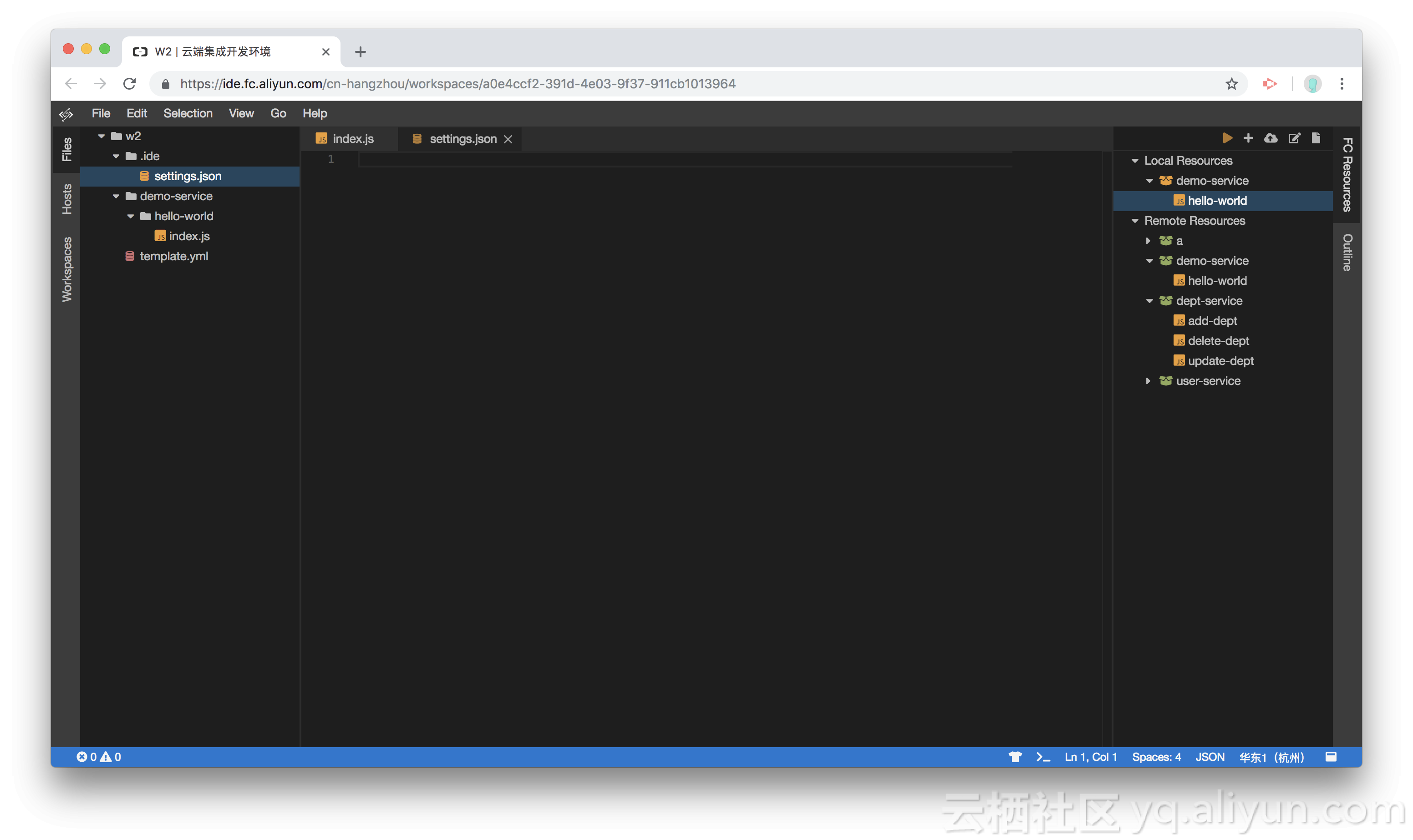
点击菜单栏 File -> Open Workspace Preferences,打开工作空间级别的偏好设置,第一次打开,会自动创建 ./ide/settings.json 文件,如下图:
继续点击菜单 File -> Auto Save,结果如下图:
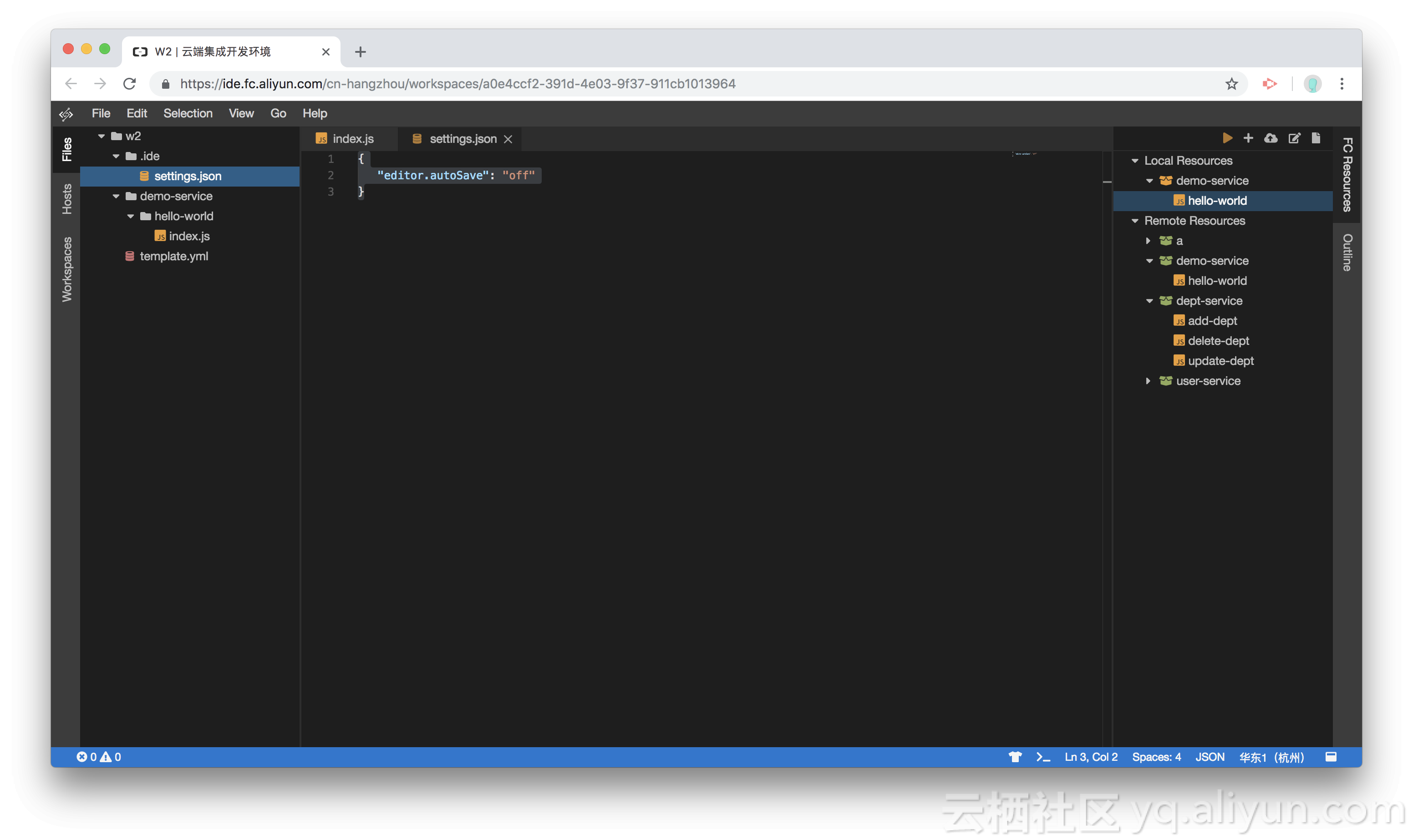
还有很多其他的偏好设置,具体请查看:偏好设置详情。
函数计算相关的资源
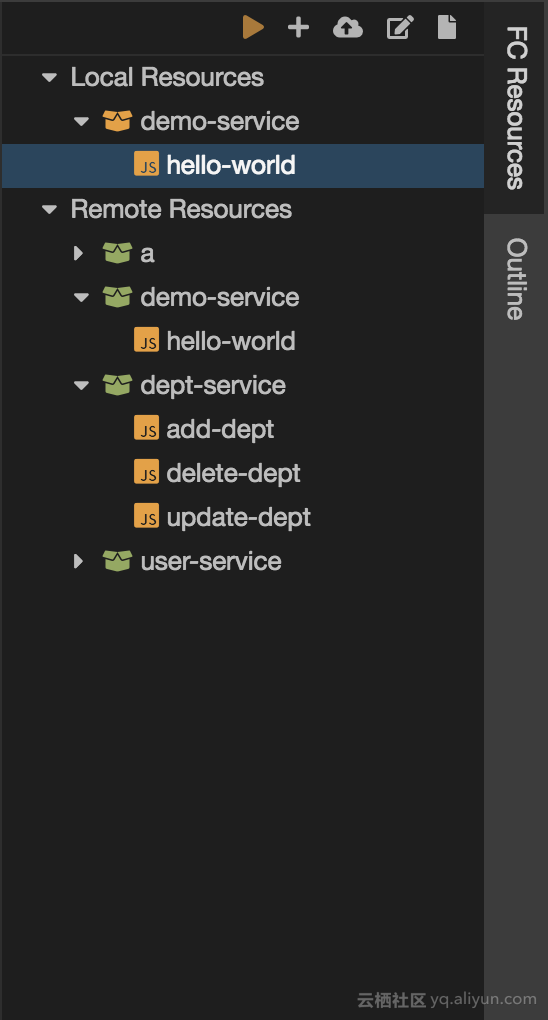
函数计算资源(FC Resources),包含本地资源(Local Resources)和远程资源(Remote Resources)相关操作。
- 创建函数,填写函数元数据后,会根据预置的模板生成函数代码,同时会创建或者更新 template.yml 文件,在本地资源(Local Resources)节点下面就能看到该函数。该函数称为本地函数。
- 本地资源(Local Resources),本地资源就是工作空间根下面的 template.yml 的可视化展现,当您修改 template.yml 文件后,本地资源会同步更新。
- 部署函数,在 Terminal 中运行
fun deloy可以将本地函数部署到远程函数计算服务中。 - 远程资源,包含的是已经部署到远程函数计算服务中的资源。
- 运行本地函数,本地函数运行和调试后期会支持。
- 运行远程函数,点击运行图标,将打开一个运行器,运行器包括:测试负载和执行结果。点击 “Run” 按钮,即可运行。
- 双击本地函数可以直接打开函数的入口文件(右键菜单也可以)。
- 直接定位编辑 template.yml 文件(右键菜单也可以)。
命令行终端(Terminal)
当打开某一个工作空间后,就可以新建一个命令行终端视图。命令行终端的工作目录初始值为当前工作空间的根目录,oh-my-zsh 开箱即用。后端运行在当前主机上的 docker container 中,如果当前主机是本地机器,也就是说运行在您本地机器的某个 docker container 之中。
状态栏
状态栏分为左侧区域和右侧区域,状态栏包含来自 WebIDE 的各种状态,状态的形式:文字、图标、文字加图标和颜色。状态按照是否可操作来分,又分为:可操作的(展现的同时关联相关操作)和不可操作的(只展现状态)。
- 主题切换,是一个可操作的图标类型状态。点击图标,弹出主题列表让您选择。
- 状态栏为紫色,表示当前尚未打开任何一个工作空间。
- 状态栏为蓝色,表示打开了一个工作空间,工作空间下的 WebIDE 状态一切正常。
- 状态栏为红色,表示有错误已经发生。
- 其他颜色待定。
小结
本文将 WebIDE 主要功能以先总后分的方式讲解,先让读者有一个大概的了解,然后在分解各个功能。大部分读者都用过其他的 IDE,本文中很多功能一看就能理解。其中,主机、工作空间和函数计算相关的概念可能是第一次接触,可以着重了解一下。函数计算相关的概念,我并没有做过多解释,想要了解更多,可以参考:函数计算文档。
偏好设置详情
{
    "navigator.autoReveal": {
        "type": "boolean",
        "description": "Selects file under editing in the navigator.",
        "default": true
    },
    "navigator.exclude": {
        "type": "object",
        "description": `Configure glob patterns for excluding files and folders from the navigator. A resource that matches any of the enabled patterns, will be filtered out from the navigator. For more details about the exclusion patterns, see: \`man 5 gitignore\`.`,
        "default": {
            "**/.git": true
        }
    },
    "notification.timeout": {
        "type": "number",
        "description": "The time before auto-dismiss the notification.",
        "default": 5000 // time express in millisec. 0 means : Do not remove
    },
    "workspace.preserveWindow": {
        "description": "Enable opening workspaces in current window",
        "additionalProperties": {
            "type": "boolean"
        },
        "default": false
    },
    "output.maxChannelHistory": {
        "type": "number",
        "description": "The maximum number of entries in an output channel.",
        "default": 1000
    },
    "editor.tabSize": {
        "type": "number",
        "minimum": 1,
        "default": 4,
        "description": "Configure the tab size in the editor"
    },
    "editor.lineNumbers": {
        "enum": [
            "on",
            "off"
        ],
        "description": "Control the rendering of line numbers"
    },
    "editor.renderWhitespace": {
        "enum": [
            "none",
            "boundary",
            "all"
        ],
        "description": "Control the rendering of whitespaces in the editor"
    },
    "editor.autoSave": {
        "enum": [
            "on",
            "off"
        ],
        "default": "on",
        "description": "Configure whether the editor should be auto saved"
    },
    "editor.autoSaveDelay": {
        "type": "number",
        "default": 500,
        "description": "Configure the auto save delay in milliseconds"
    },
    "editor.rulers": {
        "type": "array",
        "default": [],
        "description": "Render vertical lines at the specified columns."
    },
    "editor.wordSeparators": {
        "type": "string",
        "default": "`~!@#$%^&*()-=+[{]}\\|;:'\",.<>/",
        "description": "A string containing the word separators used when doing word navigation."
    },
    "editor.glyphMargin": {
        "type": "boolean",
        "default": false,
        "description": "Enable the rendering of the glyph margin."
    },
    "editor.roundedSelection": {
        "type": "boolean",
        "default": true,
        "description": "Render the editor selection with rounded borders."
    },
    "editor.minimap.enabled": {
        "type": "boolean",
        "default": true,
        "description": "Enable or disable the minimap"
    },
    "editor.minimap.showSlider": {
        "type": "string",
        "default": "mouseover",
        "description": "Controls whether the minimap slider is automatically hidden. Possible values are 'always' and 'mouseover'"
    },
    "editor.minimap.renderCharacters": {
        "type": "boolean",
        "default": true,
        "description": "Render the actual characters on a line (as opposed to color blocks)"
    },
    "editor.minimap.maxColumn": {
        "type": "number",
        "default": 120,
        "description": "Limit the width of the minimap to render at most a certain number of columns"
    },
    "editor.overviewRulerLanes": {
        "type": "number",
        "default": 2,
        "description": "The number of vertical lanes the overview ruler should render."
    },
    "editor.overviewRulerBorder": {
        "type": "boolean",
        "default": true,
        "description": "Controls if a border should be drawn around the overview ruler."
    },
    "editor.cursorBlinking": {
        "type": "string",
        "default": "blink",
        "description": "Control the cursor animation style, possible values are 'blink', 'smooth', 'phase', 'expand' and 'solid'."
    },
    "editor.mouseWheelZoom": {
        "type": "boolean",
        "default": false,
        "description": "Zoom the font in the editor when using the mouse wheel in combination with holding Ctrl."
    },
    "editor.cursorStyle": {
        "type": "string",
        "default": "line",
        "description": "Control the cursor style, either 'block' or 'line'."
    },
    "editor.fontLigatures": {
        "type": "boolean",
        "default": false,
        "description": "Enable font ligatures."
    },
    "editor.hideCursorInOverviewRuler": {
        "type": "boolean",
        "default": false,
        "description": "Should the cursor be hidden in the overview ruler."
    },
    "editor.scrollBeyondLastLine": {
        "type": "boolean",
        "default": true,
        "description": "Enable that scrolling can go one screen size after the last line."
    },
    "editor.wordWrap": {
        "enum": ['off', 'on', 'wordWrapColumn', 'bounded'
        ],
        "default": "off",
        "description": "Control the wrapping of the editor."
    },
    "editor.wordWrapColumn": {
        "type": "number",
        "default": 80,
        "description": "Control the wrapping of the editor."
    },
    "editor.wrappingIndent": {
        "enum": ['none', 'same', 'indent'
        ],
        "default": "same",
        "description": "Control indentation of wrapped lines. Can be: 'none', 'same' or 'indent'."
    },
    "editor.links": {
        "type": "boolean",
        "default": true,
        "description": "Enable detecting links and making them clickable."
    },
    "editor.mouseWheelScrollSensitivity": {
        "type": "number",
        "default": 1,
        "description": "A multiplier to be used on the `deltaX` and `deltaY` of mouse wheel scroll events."
    },
    "editor.multiCursorModifier": {
        "enum": ['ctrlCmd', 'alt'
        ],
        "default": "alt",
        "description": "The modifier to be used to add multiple cursors with the mouse."
    },
    "editor.accessibilitySupport": {
        "enum": ['auto', 'off', 'on'
        ],
        "default": "auto",
        "description": "Configure the editor's accessibility support."
    },
    "editor.quickSuggestions": {
        "type": "boolean",
        "default": true,
        "description": "Enable quick suggestions (shadow suggestions)"
    },
    "editor.quickSuggestionsDelay": {
        "type": "number",
        "default": 500,
        "description": "Quick suggestions show delay (in ms)"
    },
    "editor.parameterHints": {
        "type": "boolean",
        "default": true,
        "description": "Enables parameter hints"
    },
    "editor.autoClosingBrackets": {
        "type": "boolean",
        "default": true,
        "description": "Enable auto closing brackets."
    },
    "editor.autoIndent": {
        "type": "boolean",
        "default": false,
        "description": "Enable auto indentation adjustment."
    },
    "editor.formatOnType": {
        "type": "boolean",
        "default": false,
        "description": "Enable format on type."
    },
    "editor.formatOnPaste": {
        "type": "boolean",
        "default": false,
        "description": "Enable format on paste."
    },
    "editor.dragAndDrop": {
        "type": "boolean",
        "default": false,
        "description": "Controls if the editor should allow to move selections via drag and drop."
    },
    "editor.suggestOnTriggerCharacters": {
        "type": "boolean",
        "default": true,
        "description": "Enable the suggestion box to pop-up on trigger characters."
    },
    "editor.acceptSuggestionOnEnter": {
        "enum": ['on', 'smart', 'off'
        ],
        "default": "on",
        "description": "Accept suggestions on ENTER."
    },
    "editor.acceptSuggestionOnCommitCharacter": {
        "type": "boolean",
        "default": true,
        "description": "Accept suggestions on provider defined characters."
    },
    "editor.snippetSuggestions": {
        "enum": ['top', 'bottom', 'inline', 'none'
        ],
        "default": "inline",
        "description": "Enable snippet suggestions."
    },
    "editor.emptySelectionClipboard": {
        "type": "boolean",
        "description": "Copying without a selection copies the current line."
    },
    "editor.wordBasedSuggestions": {
        "type": "boolean",
        "default": true,
        "description": "Enable word based suggestions. Defaults to 'true'"
    },
    "editor.selectionHighlight": {
        "type": "boolean",
        "default": true,
        "description": "Enable selection highlight."
    },
    "editor.occurrencesHighlight": {
        "type": "boolean",
        "default": true,
        "description": "Enable semantic occurrences highlight."
    },
    "editor.codeLens": {
        "type": "boolean",
        "default": true,
        "description": "Show code lens"
    },
    "editor.folding": {
        "type": "boolean",
        "default": true,
        "description": "Enable code folding"
    },
    "editor.showFoldingControls": {
        "enum": ['always', 'mouseover'
        ],
        "default": "mouseover",
        "description": "Controls whether the fold actions in the gutter stay always visible or hide unless the mouse is over the gutter."
    },
    "editor.matchBrackets": {
        "type": "boolean",
        "default": true,
        "description": "Enable highlighting of matching brackets."
    },
    "editor.renderControlCharacters": {
        "type": "boolean",
        "default": false,
        "description": "Enable rendering of control characters."
    },
    "editor.renderIndentGuides": {
        "type": "boolean",
        "default": true,
        "description": "Enable rendering of indent guides."
    },
    "editor.renderLineHighlight": {
        "enum": ['none', 'gutter', 'line', 'all'
        ],
        "default": "line",
        "description": "Enable rendering of current line highlight."
    },
    "editor.useTabStops": {
        "type": "boolean",
        "description": "Inserting and deleting whitespace follows tab stops."
    },
    "editor.insertSpaces": {
        "type": "boolean",
        "default": true,
        "description": "Using whitespaces to replace tabs when tabbing."
    },
    "diffEditor.renderSideBySide": {
        "type": "boolean",
        "description": "Render the differences in two side-by-side editors.",
        "default": true
    },
    "diffEditor.ignoreTrimWhitespace": {
        "type": "boolean",
        "description": "Compute the diff by ignoring leading/trailing whitespace.",
        "default": true
    },
    "diffEditor.renderIndicators": {
        "type": "boolean",
        "description": "Render +/- indicators for added/deleted changes.",
        "default": true
    },
    "diffEditor.followsCaret": {
        "type": "boolean",
        "description": "Resets the navigator state when the user selects something in the editor.",
        "default": true
    },
    "diffEditor.ignoreCharChanges": {
        "type": "boolean",
        "description": "Jump from line to line.",
        "default": true
    },
    "diffEditor.alwaysRevealFirst": {
        "type": "boolean",
        "description": "Reveal first change.",
        "default": true
    }
}发布者:全栈程序员-站长,转载请注明出处:https://javaforall.net/180711.html原文链接:https://javaforall.net



