
cookie
cookie是保存在客户端本地的纯文本文件。其核心目的是为了解决服务器无法识别用户身份的问题。
HTTP协议是无状态的
cookie工作原理
- 客户端发送一个请求到服务器
- 服务器发送一个HttpResponse响应到客户端,其中包含Set-Cookie的头部
- 客户端保存cookie,之后向服务器发送请求时,HttpRequest请求中会包含一个Cookie的头部
- 服务器返回响应数据
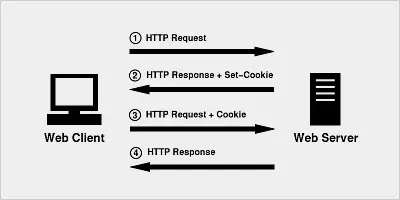


可以在浏览器调试栏中的Headers和Cookies中查看。
cookie的属性
| 属性项 | 说明 |
|---|---|
| NAME/VAULE | 键值对,可以设置要保存的 Key/Value,NAME 不能和其他属性项的名字一样 |
| Domain | 生成该 Cookie 的域名,如 domain=“www.baidu.com” |
| Path | 定义了Web站点上可以访问该Cookie的目录 |
| Secure | 指定是否使用HTTPS安全协议发送Cookie。 |
| HTTPOnly | 防止客户端脚本通过document.cookie属性访问Cookie,有助于保护Cookie不被跨站脚本攻击窃取或篡改 |
| Expires | 设置Cookie的生存期。有两种存储类型的Cookie:会话性与持久性。Expires属性缺省时,为会话性Cookie,仅保存在客户端内存中,并在用户关闭浏览器时失效;持久性Cookie会保存在用户的硬盘中,直至生存期到或用户直接在网页中单击“注销”等按钮结束会话时才会失效 |
| max-age | 与expires作用相同,用来告诉浏览器此cookie多久过期(单位是秒),是一个时间段而不是一个固定的时间点。优先级高于expires。 |
- Cookie 机制并未遵循严格的同源策略,允许一个子域可以设置或获取其父域的 Cookie。
- cookie存储大小4kb左右
cookie缺点
- 大小受限,每个cookie大约4kb左右,浏览器不同大小稍有差异。
- cookie可以被用户禁用,修改,删除
- 每次请求cookie信息都会随http传递给后端,浪费了一定的带宽。
- 安全性不高
cookie使用
/获取cookie的值 */ const getCookie = (name?: string) => {
    if (name) {
    const cookiePair = document.cookie.split(';'); for (let pair of cookiePair) {
    const parirList = pair.split('='); if (parirList[0] && parirList[0] === name) {
    return parirList[1]; } } } else {
    return document.cookie; } } /设置cookie的值 */ const setCookie = (name: string, value: string) => {
    const cookiePair = document.cookie.split(';'); const newPair = `${
     name}=${
     value}`; cookiePair.push(newPair); document.cookie = cookiePair.join(';'); } /删除cookie */ const deleteCookie = () => {
    const currentDate = new Date() const currentTime = currentDate.getTime(); //删除cookie很简单,将expires设置为过期日期即可 currentDate.setTime(currentTime - 1); const lastTimeStr = currentDate.toUTCString(); document.cookie = `expires=${
     lastTimeStr}`; }
localStorage
- 浏览器本地持久缓存,不会随浏览器关闭而丢失。
- 不会随请求发送到后端。
- 同源窗口数据共享。
- 存储大小5M左右,浏览器不同稍有差异。
localStorage使用
/获取缓存对象 */ const storage = window.localStorage /设置缓存数据 */ storage.setItem("key", "value"); /获取缓存数据 */ const keyValue = storage.getItem("key"); /删除缓存数据 */ storage.removeItem("key"); sessionStorage
- 浏览器本地会话缓存,随浏览器关闭、标签页关闭而丢失。
- 不会随请求发送到后端。
- 存储大小5M左右,浏览器不同稍有差异。
使用方法同localStorage
IndexDB
浏览器提供的本地数据库。具有以下特点:
- 键值对储存。 IndexedDB 内部采用对象仓库(object store)存放数据。所有类型的数据都可以直接存入,包括 JavaScript 对象。对象仓库中,数据以”键值对”的形式保存,每一个数据记录都有对应的主键,主键是独一无二的,不能有重复,否则会抛出一个错误。
- 异步。 IndexedDB 操作时不会锁死浏览器,用户依然可以进行其他操作,这与 LocalStorage 形成对比,后者的操作是同步的。异步设计是为了防止大量数据的读写,拖慢网页的表现。
- 支持事务。 IndexedDB 支持事务(transaction),这意味着一系列操作步骤之中,只要有一步失败,整个事务就都取消,数据库回滚到事务发生之前的状态,不存在只改写一部分数据的情况。
- 同源限制 IndexedDB 受到同源限制,每一个数据库对应创建它的域名。网页只能访问自身域名下的数据库,而不能访问跨域的数据库。
- 储存空间大 IndexedDB 的储存空间比 LocalStorage 大得多,一般来说不少于 250MB,甚至没有上限。
- 支持二进制储存。 IndexedDB 不仅可以储存字符串,还可以储存二进制数据(ArrayBuffer 对象和 Blob 对象)。
模型概念
- 数据库:IDBDatabase 对象
- 对象仓库:IDBObjectStore 对象
- 索引: IDBIndex 对象
- 事务: IDBTransaction 对象
- 操作请求:IDBRequest 对象
- 指针: IDBCursor 对象
- 主键集合:IDBKeyRange 对象
打开数据库连接
const connectDB = window.indexedDB.open(connectDBName, version); 数据库连接包含2个参数,连接名和版本号
IDBDatabase对象有三个回调事件:
- error:打开数据库失败。
- success:成功打开数据库。
- upgradeneeded:如果指定的版本号,大于数据库的实际版本号时触发。
打开数据库是一个异步操作,我们需要在事件回调中进行下一步操作,都在则无法获取到理想的结果。
IDBTransaction对象也有三个回调函数。
- error:事务处理失败。
- abort:事务回滚。
- complete:事务处理完成。
问题
- Failed to execute ‘transaction’ on ‘IDBDatabase’: A version change transaction is running.
解答:upgradeneeded会默认打开一个读写事务,如果触发了该事件,那么所有的读写操作应该基于已有的事务去处理,否则同时启动2个事务则会抛错。
使用方式
/连接配置 */ export interface ConnectConfig {
    connectDBName?: string; version?: number; tableName: string; primaryKey?: string; indexList?: IndexConfig[]; } /索引配置 */ export interface IndexConfig {
    /索引名称 */ name: string; option?: {
    /是否唯一 */ unique?: boolean; /索引路径为数组时,为每个元素添加索引 */ multiEntry?: boolean; /指定语言环境 */ locale?: string } } /任意对象 */ export interface AnyObject {
    [key: string]: any; } export default class CusTomIndexDB {
    /数据库连接名 */ private connectDBName: string = 'CUSTOM_INDEX_DB'; /数据库版本 */ private version: number = 1; /数据库表名 */ private tableName: string; /主键 */ private primaryKey?: string; /索引列表 */ private indexList?: IndexConfig[]; /数据库连接 */ protected connectDB!: IDBOpenDBRequest; /数据库 */ protected indexDB!: IDBDatabase; /事务 */ protected transactionDB?: IDBTransaction; constructor(config: ConnectConfig) {
    if (config.connectDBName) {
    this.connectDBName = config.connectDBName; } if (config.version) {
    this.version = config.version; } this.primaryKey = config.primaryKey; this.tableName = config.tableName; this.indexList = config.indexList; } /打开数据库连接 */ openConnect() {
    if (!this.connectDB) {
    /打开数据库连接 */ this.connectDB = window.indexedDB.open(this.connectDBName, this.version); return new Promise((resolve, reject) => {
    /连接打开成功 */ this.connectDB.onsuccess = (env: Event) => {
    if (!this.indexDB) {
    console.log('indexDB连接成功'); this.indexDB = (env.target as IDBOpenDBRequest)?.result; resolve(true) } }; /版本有更新*/ this.connectDB.onupgradeneeded = (env: IDBVersionChangeEvent) => {
    if (!this.indexDB) {
    console.log('indexDB版本更新') this.indexDB = (env?.target as IDBOpenDBRequest)?.result; /更新版本时,自动起了一个读写事务,该事务不关闭其他操作均会报错 */ const objectStore = this.createDataTable(this.tableName, this.primaryKey, this.indexList); const transaction = objectStore?.transaction; this.transactionDB = transaction; resolve(true) } }; /连接失败 */ this.connectDB.onerror = (err) => {
    console.log('indexDB连接失败', err); reject(false) }; }) } else {
    // 已经存在打开连接时,去掉版本更新缓存事务 this.transactionDB = undefined; return Promise.resolve(true); } } /新建或打开数据表 */ createDataTable(tableName: string, primaryKey?: string, indexList?: IndexConfig[]) {
    let objectStore: IDBObjectStore | undefined = undefined; if (primaryKey) {
    if (!this.indexDB.objectStoreNames.contains(tableName)) {
    /创建数据表 */ objectStore = this.indexDB?.createObjectStore( tableName, {
    keyPath: primaryKey } ); /创建索引 */ if (indexList && indexList.length) {
    indexList.forEach(indexItem => {
    objectStore?.createIndex(indexItem.name, indexItem.name, indexItem.option); }) } } } else {
    if (!this.indexDB.objectStoreNames.contains(tableName)) {
    /创建数据表 */ objectStore = this.indexDB?.createObjectStore( tableName, {
    autoIncrement: true } ); /创建索引 */ if (indexList && indexList.length) {
    indexList.forEach(indexItem => {
    objectStore?.createIndex(indexItem.name, indexItem.name, indexItem.option); }) } } } return objectStore; } /删除数据库 */ deleteDataBase() {
    window.indexedDB.deleteDatabase(this.connectDBName); console.log('数据库删除成功!') } /删除数据表 */ deleteDataTable(tableName: string) {
    void this.indexDB.deleteObjectStore(tableName); console.log("数据表删除成功!") } /关闭数据库连接 */ closeDataTable() {
    void this.indexDB.close(); console.log("数据连接已关闭!") } /根据主键查询 */ findByPrimaryKey(primaryKey: string | number) {
    // 创建读写事务 try {
    let Itransaction = this.transactionDB; if (!Itransaction) {
    Itransaction = this.indexDB?.transaction([this.tableName]); } if (Itransaction) {
    return new Promise((resolve, reject) => {
    // 获取数据表实例 const tableInstance = Itransaction?.objectStore(this.tableName); // 根据主键获取数据 const result = tableInstance?.get(primaryKey); if (result) {
    result.onsuccess = function () {
    console.log('获取数据成功', result); resolve(result.result); }; result.onerror = function (err) {
    console.log('获取数据失败', err); reject(undefined); } } }) } } catch (err) {
    console.log(err) } } /查询所有记录 */ findAll() {
    let Itransaction = this.transactionDB; if (!Itransaction) {
    // 创建读写事务 Itransaction = this.indexDB?.transaction([this.tableName]); } if (Itransaction) {
    return new Promise((resolve, reject) => {
    // 获取数据表实例 const tableInstance = Itransaction?.objectStore(this.tableName); // 获取指针对象 const result = tableInstance?.openCursor(); const dataList: any[] = []; if (result) {
    result.onsuccess = function (this: IDBRequest<IDBCursorWithValue | null>, ev: Event) {
    const cursor = (ev.target as any)?.result; if (cursor) {
    dataList.push(cursor.value); cursor.continue(); } resolve(dataList); }; result.onerror = function () {
    console.log('获取数据失败'); reject(undefined); } } }) } } /根据索引查询 */ findByIndex(indexKey: string) {
    let Itransaction = this.transactionDB; if (!Itransaction) {
    // 创建读写事务 Itransaction = this.indexDB?.transaction([this.tableName]); } if (Itransaction) {
    return new Promise((resolve, reject) => {
    // 获取数据表实例 const tableInstance = Itransaction?.objectStore(this.tableName); // 获取索引对象 const indexObject = tableInstance?.index(indexKey); // 获取索引数据 const result = indexObject?.openCursor(); const dataList: any[] = []; if (result) {
    result.onsuccess = function (this: IDBRequest<IDBCursorWithValue | null>, ev: Event) {
    const cursor = (ev.target as any)?.result; if (cursor) {
    dataList.push(cursor.value); cursor.continue(); } resolve(dataList) }; result.onerror = function () {
    console.log('获取数据失败'); reject(undefined); } } }) } } /新增 */ insert(item: AnyObject) {
    try {
    let Itransaction = this.transactionDB; if (!Itransaction) {
    // 创建读写事务 Itransaction = this.indexDB?.transaction([this.tableName], 'readwrite'); } if (Itransaction) {
    return new Promise((resolve, reject) => {
    // 序列化插入数据 const insertItem = JSON.parse(JSON.stringify(item)); // 新增数据 const result = Itransaction?.objectStore(this.tableName).add(insertItem); if (result) {
    result.onsuccess = function () {
    console.log('数据写入成功'); resolve(result); }; result.onerror = function (err) {
    console.log('数据写入失败', err); reject(false); } } }) } } catch (err) {
    console.log(err); } } /修改 */ update(item: AnyObject) {
    try {
    let Itransaction = this.transactionDB; if (!Itransaction) {
    // 创建读写事务 Itransaction = this.indexDB?.transaction([this.tableName], 'readwrite'); } if (Itransaction) {
    return new Promise((resolve, reject) => {
    // 如果不序列化,则会报错,DOMException: Failed to execute 'put' on 'IDBObjectStore': function onChange() {} could not be cloned. // 序列化修改数据 const updateItem = JSON.parse(JSON.stringify(item)); // 获取数据表实例 const result = Itransaction?.objectStore(this.tableName).put(updateItem);; if (result) {
    result.onsuccess = function () {
    console.log('数据更新成功'); resolve(result); }; result.onerror = function () {
    console.log('数据更新失败'); reject(false); } } }) } } catch (err) {
    console.log(err) } } /删除 */ delete(itemKey: string | number) {
    try {
    let Itransaction = this.transactionDB; if (!Itransaction) {
    // 创建读写事务 Itransaction = this.indexDB?.transaction([this.tableName], 'readwrite'); } if (Itransaction) {
    return new Promise((resolve, reject) => {
    // 获取数据表实例 const tableInstance = Itransaction?.objectStore(this.tableName); // 新增数据 const result = tableInstance?.delete(itemKey); if (result) {
    result.onsuccess = function () {
    console.log('数据删除成功'); resolve(result); }; result.onerror = function () {
    console.log('数据删除失败'); reject(false); } } }) } } catch (err) {
    console.log(err) } } }
创建实例
 const FormIndexDB = new CusTomIndexDB({
    connectDBName: 'form-schema', tableName: 'form-schema-cache', primaryKey: 'formName', });
打开连接
const isConnect = await FormIndexDB.openConnect(); 查询数据
const cacheData = await FormIndexDB.findByPrimaryKey('medical-record-home-page'); 新增数据
 const schemaItem = {
    schema:{
   }, formName: 'medical-record-home-page' } void await FormIndexDB.insert(schemaItem);
修改数据
 const schemaItem = {
    schema:{
   id:1}, formName: 'medical-record-home-page' } void await FormIndexDB.update(schemaItem);
版权声明:本文内容由互联网用户自发贡献,该文观点仅代表作者本人。本站仅提供信息存储空间服务,不拥有所有权,不承担相关法律责任。如发现本站有涉嫌侵权/违法违规的内容, 请联系我们举报,一经查实,本站将立刻删除。
发布者:全栈程序员-站长,转载请注明出处:https://javaforall.net/215306.html原文链接:https://javaforall.net



